

TikTok account warming software is a controlled workflow system for preparing account environments, checking readiness, and building operational habits before larger TikTok work begins. It should not be treated as a bot for fake engagement.
For multi-account teams, the real question is control. Each account needs a clear owner, device environment, routing plan, task history, and stop rule. Warming is useful only when it reduces operational mistakes.
TikTok's Community Guidelines should shape the boundary. Teams should avoid deceptive behavior, fake popularity signals, or actions that make account ownership unclear.
Key Takeaways
- TikTok account warming software should prepare account workspaces, not simulate fake popularity.
- Multi-account teams need device isolation, logs, and human review.
- A warm-up workflow should start with low-risk checks and account readiness tasks.
- Cloud phones help when each account needs a persistent mobile environment.
- The pilot should measure account control, not only activity count.
What Is TikTok Account Warming Software?
TikTok account warming software helps teams run early account-readiness workflows in a structured way. It may schedule checks, assign operators, manage account workspaces, record activity, and route exceptions.
The term is risky when it is used to mean spam, fake interactions, or mass behavior. A safer meaning is operational readiness. The account has a known mobile environment, stable access, approved content rules, and a clear owner.
For teams using many accounts, cloud phone environments can provide persistent Android workspaces. That is different from asking an operator to switch between accounts on one shared device.
Good software should answer four questions:
- Which account is being prepared?
- Which environment is assigned to it?
- Which actions are allowed?
- Who can pause or review the workflow?
Why TikTok Account Warming Software Matters
TikTok account operations become harder as account count grows. A single operator may remember the status of a few accounts. A team running dozens needs records.
The value is not "more activity." The value is consistency. Account setup, profile checks, app readiness, content review, and reporting should happen in a predictable order.
TikTok also provides official developer documentation for specific API use cases, such as its Content Posting API. That does not mean every account action should be automated. It means teams should separate official API workflows from mobile app execution and manual review.
For multi-account TikTok workflows, review the TikTok operations page before choosing a tool.
Key Benefits and Use Cases
The best use cases are operational. They help teams prepare and monitor accounts without mixing environments.
Typical use cases include:
- New account readiness checks.
- Profile completeness review.
- Content queue preparation.
- Comment and inbox monitoring.
- Light activity logs for operator review.
- Campaign readiness checks.
- Recovery notes after access or workflow issues.
Multi-account management is the core capability. The software should help the team know what happened, who did it, and what needs review.
How to Get Started with TikTok Account Warming Software
Start with a small account group. Do not connect every account to a new workflow at once.
- Assign one environment per account group. Use dedicated cloud phones or clear workspace rules.
- Create an allowed-action list. Include profile checks, login checks, content review, and reporting.
- Create a restricted-action list. Keep public engagement, sensitive replies, and account changes under review.
- Define a daily sequence. Example: open app, check account status, review tasks, log result, escalate issues.
- Use human approval. Let operators review anything public or brand-sensitive.
- Track exceptions. Record access issues, failed tasks, and manual recovery.
- Expand slowly. Add more accounts only when the pilot produces clean logs.
The workflow should be simple enough for a new operator to follow. If it requires memory, hidden chat instructions, or guesswork, it is not ready to scale.
Common Mistakes to Avoid
The most common mistake is confusing readiness with artificial activity. A team does not need a warm-up bot that behaves without context. It needs a controlled account workspace.
Avoid these mistakes:
- Running the same sequence on every account.
- Mixing client accounts in one session.
- Treating public engagement as a default warm-up action.
- Ignoring TikTok's platform rules.
- Not logging who touched each account.
- Expanding before account owners can review failures.
- Using GitHub scripts without understanding account, routing, and policy limits.
Device isolation is useful because it keeps account workspaces separate. It does not remove the need for policy judgment, but it reduces operational confusion.
Readiness Checklist for TikTok Account Warming Software
Use a checklist before any account enters a warm-up workflow. The checklist should be visible to the operator, not hidden in a private document.
| Field | What to Check | Why It Matters |
|---|---|---|
| Account owner | Named person or team | Prevents unclear responsibility |
| Workspace | Assigned cloud phone or device | Reduces session mixing |
| Allowed actions | Checklist of low-risk tasks | Keeps public actions under control |
| Content status | Profile, bio, content queue, assets | Shows whether the account is ready |
| Stop rule | What pauses the workflow | Gives operators a clear boundary |
| Recovery owner | Who handles failed access | Prevents silent failures |
The checklist should be completed before scheduled work starts. If one field is missing, keep the account in manual review. This is slower at the start, but it prevents account pools from becoming untraceable.
Role Design for Multi-Account Teams
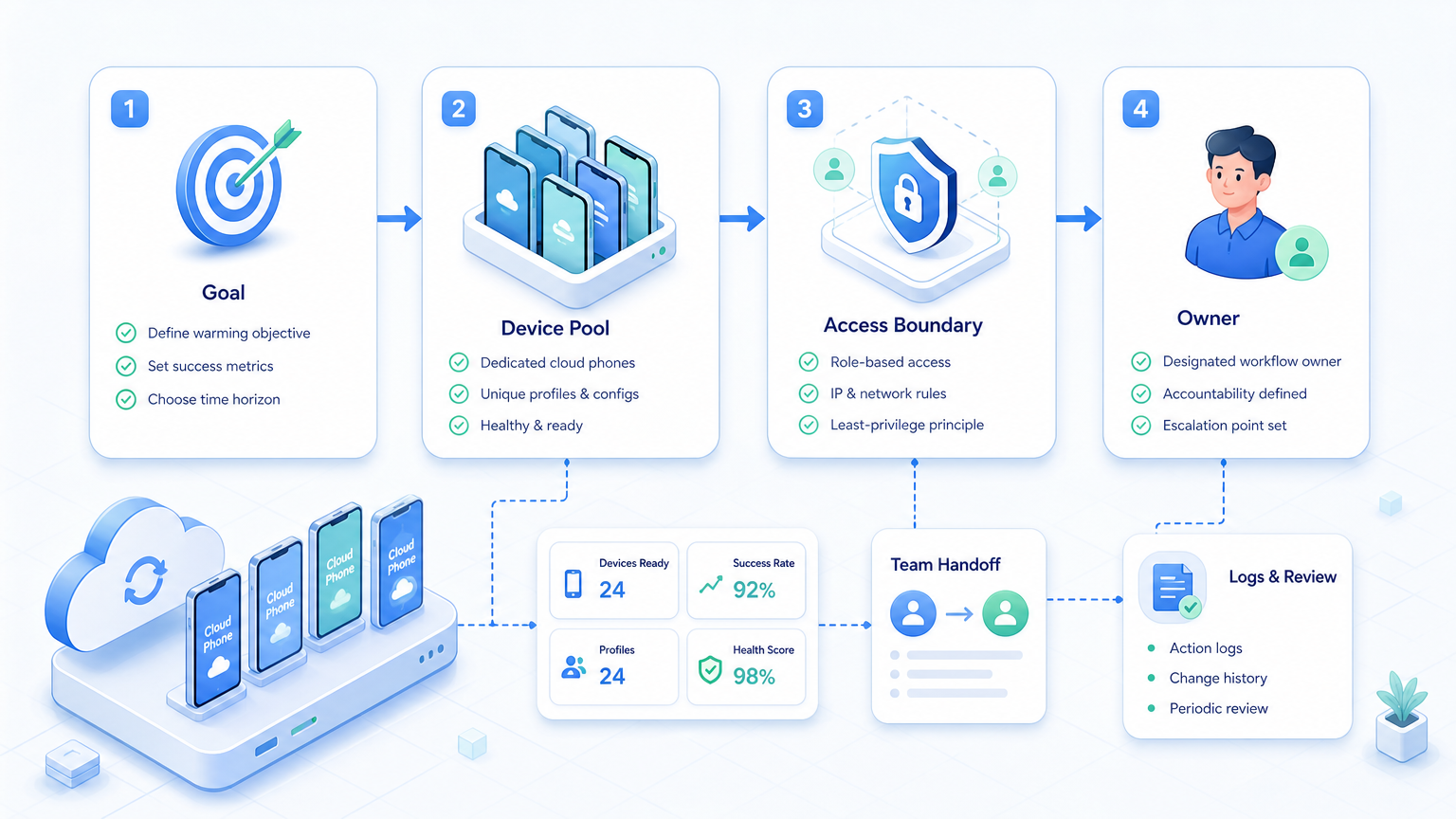
Role design makes the software easier to audit. A team should know who plans, who executes, who reviews, and who recovers issues.
Use four roles:
- Account owner: approves the account's purpose and allowed workflow.
- Operator: runs the daily readiness checklist.
- Reviewer: checks public-facing content or sensitive actions.
- Recovery owner: handles access, device, routing, or workflow failures.
One person can hold multiple roles in a small team. The roles still need to exist. Otherwise, every exception becomes an informal chat message.
This role model helps agencies. A client can see which tasks were automated, which stayed manual, and which exceptions needed review. That record is often more valuable than a higher activity count.
What to Measure Before Expanding
Expansion should depend on evidence. Do not add accounts because the first few days look quiet.
Measure these signals:
- Number of accounts with complete owner maps.
- Daily checklist completion rate.
- Exceptions per account.
- Manual recovery time.
- Wrong-workspace incidents.
- Public actions held for approval.
- Notes completed by operators.
- Accounts paused by stop rules.
A healthy pilot should make status clearer. Managers should know which accounts are ready, which are paused, and which need human review. If the software only creates more activity, it is not solving the operating problem.
Cloud Phone Setup for TikTok Account Readiness
A cloud phone setup should be simple enough to audit. Each account should map to one mobile workspace, one owner, one routing rule, and one task list.
Use a workspace record with these fields:
- Account handle.
- Assigned cloud phone.
- Operator name.
- Campaign or account purpose.
- Current readiness status.
- Last completed check.
- Open exception.
- Next review date.
This record keeps account warming from becoming informal. Operators can see whether the account is new, paused, active, or under review. Managers can also see whether a workflow failed because of access, content readiness, routing, or missing ownership.
Cloud phones are not a replacement for judgment. They are a way to make mobile execution repeatable. The team still needs content rules, platform-aware limits, and a human review path for anything public.
Example Warm-Up Workflow for a Team
A practical workflow may start with a Monday account check. The operator opens the assigned workspace, confirms the account status, checks the profile, reviews the content queue, logs exceptions, and sends unclear issues to the reviewer.
On campaign days, the workflow can add comment monitoring and inbox checks. Public replies stay under approval until the team confirms tone and escalation rules. At the end of the week, the owner reviews logs and removes any account that needs manual recovery.
Who It Fits and When It Is a Strong Match
TikTok account warming software fits teams that already have a legitimate account operations plan. It does not create a strategy by itself.
Strong-match teams include:
- Agencies managing client TikTok accounts.
- Cross-border sellers preparing regional accounts.
- Creator teams coordinating multiple profiles.
- E-commerce teams preparing campaign accounts.
- Support teams checking customer message channels.
It is a weak match for teams that want one-click growth. It is also weak when there is no content calendar, owner map, or escalation path. In that case, build the operating process first.
For mobile-first workflows, mobile automation can help operators run repeatable checks from persistent Android environments.
Pilot Rollout, Measurement, and Recovery Checks
A good pilot is narrow. Pick 5 to 10 accounts, one operator, one owner, and one readiness checklist.
Track:
- Account workspace assigned.
- Daily check completed.
- Content queue reviewed.
- Issues escalated.
- Manual recovery time.
- Wrong-account events.
- Public actions held for review.
- Operator notes completed.
Use a pass/fail rule. The pilot passes when operators can see account status, trace activity, and pause the workflow without engineering help. It fails when activity happens but nobody can explain it.
Recovery checks matter because multi-account work breaks in practical ways. Passwords change, sessions expire, media assets are missing, and operators switch shifts. The software should make those cases visible.
Frequently Asked Questions
Is TikTok account warming software low risk?
No tool removes platform or operational risk. Use controlled workflows, clear ownership, and platform-aware limits.
Is warming the same as fake engagement?
It should not be. Treat warming as operational readiness, not artificial popularity.
Do teams need cloud phones?
Cloud phones help when each TikTok account needs a persistent Android environment.
Can I use a GitHub warm-up script?
Only with caution. Scripts may lack account controls, logs, routing, and policy review.
How many accounts should a pilot include?
Start with a small group. Five to ten accounts is enough to test ownership and recovery.
Should public actions be automated?
Keep public actions under review until the workflow is proven and policy boundaries are clear.
What should be logged?
Log account, workspace, operator, task, result, exception, and recovery action.
What is the best first workflow?
Start with account readiness checks, content review, and exception logging.
Conclusion
TikTok account warming software is useful when it supports account readiness, team handoff, and controlled execution. It is weak when it is used as a blind activity engine.
Before scaling, check the basics: account owner, workspace, allowed actions, stop rules, and recovery logs. If those are clear, the team can expand account-by-account with less confusion.



