Key Takeaways
- Social media comment automation is a workflow for triage, draft prep, review, and execution.
- Instagram and TikTok comment queues become an operations problem before they become a tooling problem.
- Account separation and queue ownership matter more than raw auto-reply volume.
- A pilot should test quality, routing, and blocked-case handling together.
Social media comment automation is a system that helps teams sort, route, review, and respond to comments on Instagram and TikTok with repeatable rules. It is not just a reply generator. A useful setup also keeps account context clear, assigns reviewers, and records what happens when a comment needs escalation rather than a routine answer.
This topic matters because comments are often where brand, support, sales, and moderation work collide. One account may receive product questions. Another may receive complaints. A third may mostly need moderation. Once several accounts share the same operator pool, comment handling quickly becomes a queue and ownership problem.
That is why many teams connect comment handling to MoiMobi as a broader execution system. The better question is not "can AI answer comments?" The better question is "can the team run social media comment automation across several lanes without losing control of ownership, review, and account state?"
Meta Business Help, Instagram for Business, TikTok Business Help, and TikTok Support all reflect this operational reality because they document account-specific management and business workflows rather than free-floating reply automation.1 2 3 4
What Is Social Media Comment Automation for Instagram and TikTok?
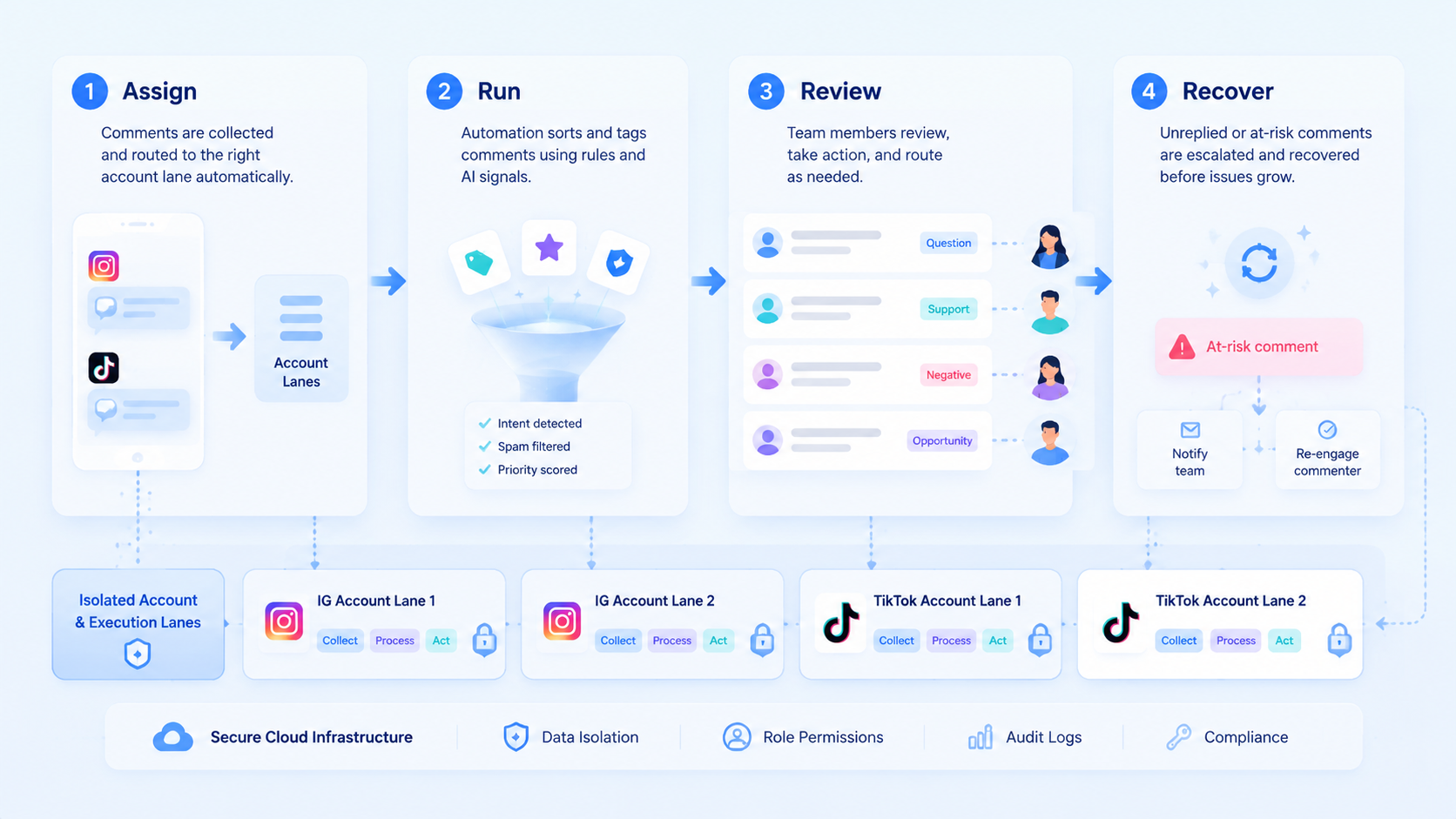
The most useful definition is narrow. Social media comment automation for Instagram and TikTok is a queue system that helps operators classify comments, prepare likely responses, route tasks, and execute approved actions in the correct account lane.
That system usually includes four components:
| Component | Role | Why it matters |
|---|---|---|
| Classification | Tag question, complaint, spam, or lead | Stops one queue from becoming a pile of mixed intent |
| Drafting | Prepare a response or next-step suggestion | Reduces routine writing time |
| Routing | Send to the right reviewer or team | Keeps support and brand work separated |
| Execution | Post or handle the approved next step | Preserves account context and traceability |
This is why multi-account management and social media marketing belong in the same discussion. Comment work becomes useful when it fits the wider operating system.
Why Social Media Comment Automation for Instagram and TikTok Matters
The queue grows faster than most teams expect. A small brand may begin with routine moderation. Then customer support, creator coordination, and product-interest comments all land in the same place.
Once several operators touch the same accounts, quality drift appears. One operator may answer too broadly. Another may escalate too late. A third may not know whether a comment belongs to brand, sales, or support.
That is where automation helps. The first pass can become structured. Comments can be tagged, routed, and drafted before a reviewer takes the final step. The team saves time, but more importantly, the queue becomes easier to understand.
Key Benefits and Use Cases
The main benefit is not mass reply volume. The main benefit is cleaner queue control.
Common use cases include:
- Support triage: send customer issues to the right follow-up path.
- Lead routing: flag product-interest comments for a sales or creator workflow.
- Moderation support: separate obvious low-value noise from useful questions.
- Agency review: keep brand-sensitive replies inside a visible approval path.
For teams that need account-specific execution surfaces, cloud phone and device isolation are relevant follow-up pages. Some comment flows are reviewed in the browser and completed in a mobile lane.
That matters because comment work does not always end with a reply. A product question may become a lead. A support complaint may become a ticket. A creator request may move into a separate outreach lane. The queue needs to preserve that next step.
How to Get Started with Social Media Comment Automation for Instagram and TikTok
The first warning is simple: do not automate final replies before the queue structure is clear.
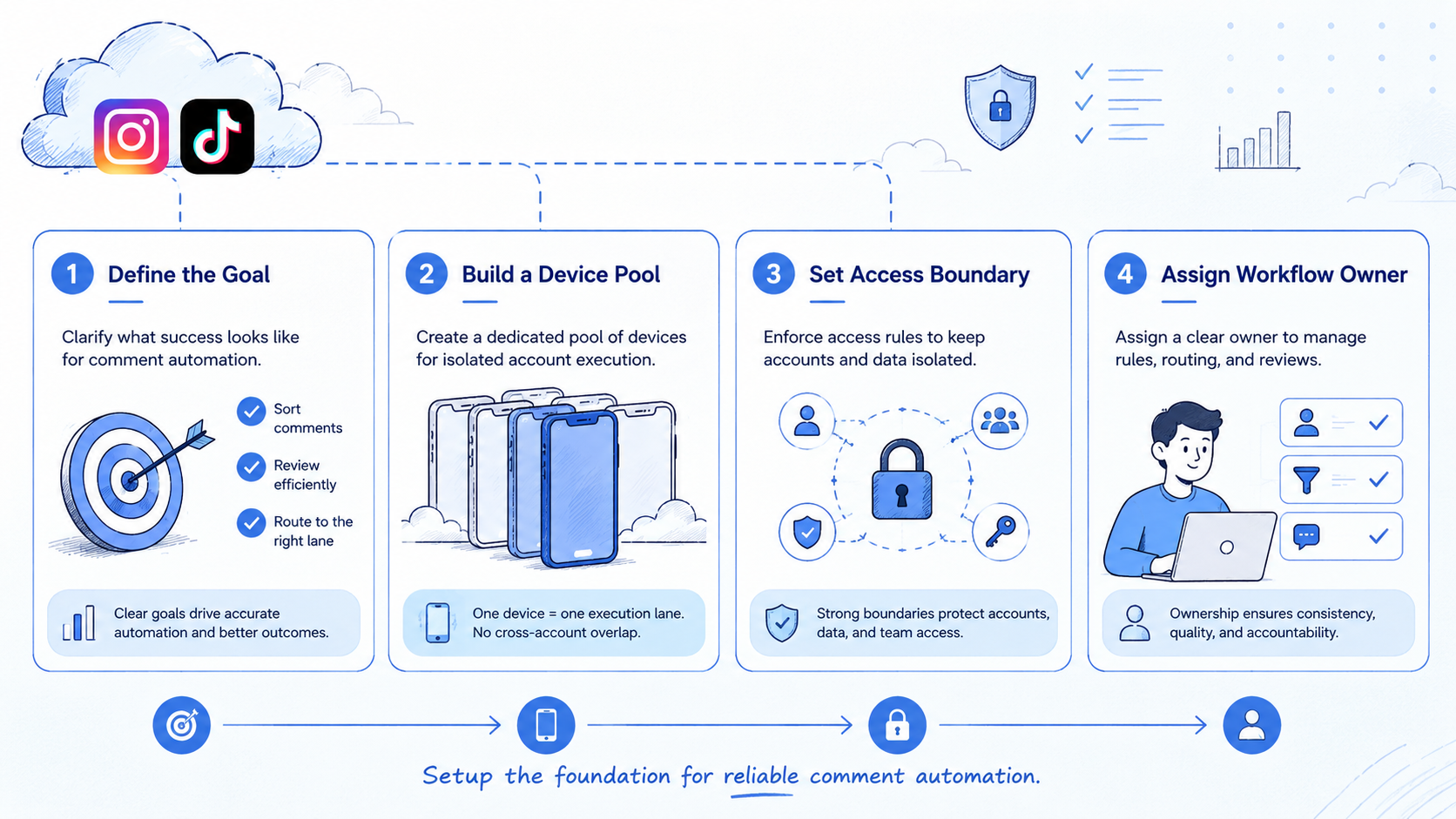
Start with one account group and one comment category.
- Choose a narrow category, such as product questions or simple moderation work.
- Define the first-pass tags the queue will use.
- Create one reviewer rule for public replies and one escalation rule for exceptions.
- Assign one account lane for the chosen account group.
- Track blocked cases before extending the workflow to more accounts or more comment types.
Use a short task record:
| Field | Why it matters |
|---|---|
| Account lane | Keeps the comment tied to the right context |
| Comment type | Shapes the next routing choice |
| Reviewer | Makes public approval visible |
| Escalation reason | Explains why a reply paused |
| Next action | Prevents queue ambiguity |
One more rule helps here. Teams should decide which categories are safe for routine reply preparation and which categories must always pause for human review. That boundary keeps the first pass efficient without making it careless.
Common Mistakes to Avoid
The first mistake is treating all comments as one queue with one default response style. That makes routing weaker and review slower.
The second mistake is skipping classification. If the system cannot separate sales, support, and moderation cases, the operator still does too much cleanup work after the model finishes.
The third mistake is ignoring account-lane discipline. Playwright browser contexts and W3C WebDriver both reinforce the idea that execution happens in explicit sessions.5 6 That same discipline matters when comment work spans several accounts.
What not to do
- Do not pool unrelated account groups into one reply lane.
- Do not auto-approve sensitive replies by default.
- Do not measure only reply speed if escalation clarity is falling.
- Do not expand queue categories before the current tags are reliable.
Who It Fits and When It Is a Strong Match
This workflow is strongest when the team already has repeated comment volume and at least a rough response policy.
Strong match
- Brands handling frequent product questions and support comments.
- Agencies managing several client communities.
- Cross-border teams routing comments by region or language.
- Operators who already use review and escalation roles.
Weak match
- Low-volume accounts with no real queue pressure.
- Teams with no reviewer or no escalation rule.
- Workflows where every comment needs custom executive judgment.
- Setups that still rely on one shared session for all accounts.
One clear example is a team managing Instagram and TikTok accounts for several brands. Product questions can be routed one way, creator questions another way, and complaint cases into a stricter review path. That is a strong automation fit because the same decision pattern repeats every day.
The same fit appears in support-heavy teams. If operators already know the main categories and the likely owner for each one, automation can improve speed without making the workflow less visible.
Pilot Rollout, Measurement, and Recovery Checks
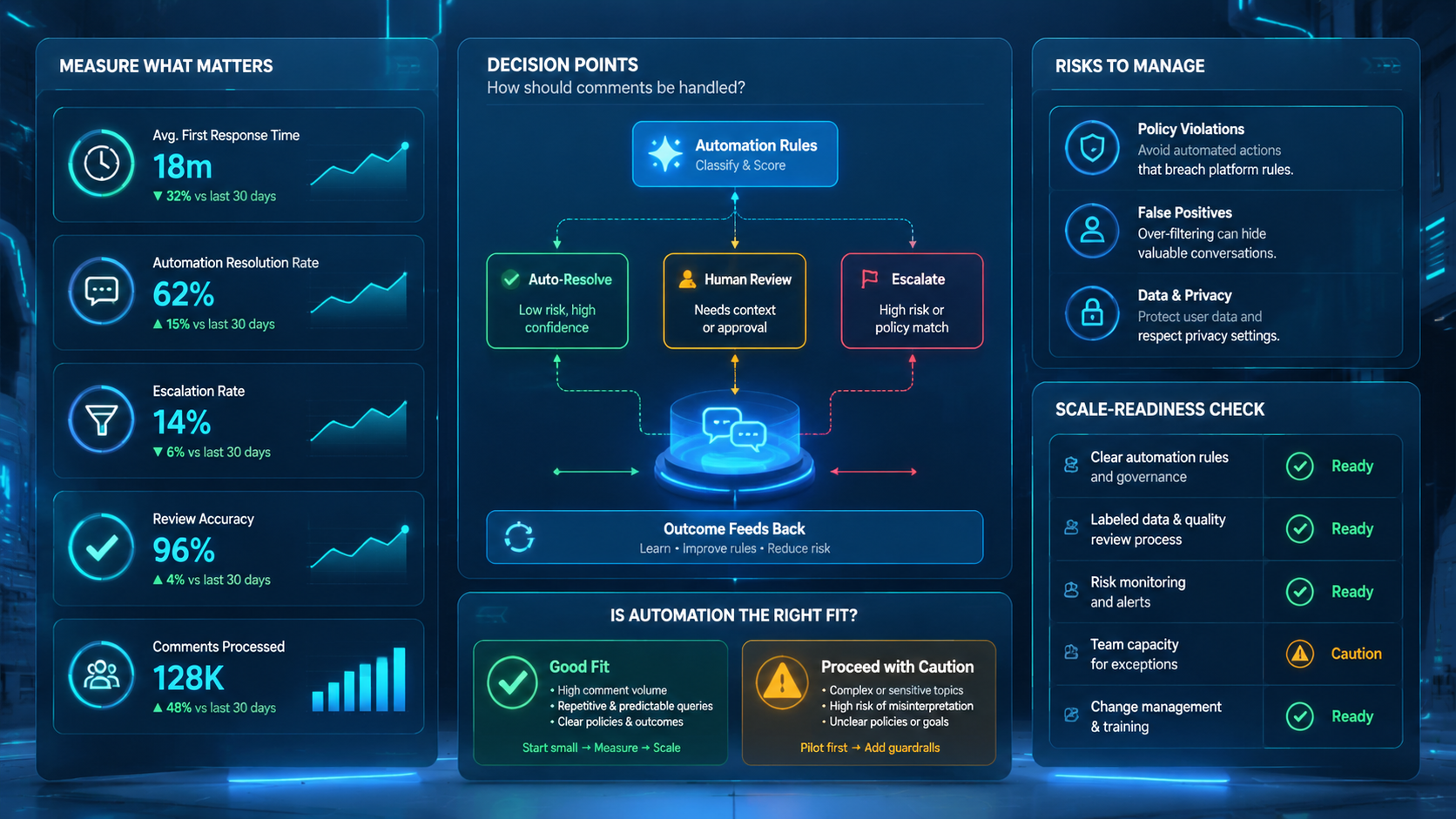
The pilot should prove that comment work is easier to inspect and recover, not only faster to process.
It also should prove that the routing system stays understandable after several reviewers touch the queue. If the team can no longer explain why a comment moved from triage to reply, from reply to escalation, or from escalation to another workflow, the automation layer is adding confusion instead of control.
Use a short scorecard:
| Check | Healthy sign | Failure sign |
|---|---|---|
| Queue clarity | Comment categories stay consistent | Reviewers keep recategorizing basic items |
| Approval quality | Routine drafts need only light edits | Most drafts need full rewrites |
| Lane integrity | Each account stays in its assigned environment | Operators lose track of active context |
| Blocked-case handling | Escalations reach the right owner quickly | Paused comments sit unresolved |
| Scale readiness | The pattern works for another account group | Manual rescue rises sharply |
AWS Device Farm, BrowserStack, and Android Enterprise all stress repeatability and observable environments in device-centered workflows.7 8 9 Those same ideas help comment automation remain operational instead of turning into an invisible queue.
Reviewer confidence is another useful signal. If routine drafts become easier to approve while sensitive cases still pause correctly, the queue is improving in the right direction. If trust falls, the categories or escalation rules are still too loose.
One more measurement helps before scaling. Sample a small set of closed comment threads and ask whether another reviewer can reconstruct why each one was routed, answered, or paused. If that review fails, the queue may be fast, but it is still too opaque for wider use.
Frequently Asked Questions
Is social media comment automation the same as auto-replying to everything?
No. The stronger model focuses on triage, draft prep, review, and routing.
What should a team automate first?
Start with one repeated category and one simple review path.
Why is account separation important?
It keeps comments, approvals, and final actions tied to the right account context.
Does this fit agencies?
Yes, especially when several client communities follow the same operating pattern.
What is the first warning sign?
Reviewers stop trusting the tags or cannot explain who owns the next step.
Can browser and mobile lanes both be used?
Yes, when the queue record shows which surface owns the next action.
What should the pilot measure?
Queue clarity, approval quality, lane integrity, and blocked-case handling.
Can this support support teams and community teams together?
Yes, but only when queue definitions are clear enough that each team can inherit the right cases without confusion.
What should be reviewed before adding more comment categories?
Review whether the current tags, escalation paths, and reviewer rules are still producing consistent outcomes for the first category set.
What shows the routing model is stable enough to scale?
The clearest signal is that two reviewers classify the same sample comments in nearly the same way and can still explain the next owner for each case.
Conclusion
Social media comment automation for Instagram and TikTok works best when the queue is structured before the team increases automation depth. The best systems keep categories clear, account lanes separate, and reviewers visible.
Before scaling, check four things:
- comment categories are stable
- reviewers trust routine drafts
- blocked cases reach the right owner
- each account queue stays in its own lane
If those checks hold, the workflow is ready for a broader rollout.
Sources