
BT Cloud Phone is best understood as a cloud communications or business phone system, not as a mobile execution environment for automation workloads. Teams should consider it for calls, messaging, meetings, and unified communications. They should evaluate a different cloud phone stack when the workload requires Android app execution, account workspaces, automation tasks, and device isolation.
The decision depends on what the team means by "cloud phone." In telecom, a cloud phone usually means VoIP calling and business communications. In mobile automation, a cloud phone means a remotely hosted Android device or mobile environment used to run app-based workflows. Those are different buying decisions.
Key Takeaways
- BT Cloud Phone or BT Cloud Work can fit business communications workflows.
- It should not be assumed to replace cloud Android devices for automation workloads.
- Mobile automation teams need app execution, device identity, logs, task scheduling, and account isolation.
- A pilot should test the actual workload, not only the vendor category name.
- Moimobi fits teams evaluating cloud phone alternatives for browser and mobile execution.
The Core Idea Behind BT Cloud Phone for Automation Workloads
The common mistake is reading "cloud phone" as one category. It is not. A business cloud phone system and a cloud Android execution platform solve different problems.
BT describes cloud-based phone solutions such as BT Cloud Work as platforms that bring calls, messaging, online meetings, video conferencing, voicemail, fax, and related collaboration features into one system. That is valuable for business communications. It does not automatically mean the service can run Android apps, execute TikTok or Instagram workflows, or isolate mobile account environments.
Automation teams usually need a different capability set. They may need remote Android devices, persistent app sessions, mobile network routing, account-level isolation, task logs, and execution controls. Android Enterprise documentation also treats dedicated Android devices as managed devices for specific business purposes. That framing is closer to execution governance than telecom calling.
So the short answer is practical: use BT Cloud Phone for communications if that is the problem. Use a purpose-built cloud phone or mobile execution platform if the workload involves app automation, social account operations, or mobile device orchestration.
Why Teams Search for This Topic
Teams search for this topic because the naming is confusing. "Cloud phone" can mean a hosted business phone service. It can also mean a cloud-hosted Android environment. Both live in the cloud. Only one is usually relevant for mobile automation workloads.
The confusion becomes expensive when procurement teams buy based on a category label. A support team may need cloud calling, call queues, and business messaging. A growth team may need multiple Android workspaces for TikTok, Instagram, WhatsApp, or marketplace apps. These are not interchangeable.
The best evaluation starts with the task. Ask whether the team needs calls and unified communications, or whether it needs remote mobile execution. If the task involves running mobile apps, collecting app workflow evidence, publishing, replying, or testing behavior on mobile devices, a telecom phone system is unlikely to be enough.
Moimobi positions cloud phones as one layer inside a broader execution system. The relevant question is not "which cloud phone sounds familiar?" It is "which platform can run the exact workflow with account ownership, environment separation, logs, and recovery checks?"
BT Cloud Phone vs Mobile Automation Requirements
Use a comparison table before shortlisting vendors. It helps separate communications features from execution features.
| Requirement | Business Cloud Phone Fit | Mobile Automation Fit |
|---|---|---|
| Business calls and voicemail | Strong fit | Usually not the core need |
| Team messaging and meetings | Strong fit | Usually handled elsewhere |
| Android app execution | Not the expected workload | Core requirement |
| Account workspace isolation | Limited relevance | Core requirement for multi-account work |
| Automation task logs | Call logs may exist | Needs workflow-level evidence |
| Device fleet control | Phone endpoint management | Remote Android or cloud device management |
AWS Device Farm is a useful reference point for the mobile execution side. AWS describes it as a service for manually reproducing issues and running automated tests on real devices, with videos, logs, and performance data. That is different from a cloud calling product. It shows what execution-oriented teams often need: devices, runs, logs, artifacts, and parallel testing.
Who Benefits Most and in What Situations
BT-style cloud phone systems fit teams that need communications modernization. Sales, support, and operations teams may need business numbers, call handling, voicemail, mobile apps, meetings, and centralized administration.
Mobile automation teams need a different fit profile. They manage app-based actions, account groups, workflows, schedules, and environment health. A team running social media accounts across mobile apps needs mobile automation, account workspace control, and review logs.
Use BT Cloud Phone When
- The main workload is calls, voicemail, meetings, and team communication.
- The buyer is replacing office telephony or scattered calling tools.
- The team needs business phone administration, not app execution.
- Success is measured by call handling and communication reliability.
Use a Cloud Phone Automation Platform When
- The workload depends on Android apps or mobile-first platforms.
- The team manages many accounts across social, messaging, or marketplace apps.
- Each account needs a separated environment and task record.
- Success is measured by workflow completion, account control, and recovery evidence.
This distinction matters for budget. A telecom project may be owned by IT or support operations. A mobile execution project may be owned by growth, e-commerce, customer engagement, or automation operations.
How to Evaluate BT Cloud Phone for Automation Workloads
Start with the workload, not the vendor name. A short preflight process prevents the team from comparing unrelated tools.
- Name the job. Is the team trying to manage calls, messages, meetings, Android apps, or social account tasks?
- List required environments. Decide whether the workflow needs browsers, cloud phones, physical devices, or only communication endpoints.
- Define the account model. Identify whether one team account is enough or each business account needs its own workspace.
- Check execution evidence. Ask what logs, screenshots, run records, or task results the workflow must keep.
- Review routing needs. Confirm whether network routing, region consistency, or proxy rules affect the workflow.
- Run a pilot. Test the exact workflow with a small account group before expanding.
- Score the result. Compare completion rate, failed steps, review time, and recovery clarity.
For mobile app automation, a platform like Moimobi is closer to the relevant stack because it combines browser and mobile execution layers. For cloud phone provider research, Moimobi also maintains comparison resources such as its UGPhone alternative and VMOS alternative pages.
BT Cloud Phone Provider Comparison Scorecard
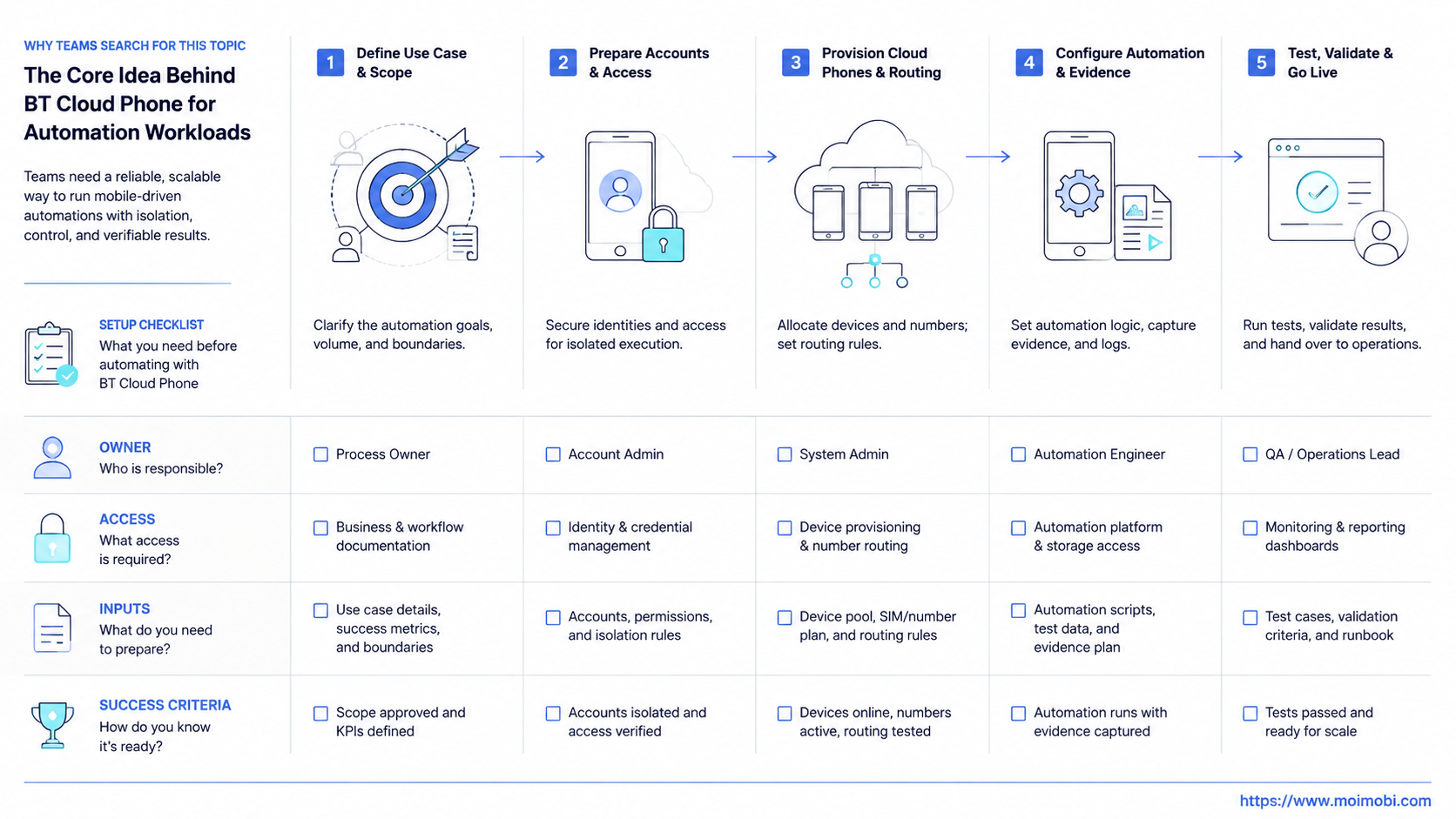
Use a scorecard when the short list includes both communications products and mobile execution platforms. The scorecard should force each option to answer the same workload questions.
| Question | What a Communications Tool Should Prove | What an Automation Platform Should Prove |
|---|---|---|
| Primary job | Calls, messaging, meetings, and admin controls | Android app execution and workflow control |
| Evidence | Call records, user management, and service history | Task logs, run results, screenshots, and failure reasons |
| Account model | Business users, numbers, teams, and departments | Account groups, environments, reviewers, and operators |
| Scaling limit | Seat count, phone numbers, and communication usage | Device capacity, app sessions, schedules, and recovery load |
This scorecard also exposes mixed projects. A support organization may need both cloud calling and mobile app workflows. In that case, buying one platform to cover both jobs may not be realistic. The clean answer may be a communications system for calls and a mobile execution platform for app work.
Vendor language should be tested against the actual pilot. Ask each provider to show the exact workflow, not only a feature page. If the task is "reply to customer messages from a mobile app account and keep task evidence," the demo should show that path from start to recovery.
Mistakes That Reduce Results
The first mistake is using a familiar telecom product name as a shortcut for mobile automation. A product can be excellent for business communication and still be the wrong tool for Android execution.
The second mistake is ignoring evidence requirements. Automation teams need records that explain what happened. A call log is not the same as a task log. A meeting history is not the same as workflow evidence.
Another mistake is buying for the first use case only. A team may start with one social app, then add messaging apps, marketplaces, or review workflows. If the platform cannot manage account environments and execution history, the team may need to rebuild the stack later.
Teams also skip recovery planning. When a mobile workflow fails, operators need to know whether the issue came from login state, device state, routing, app behavior, task design, or permission boundaries. The platform should make this easier to inspect.
Pilot Rollout, Measurement, and Recovery Checks
Do not treat a demo as a pilot. A demo shows product features. A pilot proves whether the exact workload runs with your account model, team rules, and recovery needs.
Use a small pilot group:
- One business workflow.
- One or two account groups.
- One owner and one reviewer.
- One browser or mobile environment per account group.
- One recovery checklist.
Measure four signals. First, measure whether the workflow completed as expected. Second, measure whether the team could review the result. Third, measure whether failures were easy to diagnose. Fourth, measure whether expansion would require new manual work.
If the workload is communications, BT Cloud Phone may be a strong fit. If the workload is app execution, the pilot should test a cloud Android or mobile automation platform instead. That is the practical split.
Frequently Asked Questions
Is BT Cloud Phone the same as a cloud Android phone?
No. A BT-style cloud phone usually refers to cloud communications or VoIP services. A cloud Android phone refers to a remotely hosted Android environment.
Can BT Cloud Phone run automation workloads?
It depends on the workload. It can support communication workflows, but Android app automation usually needs a mobile execution platform.
What should teams compare first?
Compare the task requirements. Calls, voicemail, and meetings point to business communications. Android apps, account workspaces, and task logs point to mobile automation.
What is a better fit for social media operations?
Teams running TikTok, Instagram, WhatsApp, or marketplace app workflows usually need cloud phones, device isolation, and multi-account management.
Should teams consider cloud phone alternatives?
Yes, if the project requires mobile execution rather than business telephony. Compare device access, isolation, logs, routing, and workflow controls.
How does AWS Device Farm relate to this decision?
AWS Device Farm shows how execution platforms focus on real devices, automated tests, logs, and artifacts. That is closer to mobile workload evidence than telecom calling.
Where does Moimobi fit?
Moimobi fits teams that need browser and mobile execution environments for social media, e-commerce, and customer engagement workflows.
What is the safest first test?
Run one real workflow with one account group. Track completion, failure reasons, owner handoff, and whether the platform keeps useful evidence.
Conclusion
Rank the decision in this order: workload type, required environment, evidence needs, account isolation, and recovery process. A BT cloud phone system can be useful for communications. It should not be assumed to solve mobile automation work.
If your team needs calls and meetings, evaluate business cloud phone features. If your team needs Android app execution, account environments, workflow logs, and multi-account control, evaluate a purpose-built cloud phone alternative or mobile execution platform instead.



