
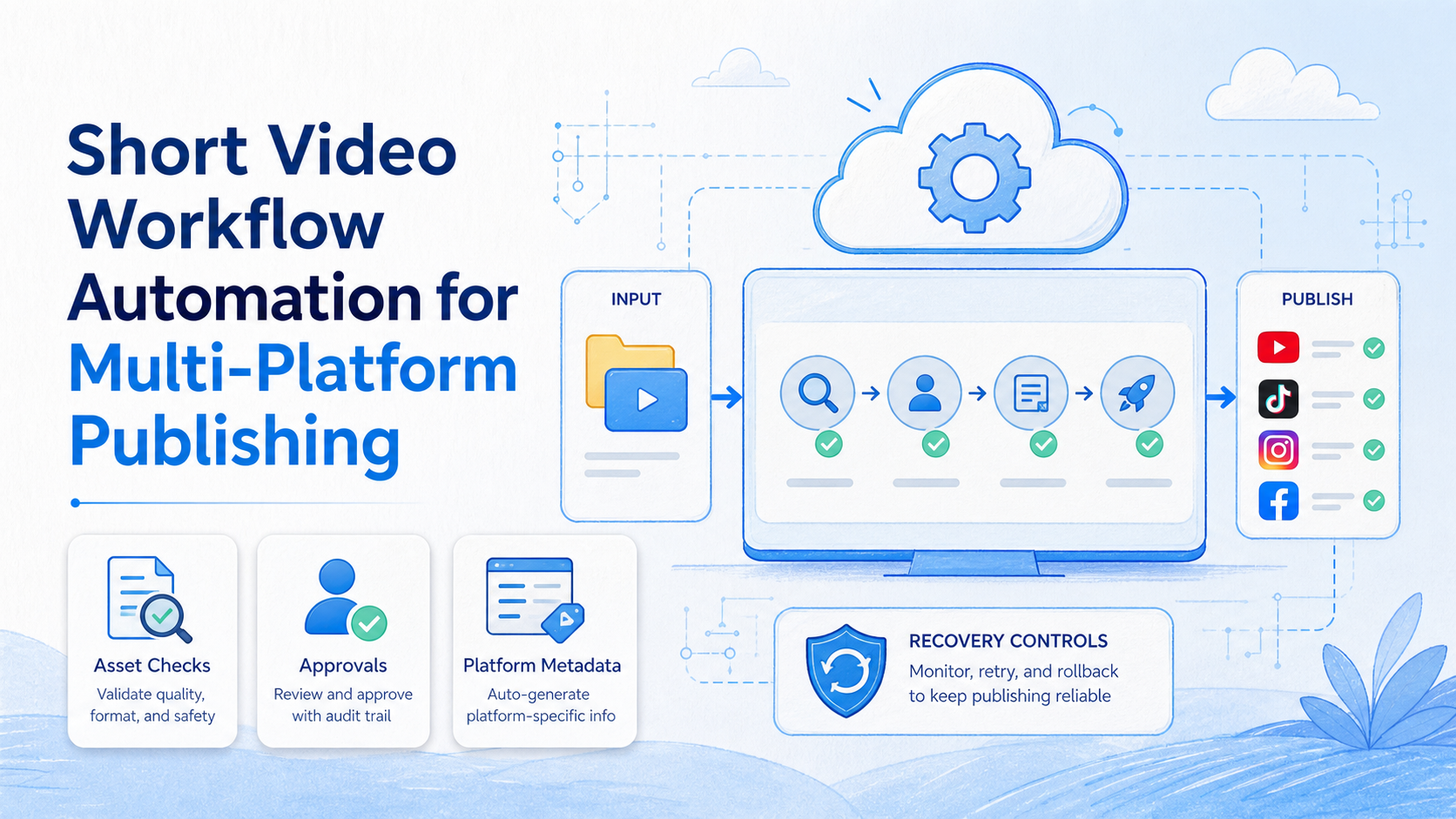
Short video workflow automation is a controlled process for preparing, reviewing, publishing, and recording approved video assets across more than one platform. It is not a promise that the same file, caption, or publishing behavior should be copied everywhere. Each platform has its own formats, permissions, API limits, and policy requirements.
The strongest workflow automates preparation and coordination first. It checks the source asset, assigns an owner, creates platform-specific metadata, routes high-impact actions for approval, and records the resulting post IDs or errors. A team should use official platform tools and APIs where available, rather than attempting to bypass publishing rules through uncontrolled scripts.
For a marketing or creator team, the objective is reliable execution. The workflow should make it easy to see which version was approved, which channel received it, whether publication succeeded, and what needs human attention next.
Key Takeaways
- Treat each platform as a distinct publishing destination, not a duplicate endpoint.
- Validate assets, rights, captions, and metadata before a publish request starts.
- Keep final review for sensitive content, commercial claims, and policy-dependent changes.
- Use official APIs and native publishing tools when they cover the workflow.
- Measure result quality and recovery clarity, not only the number of posts sent.
What Is Short Video Workflow Automation for Multi-Platform Publishing?
Short video workflow automation is a repeatable operating sequence that moves an approved video from a content library through checks, platform-specific preparation, publishing, and evidence capture. The system may create a draft caption, resize a file, allocate a task, or collect a completion record. It should not turn an unreviewed asset into uncontrolled cross-platform posting.
The usual mistake is assuming the workflow begins at the upload button. It begins earlier, with asset ownership and publishing rights. A team needs to know the approved source file, version, intended platforms, required disclosures, owner, reviewer, and desired outcome before it tries to publish.
The implementation layer varies by platform. The YouTube Data API supports video uploads and metadata under authorization, while its documentation notes that some uploads from unverified API projects are restricted to private viewing until compliance requirements are met. That is a useful operational reminder: publishing automation requires platform approval and status checks, not just a successful request.
| Workflow stage | Automation role | Human control |
|---|---|---|
| Asset intake | Create an asset record and validate required files | Confirm ownership and publishing rights |
| Platform preparation | Generate draft fields and format checklist | Review claims, disclosures, and platform fit |
| Publish request | Send through an approved native tool or API | Authorize high-impact or first-time publishing |
| Result capture | Store post ID, timestamp, status, and error reason | Review exceptions and decide on a retry |
| Performance review | Collect comparable reporting inputs | Interpret audience and business impact |
Why Multi-Platform Video Workflows Need Structure
Every destination has its own content rules and publishing mechanics. A vertical video may need a different title, call to action, caption length, or rights check depending on where it appears. The workflow should capture those differences as explicit fields, not hide them behind one generic “post everywhere” instruction.
Structure also prevents version confusion. Without a content record, a team can publish an outdated edit, omit a required disclosure, or send a draft caption to the wrong channel. A simple source-of-truth record should identify the asset version, owner, legal or brand status, platform checklist, reviewer, and current publishing state.
For teams with shared execution, social media marketing is easier to manage when content ownership and result records are visible. The point is not to maximize posting frequency. The point is to let a team understand what was approved, where it appeared, and what happened when a platform response differed from plan.
Preflight Checks Before Publishing a Short Video
Use a preflight checklist for every new asset, even when the publishing sequence is automated:
- Asset identity: Confirm the source file, edit version, owner, and storage location.
- Rights and disclosures: Confirm music, images, brand claims, sponsorship language, and regional requirements.
- Platform fit: Check aspect ratio, duration, caption fields, cover image, audience settings, and destination-specific rules.
- Account scope: Confirm the authorized channel or account role and the person approving publication.
- Metadata: Review title, caption, links, hashtags, tags, and any commercial wording.
- Stop rule: Define the condition that pauses the run, such as missing approval, missing rights evidence, or an unexpected platform response.
These checks turn content publishing into an auditable operating process. They also reduce the temptation to use fragile browser scripts for actions that a platform already supports through an official tool. Where a supported API exists, make that the first implementation choice. For example, YouTube’s upload endpoint requires authorization and provides a concrete result object to record after publication.
How to Build Short Video Workflow Automation
Begin with one platform pair and a single content category. A narrow pilot is easier to test than an all-channel workflow with several undefined exceptions. Map the manual process first, including approvals and recovery steps.
- Create the asset record. Store the approved file, version, owner, campaign, publishing rights, and target platforms.
- Generate platform drafts. Prepare separate caption, title, cover, link, and disclosure fields for each destination.
- Route for approval. Require sign-off for customer claims, paid promotion, regulated topics, or a first-time channel workflow.
- Publish through approved channels. Use native tools or documented APIs, with the correct account authorization.
- Capture the outcome. Save the platform post ID, timestamp, status, and an error detail if the run did not finish.
- Review exceptions. Retry only after the team knows why a run paused or failed.
When a workflow includes mobile-only review or publishing steps, an assigned cloud phone can provide an accountable mobile workspace. It should be tied to the same asset record, channel role, task owner, and review path as the browser or API step. A mobile environment is an execution surface, not a substitute for platform permissions.
Common Mistakes to Avoid
Using one caption without adaptation. A shared message can be useful, but every platform may have different field limits, audience expectations, and disclosure requirements. Prepare variants and review them against the destination.
Publishing before rights are confirmed. A fast workflow cannot correct an unlicensed audio track or unsupported commercial claim after distribution. Keep the approval evidence with the asset record.
Treating success as a single API response. A request can be accepted while the video is still processing, private, rejected, or awaiting review. Store the result and check the relevant status before the team marks the task complete.
Running browser automation where a supported API is available. Browser steps are more exposed to interface changes and session failures. Prefer a documented platform integration for supported actions, then use browser or mobile steps only for a clear operational gap.
Ignoring account ownership. A posting task needs a named owner and authorized role. Use multi-account management to clarify assignment and task evidence, not to obscure responsibility.
Platform-Specific Review and Reporting Rules
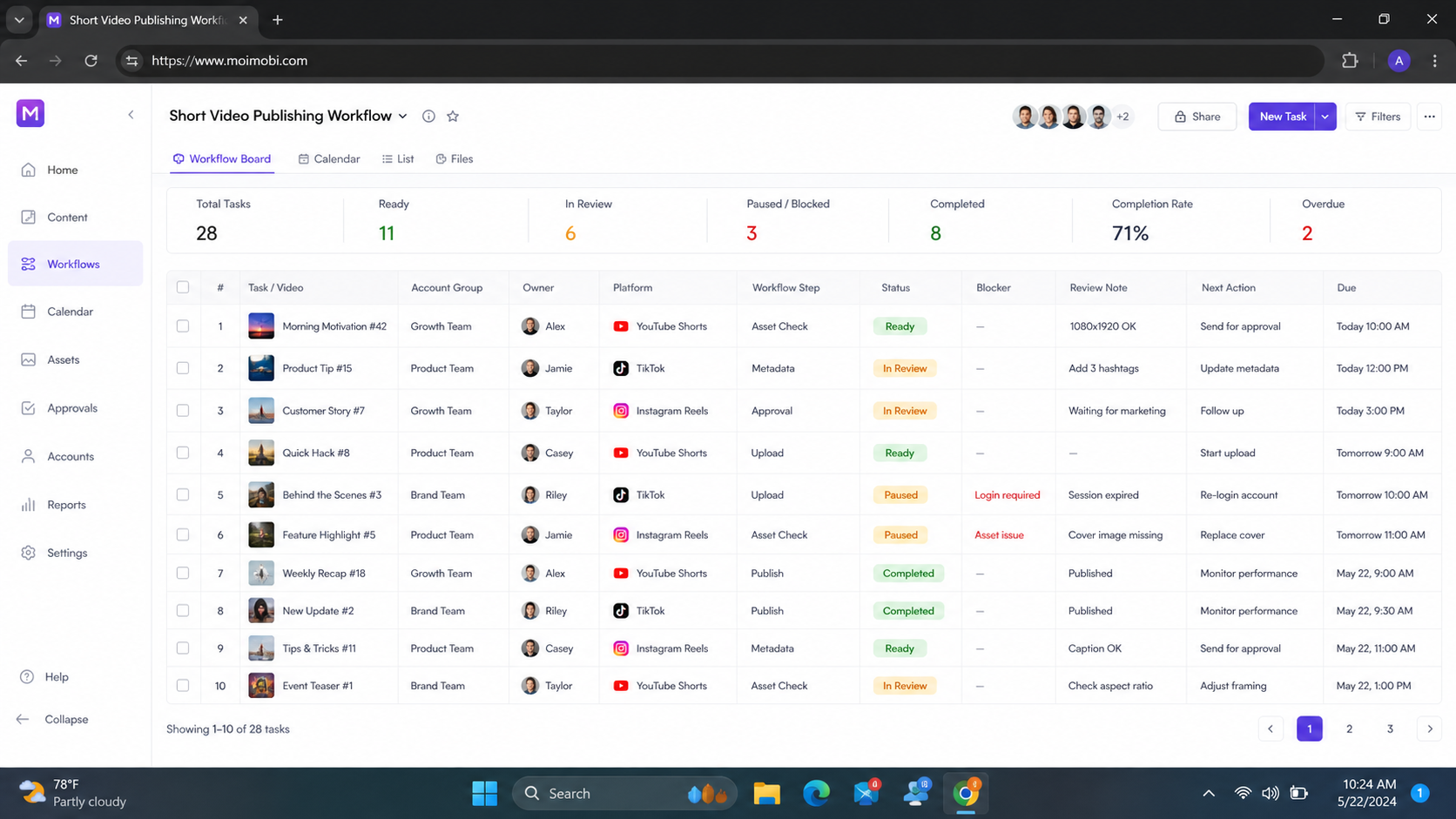
Do not make a cross-platform workflow responsible for deciding whether content is appropriate for every destination. Build a destination card for each platform. The card can define the approved channel role, required fields, title or caption review, cover or thumbnail requirement, disclosure rule, privacy setting, and the status signal that proves the task has finished.
This makes review practical. A creator does not need a new meeting for every standard asset. The reviewer only needs to inspect the fields and conditions that differ from the approved template. When a platform introduces a new requirement, update the relevant destination card and run a controlled test before treating the change as part of the normal workflow.
Publishing records should also separate operational status from performance analysis. An upload status tells the team whether the task reached the destination. It does not tell the team whether the content resonated with its intended audience. Keep those questions in different views:
- Operational record: asset ID, platform, account role, request or post ID, timestamp, status, owner, and error detail.
- Content review record: topic, intended audience, approval notes, disclosure, creative version, and campaign context.
- Performance review record: metrics that the team has chosen to compare, collection date, interpretation owner, and next experiment.
The separation prevents one weak signal from driving the wrong decision. A platform may accept a post while its distribution is still pending. A video may receive views without meeting the campaign objective. A low-performing asset may need a creative review rather than a publishing-system change. The workflow should preserve enough context for the team to make that distinction.
Use a recovery rule for each destination. On a publishing error, capture the error and stop. For an uncertain status, inspect the account’s native publishing view or official API status before retrying. When the post already exists, update the task record instead of sending a duplicate. A policy or permission issue belongs with the owner who can address that requirement, not with unrelated workflow settings.
Who This Workflow Fits
- Teams with a repeatable review and approval process
- Creators publishing recurring content formats
- Agencies coordinating client-approved assets
- Operations teams that need post-level evidence
- Content without a rights or ownership record
- Unclear channel permissions
- Work that requires subjective approval at every action
- Any process that conflicts with platform policy
The right first workflow has a stable content format and a clear finish state. For example, a team can use one approved tutorial format, prepare platform-specific drafts, send it through review, and record each published post. It should not begin with an open-ended plan to post every asset everywhere.
Pilot Rollout, Measurement, and Recovery Checks
Run the pilot with a small batch of approved assets. Track the manual baseline: preparation time, number of handoffs, revision count, error types, and time needed to resolve a failed publishing attempt. Then compare the same measures after the workflow is introduced.
Check four outcomes after each cycle. Can the team locate the source asset? Can it explain each platform-specific version? Can it identify the account and owner that ran the task? Can it recover from a missing approval, API error, or status mismatch without publishing a duplicate? Those questions reveal whether the workflow is operationally ready to expand.
For browser or mobile operations that remain necessary, mobile automation should preserve a task-level audit trail. Keep the retry decision with a responsible operator. Automation can prepare and route work, but it should not guess whether an ambiguous publishing state is safe to repeat.
Frequently Asked Questions
Can one short video be published everywhere automatically?
It can be prepared for several destinations, but each platform needs its own authorization, metadata, status check, and policy review. Do not assume one successful request proves every destination is ready.
Should a team use APIs or browser automation?
Use an official API when it supports the action and the team can meet its authorization and compliance requirements. Use a browser workflow only for justified gaps and keep it reviewable.
What is the first thing to automate?
Start with asset intake, draft preparation, or approval routing. Those steps often reduce repetitive coordination without automating a high-impact publishing decision.
How many approval steps are needed?
Keep approvals proportional to the risk. A routine, pre-approved format may need one check. Paid, regulated, or customer-sensitive content may need additional review.
What should the result record include?
Include the asset version, platform, account role, task owner, timestamp, post or request ID, current status, and exception note.
How do we avoid duplicate posts?
Use a unique asset-and-platform task record, check the published status before retrying, and require a human review when the response is ambiguous.
Can a cloud phone publish videos without API permissions?
No. A cloud phone is an execution environment. It does not grant platform access or remove the need to follow the platform’s rules and account authorization.
What should pause a publishing workflow?
Pause for missing approval, unclear rights, changed platform requirements, an unexpected account state, or any situation that could produce an unapproved or duplicate post.
Conclusion
Short video workflow automation works best when it creates an accountable path from approved asset to platform result. Build from source-of-truth records, platform-specific preparation, approval gates, official publishing paths, and clear exception handling.
Start with one content type and two destinations. Verify that the team can recover cleanly from a failure before adding more channels. That approach makes multi-platform publishing more repeatable without turning it into uncontrolled bulk posting.



