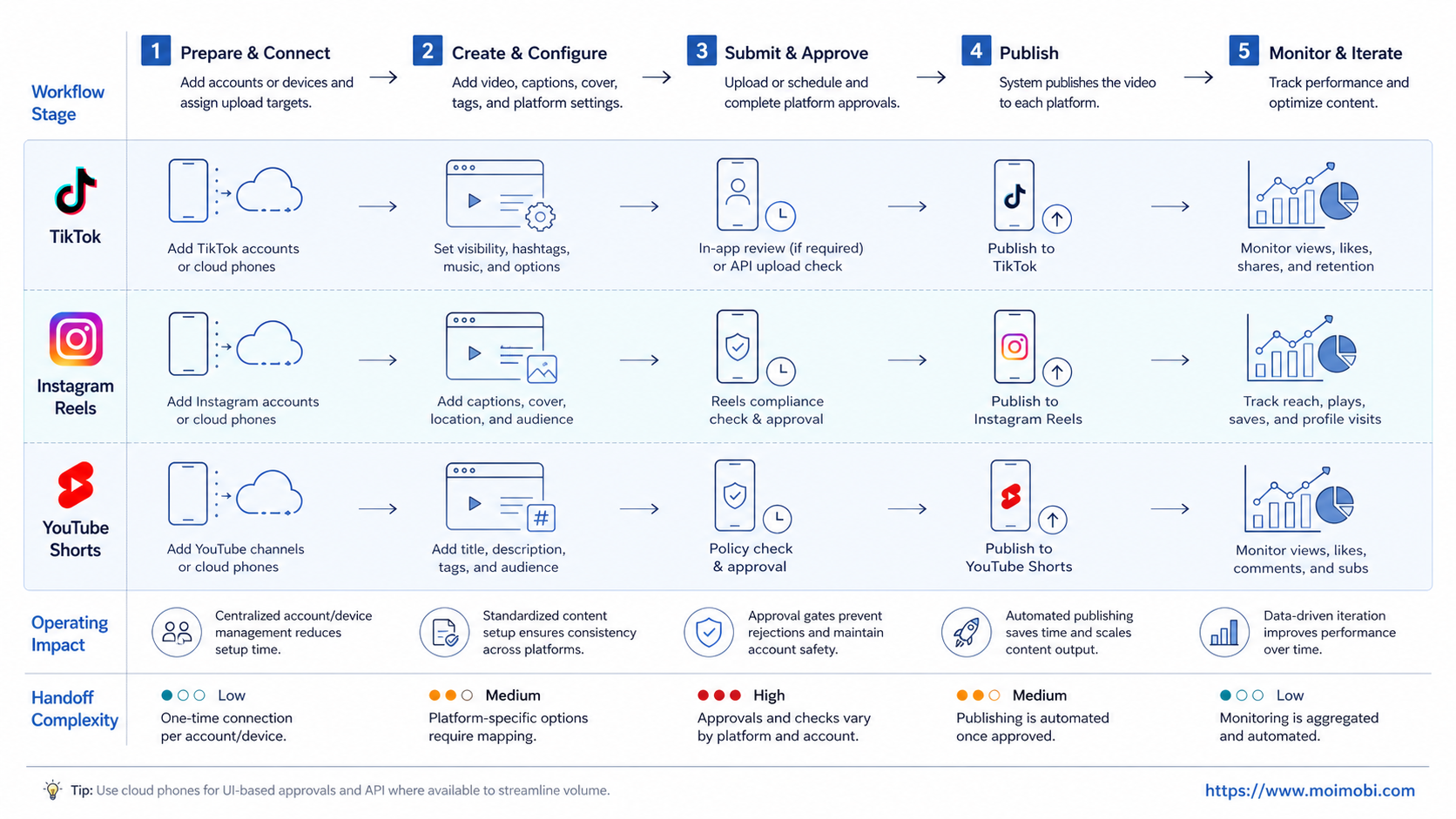
A multi-platform video uploader is a workflow that helps teams prepare, route, review, and publish short videos across TikTok, Instagram Reels, and YouTube Shorts. The right choice depends on how your team handles accounts, captions, approvals, mobile app requirements, and posting records.
Do not choose only by asking whether a tool can upload a file. Short-video operations also need account assignment, platform-specific formatting, review controls, and recovery when a post fails. For many teams, the real decision is whether to use official APIs, browser automation, cloud phones, or a combined execution platform.
Key Takeaways
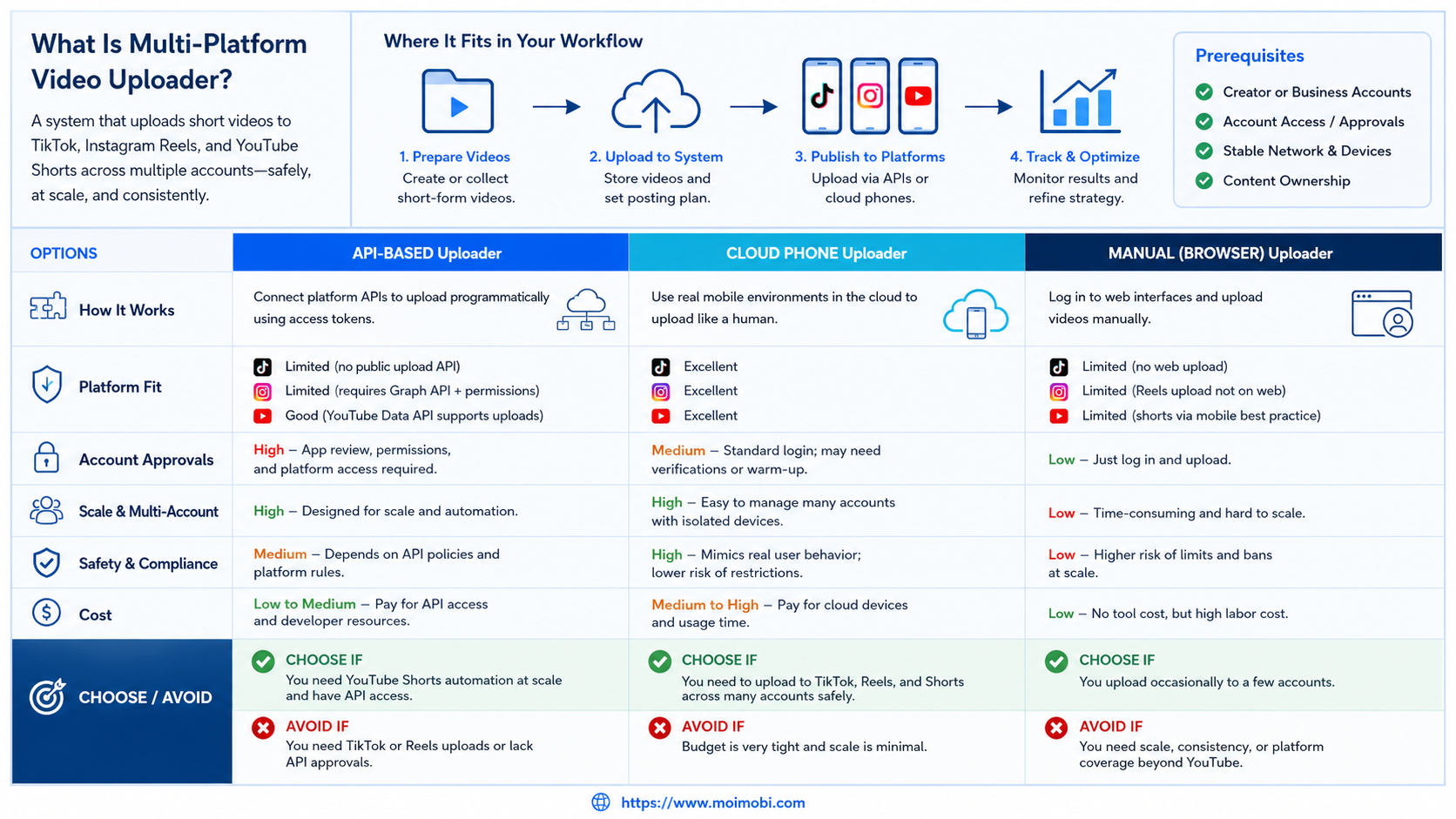
- API-based uploaders are useful when platform access, scopes, and publishing requirements fit your workflow.
- Cloud-phone or mobile execution matters when teams work through app-based account environments.
- Browser workflows help with dashboards, content calendars, asset checks, and account workspace management.
- A strong uploader should include approvals, error records, and account-level visibility.
- Multi-account teams should test with a small batch before scaling posting volume.
What Is Multi-Platform Video Uploader for TikTok Instagram and YouTube Shorts?
This kind of uploader is not just a file-transfer button. It is a publishing workflow that connects a video asset to the right account, caption, platform, schedule, approval state, and post result.
The simplest version uploads one video to one platform. That may be enough for a solo creator. Teams usually need more. They may publish the same short video in different formats, rewrite captions by platform, route drafts to a reviewer, and post from different brand or regional accounts.
Official APIs can help when a platform supports the needed publishing path. TikTok documents its Content Posting API for direct post and upload flows. Meta documents Instagram content publishing through its developer platform. YouTube Data API includes a videos.insert method for uploading videos to YouTube. These official paths are valuable because they define supported access patterns.
Still, APIs are not the whole decision. Some operations depend on mobile account state, app checks, creator workflows, or manual review before posting. In those cases, teams may need browser profiles, cloud phones, Android devices, and a clear task queue. MoiMobi fits this side of the problem as an AI browser and cloud phone platform for execution workflows.
Why Multi-Platform Video Uploader for TikTok Instagram and YouTube Shorts Matters
Short-video teams often lose time at the handoff points. A creator exports the video. A manager checks captions. Another operator logs into accounts. Someone posts on TikTok, someone else posts Reels, and the YouTube Shorts version waits in a folder.
The workflow becomes harder when the team manages many accounts. Posting is no longer only a content task. It becomes account operations. Each account may have its own language, region, owner, review policy, device environment, and posting rhythm.
That is why a multi-platform video uploader should be judged on four layers:
- Asset layer: video file, thumbnail, caption, hashtags, and platform notes.
- Account layer: which account posts, who owns it, and which environment it uses.
- Execution layer: API, browser profile, cloud phone, Android device, or manual approval.
- Feedback layer: publish status, error reason, reviewer note, and next action.
When those layers are visible, teams can improve the workflow. When they are hidden, a failed post becomes a guessing exercise.
Decision Matrix for a Multi-Platform Video Uploader
Use this comparison table before choosing a setup.
| Option | Better fit | Main value | Watch carefully |
|---|---|---|---|
| Official API workflow | Teams with approved apps, stable scopes, and developer resources | Structured publishing through supported platform paths | Scope approval, platform limits, review requirements |
| Browser-based workflow | Teams managing web dashboards, calendars, and account workspaces | Better control over web-side reviews and records | Does not cover every mobile-app action |
| Cloud phone workflow | Teams posting or checking through mobile apps | Real mobile execution context and app-based account operations | Needs device assignment, routing, and task monitoring |
| Combined platform | Agencies and multi-account teams using browser and mobile flows | One place to coordinate assets, accounts, environments, and review | Requires clear SOPs and ownership rules |
| Script-only setup | Technical teams testing a narrow upload path | Flexible for experiments and internal prototypes | Maintenance and policy handling become team responsibilities |
For multi-account teams, a combined setup is often easier to operate than disconnected scripts. Browser profiles can support dashboards and account records. Cloud phones can support mobile app workflows. The key is not using every environment for every task. The key is assigning the right environment to the right workflow.
Key Benefits and Use Cases
The myth is that a video uploader only saves upload time. In practice, the bigger benefit is reducing operational confusion.
One use case is creator-to-operator handoff. A creator finishes a video and adds a short brief. The operator checks captions, assigns accounts, and sends the item to review. After approval, the workflow publishes or schedules the asset and records the result.
Another use case is regional account publishing. A brand may need different captions for US, EU, LATAM, or Southeast Asia accounts. The same video can move through separate account workspaces, with different owners and review notes.
A third use case is agency operations. Agencies need to manage client accounts without mixing assets, login sessions, or task history. This is where multi-account management becomes more important than a simple upload queue.
The strongest benefit appears when publishing is tied to review and reporting. The team knows what was prepared, approved, published, paused, failed, or sent back for edits.
Fit and Not-Fit Guidance
A multi-platform uploader is a strong fit when the team already has repeated short-video work. It helps most when the team posts across several accounts, needs approvals, and wants clean records.
It is also a strong fit when TikTok, Instagram, and YouTube are part of one content workflow. A tool that only handles one platform may create another handoff. A combined system can make the workflow easier to monitor.
Teams with no stable publishing process should move slower. If captions, reviewers, account owners, and posting rules change every day, automation may only make the confusion faster.
Unsupervised high-volume posting is also a weak fit. Platform publishing systems and community rules vary. Teams should use official APIs when appropriate, keep records, and avoid behavior that looks like careless mass activity.
For teams that work heavily inside mobile apps, mobile automation and cloud-device execution should be evaluated early. For teams that mainly manage calendars and dashboards, browser execution may be enough.
How to Get Started with Multi-Platform Video Uploader for TikTok Instagram and YouTube Shorts
Start with one account group and one content format. Do not begin with every account, every region, and every platform. A small pilot shows whether the workflow is ready.
Follow this rollout sequence:
- Define the source asset. Decide where the video file, thumbnail, caption, and hashtags live.
- Map platform variants. Note what changes for TikTok, Instagram Reels, and YouTube Shorts.
- Assign accounts. Link each account to an owner, environment, and approval rule.
- Choose execution method. Use API, browser, cloud phone, or a combined route based on the task.
- Add review states. Draft, pending review, approved, paused, failed, and published should be visible.
- Record the result. Save platform, account, time, post URL when available, and failure reason.
- Review the pilot. Check edit rate, failed posts, operator time, and whether account owners trust the process.
This sequence makes the uploader part of operations, not just another content tool.
Cost and Maintenance Tradeoffs
Cost is not only the monthly subscription price. A multi-platform workflow also creates setup, review, maintenance, and recovery costs.
An official API path may need developer time, app review, permission management, and ongoing monitoring when platform requirements change. That route can be clean when the use case fits the platform documentation. It can also become slow when the team lacks engineering support.
A script-only route may look cheaper at first. Search terms like “n8n youtube shorts automation free” or “auto upload video tiktok github” often point to experiments, templates, or one-off automations. Those can be useful for learning. They become harder in production when account ownership, approvals, retries, and audit logs are missing.
A cloud phone route has a different cost profile. It may require device capacity, routing control, task scheduling, and operator review. The upside is that app-based workflows can be handled closer to how a real operator works. This matters when the team needs mobile app checks, account-specific state, or manual review before posting.
A combined execution platform costs more than a simple script, but it can reduce coordination cost. The team gets one place to see assets, tasks, environments, approvals, and failures. That visibility is valuable when many accounts and operators are involved.
Migration Notes for Teams Moving from Manual Posting
Manual teams should not automate every platform on day one. Start by copying the current workflow into a visible checklist. Then decide which steps can be automated, assisted, or kept manual.
The first migration step is usually content packaging. Standardize the video file name, caption draft, thumbnail, platform note, owner, and approval state. This creates the input structure that the uploader needs.
The second step is account mapping. Each TikTok, Instagram, and YouTube account should have an owner, target platform, execution environment, and review rule. If the account is mobile-first, test it through a cloud phone or Android device. If the account is dashboard-heavy, test it through a browser profile.
The third step is controlled posting. Publish a small sample and record every outcome. Do not only record successful posts. Failed posts, rejected drafts, missing captions, and login interruptions are the data that make the next run better.
The last step is expansion. Add more accounts only after the pilot shows stable completion, useful logs, and clear review behavior. If the team cannot explain why a post failed, it is too early to scale.
Common Mistakes to Avoid
The first mistake is treating TikTok, Instagram, and YouTube as identical upload targets. Each platform has its own product rules, APIs, account states, and review requirements. Use official developer documentation when building API-based publishing.
The second mistake is skipping account isolation. If several operators share logins, devices, or browser sessions, it becomes harder to know what happened. Device isolation helps teams connect tasks to the right account environment.
The third mistake is ignoring mobile workflow reality. Some teams search for terms like “auto upload video tiktok github” or “youtube auto video uploader github” because scripts look simple. Scripts can help technical teams test a path, but they usually need maintenance, permission handling, error recovery, and policy awareness.
The fourth mistake is making publishing fully automatic too early. A safer pilot prepares drafts and routes them to review. The team can later automate low-risk actions once records and recovery checks are reliable.
The fifth mistake is measuring only post count. Better metrics include approval time, failed publish rate, caption edit rate, account coverage, and whether the team can trace every post to an asset and owner.
Rollout and Review Checklist
Before scaling, run this checklist:
- The team has a clear source folder or content library.
- Each platform version has caption and format notes.
- Each account has an owner and execution environment.
- Approval rules are written before posting begins.
- Failed uploads create visible error records.
- Mobile-first accounts are tested on cloud phones or Android devices.
- Browser-based account work uses separated profiles.
- The pilot report shows what worked and what needs manual handling.
For TikTok-heavy workflows, a dedicated TikTok operations page can be used as a next-step hub. It keeps the platform workflow separate from broader social media planning.
Frequently Asked Questions
What is a multi-platform video uploader?
It is a workflow for preparing, reviewing, and publishing short videos across multiple platforms and accounts.
Can one uploader handle TikTok, Instagram, and YouTube Shorts?
It can if the workflow supports each platform’s publishing method, account setup, review state, and error handling.
Should I use official APIs or cloud phones?
Use official APIs when they fit the platform requirements. Use cloud phones when the workflow depends on mobile app execution or app-based account state.
Is a GitHub script enough?
A script may be enough for a narrow technical test. Teams usually need approvals, records, account assignment, and recovery handling.
How should agencies manage many accounts?
Agencies should separate accounts by owner, environment, task queue, and review rule. Avoid shared sessions and unclear responsibility.
What should be reviewed before publishing?
Review the video file, caption, platform variant, account, timing, and whether the action is allowed for that workflow.
What metrics matter after launch?
Track publish success, failure reasons, review time, caption edits, account coverage, and operator workload.
Where does MoiMobi fit?
MoiMobi fits teams that need browser profiles, cloud phones, Android devices, and multi-account workflows in one execution system.
Conclusion
A multi-platform video uploader should help the team control the whole publishing workflow, not only move files. The best setup depends on platform support, account structure, mobile requirements, approvals, and reporting needs.
Start with one pilot, one account group, and one video format. Compare API, browser, cloud phone, and combined execution based on real workflow results. When the pilot produces clear records and fewer handoff problems, the team can expand with more confidence.
References