Key Takeaways
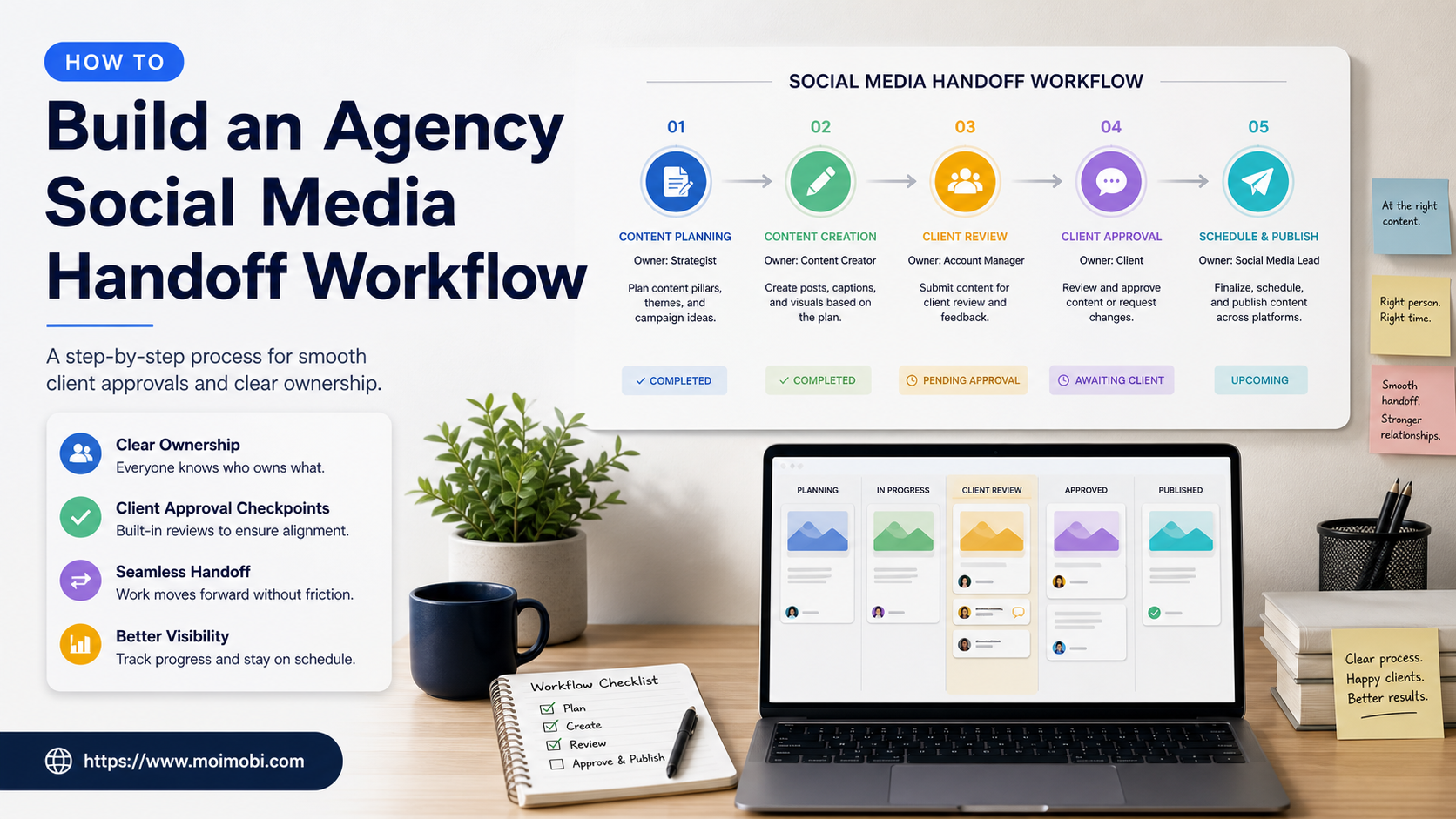
- An agency social media handoff workflow transfers responsibility for a defined client task, not just a password, login, or folder link.
- The handoff record needs a named owner, approved account environment, current task state, client approval boundary, evidence reference, and next review time.
- The best workflow makes routine coverage easier while preserving a clear pause path for brand, legal, support, or platform-policy questions.
An agency social media handoff workflow is the operating procedure used when a client account, campaign task, content queue, or customer conversation moves from one agency role to another. It is most visible during shift coverage, client onboarding, campaign launches, team changes, and urgent escalations. Yet the same workflow also prevents day-to-day problems: duplicate replies, posts published without final approval, unclear client instructions, and account access that stays open after the work has changed.
The core question is not “who can open the account?” It is “who owns the next decision, in which approved workspace, and what evidence shows the last confirmed action?” A useful handoff lets a new operator continue safe work without searching multiple chats or guessing at a client’s preferences. It also gives the outgoing owner a defined point at which responsibility actually ends.
Access and accountability are established control problems, not agency-specific inventions. NIST SP 800-53 identifies access enforcement and account management as core security controls. The OWASP Authorization Cheat Sheet similarly emphasizes least privilege and consistent permission checks. For an agency, these principles become practical rules: grant the smallest necessary access, record who accepted a task, and remove temporary access when the handoff closes.
What an Agency Social Media Handoff Workflow Covers
The workflow covers the transfer of work context. It should include the client and campaign reference, the approved account or workspace, the current task status, the last confirmed action, the next required approval, and the person responsible for recovery. It does not need to copy confidential client data into a general project board. A secure ticket or approved client system can hold sensitive details while the handoff record links to that source.
| Handoff element | What to record | Why it matters |
|---|---|---|
| Client scope | Brand, market, campaign, or channel reference | Prevents a task from moving into the wrong client context |
| Account environment | Approved workspace or profile reference | Shows where the next action is allowed |
| Current owner | Named person or role responsible now | Avoids unassigned queue items |
| Last confirmed action | What was reviewed, published, answered, or paused | Gives the incoming owner a reliable starting point |
| Approval state | Ready, awaiting client, awaiting internal review, or blocked | Prevents work from moving past a decision gate |
| Evidence reference | Approved asset, ticket, task log, or review record | Supports later audit and recovery |
| Next checkpoint | Time and owner for the next review | Stops work from disappearing between shifts |
The system can be lightweight. A small agency may use a structured task board and an approved asset folder. A larger agency may route work through a content library, customer-support queue, or operating console. What must not change is the accountability rule: every live client task has one current owner and a known backup path.
Start With Client Boundaries and Role Maps
Do not start with a generic handoff template. Start by mapping the client’s approved scope. Which channels does the agency manage? Which decisions need client approval? Which actions may a community manager take without escalation? Which topics go directly to support, legal, or the client’s internal team?
Then map agency roles. A content strategist may own the editorial plan. A social manager may own approved publishing and routine community replies. A client lead may own commercial decisions. A support specialist may own customer-specific problems. The same person can fill several roles in a small team, but the handoff record should state the role they are acting in for a particular task.
This separation helps an agency avoid a common mistake: letting whoever is online make a business decision because they can see the account. Visibility is not approval. The workflow must identify who can decide, who can execute, and who should be notified when the situation changes.
For teams running several client environments, multi-account management should provide a clear account-to-workspace view. Use it to select the approved context for work, not to treat every visible account as available for any operator.
Create a Standard Intake Record
Every handoff should begin from a record that is short enough to complete and detailed enough to be useful. The outgoing owner should not write a long status essay. They should capture the facts the next person needs to act safely.
Use these intake fields:
- Client and channel reference.
- Task type: publishing, comment review, direct-message follow-up, analytics review, content revision, or client request.
- Assigned workspace and authorized account identity.
- Current state: scheduled, active, awaiting approval, paused, escalated, completed, or closed without action.
- Last confirmed action with an evidence reference.
- Any client instruction, deadline, or explicit constraint.
- Incoming owner, backup owner, and next review time.
Keep private customer messages, credentials, and payment information out of the broad handoff record. The note should point to the approved source, such as a support ticket or client system, rather than duplicating sensitive material into another tool.
Set Approval Gates Before a Campaign Is Live
Approval rules should be decided before the most time-sensitive moment. A campaign launch is not the time to discover that the client expects final review of every caption, or that certain customer comments require a support lead.
| Decision type | Default agency owner | Approval or escalation path |
|---|---|---|
| Scheduled post using approved assets | Social manager | Follow the pre-approved calendar |
| Copy change after approval | Content lead | Confirm client or account owner approval |
| Customer-specific order question | Support owner | Move to a secure support route |
| Public complaint or safety concern | Client lead or moderator | Review against policy and response guidance |
| Paid promotion or commercial claim | Client owner | Require explicit approval before publishing |
| Platform-policy uncertainty | Operations lead | Pause and document the issue |
The aim is not to add unnecessary approvals. It is to make the few high-impact decisions explicit. Routine work can then move quickly because staff know which tasks are already approved and which must wait.
Assign an Approved Execution Environment
The account environment is part of the handoff. An incoming operator should know which profile, browser workspace, or mobile environment was assigned to the client task. Do not rely on “the account that was already open” or a browser history entry.
When the task needs a cloud phone, include the assigned workspace reference and role in the handoff note before action begins. This provides a durable link between the client task and the mobile execution context. If the agency is evaluating capacity or features for a client program, use the specific cloud phone platform context separately from the day-to-day task instruction.
For browser-based work, device isolation can help teams keep client workspaces visibly separate. It does not replace the operating procedure. The task still needs a current owner, a permitted action scope, and a recovery decision if the workspace is unavailable or the client instruction is unclear.
Run the Handoff in Three Confirmed Steps
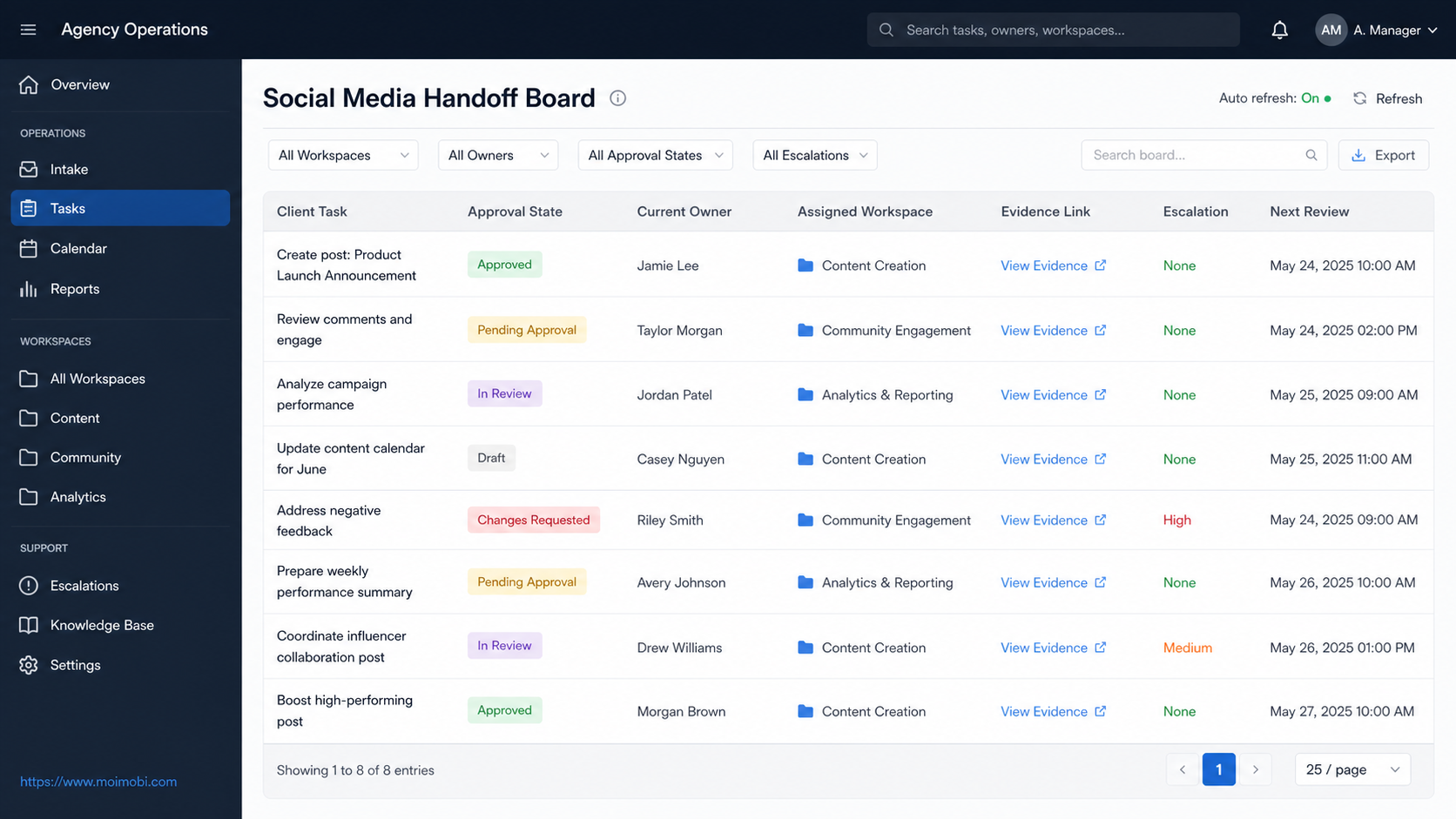
First, the outgoing owner prepares the record and names the incoming owner. They confirm the last completed action, open approvals, deadlines, and evidence. Second, the incoming owner acknowledges the handoff only after they can locate the assigned workspace and understand the next action. Third, the team performs a scheduled follow-up check to confirm that the task did not remain in an unowned state.
An acknowledgement should mean more than “seen.” It should mean the incoming owner can state the current task, the decision boundary, and the next checkpoint. If they cannot, the task remains with the outgoing owner or moves to a supervisor. This small rule prevents a large amount of hidden operational debt.
Use a visible stop rule. Pause the task if the client instruction conflicts with the current calendar, a sensitive customer issue appears, the required asset is not approved, the assigned workspace is unclear, or the requested action may violate a platform rule. A documented pause is a successful control. An improvised action is not.
Scenario: Weekend Campaign Coverage
Consider an agency running a weekend launch for a retail client. The weekday social manager prepares the approved content queue, notes the client’s response boundaries, and hands the task to the weekend operator. The record identifies the client workspace, the approved posts, support escalation route, and the two time windows when the client contact will be available.
On Saturday, a viewer asks a question that looks like a product availability issue. The weekend operator does not make an unsupported promise. They use the approved acknowledgement, open the support handoff, and record the ticket reference. Later, a comment asks for a copy change on a scheduled post. Because this requires client confirmation, the task moves to awaiting approval rather than being published under the original calendar.
On Monday, the client lead can review a compact exception list: what was published, what was escalated, what waited for approval, and what should change in the next campaign brief. The handoff did not make the agency slower. It made the agency’s decisions visible.
Measure Handoff Quality, Not Only Output Volume
An agency can measure whether its process is working without turning it into a reply-count competition. Start with the percentage of active tasks that have a named owner, the time from handoff to acceptance, the number of tasks paused for missing approval, the number of exceptions without a recovery owner, and repeated client clarification requests.
Review a small sample each week. Did the incoming operator use the assigned workspace? Was the evidence reference enough to reconstruct the decision? Did the task remain within the client’s stated scope? Were temporary access assignments removed after the coverage window? These questions reveal system weaknesses that a simple number of posts or replies cannot show.
When the same issue repeats, update the client playbook. Repeated copy changes may mean the approval brief is incomplete. Repeated customer escalations may mean the support route is unclear. Repeated workspace confusion may mean the profile labels or task form need revision.
Common Handoff Failures
The first failure is treating a login as the handoff. Access is only one input. The incoming person also needs task context, approval state, and a next action.
The second failure is sharing overly broad credentials to solve a short coverage gap. Use approved access controls and time-limited role changes instead. Broad access is hard to review and even harder to remove later.
The third failure is closing the task as soon as a message is sent. A handoff is complete only when the incoming owner has accepted it or the task is explicitly closed with evidence.
The fourth failure is making the client relationship depend on one person’s private notes. Use a shared, approved record that preserves essential context without copying sensitive data unnecessarily.
The fifth failure is treating every exception as an emergency. Categorize it. Some issues require client approval, some require support, some require a short pause, and some simply need clearer instructions next time.
Frequently Asked Questions
What is an agency social media handoff workflow?
It is a documented process for transferring responsibility for a client-related social media task, including its workspace, approval state, evidence, owner, and next review point.
Does every task need a full handoff?
No. Use the full record for work that changes owner, crosses a shift, includes approvals, affects a client commitment, or has an unresolved exception. Routine work can use a lighter version with the same ownership principle.
Who should approve a client-account change?
The client-defined decision owner should approve material changes. The agency workflow should record the approval reference before execution.
How should agencies handle sensitive customer issues?
Move them to the approved support route. The social handoff record should capture the reference and next owner, not copy private customer details into a general collaboration board.
What makes a handoff acceptance valid?
The incoming owner can locate the approved environment, understand the task state and stop rule, and confirm the next action. A simple chat acknowledgement is not enough.
How often should the workflow be reviewed?
Review high-volume or campaign-critical handoffs daily and sample the overall process weekly. Update the client playbook when a recurring exception appears.
Conclusion
An agency social media handoff workflow protects both service quality and team continuity. Define client boundaries, use a short intake record, keep approval gates visible, assign the right execution environment, and require real acceptance. The result is a workflow where client work can move across people and shifts without losing context or accountability.