
Key Takeaways
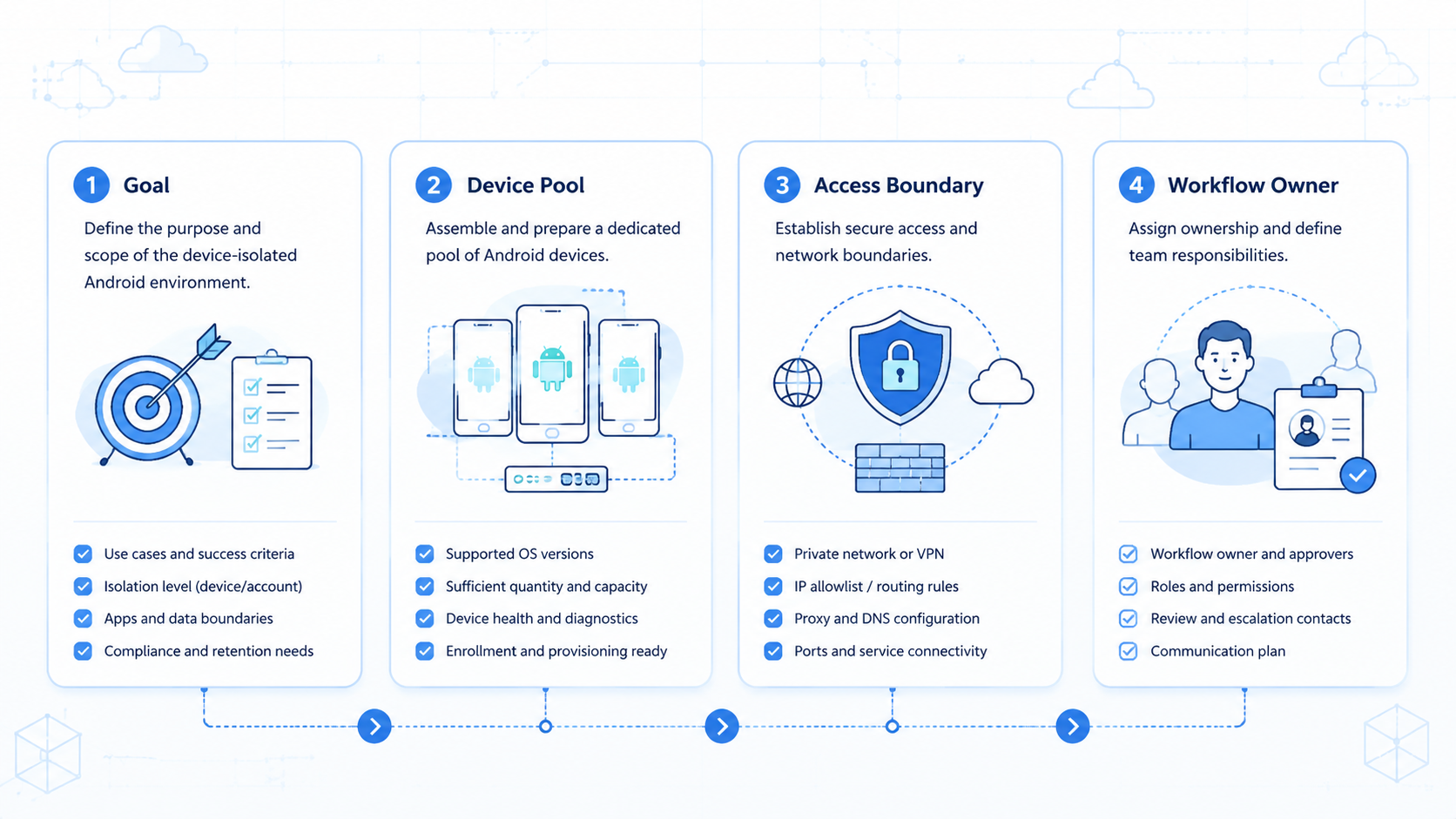
- A device-isolated Android environment means each account has a separated mobile workspace
- Isolation is an operating rule, not only a device setting
- Verification should include session state, routing, logs, and human review
- Start with low-risk tasks before adding publishing, replies, or account changes
A device-isolated Android environment is a separated Android workspace where one account, task group, or client workflow runs without sharing device context with unrelated work. It gives teams a clearer way to operate mobile accounts, check work, and trace failures.
This setup matters when mobile work touches social commerce, messaging apps, customer replies, or multi-account operations; the goal is controlled execution, not a promise of account safety. Moimobi provides cloud phone platform infrastructure for teams that need Android workspaces connected to task flows.
Pre-Setup Requirements for a Device-Isolated Android Environment
Start with an account map before touching devices. Each account should have an owner, a platform, a task type, a region rule, and a review level. Without this map, isolation becomes a label rather than a workflow.
Use a simple field set:
| Field | Example | Why it matters |
|---|---|---|
account_id |
store-us-014 | Keeps work traceable |
device_ref |
android-221 | Binds account to phone |
route_rule |
US support route | Separates network context |
task_scope |
inbox check | Limits early automation |
review_gate |
reply approval | Stops risky actions |
AWS Device Farm describes remote access sessions where users interact with a selected physical device through a browser and can capture screenshots, video, and logs: AWS Device Farm remote access. That pattern is useful for operations teams: every mobile run should leave evidence.
The Core Workflow for a Device-Isolated Android Environment
Build the environment in layers: start with identity, device, and proof before any automation is added.
-
Assign one account to one Android workspace. Use device isolation as the operating boundary.
-
Set the route rule. Keep proxy, region, and account purpose aligned.
-
Install only required apps. Extra apps create noise during checks; record the app list so a reviewer knows what changed.
-
Define allowed actions. Separate read-only checks from edits, replies, and publishing.
-
Record evidence. Save screenshots, task status, failure reason, and the operator who touched the account.
-
Add automation last. Turn only stable manual steps into mobile automation.
This order keeps the first pass inspectable; if the setup fails, the team can see which layer broke.
How to Verify a Device-Isolated Android Environment
Verification should test one account and one task before the environment joins a larger account pool. Use a pass/fail checklist instead of a vague "looks good" review.
| Check | Pass condition |
|---|---|
| Account binding | The same account opens only in its assigned Android workspace |
| Route consistency | The expected route and region rule are documented |
| Session continuity | The app remains usable across the planned work window |
| Evidence capture | The run saves status, screenshot, or operator note |
| Review gate | High-risk actions pause before final submit |
BrowserStack's App Automate documentation says its Appium API can test native and hybrid apps on real iOS and Android devices, with sessions and device lists available through API endpoints: BrowserStack Appium API. For operations teams, the lesson is not to copy a testing stack; it is to treat each device run as a named, inspectable session.
Where Teams Usually Get Stuck
The first failure is mixed ownership. A phone gets shared by several accounts, then nobody knows which login, proxy, or app state caused the issue.
The second failure is skipping logs. A task marked "done" without proof is hard to debug later. Capture enough context for another person to repeat the check.
The third failure is automating too early. Appium's documentation explains that Appium uses a WebDriver-based interface and platform-specific drivers for mobile automation: Appium architecture. That separation is a reminder that mobile automation depends on the platform layer underneath. If the manual environment is unstable, automation will repeat the instability faster.
Fit and Not-Fit Rules
This setup fits teams that manage many mobile-first accounts, customer inboxes, social commerce flows, or client workspaces. It also fits teams that need separation between operators, devices, and task scopes.
It is not the right starting point for a team with one account and no mobile task. A normal web dashboard may be enough. It is also a poor fit when the team cannot describe the manual SOP.
For multi-account work, connect each Android workspace to multi-account management. For Android-specific workspace control, use Android antidetect as part of the environment plan, not as a standalone shortcut.
Next Steps After the First Pass
Avoid account settings, payments, disputes, and irreversible changes during the first pilot. Start with observation tasks where a reviewer can confirm the result quickly.
Use this 5-day pilot: pick three accounts and three Android workspaces, bind each account to a named operator, and run one read-only task per account each day. Record status and proof, then review the results before adding replies or publishing.
Move forward only when the team can explain failures in plain terms. If a result is unclear twice, stop scaling and fix the rule. Keep the next run small, even if the first run looks clean.
Frequently Asked Questions
What is a device-isolated Android environment
It is a separated Android workspace for one account, task group, or client workflow.
Does device isolation remove all account risk
No. It improves operational separation, but platform behavior, content quality, routing, and human actions still matter. Treat it as one control inside a wider process.
Should every account get its own Android phone
For sensitive multi-account work, one account per workspace is easier to audit; low-risk testing may use a looser model.
When should automation be added
Add automation after the manual workflow is stable, logged, and easy to review. Start with read-only steps.
What evidence should a run save
Save task status, screenshot or note, device reference, account name, and failure reason.
Can this work with browser profiles
Yes. Browser profiles can handle web dashboards while Android workspaces handle mobile app tasks. Keep the handoff visible.
How does Moimobi help
Moimobi connects cloud phones, isolation, routing, task runs, and account workspaces for mobile execution.
Conclusion
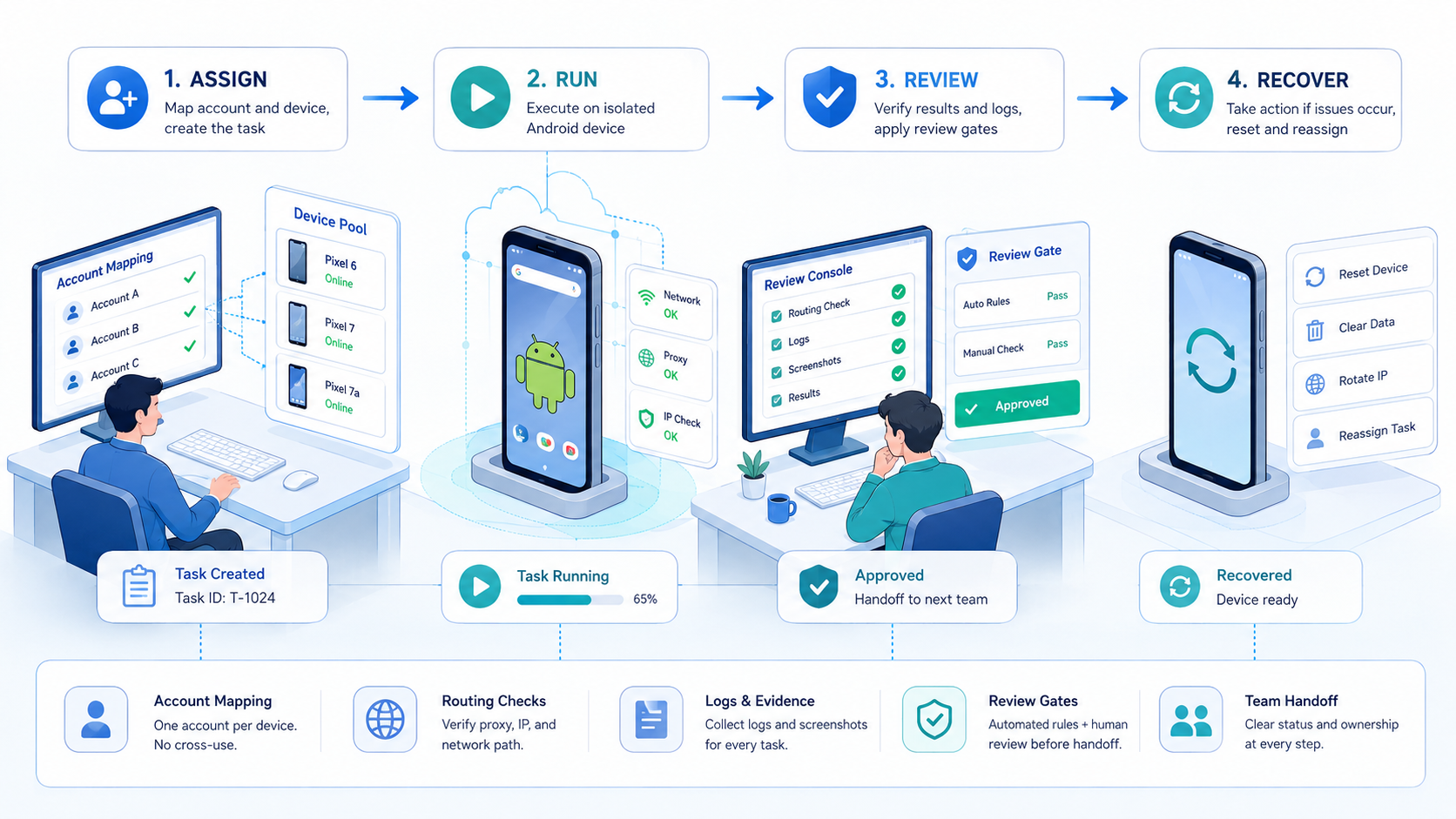
Build a device-isolated Android environment in this order: account map, Android workspace, route rule, allowed actions, evidence capture, then automation. Do not scale until one small task runs cleanly for several days. The next practical step is to pick one account group and write the pass/fail checklist before adding more devices.



