
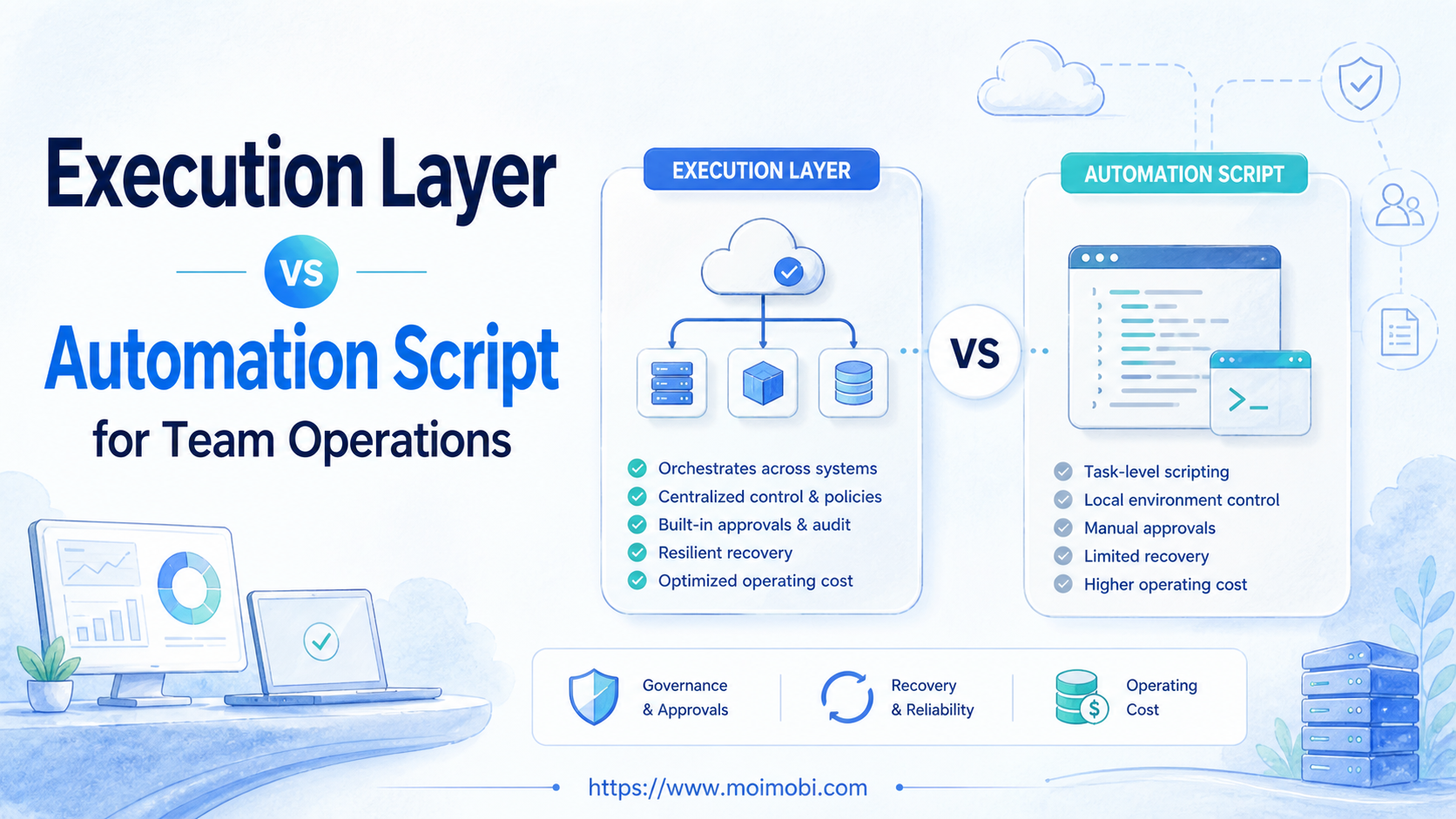
Execution layer vs automation script is a choice between two different operating models. An automation script performs a defined sequence. The surrounding execution layer coordinates the environment, ownership, inputs, approvals, task state, and recovery around that sequence. Neither is automatically the right starting point; the useful choice depends on how stable the task is and how many people, accounts, and environments must share it.
For a single predictable action, a script can be a focused solution. For recurring work across browser and mobile environments, teams usually need more than code that runs once. They need to know who launched a task, which account context it used, which decision approved it, and how a backup handles an exception. When mobile execution is required, assign the first cloud phone reference to the task before it starts.
Key takeaways
- Scripts are useful when inputs, permissions, and success conditions are fixed.
- An execution layer adds operating controls around people, accounts, and environments.
- The decision should start with failure recovery and handoff, not a feature checklist.
- Test one recurring workflow before replacing an existing process.
What to Compare: Execution Layer vs Automation Script
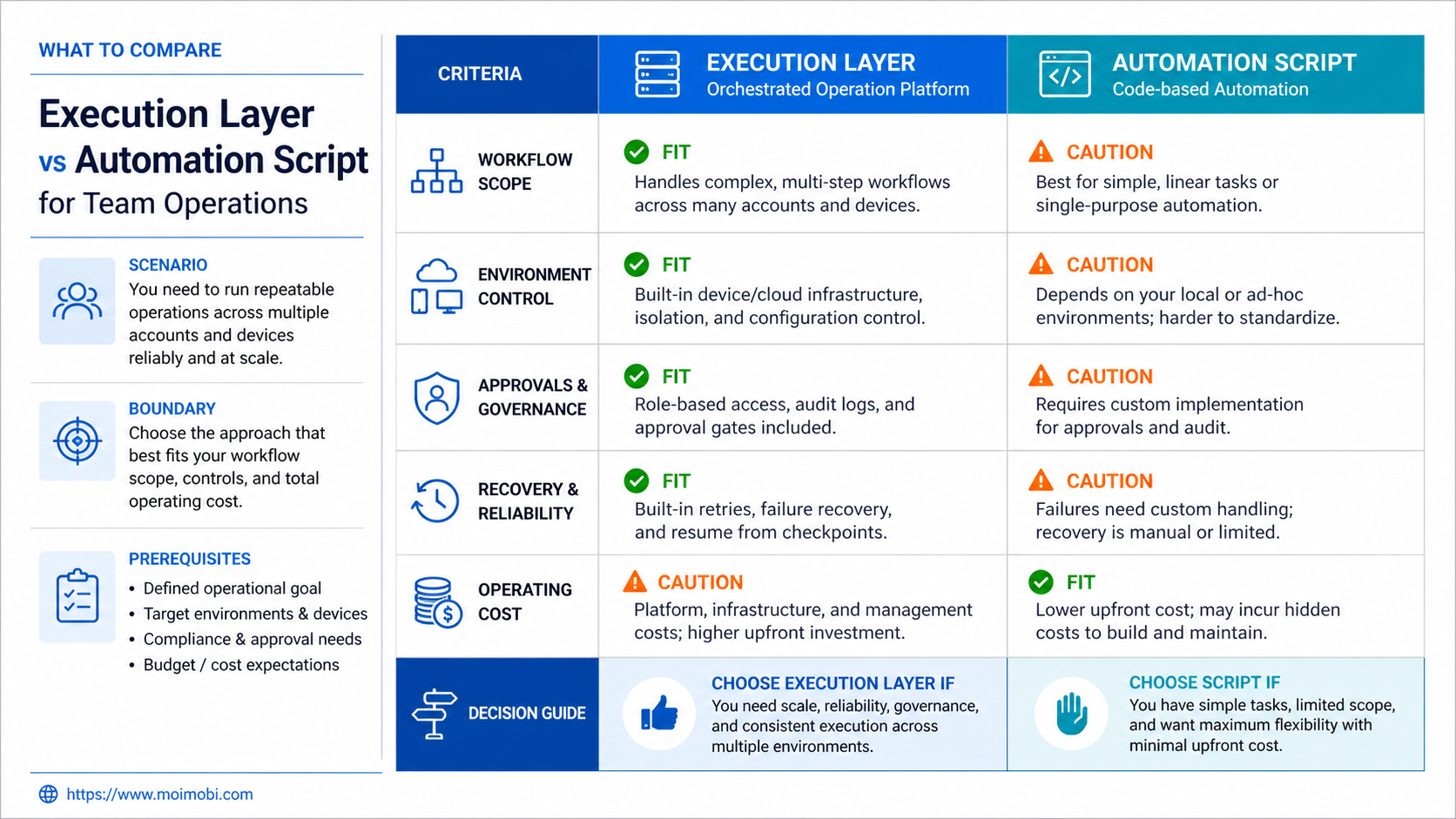
Compare the two approaches through the work they must support. A script is normally defined by its logic: receive an input, execute steps, return a result. An execution layer includes that logic but also tracks the surrounding context. It can route a task to an assigned browser or mobile environment, hold it for review, preserve result evidence, and expose a pause state.
The difference becomes visible when the task changes hands. If an operator leaves, a script may still run, but a team can lose the account context or reason for the current state. An execution layer should make the task reconstructable: client or business owner, account scope, environment, input, approval, operator, result, and exception reason.
| Decision area | Automation script | Execution layer |
|---|---|---|
| Primary unit | A defined sequence of actions | A task plus its operating context |
| Best input shape | Stable, structured, repeatable data | Recurring work with owners and exceptions |
| Environment handling | Often configured inside the run | Assigned and recorded per task or lane |
| Approvals | Added as custom logic when needed | Part of the task-state model |
| Recovery | Retry or error handling in code | Pause, evidence, owner, and next-action path |
The table is not a maturity ranking. A small script can be appropriate for one dependable internal step. A broad execution model is appropriate when the cost of a wrong account, unclear approval, or invisible retry becomes meaningful to the team.
Key Differences in Team Operations
Control boundary. A script's control boundary is usually its input and runtime. A team's boundary also includes account ownership, permissions, and the destination environment. That broader boundary matters when one person prepares work and another person executes it.
State visibility. Code can return success or failure. Operations need more states: ready, waiting for review, running, paused, completed, and closed without action. Those states keep a task from being silently retried after a customer, account, or content decision changed.
Evidence. A script log can be useful for an engineer. A shared operations record needs a readable outcome, owner, time, input reference, and exception note. NIST's log management guide describes logging as support for monitoring and analysis; the same idea helps teams reconstruct a task without searching personal chat history.
Change management. Scripts can be fast to modify for a known use case. An execution layer adds a process for changing task rules, approval requirements, and assigned environments. That overhead is justified only when it reduces repeated coordination work or recovery risk.
Features, Workflow, and Trade-Offs
The common mistake is to treat an execution layer as a larger script. It is not simply more automation. Its value is the control model around automation: who owns the task, which account and environment it may use, when it must stop, and what proof is required before the next person continues.
For example, a script may prepare a set of draft captions from approved inputs. The execution layer can then assign the review task to a content owner, bind final publication to the intended account environment, and record the completed action. The AI or script handles preparation; the operating layer handles controlled execution.
This model is useful when a task crosses web and mobile contexts. A browser-and-mobile execution workspace can represent where a task runs, while a device-isolated task context separates account work that should not be mixed. The technology does not remove the need for a human owner. It makes that ownership easier to preserve.
The trade-off is setup discipline. Teams must define task types, evidence fields, stop rules, and role boundaries. A loose workflow can feel faster at first, but it often becomes difficult to audit or hand off once account count and task volume increase.
Pricing and Operational Cost Considerations
Do not compare cost only as software subscription versus development time. The operational cost includes retries, unclear approvals, duplicate actions, account-context mistakes, training, and the time required for a new operator to understand an in-progress task.
A script may have lower initial cost when the flow is narrow and maintained by the same technical owner. Its cost rises when each client, platform, or exception needs a separate configuration or manual intervention. An execution layer may require more initial design, but it can reduce repeated coordination when many tasks share a common control structure.
Use a simple cost question: if the primary operator were unavailable tomorrow, could another person safely continue the task? If the answer depends on reading code, searching chat, or guessing the active account, include the recovery work in the evaluation.
Avoid claims that one model is always cheaper or more secure. The right cost model depends on task frequency, account sensitivity, staffing, and how often the workflow changes.
Implementing Execution Layer vs Automation Script Together
Many teams do not need to choose one model for every task. The practical architecture is often a narrow script inside a wider execution lane. The script performs a stable operation such as collecting structured data, checking a required field, preparing a draft, or triggering a defined browser step. The execution layer supplies the surrounding decisions: whether the task is ready, which environment it uses, who must approve it, and what happens if it does not complete.
Start by drawing the boundary. Put deterministic steps inside the script. Keep account selection, client-specific instructions, approvals, and exception decisions outside the script in the task record. This keeps code reusable without hiding high-impact decisions inside configuration files that only one operator understands.
For browser actions, the W3C WebDriver standard describes a protocol for browser automation. That technical layer can drive a defined step, but it does not provide a team-specific policy for when the step should run. An execution layer fills that operating gap by evaluating task state before and after the automated action.
Use a short integration checklist:
- Identify the script input and output in plain language.
- State which fields must be present before the script can run.
- Bind the task to the intended account and environment.
- Record whether the action needs approval before execution.
- Capture the output, timestamp, and exception reason after the run.
- Define who can retry, reroute, or close a failed task.
This approach also makes migration less disruptive. A team can retain a working script while moving its task assignment and evidence into a controlled lane. The first measure of success is not whether every task was automated. It is whether the team can see and recover the work without relying on private context. Document that decision in the lane so later operators understand why the boundary exists and can apply it consistently during future exceptions.
Operational Boundaries and Failure Modes
Scripts fail in ways that code can often describe: invalid input, unavailable dependency, timeout, or unexpected response. Team workflows have additional failure modes: the wrong client context was chosen, a planned action no longer has approval, the assigned operator is unavailable, or another task already changed the relevant state. Treat those conditions as first-class task states rather than as generic errors.
For example, a script that prepares a report may safely retry after a temporary service error. A script that follows an external action should not retry until the task record confirms what happened. The record may need an owner to decide whether to resume, revise the action, or close it. A managed Android execution environment can provide capacity for mobile work, but the task state should still decide whether the action is allowed.
Separate technical retries from operational retries. Technical retries can follow narrow limits that are documented in code. Operational retries should require the account context, approval, and prior outcome to be checked. This distinction prevents a retry mechanism from repeating an action that is no longer valid.
Review failures weekly by category. If several tasks pause for missing input, improve the request form. If they pause for missing access, clarify the owner and onboarding process. If they pause after a handoff, improve the evidence fields. The correction belongs in the workflow design, not only in an incident chat.
Which Option Fits Different Teams?
Choose a focused script first when one technical owner runs a stable internal task with clear inputs and a simple success rule. Examples include formatting a report, copying approved data between systems, or generating a bounded draft for human review.
Consider an execution layer when work involves multiple account contexts, browser and mobile steps, separate approvers, or a need to hand tasks between people. The first value is usually not speed. It is reliable visibility into what the team is allowed to do and what happened when it did it.
Use both when a script performs a well-defined subtask inside a controlled task lane. The script can prepare or validate data; the execution layer can own assignment, review, state transitions, and recovery. This combination prevents a team from rebuilding every repeatable action while still keeping operational context visible.
Do not add either yet when the team cannot describe the human workflow. Write the SOP first: input, owner, action, approval, output, and stop condition. Automation should reinforce a known process, not create the process in production.
Pilot Rollout, Measurement, and Recovery Checks
Run a pilot with one recurring task, one account group, and two named people: an owner and a backup. Start by documenting the normal path and one likely exception. Then decide whether a script, an execution layer, or both are needed for that small scope.
Measure ready-to-complete rate, time spent waiting for approval, reopened tasks, pause reasons, and successful backup handoffs. OWASP's authorization guidance recommends least-privilege access. In practical team terms, assign only the account and action scope needed for the pilot, then expand after the recovery path is proven.
When a task pauses, preserve the available evidence and give it a clear disposition. Do not restart the same external action from a second queue until the owner decides whether it should resume, change, or close. This check is more important than a raw success count because it determines whether the team can recover without duplicate work.
Frequently Asked Questions
Is an execution layer a replacement for scripts?
No. It can coordinate scripts and other tools, but a stable script may remain the best way to perform a narrow technical step.
When does a script become hard to manage?
The warning sign is not line count alone. It is repeated manual work to recover context, route approvals, or identify the correct account and environment.
Can an execution layer work without AI?
Yes. It is an operating model for controlled task execution. AI can help prepare inputs or decisions, but the state and ownership controls remain useful without it.
Does every task need an approval?
No. Reserve approvals for actions with external impact, account changes, sensitive content, or unclear inputs. Routine approved work can use a defined path.
What should be logged for a task?
Keep the task type, owner, environment, input reference, approval state, result, and exception reason. Do not place credentials in the task record.
How can a small team start?
Pick one recurring workflow and test whether a backup can complete or recover it using only the shared record.
What is the first sign the pilot is working?
The team can explain the current task state, next owner, and recovery action without relying on a single operator's memory.
Conclusion
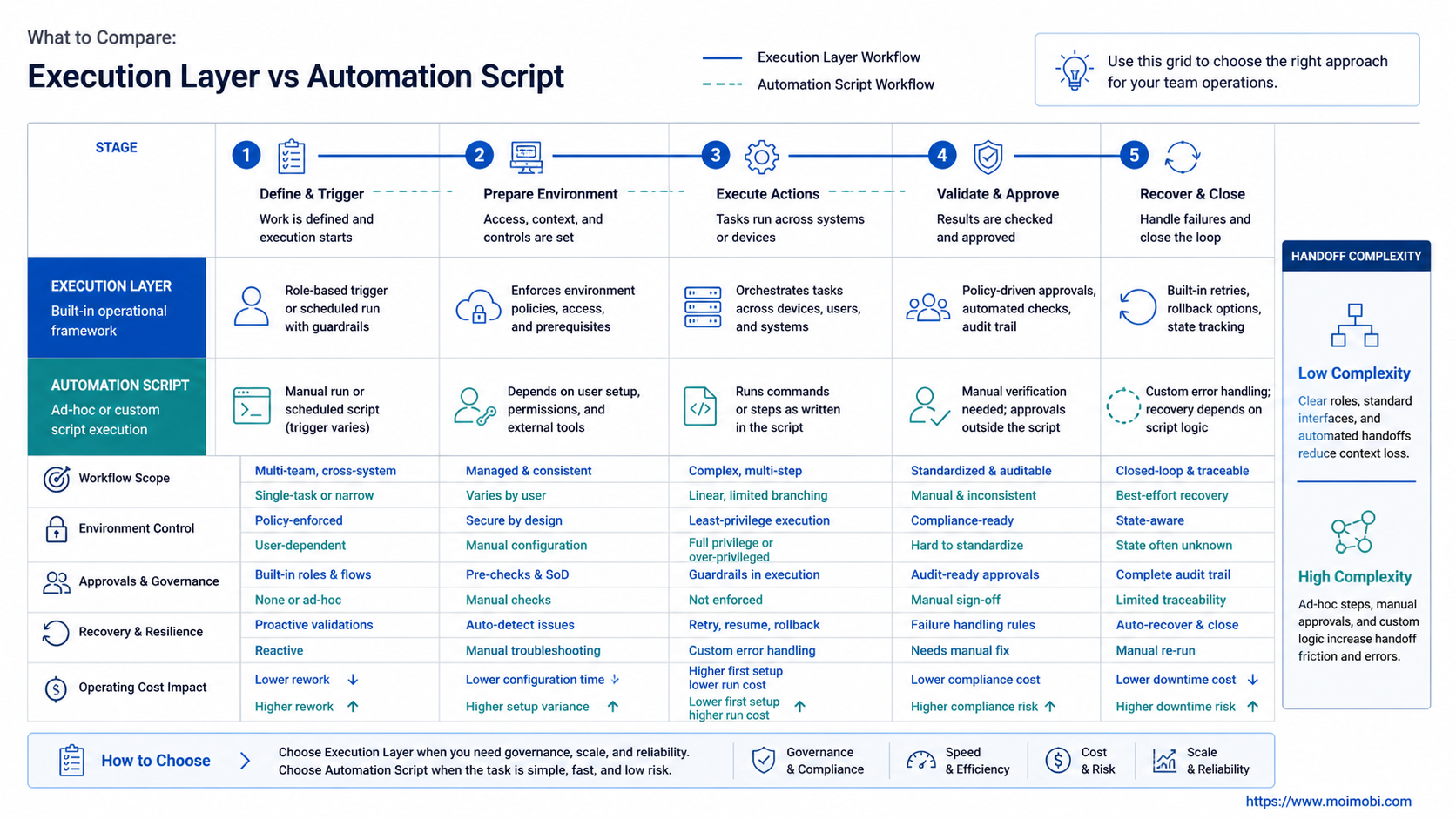
Execution layer vs automation script is not a choice between modern and outdated tooling. It is a choice about the boundary that needs control. Use a script for a stable, defined sequence. Add an execution layer when team operations require visible ownership, environment assignment, approvals, and recovery.
Test that boundary on one workflow. If the task can be handed off, paused, and recovered through a shared record, the team has evidence for the next step.


