
A cross-platform automation checklist is a shared control list for preparing, approving, executing, and reviewing recurring social tasks across more than one platform. Agencies need it because a content calendar alone does not show which account, environment, operator, and recovery rule applies to an action.
The purpose is not to turn every social interaction into unattended activity. It is to make routine work repeatable while retaining named owners for content, account changes, sensitive messages, and exceptions. Build the checklist around the task that actually repeats, then use it to decide what may move between platforms and what must remain platform-specific.
Key takeaways
- Separate reusable controls from platform-specific actions.
- Assign every account group to a named owner and execution environment.
- Require approval before external actions that change a client account or public message.
- Measure completion, rework, pauses, and successful handoffs before expanding scope.
The Core Cross-Platform Automation Checklist
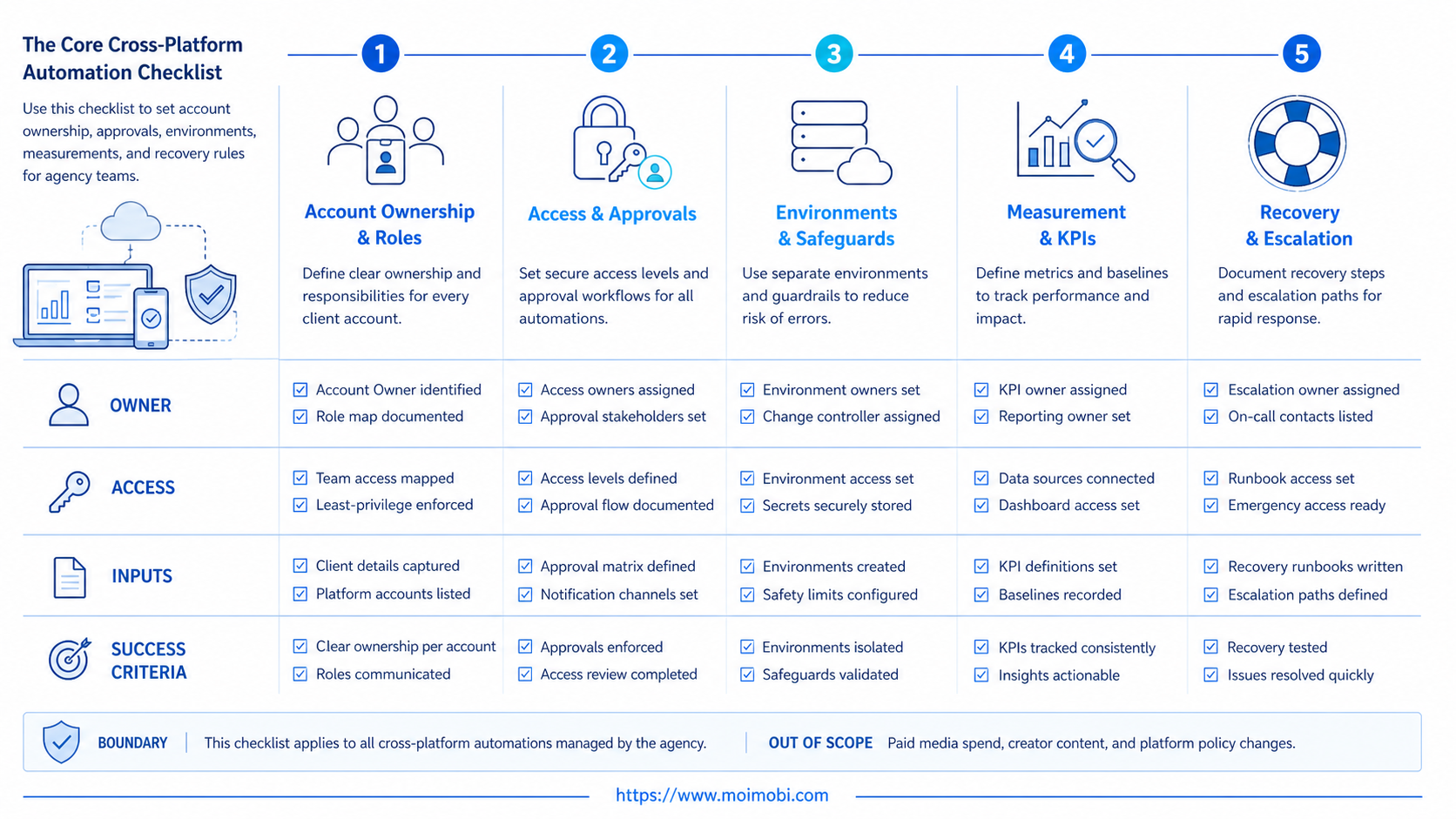
Start with four operating layers: account context, approved inputs, execution controls, and evidence. Account context identifies the client, platform, account role, and owner. Approved inputs include the final content, campaign restriction, or response policy. Execution controls specify the environment, operator, approval gate, and stop conditions. Evidence records the result and any exception.
This structure works across platforms because it describes the team process, not a particular API or interface. A publishing action may differ from one platform to another, but the agency can still require a known account, approved asset, named operator, and recorded outcome. That is the reusable part of social automation.
| Checklist area | Minimum question | Evidence to retain |
|---|---|---|
| Account ownership | Which client account is in scope and who owns it? | Account role and named owner |
| Content readiness | Is the source material approved for this platform? | Brief or approval record |
| Environment | Where will the work be completed? | Browser or mobile environment ID |
| Decision control | Who approves an external action? | Approval state and time |
| Result | What happened and who verified it? | Result reference, operator, timestamp |
Keep the list small. A checklist with twenty optional fields is often ignored at the point of execution. Begin with the fields that answer a recovery question: what task ran, where it ran, who approved it, and what happened next.
Why Agencies Need a Cross-Platform Automation Checklist
Agency teams move between client accounts, channels, markets, and task types. Without an explicit boundary, context leaks into the next task: a draft is prepared for the wrong account, an approval is assumed rather than recorded, or a backup operator cannot see why an action paused.
A campaign handoff operating model should connect content preparation to account execution and follow-up. The checklist makes that connection visible. It lets the content team hand off approved work without granting broad account authority, and it gives an operations lead a record to inspect when an exception appears.
The platform-specific part still matters. Meta, TikTok, messaging tools, and web dashboards have different user interfaces and policies. The checklist should therefore record the platform and task type rather than pretending one sequence works everywhere. Reuse the control model while keeping the final task instructions specific to the destination.
Cross-Platform Automation Checklist by Task Type
Treat every repeated task as a small contract. The contract defines the inputs, allowed action, decision owner, and evidence required after completion. This removes guesswork when the same campaign uses a publishing task on one platform and a response task on another.
For content publication, attach the approved asset, final copy, destination account, time window, and client approver. The record should say whether a late approval cancels the action or moves it to a new slot. For inbox triage, attach the source message, customer category, allowed response pattern, escalation owner, and stop rule. For research, keep the source URL, question, extraction requirement, reviewer, and handoff destination.
Account administration needs a stricter contract. Changing access, connecting a new identity, or modifying account settings should not be grouped with ordinary content work. Meta's Page access documentation distinguishes full control from task access, which illustrates why administrative authority and routine task handling should be recorded separately.
The following mini-matrix is a practical starting point:
| Task type | Reusable control | Platform-specific check | Stop condition |
|---|---|---|---|
| Publish content | Asset approval and named account | Correct destination and final preview | Approval missing or asset changes |
| Reply or triage | Response owner and escalation category | Channel context and reply restriction | Complaint, payment, or sensitive request |
| Research | Question, source rule, reviewer | Platform access and evidence format | Source unavailable or claim unverified |
| Account maintenance | Owner approval and change record | Exact account and permission scope | Identity, recovery, or access change |
This task-level approach prevents an agency from importing a vague “automation” label into the queue. An operator sees exactly what is authorized and a reviewer can see exactly what evidence is expected.
Team Roles and Escalation Paths
Assign roles before the first task is scheduled. The client or business owner decides what the account may do. The operations owner maintains the workflow and resolves process gaps. The operator completes approved work. A reviewer approves the actions that need a second decision. One person may hold more than one role in a small team, but the decision boundaries should still be visible.
Create a backup path for each role. If an approver is unavailable, the task needs a deadline and an explicit fallback: pause, move to a new window, or escalate to the client owner. Do not let the operator infer approval from an old message or from a similar campaign. A fast but undocumented exception creates more rework than a short, visible pause.
Use an escalation note that contains only the decision needed. For example: “Client A, short-form video, final asset approved, scheduled slot missed because owner review is pending; decide publish today or reschedule.” This is clearer than forwarding an entire task history. It also keeps the next action tied to the right account and campaign.
When a workflow requires repeated mobile steps, connect the environment assignment to the task before it reaches an operator. A mobile execution workflow can make that handoff more visible, but the role model still determines who can approve and recover the work.
Reporting Without Distorting the Workflow
Use a weekly report with both throughput and control measures. Throughput includes ready tasks, completed tasks, and time to completion. Control measures include approval delay, reopened tasks, pause reasons, and backup handoff success. Reading both sets together protects the team from celebrating volume while errors or unclear ownership are increasing.
Review one positive example and one failure example each week. A positive example shows which checklist fields made the handoff work. A failure example shows whether the root cause was incomplete input, a role gap, an environment issue, or an unclear stop condition. Convert only the repeated root causes into a checklist change; not every unusual incident deserves a new mandatory field.
The most useful reporting question is simple: could another operator reconstruct the work from the record? If not, add the missing account context, approval state, or evidence field before expanding to another platform. This keeps the checklist operational rather than decorative.
Preflight: Accounts, Permissions, and Environments
Before adding a task to a shared queue, confirm the following:
- The client account and platform are named in the task.
- A primary owner and backup owner are recorded.
- The required content or response input is attached or linked.
- The execution environment is assigned to the correct account context.
- The task states whether approval is required.
- The stop rule is explicit for missing input, access changes, or unclear instructions.
For mobile-first actions, bind the task to a cloud phone or other declared environment before the operator starts. For browser work, identify the separate account context. The environment does not decide whether an action is appropriate, but it prevents a team from losing the connection between the action and the client lane.
OWASP's authorization guidance recommends least-privilege access. In an agency workflow, that is a practical design rule: an operator gets the access needed for the assigned client task, not an unbounded set of accounts because they may be needed later.
How to Run the Checklist in Daily Work
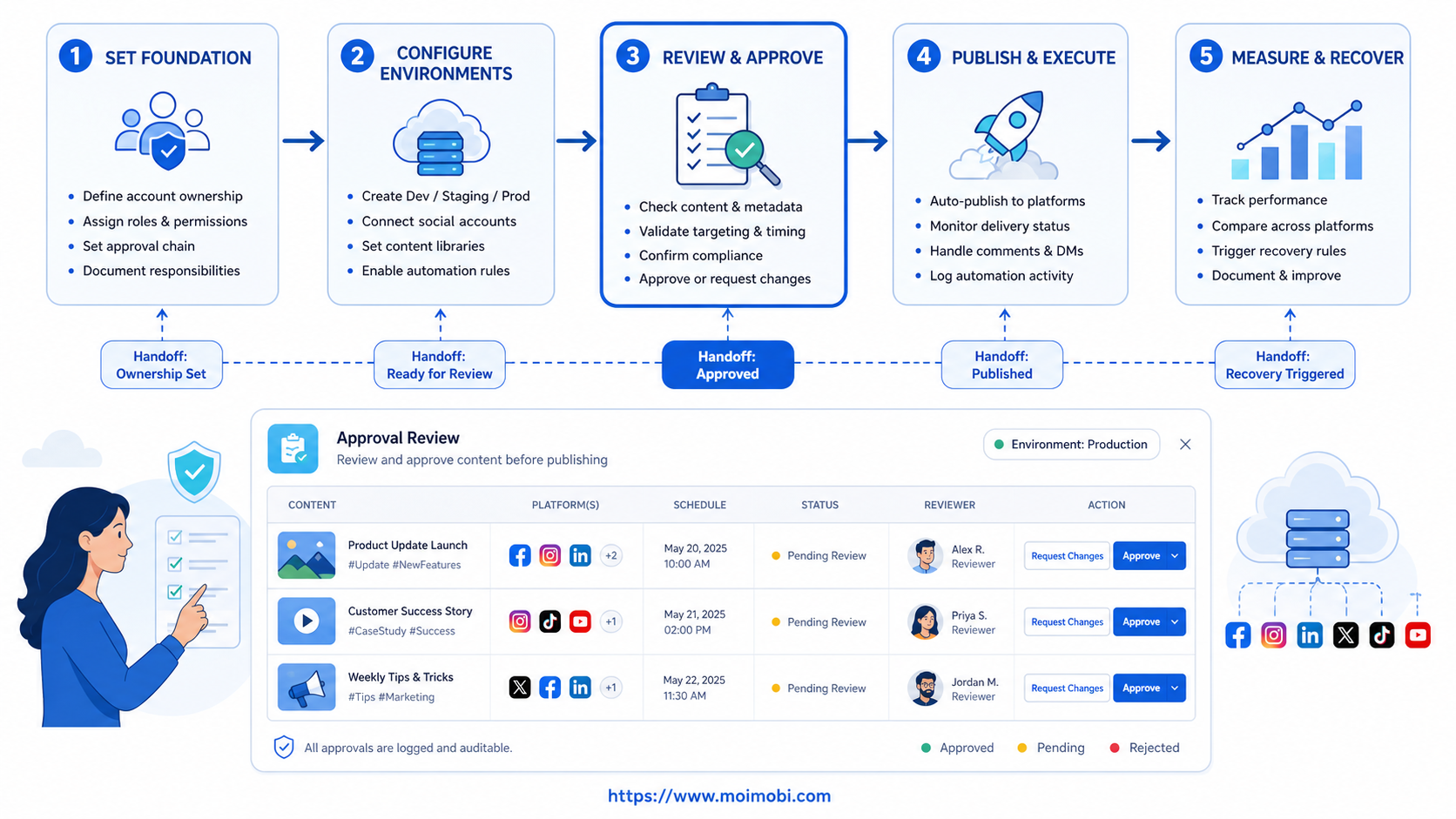
Use the same sequence for each recurring workflow, then tailor the final execution instruction to the platform.
- Classify the task. Mark it as publishing, response triage, account maintenance, research, or reporting.
- Confirm the account lane. Verify client, platform, account role, owner, and assigned environment.
- Check inputs. Confirm the content, source, approval state, and any client-specific limits.
- Execute only the approved action. Pause when the task differs from the approved scope.
- Write the outcome. Record completion, exception, result reference, and next owner.
- Review recurring exceptions. Turn repeated pause reasons into a checklist or SOP change.
Do not use the checklist as a blanket authorization to take extra actions. It is a control that tells the operator when to continue and when to stop. A task with an unclear account context should return to the owner, even if the content itself looks ready.
Platform-Specific Controls That Should Not Be Blended
Some controls should remain separate. Login and account recovery belong to the account owner. Public replies need a response policy and escalation path. Content publication needs the correct asset version and approval. Customer support requires a handoff rule for sensitive, payment, or complaint cases.
Separate client contexts also matter. A client-bound device context can support a clear execution boundary where mobile account work is involved. It does not replace the human decision to approve a task, nor does it justify mixing multiple client actions in a single record.
Avoid copying a platform workflow simply because it performed well elsewhere. Instead, ask which part is reusable. The approval timing, evidence fields, and recovery rule may transfer. The final interaction instructions should be checked against the target platform and client requirements.
Fit Boundaries for Agency Teams
This checklist fits agencies managing recurring tasks across two or more channels, especially when content, operations, and client approvals are handled by different people. It also fits a team moving from private-message coordination to a shared task record.
It is not a strong fit for a one-off creative experiment or a client program that has not defined who owns accounts and approvals. Start with a human SOP in those cases. Automation should reinforce a known process, not become the place where the process is invented.
The smallest useful pilot is one client, one account group, and one repeatable task. Use it to test whether the record survives a shift change. If a backup cannot identify the account, input, approval, and next action, the process is not ready for additional platforms.
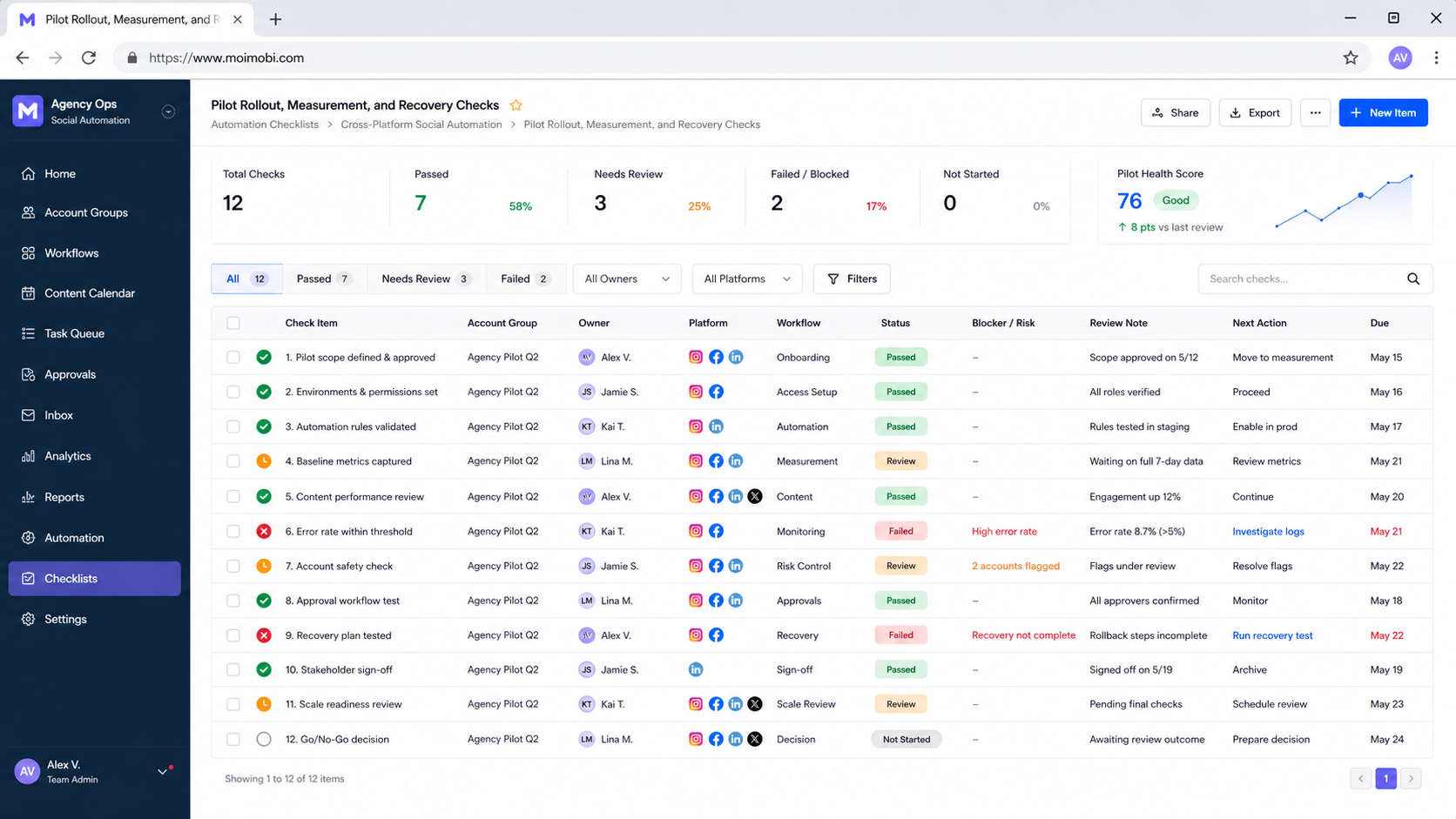
Pilot Rollout, Measurement, and Recovery Checks
Run the pilot for one week. Track ready-to-complete rate, approval turnaround, rework rate, pause reasons, and backup handoff success. Review the results by workflow and client lane rather than as one agency average.
NIST's log management guide describes logs as useful for monitoring and analysis. Agencies can apply the same idea without a formal compliance program: retain enough evidence to reconstruct the task, account context, time, owner, and result.
When a task fails, stop the action, save the available evidence, label the exception, and notify the named owner. Do not create a second task that repeats the same external action until the first record has a disposition. That reduces duplicate work during handoffs and turns exceptions into usable process feedback.
Frequently Asked Questions
Does one checklist work for every social platform?
The control model can be shared, but platform-specific execution instructions should remain separate.
What is the first field an agency should add?
Start with the account owner and account context. Without them, recovery and approval are unclear.
Can automation approve posts or replies?
Automation can prepare information and route work. Teams should keep named approval rules for external actions.
How many platforms should a pilot include?
Begin with one recurring task and the smallest account group that tests the handoff. Add a second platform after the first lane is reliable.
What should trigger a pause?
Missing input, unclear approval, access change, wrong account context, or an action outside the approved scope.
How should a team measure success?
Check whether tasks complete with fewer rework cycles and whether a backup can reconstruct a paused task from the shared record.
Is this only for publishing?
No. The same model can guide research, engagement, account maintenance, customer handoff, and reporting work.
Conclusion
A cross-platform automation checklist gives an agency a repeatable control model without erasing platform differences. Start with ownership, inputs, environment, approval, and evidence. Pilot one lane, review the exceptions, and expand only after the team can complete and recover work through a shared record.


