Key Takeaways
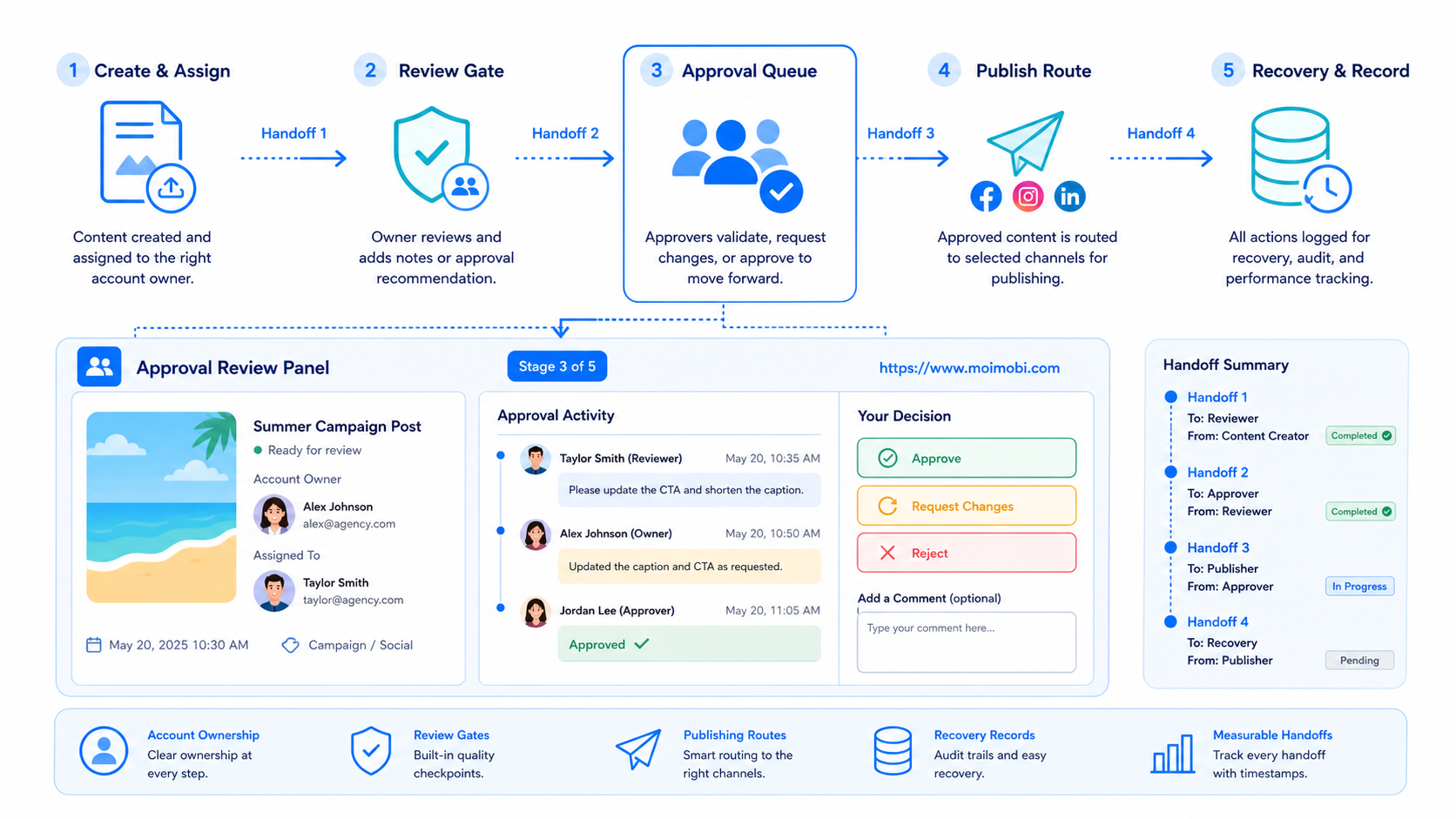
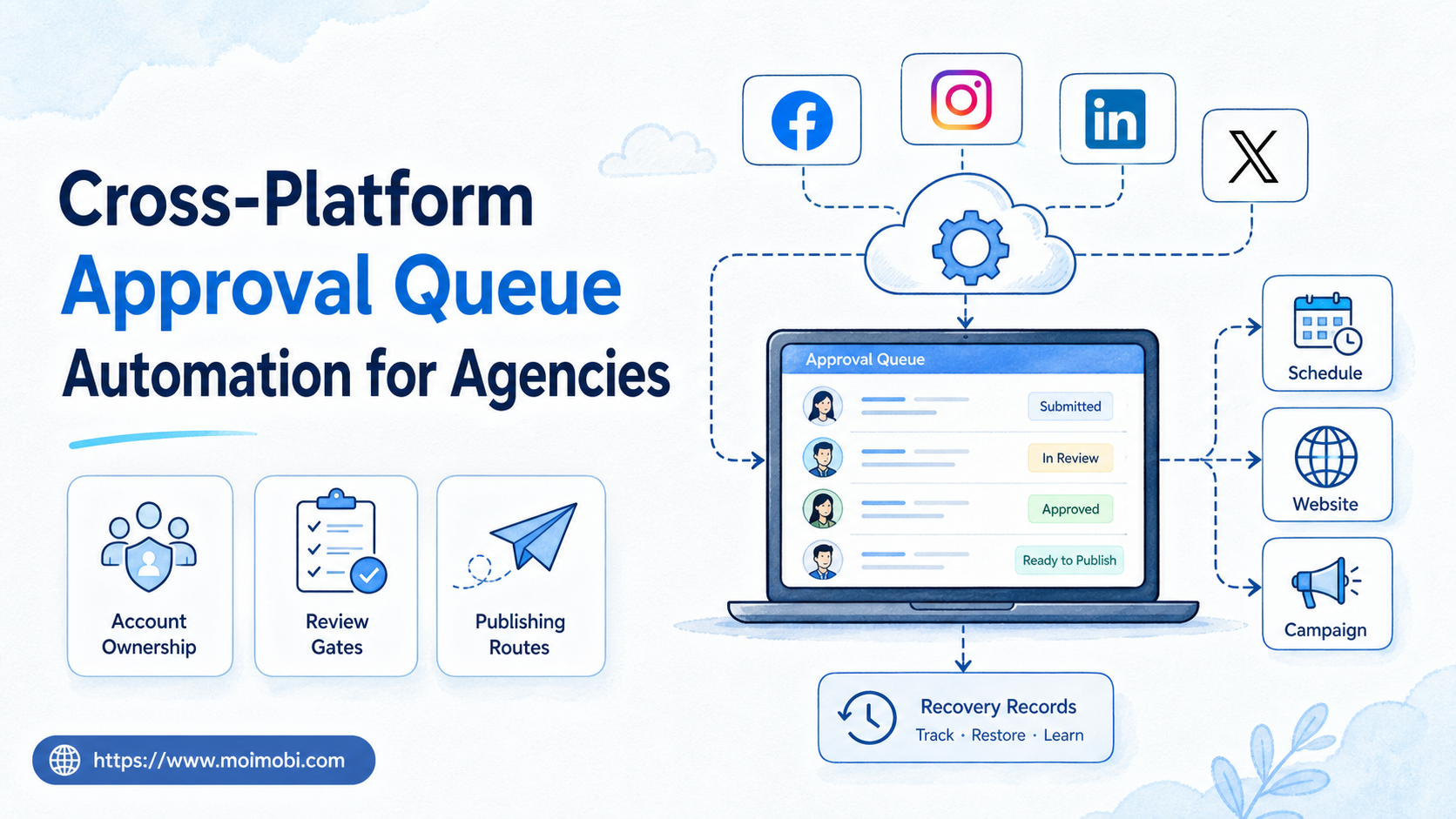
- Cross-platform approval queue automation for agencies is a controlled way to route prepared work to the right reviewer before a channel-specific action occurs.
- A usable queue identifies the client, account, asset, requested action, owner, due time, and evidence needed to close the task.
- The first rollout should cover one repeatable workflow, then measure review latency, rejection reasons, and recovery quality.
Cross-platform approval queue automation for agencies is a workflow that collects prepared tasks from several channels and sends each task through a defined review and release path. It does not mean one universal publish button. It means the agency can see what is waiting, who may approve it, and which account or platform route applies next.
Agencies need this separation because a content asset can be ready while its destination is not. A client may need to approve the copy. An account owner may need to confirm the channel. A platform integration may need a scoped authorization. TikTok's Content Posting API, for example, requires approved scopes and creator authorization for supported publishing paths. TikTok's Content Posting documentation shows why approval state and platform permission must be recorded separately.
The practical goal is a reliable handoff. Creative work should not disappear into chat messages, and a reviewer should not need to search several dashboards to know what decision is required.
The Core Idea Behind Cross-Platform Approval Queue Automation for Agencies
The common mistake is to treat approval as a binary label. In a real agency workflow, “approved” can mean several different things: the client accepts the concept, the editor accepts the final asset, the account owner confirms the destination, or the platform has accepted an authorized API request. Those decisions should not be collapsed into one checkbox.
Use a queue item as the unit of work. Each item represents one outcome, such as “submit the approved video to the client’s TikTok account for review” or “prepare a product update for two client-owned channels.” The item holds the asset reference and the decision history. It does not need to expose credentials or turn a reviewer into a technical operator.
| Queue field | Why it matters | Example |
|---|---|---|
| Client and account | Prevents work from reaching the wrong workspace | Northstar / TikTok brand account |
| Requested action | Sets the correct review standard | Prepare, submit, publish, or report |
| Asset version | Keeps reviewers on the current file | Video v3 with approved caption |
| Approval owner | Makes a pending decision visible | Client lead or agency account manager |
| Evidence and result | Supports recovery and later review | Approval note, platform status, or pause reason |
This structure also keeps the automation narrow. The system may create a queue item, notify the right owner, open an assigned environment, or return a structured status. It should not infer that a client approval permits a different account action.
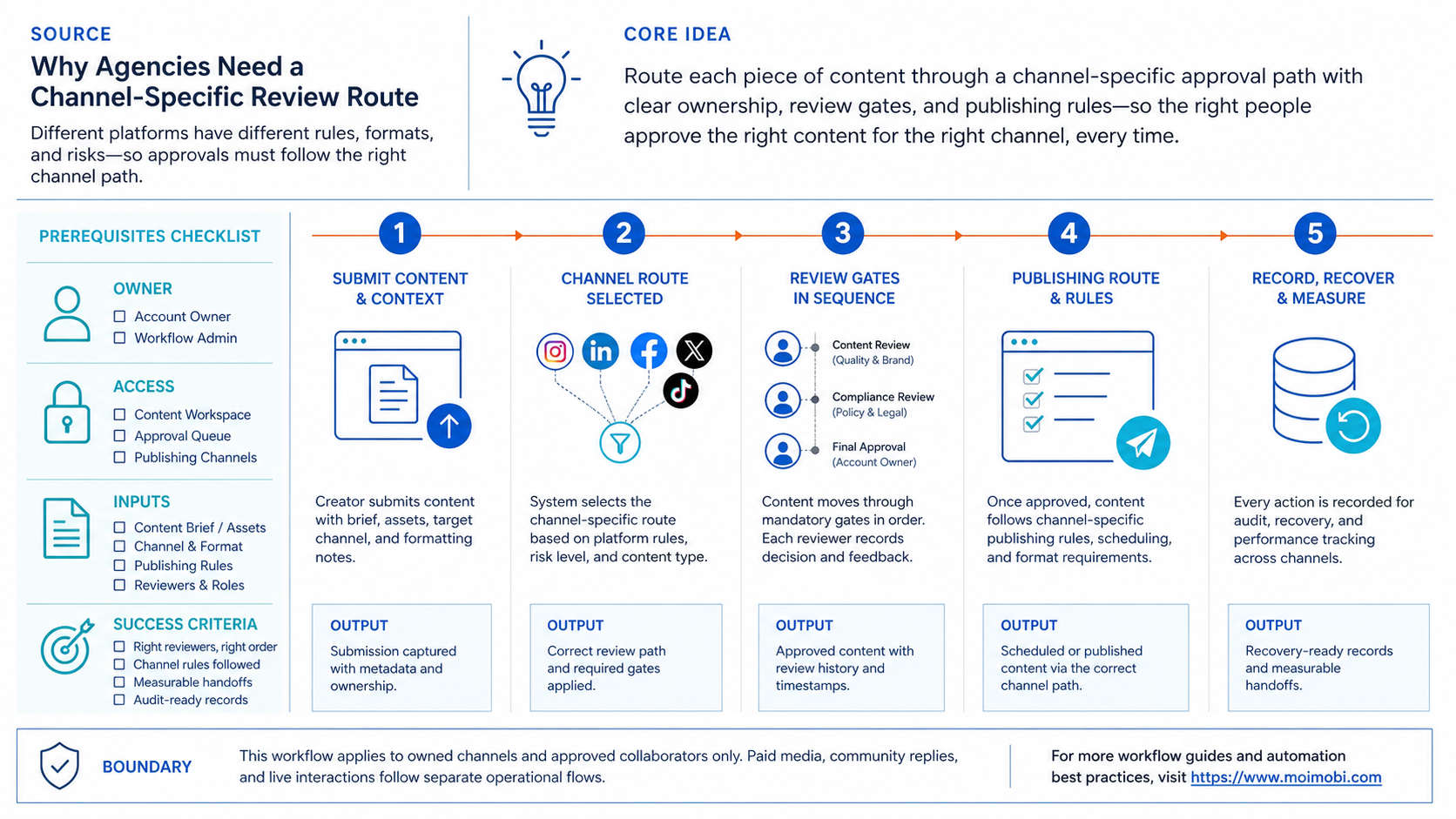
Why Agencies Need a Channel-Specific Review Route
Platforms differ in what they allow and what they require. For an API-supported route, the platform may require user consent, a verified application, and an explicit scope. TikTok states that its direct-post flow uses current creator information and authorization before a post request is initialized. TikTok's Direct Post reference is a useful example of a route with its own preconditions.
Therefore, a cross-platform queue should resolve the route after the content decision. A reviewer may approve the copy once, while the system still creates separate account-specific tasks. One task could use an authorized platform API. Another could pause in a browser workspace for an account owner to complete a permitted web-interface step. A mobile-first workflow may use an assigned cloud phone only after its target account and reviewer are known.
This prevents a misleading “published” label. A task is complete only after the route reports a confirmed outcome. TikTok's upload flow distinguishes upload from the creator's later posting action, and its status endpoint supports checking the final outcome. TikTok post status guidance supports recording this distinction.
Preflight Checklist for an Approval Queue
Before automating notifications or execution, confirm the operating inputs:
- Name the account owner. Every target account needs a responsible agency or client contact.
- Define the decision. Separate content approval, destination approval, and final release approval.
- Attach a versioned asset. Reviewers should see one current caption, media file, and destination note.
- Choose the allowed route. Prefer an official API when it supports the approved action; otherwise document the permitted browser or mobile step.
- Set a pause rule. Missing ownership, expired approval, changed copy, or a platform error should stop the item.
- Define closure evidence. Store a platform result, reviewer decision, or clear exception record.
The checklist matters more than automation volume. A queue with fewer tasks and clear owners is easier to improve than a large list of items that nobody can safely release.
Who Benefits Most and Who Should Wait
This workflow is a strong fit for agencies that repeatedly coordinate content across client accounts, editors, and account managers. It is especially useful when delays come from unclear ownership rather than from asset production itself. A shared operational view lets the team work without giving every participant access to every platform.
It is a limited fit for a small team with one channel and one approver. A simple checklist or shared calendar may be easier at first. The agency should add a queue when tasks are lost, reviewers lack context, or the final release route differs by client and platform.
Good fit
Several client accounts, recurring content work, clear account ownership, and a real need to record approvals.
Start smaller
One team, one channel, and no repeated approval delay. Begin with documented fields before adding automation.
Not a fit
Unapproved messaging, vague account ownership, copied credentials, or any workflow that tries to bypass platform controls.
How to Start Cross-Platform Approval Queue Automation for Agencies
Start with one narrow workflow, such as client approval for scheduled short-form content. Map the journey from asset handoff to confirmed result. Do not include every social platform on day one.
- Create a queue template with client, account, asset, caption, destination, reviewer, due time, and action type.
- Add one content review stage. A rejection must include a reason and return the item to a named owner.
- Add a route check after approval. The system identifies whether the next path is an official API, a browser task, or a manual handoff.
- Require a separate release decision for customer-facing publication. This avoids treating creative approval as blanket authorization.
- Capture the result. Record the status, evidence link, exception, and next owner.
- Review the queue weekly. Remove fields that nobody uses and add only the controls that prevented a real failure.
Moimobi can support the execution side when an agency needs account-scoped browser or mobile workspaces alongside a queue. The relevant next step is multi-account management, not a promise that every platform action can be automated.
Metrics, Recovery, and Common Failure Modes
Measure decision latency before measuring output. Track the time from queue creation to first review, the time spent in revision, the number of items paused for missing information, and the share of tasks with confirmed completion evidence. These signals reveal whether the queue is clarifying work or simply adding a new inbox.
Recovery begins with the last confirmed business event. If a platform request reports an error, do not repeat a publish action blindly. Inspect the account, asset version, approval state, and platform status first. TikTok's API documentation exposes status checking because upload, processing, moderation, and publication are distinct stages; agency records should preserve the same distinction.
Avoid three recurring failures: using one approval field for unrelated decisions, allowing a changed asset to keep an old approval, and treating a technical submission as proof of publication. A compact audit record solves more of these problems than another automation rule.
Approval Queue Operating Model for Client Teams
Start with a small, visible service model. Decide who creates a queue item, who can return it for revisions, who can approve the creative, and who can release an account-specific action. A client should not need access to every internal tool merely to approve a caption. Likewise, an editor should not be able to publish just because they prepared an asset.
Set simple service expectations instead of hidden urgency. For example, the team may promise to acknowledge a new client decision request within one business day, while urgent changes use a separate escalation path. The exact timing varies by agency. What matters is that the queue exposes the age of an item and its next owner.
Keep status labels plain:
- Drafting: the asset is still owned by a creator or editor.
- Ready for client review: the required materials are attached and the request is clear.
- Changes requested: the reviewer identified a concrete issue and returned the item.
- Approved for route check: the content decision is complete, but account and platform conditions still need confirmation.
- Released or paused: the final task has either reached a confirmed result or stopped with a recorded reason.
This model avoids the common trap of calling a task “approved” when only the copy was approved. It also makes it easier to report on where work is delayed. A long client review is a relationship issue. A long route check may be an account-access or platform-permission issue. Those problems need different owners.
For agencies with several active accounts, keep account environment assignment outside the creative review screen. The approval queue can hand a valid task to the relevant device isolation or mobile automation workflow without exposing session details to every collaborator.
Verification Checklist Before Adding Another Platform
Do not expand based only on the number of items completed. Review a representative sample from the last cycle and ask whether the queue preserved the essential facts. A good verification pass catches unclear ownership before the workflow becomes harder to change.
- Check decision clarity. Can a reviewer tell whether the item needs a content decision, a route decision, or a final release decision?
- Check version integrity. Does the final asset match the version that received approval?
- Check account boundaries. Is the assigned account and execution environment visible to the permitted operator only?
- Check outcome evidence. Does every released item include a confirmed platform result, not merely a submitted request?
- Check pauses. Are rejection and error reasons structured enough to improve the next cycle?
When these checks pass for one platform route, copy the operating pattern rather than copying every integration detail. Each new channel needs its own authorization, asset rules, and release evidence. The queue remains the common coordination layer; the platform route remains specific.
Frequently Asked Questions
What is cross-platform approval queue automation for agencies?
It is a controlled workflow for routing prepared work to the correct reviewer and channel-specific release path, with a clear record of each decision.
Does one client approval authorize every platform action?
No. The queue should keep creative approval, account authorization, and platform-specific release decisions separate.
Should an agency use an official API when available?
Yes. An official API is usually the clearest route for supported, authorized actions. Use a browser or mobile workflow only for a valid documented need.
What should happen when an item is rejected?
Return it to a named owner with the reason, preserve the current version history, and require a new review after a material change.
Can a queue handle mobile-first workflows?
Yes, when the item records the assigned mobile environment and the person responsible for the account. The environment is not an approval by itself.
Which metric matters first?
Start with review latency and unclear-owner pauses. They show whether the queue is actually improving agency handoffs.
Does a client need access to the execution environment?
Usually no. The client needs a clear decision screen and a record of the outcome. The agency can keep account environments limited to the authorized operators.
Can the same asset have different approval states?
Yes. A client may approve creative direction while one channel still needs a different caption, permission, or release step. Track those states separately.
What is a useful pause reason?
Use a specific reason such as missing owner, changed asset, expired consent, unavailable platform route, or reviewer requested revision. “Error” alone is not actionable.
When should a team expand the workflow?
Expand after one route has stable ownership, decision records, and recovery handling. Add platforms one route at a time.
Conclusion
The model works when it turns scattered handoffs into named decisions. Keep the client, account, asset version, route, reviewer, and outcome connected in one queue item.
Start with one repeatable path. If the team can show who approved what, which route ran, and what happened next, the workflow is ready to expand. If it cannot, improve those records before adding more automation.
References