Content Type: guide
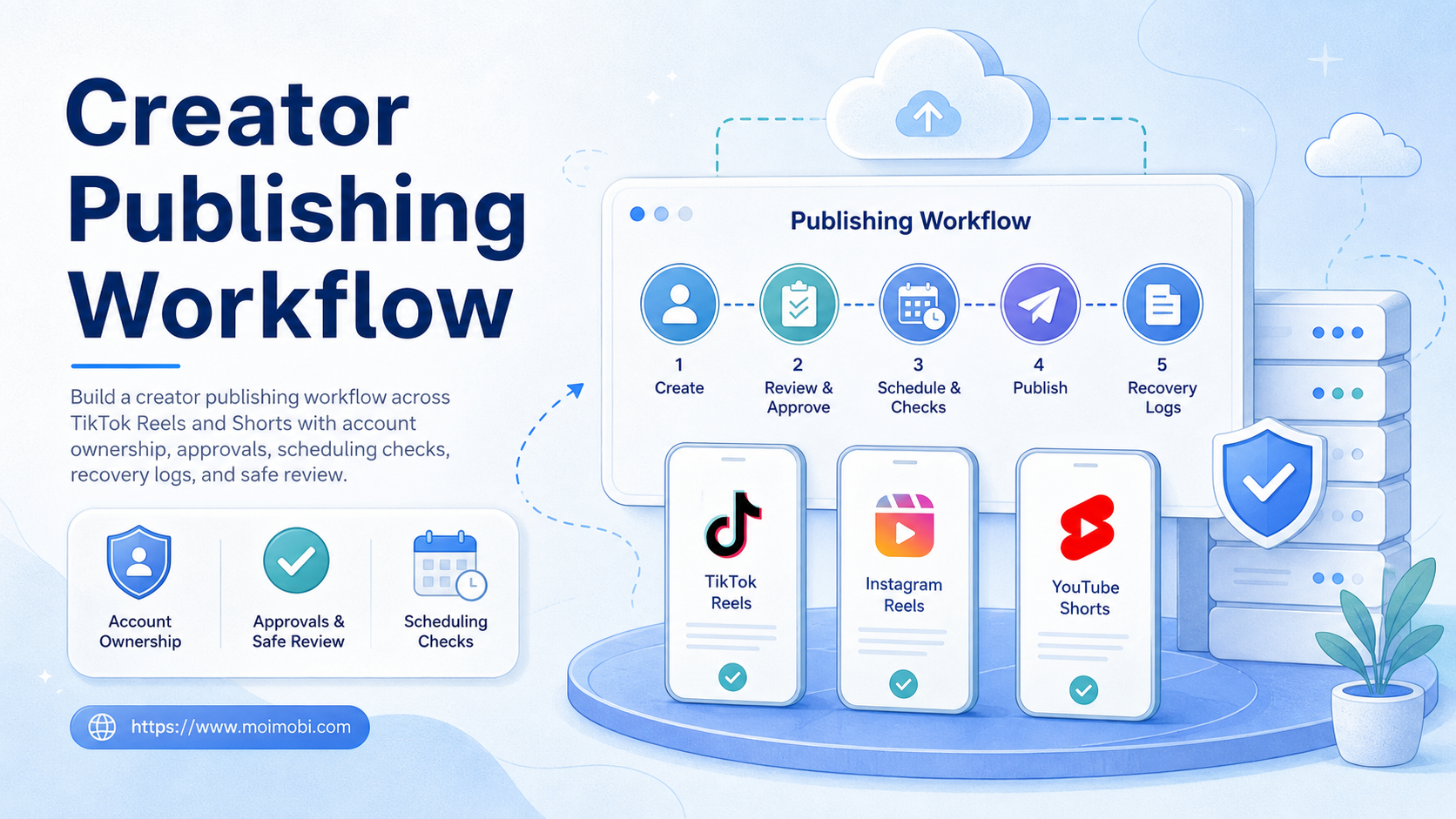
A creator publishing workflow is a repeatable operating process for preparing, reviewing, scheduling, posting, checking, and recording short-form content across platforms. For teams managing TikTok, Instagram Reels, and YouTube Shorts, the workflow matters more than any single upload script.
The goal is not to push the same video everywhere without review. The better model is a controlled pipeline: content intake, platform adaptation, approval, account assignment, publishing, verification, and result tracking. This keeps creators, editors, and operators aligned.
If your team uses automation tools, keep the boundary clear. Use automation to prepare tasks, move files, create drafts, remind owners, and collect status. Use human review for brand fit, platform context, sensitive claims, and publishing decisions.
Key Takeaways
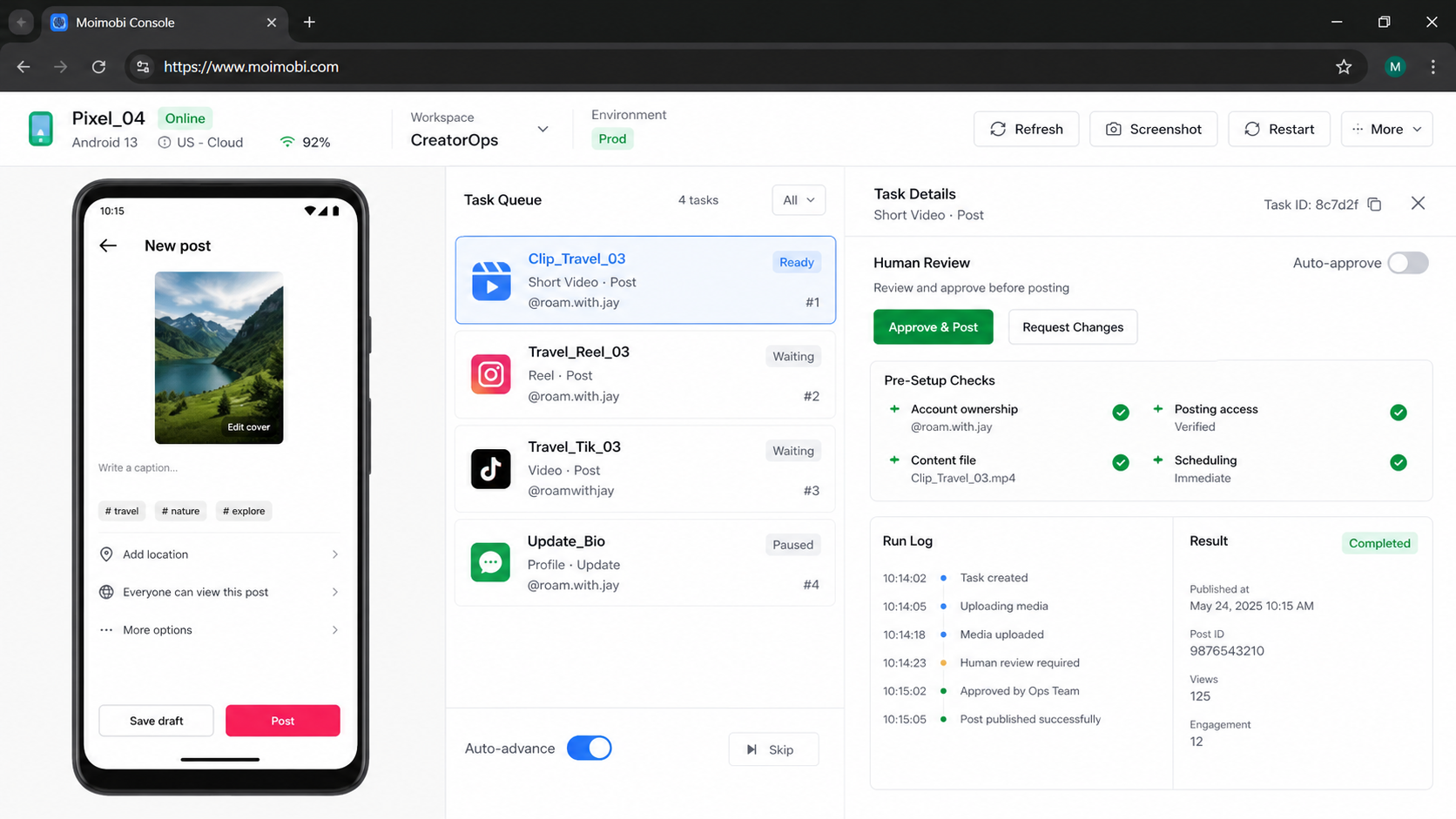
- A creator publishing workflow should separate content preparation from final publishing.
- TikTok, Instagram Reels, and YouTube Shorts need platform-specific checks.
- Teams need account owners, approval rules, captions, assets, and recovery logs.
- Automation should support the workflow, not remove review from public posting.
- A small pilot helps prove the process before adding more accounts.
Pre-Setup Requirements and Checks and creator publishing workflow
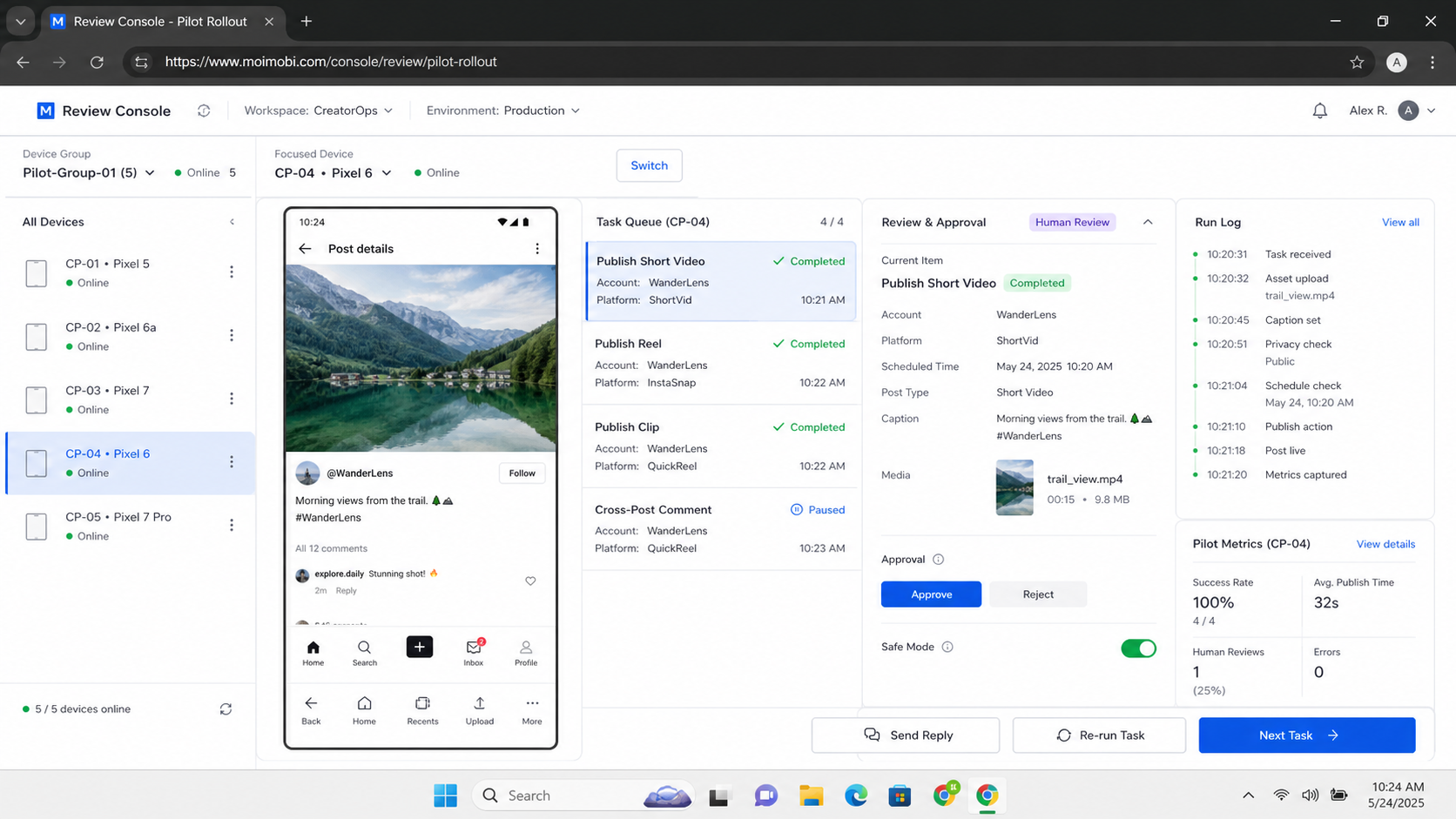
Prepare the operating fields before building any automation. A workflow without clear fields becomes hard to debug when a post fails, an owner changes, or a video needs edits after review.
Use this preflight checklist:
- Account map: platform, handle, owner, backup owner, region, and login environment.
- Asset map: final video, thumbnail, caption, hashtags, campaign tag, and source file.
- Approval rule: who checks brand fit, compliance, claims, and platform suitability.
- Publishing mode: manual publish, scheduled publish, API-based workflow, or mobile task.
- Verification rule: what counts as posted, failed, skipped, or needs review.
- Recovery owner: who fixes failed uploads, wrong captions, missing thumbnails, or duplicate posts.
Official APIs also have platform-specific limits and review rules. TikTok's Content Posting API documentation explains that posting through its API depends on supported app permissions and integration steps. YouTube's Data API documents video upload through videos.insert. Meta's Instagram documentation covers content publishing through approved platform capabilities.
Those sources show why one generic upload script is not enough. Each platform has its own access model, publishing surface, and review requirements. A team should design the workflow around those differences before testing automation.
The Core Workflow for How to Build a Creator Publishing Workflow Across TikTok Reels and Shorts
Start with a single content item and follow the same path every time. The first version should be boring, visible, and easy to inspect.
- Intake the source video. Record creator, campaign, product, language, and usage rights.
- Create platform variants. Prepare caption, title, description, thumbnail, hashtag set, and platform notes.
- Assign the account. Choose which TikTok, Instagram, or YouTube account owns the post.
- Run review. Check claims, music rights, visual quality, CTA, and platform fit.
- Prepare the publish task. Add the video, caption, schedule, owner, and expected result.
- Publish through the chosen environment. Use API, web dashboard, or mobile execution only when it fits the account.
- Verify the live result. Confirm URL, caption, visibility, thumbnail, and owner record.
- Log the outcome. Save status, errors, edits, live links, and next action.
For mobile-first accounts, teams may use a cloud phone as the execution environment. For TikTok-specific routing and account setup, connect the publishing workflow to a clean USA TikTok cloud phone guide instead of mixing routing decisions into the upload checklist.
How to Verify the Setup Is Working
Verification starts before the post goes live. A workflow is working only when operators can trace the post from source file to live URL without guessing.
Use a pass/fail check after each test post:
| Check | Pass Condition | Failure Signal |
|---|---|---|
| Asset match | The uploaded video matches the approved file | Wrong cut, old edit, missing subtitles |
| Caption fit | Caption and hashtags match the platform plan | Copied text ignores platform context |
| Account ownership | Each post has one owner and one account record | Several people touch the same account |
| Live URL | The final post URL is saved in the task log | Team cannot find what went live |
After the post is live, check visibility, caption accuracy, thumbnail state, comment status, and whether the platform shows any publishing error. Do not treat "task completed" as proof. The live post is the proof.
Teams that run account work across multiple mobile environments can use mobile publishing task execution to keep app-side work tied to owners and logs.
Where Teams Usually Get Stuck
The first stuck point is treating short-form platforms as identical. TikTok, Reels, and Shorts may share a vertical video format, but their publishing surfaces, account roles, captions, and analytics workflows differ. One file can travel across channels, but one blind process should not.
The second stuck point is skipping approval. Creator teams move quickly, so someone may publish a draft before the caption, claim, thumbnail, or call to action is ready. Add an approval field that blocks publishing until the reviewer marks the asset ready.
The third stuck point is overusing public automation. Search queries such as "youtube auto video uploader github" or "auto upload video tiktok github" often lead teams toward scripts before they define account ownership. Scripts are not a workflow. A reliable workflow still needs owners, records, recovery rules, and platform boundaries.
The fourth stuck point is missing recovery. Failed uploads, wrong captions, duplicate posts, and missing live URLs are normal operating cases. The workflow should say what happens next, not just mark the task failed.
Next Steps After the First Pass
Treat the first workflow as a pilot, not a finished system. The goal is to learn where the team loses control.
- Run five controlled posts. Use one creator, one campaign, and a limited account set.
- Record every edit. Track caption rewrites, thumbnail swaps, timing changes, and owner handoffs.
- Compare platform steps. Note which tasks are shared and which are platform-specific.
- Create reusable templates. Build caption, hashtag, approval, and recovery templates from real posts.
- Add automation only where stable. Automate file movement, reminders, draft creation, and status checks first.
- Keep manual review for public posting. Use automation to assist, not to remove accountability.
For teams managing multiple social accounts, the workflow should also connect to cross-platform campaign publishing records. This keeps campaign work, publishing tasks, and post-check records in the same operating model.
File Naming, Handoff Fields, and Platform Variants
Operational quality improves when every asset follows the same naming rule. Use a file name that includes campaign, creator, platform, version, language, and date. A file named summer-drop_maya_tiktok_v03_en_0728.mp4 is easier to audit than final-final-new.mp4.
Keep a platform variant sheet beside the assets. Each row should include the platform, account, caption, thumbnail, hashtags, publish owner, review owner, planned time, live URL, and status. This row becomes the handoff object between creator, editor, operator, and manager.
Platform variants should not be treated as duplicates. TikTok may need a different caption hook. Reels may need a different thumbnail decision. Shorts may need a title and description field that the other channels do not use the same way. The base idea can stay consistent while the execution changes.
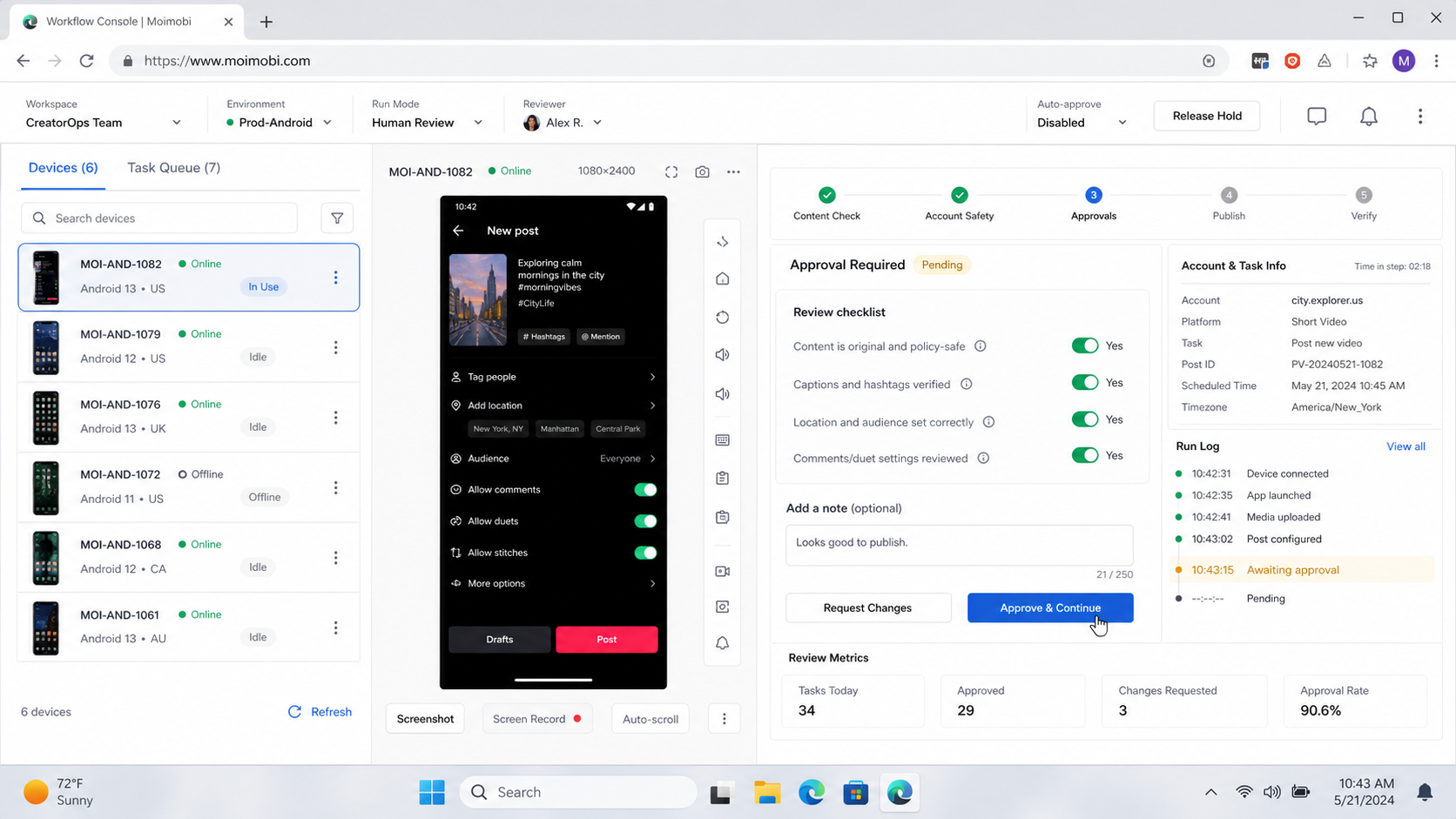
Use a simple status model:
- Draft: source file exists, but the platform version is not ready.
- Ready for review: caption, thumbnail, and account are selected.
- Approved: the reviewer has cleared the post for publishing.
- Queued: the post is assigned to an environment and owner.
- Live: the URL has been verified and saved.
- Needs repair: the task failed or the live result does not match approval.
This status model prevents invisible work. The team can see whether a post is stuck in editing, review, publishing, or recovery. It also stops operators from guessing which version is approved.
Permission Boundaries for a creator publishing workflow
Permissions should follow the publishing risk. Not every teammate needs access to every account, and not every automation step needs publishing rights. Split permissions into creator, editor, reviewer, publisher, and recovery owner.
Creators submit source files and notes. Editors prepare platform versions. Reviewers approve captions, claims, thumbnails, and timing. Publishers operate the chosen account environment. Recovery owners fix failed tasks and document what changed.
This separation keeps the creator publishing workflow easier to audit. If a caption is wrong, the team knows whether the issue came from editing, review, publishing, or recovery. If a post goes live on the wrong account, the log shows which environment and owner handled the task.
Use least-access rules for early pilots. Give publishing rights only to the operator who needs them for that account group. Give reviewers approval access, not account control. Give creators submission access, not live posting access.
The same structure helps when the team adds automation. A bot, script, or workflow runner should not inherit broad access by default. It should perform a narrow task, write a status record, and hand sensitive decisions back to a person.
Who It Fits and When It Is a Strong Match
This workflow fits creator teams that publish across several short-form channels each week. It also fits agencies that need one process for different clients, languages, regions, or account groups.
It is a strong match when operators already feel the pain of duplicated posts, missed approvals, unclear owners, and lost live URLs. In those cases, the workflow reduces confusion before it increases output.
It is not a strong match when the team has only one creator, one account, and occasional posting. A simple checklist may be enough. Adding automation before the process is stable can create more work than it removes.
Good Fit
- Multi-account creator teams
- Agencies with client publishing queues
- Cross-platform short-form campaigns
- Teams needing approval and recovery logs
Not Yet
- No account owner per platform
- No approved caption process
- No live URL tracking
- No recovery plan for failed posts
Pilot Rollout, Measurement, and Recovery Checks
The pilot should test the process under normal pressure. Do not pick only perfect assets. Include one caption change, one rescheduled post, one failed upload, and one post that needs human review.
Measure five things:
- Cycle time: how long a post takes from approved asset to live URL.
- Review edits: how many items need caption, thumbnail, or CTA changes.
- Failure visibility: whether failed tasks show the exact problem.
- Owner clarity: whether the next responsible person is obvious.
- Platform drift: whether TikTok, Reels, and Shorts need different steps.
Recovery checks matter more than speed in the first pilot. Ask an operator to find a failed task and explain the next action. If the answer requires chat history or memory, the workflow needs better records.
After the pilot, lock the stable parts. Keep flexible parts visible. Platform rules, API access, and app behavior can change, so the workflow should be easy to inspect and update.
Keep one monthly cleanup routine. Remove stale templates, archive old assets, review failed publishing tasks, and confirm that account owners still match the current team. Small maintenance work prevents the creator publishing workflow from becoming another messy shared content folder later.
Frequently Asked Questions
What is a creator publishing workflow?
It is a repeatable process for preparing, approving, publishing, verifying, and recording creator content across platforms.
Can I use n8n for YouTube Shorts automation?
You can use automation tools for parts of the workflow. Check YouTube API requirements and keep approval and account ownership clear.
Should TikTok, Reels, and Shorts use the same caption?
Not always. A shared base caption can help, but each platform may need different wording, tags, or timing.
Is auto upload video TikTok GitHub code enough?
Code is only one piece. Teams still need account roles, platform access, review rules, and recovery logs.
Where should mobile execution fit?
Use mobile execution when the task depends on the app environment. Use dashboards or APIs when they fit the workflow better.
How many accounts should the first pilot include?
Use a small account group. The pilot should expose process issues before the team expands.
What should be recorded after publishing?
Record platform, account, live URL, owner, caption version, schedule, status, and any recovery note.
When should automation stop?
Pause when posts fail repeatedly, account ownership is unclear, platform access changes, or review quality drops.
Conclusion
A creator publishing workflow works when every post has a source file, platform variant, owner, approval state, publish method, live URL, and recovery path. The team should be able to trace the post without asking who handled it.
Before scaling, run one pilot across TikTok, Reels, and Shorts. Check whether the workflow reduces missing approvals, duplicate work, and lost live links. Add automation only after the manual process is clear enough to inspect.
References