
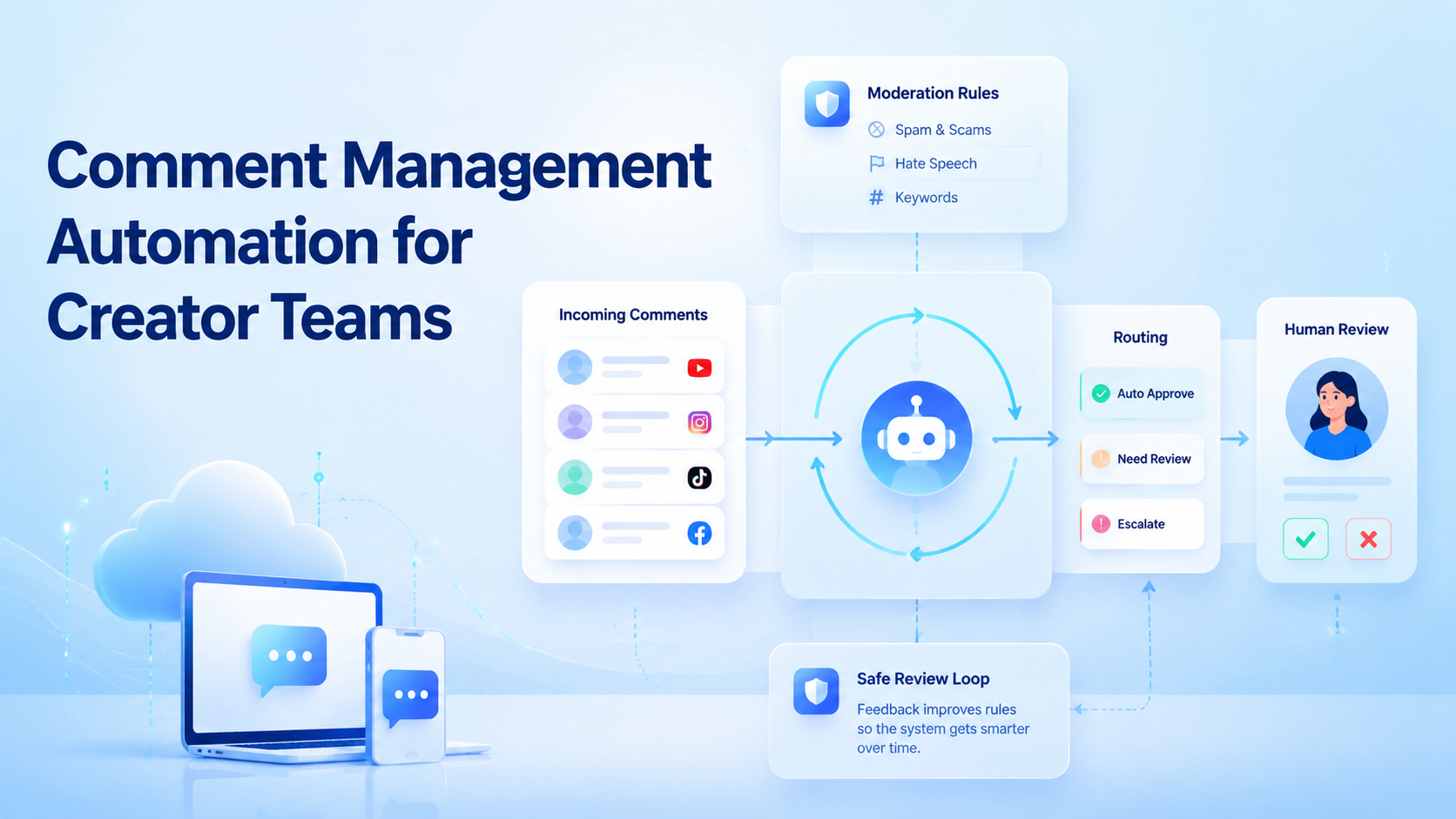
Comment management automation is a workflow that helps creator teams collect, classify, route, reply to, hide, or escalate comments with clear rules and human oversight. It should support faster response work without turning comment sections into low-quality automated replies.
Creator teams need it because comments become operational work. A viral post may create customer questions, spam, complaints, lead signals, and community feedback at the same time. Without a system, operators miss useful comments and overreact to noisy ones.
The best setup combines platform-supported actions, account-specific workspaces, review rules, and measured response loops. Automation should assist operators, not remove judgment from sensitive conversations.
Key Takeaways
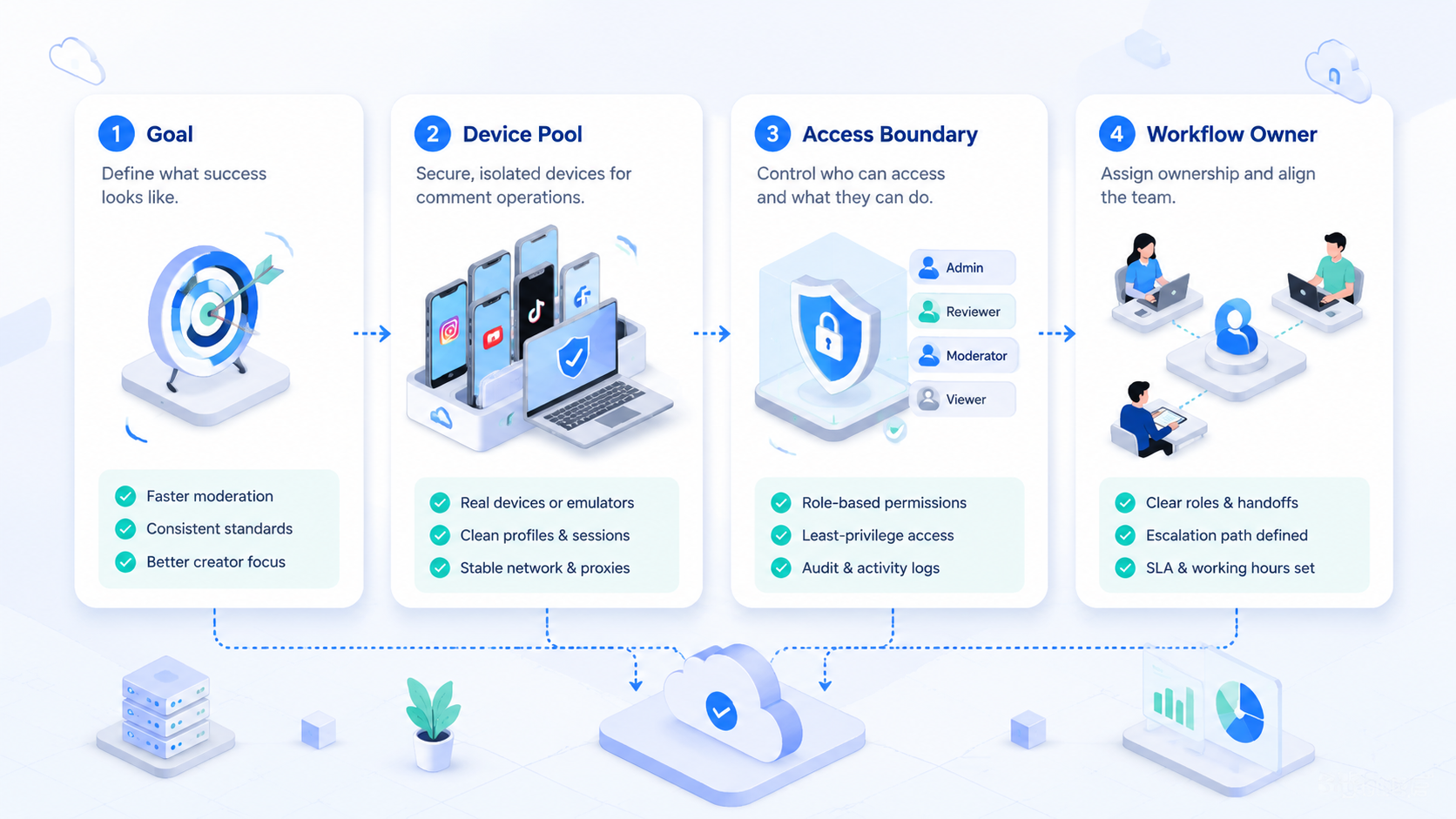
- Comment management automation should triage, route, and assist replies before it auto-posts.
- Creator teams need human review for complaints, sensitive comments, and brand-specific replies.
- Platform-supported APIs and account workspaces make the workflow easier to audit.
- A pilot should measure useful action time, approval rate, and missed-comment rate.
What Is Comment Management Automation for Creator Teams?
Comment management automation is not just auto-reply software. The workflow moves comments from discovery to action with reviewable steps.
A basic workflow has five steps:
- Capture comments from the right account or post.
- Classify comments by intent, urgency, and risk.
- Route comments to the right operator or response queue.
- Reply, hide, report, or escalate based on policy.
- Measure outcomes and adjust rules.
Meta's official Instagram Graph API comment references document supported actions around Instagram comments for eligible professional accounts. That matters because teams should prefer supported API paths where available, and avoid unknown scripts that cannot be audited.
For browser or mobile app workflows that are not fully API-covered, teams still need controlled execution. A cloud phone or browser workspace can help keep account context separate while operators review and act.
Why Comment Management Automation Matters
Comments are public customer operations. A reply can help a buyer, calm a complaint, or create a lead. A careless reply can look robotic or off-brand.
Instagram's own help resources describe comment controls such as filtering, blocking, and managing comment visibility. That reinforces a basic point: moderation is part of normal account management. Automation should organize that work, not bypass it.
For multi-account teams, the hard part is not only the reply text. It is the queue:
| Comment type | Recommended automation role | Human role |
|---|---|---|
| Simple FAQ | Suggest a prepared answer. | Approve or edit. |
| Product question | Route to sales or support queue. | Answer with context. |
| Complaint | Flag and prioritize. | Review before response. |
| Spam | Detect and group. | Confirm hide/report rules. |
| Sensitive topic | Escalate immediately. | Decide action. |
This approach keeps automation close to the workflow. The queue avoids the mistake of treating all comments as equal.
Key Benefits and Use Cases
The first benefit is triage. Operators can focus on comments that need judgment instead of scanning every post manually.
The second benefit is consistency. A team can define response rules for product questions, shipping questions, creator collaborations, support issues, and spam. The system can suggest actions without forcing identical replies.
The third benefit is visibility. Team leads can see which accounts have pending comments, which posts are generating issues, and which workflows need better response templates.
Common use cases include:
- Creator agency inbox and comment operations.
- Brand account customer response workflows.
- Product launch comment monitoring.
- Multi-account campaign review.
- Lead discovery from comment threads.
- Community moderation across Instagram, TikTok, Facebook, and YouTube.
For teams running many social accounts, multi-account management becomes the backbone. Each account needs clear ownership, environment separation, and task status.
Creator teams also need comment memory. A customer who asked about shipping yesterday may comment again today. A creator partnership lead may move from a public comment into a direct message. The workflow should make those handoffs visible instead of forcing operators to remember context.
Campaign teams can use the same system to detect patterns. Repeated product questions may indicate a weak caption. Repeated complaints may show a fulfillment issue. Repeated collaboration comments may become a lead source when routed correctly.
How to Get Started with Comment Management Automation for Creator Teams
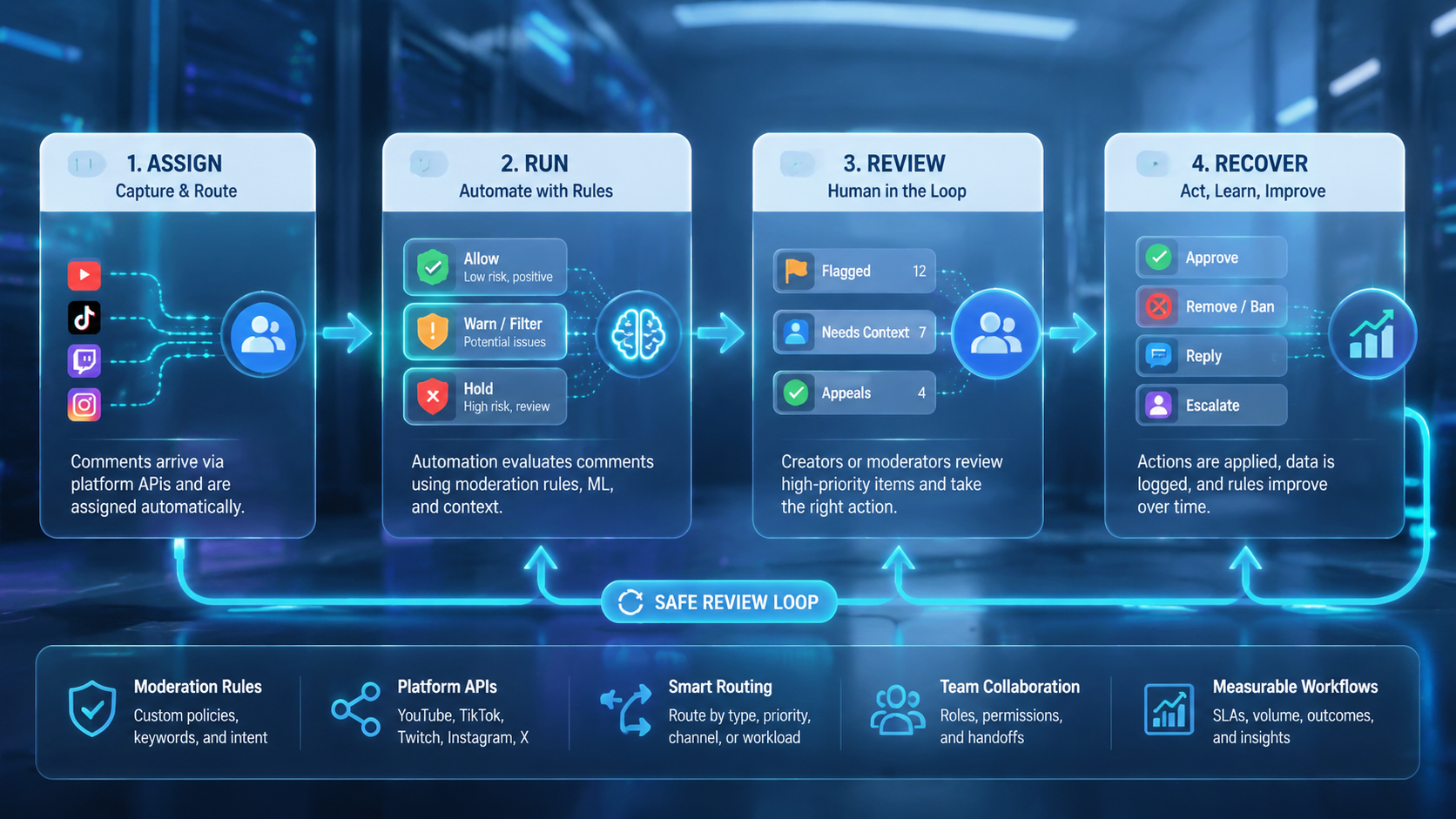
Do not start with an auto-reply rule. Build a comment map first.
Build a small operating model:
- List the platforms and accounts.
- Define comment categories.
- Decide which categories can use suggested replies.
- Decide which categories require human approval.
- Assign accounts to operators.
- Set daily review windows.
- Track response time and unresolved comments.
Use social media marketing workflows when comment management connects to content publishing, campaign monitoring, and customer engagement. The comment queue should not sit outside the rest of operations.
For mobile-first platforms, mobile automation can support routine checks and app-based steps. Keep the guardrails clear. Automation should not mass-post replies, impersonate humans, or ignore platform limits.
Add one approval stage before any public reply automation. The stage can be lightweight. Operators review suggested replies for tone, accuracy, and context. After enough approvals, the team can decide which narrow categories are safe for faster handling.
Common Mistakes to Avoid
The biggest mistake is using one reply pattern for every account. Creator comments depend on audience, post context, language, and brand voice.
Another mistake is hiding too much automatically. Moderation APIs and AI classifiers can misread sarcasm, slang, reclaimed language, or context. Research on content moderation systems has shown that automated moderation can both over-moderate and under-moderate language in difficult cases. Treat classification as assistance, not final judgment.
Avoid these operating failures:
- No human review for complaints.
- No escalation path for sensitive comments.
- No account-specific reply style.
- No record of hidden, deleted, or escalated comments.
- No distinction between spam, criticism, and real support needs.
- No platform-specific policy review.
Meta's Inauthentic Behavior policy is also relevant. Teams should not use comment automation to create deceptive engagement or coordinated fake activity. The safer use case is response management for real communities.
Quality control should include deletion and hiding decisions. A deleted comment can remove evidence from the team view. A hidden comment can change the visible conversation. Operators need a record of who acted, which account was used, and why the action was chosen.
Another failure mode is ignoring language coverage. Multilingual comments can be misread by simple keyword rules. Teams should route uncertain language to review instead of assuming every classifier understands slang, abbreviations, or local context.
Who It Fits and When It Is a Strong Match
Comment management automation fits teams with enough comment volume to need queues, rules, and review. It is less useful when one person can read every comment manually.
Strong fit
- Creator teams managing many active accounts.
- Brands receiving sales or support questions in comments.
- Agencies that need response review and account ownership.
Weak fit
- Low-volume accounts with simple manual review.
- Teams without approved response rules.
- Workflows focused on fake engagement or repetitive mass replies.
For TikTok-heavy teams, review the cloud phone for TikTok workflow separately. TikTok comment operations may involve different app steps, creator formats, and moderation habits than Instagram.
Pilot Rollout, Measurement, and Recovery Checks
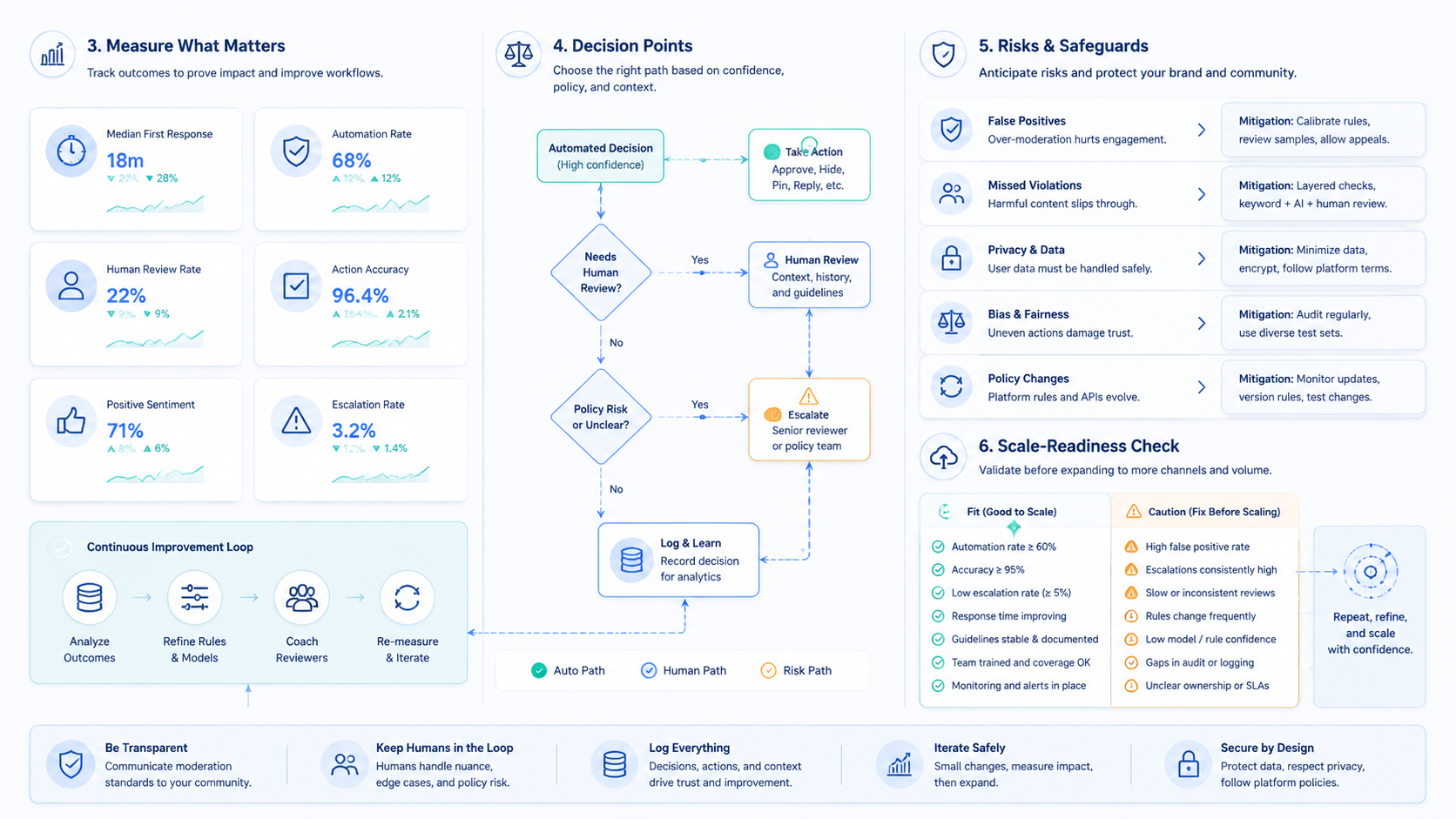
Do not measure success by comment volume alone. Measure whether the team handles the right comments faster and with fewer mistakes.
Begin with one account group and one content category. For example, run the pilot only on product launch posts or creator collaboration posts. Keep the scope narrow enough to review every decision.
Track these metrics:
- New comments captured.
- Comments classified by category.
- Comments routed to an operator.
- Suggested replies approved, edited, or rejected.
- Comments escalated to support, sales, or account owner.
- Average time to first useful action.
- Errors, missed comments, and over-filtered comments.
The recovery check matters. When an automation rule misclassifies a comment, the team should know which rule acted, which account was affected, and how to correct it. Without that loop, automation becomes a hidden risk.
Pair comment workflows with device isolation when operators act inside mobile apps or account-specific browser sessions. The account environment should match the account queue.
Review the pilot by category. FAQ replies may work well, while complaints may need more human time. Spam grouping may save effort, while collaboration leads may need manual routing. The result should be a sharper rule set, not a blanket decision to automate everything.
Add a final review with the people who own brand voice, support, and sales. Each group sees a different risk. Brand teams notice tone drift. Support teams notice missing context. Sales teams notice weak lead routing. Their feedback turns the pilot into a usable operating rulebook.
After the review, freeze the first approved workflow. Define which categories can use suggested replies, which need approval, and which must be escalated. Then expand one platform or account group at a time. This keeps the system measurable while the team learns.
Keep the first dashboard simple. Show pending comments, assigned owners, approved replies, escalations, and unresolved items. A simple board is easier to trust than a complex report nobody reviews.
Review it every working day.
Frequently Asked Questions
What is comment management automation?
It is a workflow for collecting, classifying, routing, replying to, hiding, or escalating comments with rules and review.
Is auto-replying to every comment a good idea?
Usually no. Broad auto-replies can look low quality and may mishandle sensitive comments.
Can Instagram comments be managed through official APIs?
Eligible professional account workflows can use Instagram Platform APIs for supported comment actions. Teams should verify permissions and limits in Meta's documentation.
Should AI write comment replies?
AI can draft suggestions. Human review is still important for complaints, sensitive topics, and brand-specific replies.
What should teams automate first?
Start with categorization, routing, and suggested replies. Leave final action to operators until the workflow is proven.
How do teams avoid robotic replies?
Use account-specific tone rules, edit suggestions, and avoid repeating the same response pattern across many posts.
What is the best metric for a pilot?
Track useful action time, approval rate, escalation accuracy, and missed-comment rate. Do not track only reply count.
Conclusion
Comment management automation works best when it turns public conversations into a controlled team workflow. It should help operators find the right comments, choose the right action, and learn from mistakes.
Start with triage and routing before auto-replies. Add human review for sensitive categories. Measure response quality, not only speed. Then expand the workflow across more accounts once the process is clear.



