
Key Takeaways
- Cloud phone 2FA verification needs account ownership, device access, and recovery rules
- Shared teams should avoid private one-person verification paths
- MFA improves account protection, but recovery planning still matters
- Moimobi fits teams that need cloud phone access inside controlled multi-account workflows
Cloud phone 2FA verification is the process of receiving and handling two-factor authentication checks through a remote mobile environment used by a team. The goal is not to make verification casual. The goal is to keep access controlled, reviewable, and recoverable.
Shared workflows create a practical problem. One operator may start a task, another may review it, and a third may own account recovery. If the 2FA path sits only on a private device, the team can lose operational continuity.
The Core Idea Behind Cloud Phone 2FA Verification
Two-factor checks add another proof step beyond a password. NIST SP 800-63B explains authenticator requirements and notes that sign-in strength depends on the authenticator type and setup (NIST SP 800-63B).
For cloud phone workflows, the key issue is ownership. The team must know which account uses which device environment, who can access it, and what happens when verification fails.
A practical setup has four fields:
- Account group
- Assigned cloud phone or Android workspace
- Verification owner
- Recovery path
Moimobi's cloud phone environment can support this model when mobile access is part of a broader account workflow.
Why Teams Search for This Topic
Teams usually search for cloud phone 2FA verification after a handoff problem. A login code arrived on a device that only one person could access. A session expired during a shift change. A recovery prompt appeared when the account owner was offline.
The issue is workflow design, because the team needs a known path for sign-in, review, and recovery.
Cloud phones help when verification must be handled inside a shared mobile environment. Access still needs rules. CISA recommends phishing-resistant MFA where possible and treats MFA as a major account protection measure (CISA).
For operations teams, that means 2FA should be planned as part of account ownership, not patched in after accounts are already active.
Who Benefits Most and In What Situations
This setup fits teams that run mobile-first accounts across shifts, roles, or locations. It is common in social media operations, customer engagement, and ecommerce support where account access cannot depend on one person's phone.
Good fit:
- Shared account operations
- Shift-based customer support
- Multi-account social workflows
- Team review of mobile app tasks
- Accounts that need a documented recovery path
Poor fit:
- Personal accounts with no team handoff
- Sensitive accounts without an owner
- Workflows where no one can approve recovery
- Any setup that encourages uncontrolled credential sharing
For larger account groups, connect 2FA planning with multi-account management, not only device rental.
Cloud Phone 2FA Verification Setup Path
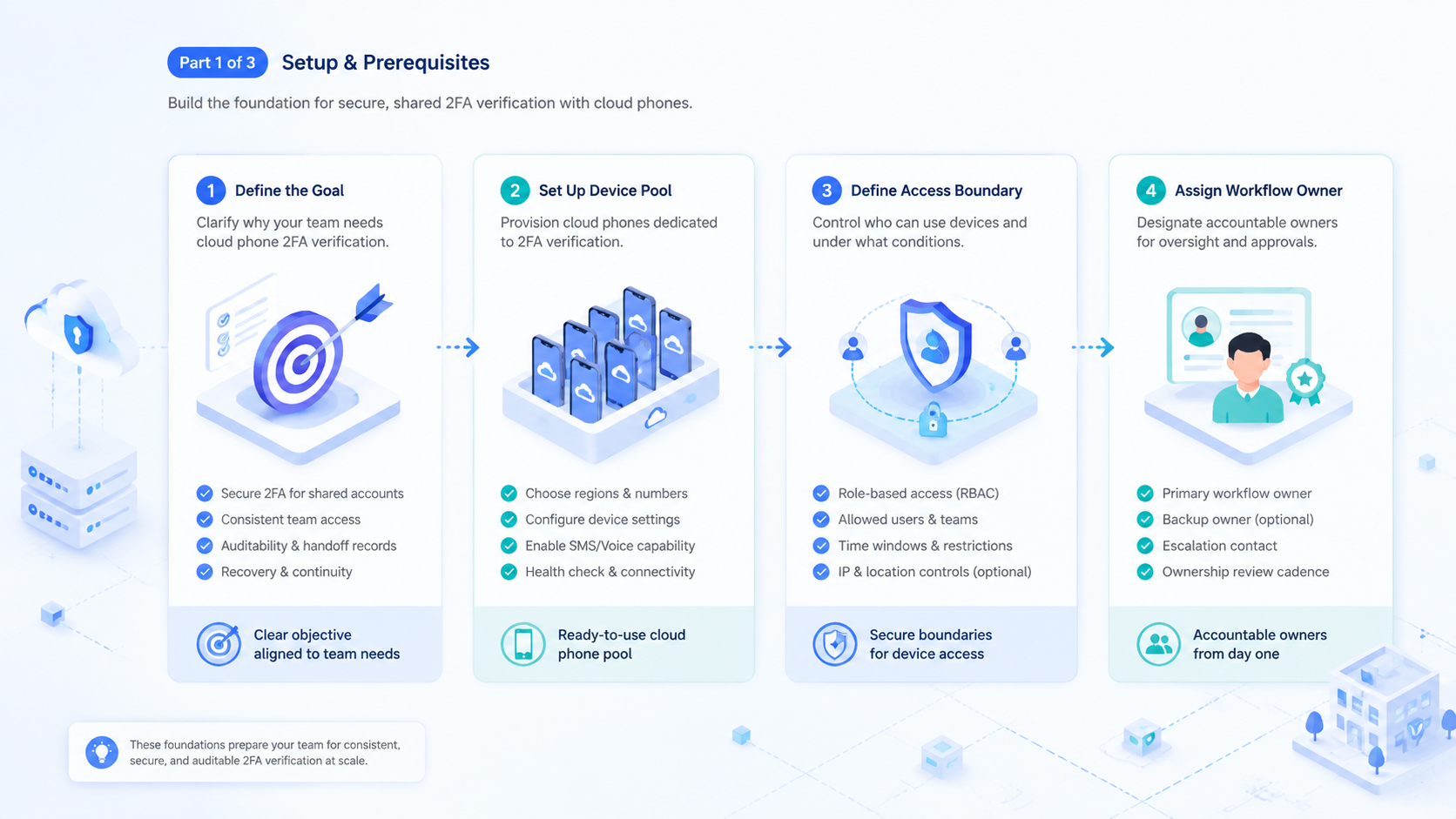
Do not start by moving every code into one shared place. That creates a weak team model. Start by mapping ownership and recovery.
Use this setup path:
- Map accounts to device environments. One account group should have a clear mobile workspace.
- Assign code owners. Decide who can view, approve, or recover access.
- Document accepted prompts. List normal login, device confirmation, and recovery screens.
- Define stop rules. Pause on unfamiliar prompts, recovery loops, or account warnings.
- Record handoffs. Keep timestamp, account group, operator, and result.
Android Enterprise documentation describes managed Android concepts such as work profiles and device management for organizations (Android Enterprise). A cloud phone workflow should follow the same general idea: separate work access from casual personal access.
Cloud Phone 2FA Verification Mistakes That Reduce Results
The biggest mistake is treating 2FA as an obstacle instead of an account control. Bad pattern: rush the code. If operators only focus on getting through the prompt, they may skip ownership, notes, and recovery planning.
Another mistake is using one device space for unrelated accounts. That can make handoff easier today, then harder to review during a later account incident. Moimobi's device isolation is relevant when each account group needs a separated mobile workspace.
A third mistake is ignoring failed verification events. Log the failure. A failed code, unusual prompt, or recovery loop should become a record so the same account problem does not repeat across shifts.
Pilot Rollout, Measurement, and Recovery Checks
Pilot the workflow with a small account group first. The team should prove it can handle normal verification, failed verification, and recovery review without private side channels.
Track:
- Verification attempts
- Successful handoffs
- Failed code events
- Recovery prompts
- Time to complete login
- Human approval events
- Accounts with repeated verification issues
The recovery check is simple. If the account owner is offline, can the team still identify the device workspace, the last prompt, and the next approved action? If not, the workflow needs better records.
For teams that combine mobile access with browser work, mobile automation and browser workflows should share the same account map.
Frequently Asked Questions
What is cloud phone 2FA verification?
It is 2FA handling through a remote mobile environment assigned to a team workflow, account group, and named review owner.
Is 2FA still necessary with cloud phones?
Yes. Cloud phones are execution environments, not a replacement for account authentication controls or recovery planning.
Should every team member see every code?
No. Keep access tied to role, ownership, and review rules, especially when several operators share one workflow.
What should be recorded?
Record account group, device workspace, operator, timestamp, result, prompt type, and recovery note.
What should trigger a pause?
Pause on unfamiliar prompts, repeated failed codes, recovery screens, or any request the team has not approved.
Does this help social media teams?
It can, when social workflows require shared mobile access across account groups and clear handoff records between shifts.
Where does Moimobi fit?
Moimobi provides cloud phones for social media operations, account workspaces, and mobile execution controls.
Conclusion
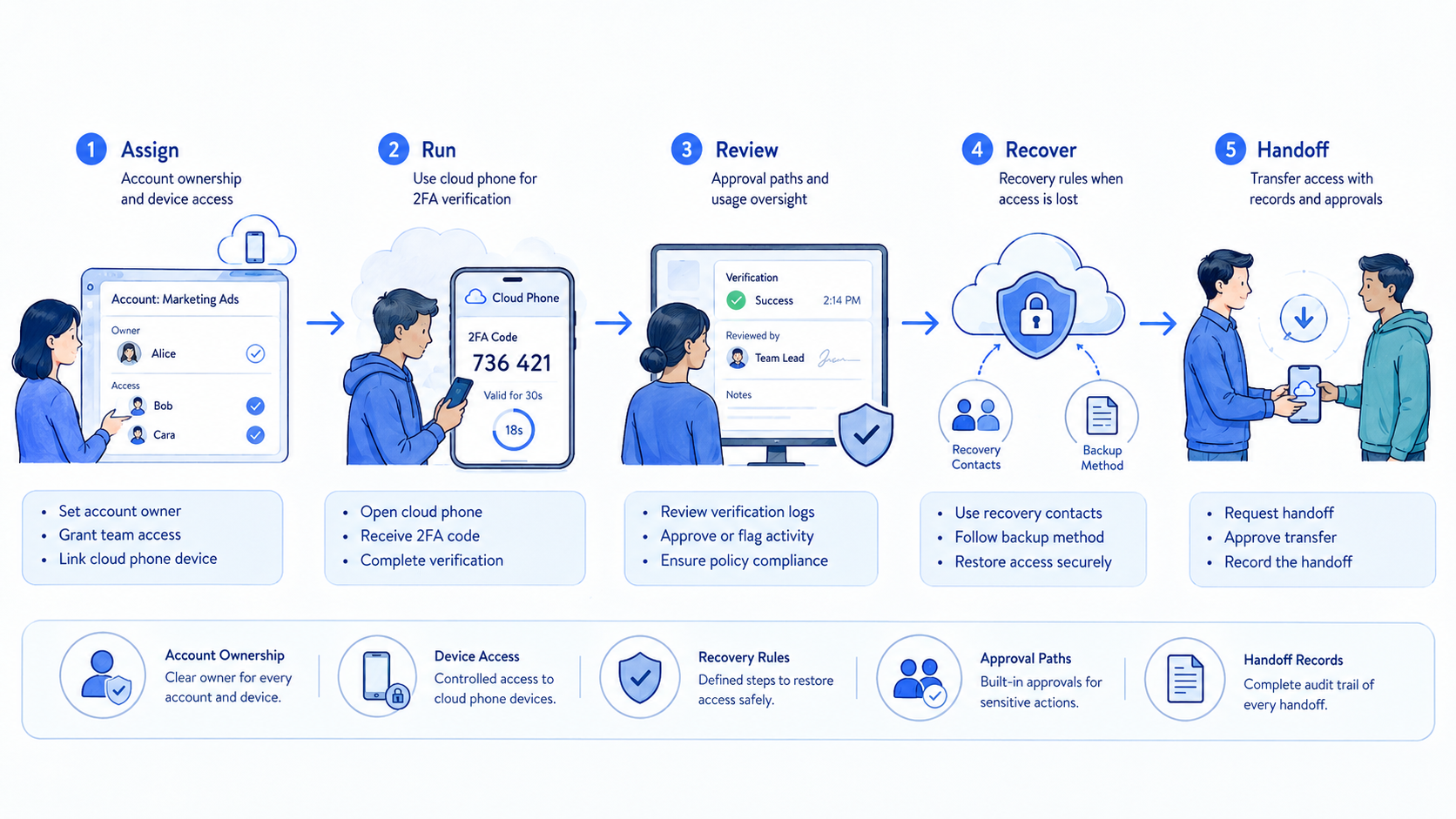
Set up 2FA around ownership first, device access second, and recovery rules third. That order keeps the workflow operational instead of reactive.
Before scaling, test one account group. If the team can complete, review, and recover verification events without private context, expand to the next shared workflow.



