Key Takeaways
- A browser automation API for AI lets an approved workflow control a browser through defined commands and session rules.
- For social media work, the API should sit behind account ownership, platform permissions, human approval, and an auditable task record.
- Start with low-risk internal tasks, then measure recovery and exception quality before expanding execution.
A browser automation API for AI is an interface that lets approved software perform defined browser tasks inside a controlled session. For social media AI agents, it is useful when a team needs to complete a permitted web workflow that is not available through a platform API. It is not a substitute for platform authorization, account ownership, or human judgment.
The right implementation treats browser control as one layer of a broader task system. The task has a purpose, a named owner, an account scope, an approval state, and a record of the result. The browser session supplies the execution environment. Keeping those responsibilities separate makes failures easier to review and prevents a generic agent instruction from becoming an uncontrolled action.
WebDriver provides a standards-based model for remote browser control. The W3C specification describes it as a wire protocol that allows an outside program to instruct a user agent. W3C WebDriver is useful background for the protocol layer. Teams still need their own controls for who starts a task, which account it uses, and when the session should stop.
What Is a Browser Automation API for AI?
The API layer exposes limited actions such as open a page, read a permitted page element, fill an approved field, upload an assigned asset, or record a result. An AI agent can use those actions to follow a structured plan. It should not receive open-ended authority to browse, message, or publish wherever it chooses.
For social media operations, distinguish three execution paths:
- Official platform API. Use it when the platform supports the required approved action and the account has granted the relevant permissions.
- Browser task. Use it when an authorized workflow must happen in the web interface and a person or policy has approved the task.
- Mobile task. Use it when the valid workflow requires an assigned Android application environment.
TikTok's official Content Posting API demonstrates why those paths should remain distinct. It supports direct posting or upload-for-editing for authorized users, but its product documentation describes specific configuration, consent, and posting constraints. TikTok Content Posting API should guide an API-supported publishing path rather than being replaced by generic browser control.
| Layer | Primary job | Control to require |
|---|---|---|
| Task plan | Define the allowed outcome and required inputs | Purpose, owner, account scope, and approval state |
| Browser automation API | Execute limited browser actions | Action allowlist, timeout, and structured error output |
| Account workspace | Provide the correct authorized session | Named account, environment, and access boundary |
| Review record | Capture outcome and exception decision | Last confirmed action, reviewer, and next step |
Browser Automation API Workflow for Social Media AI Agents
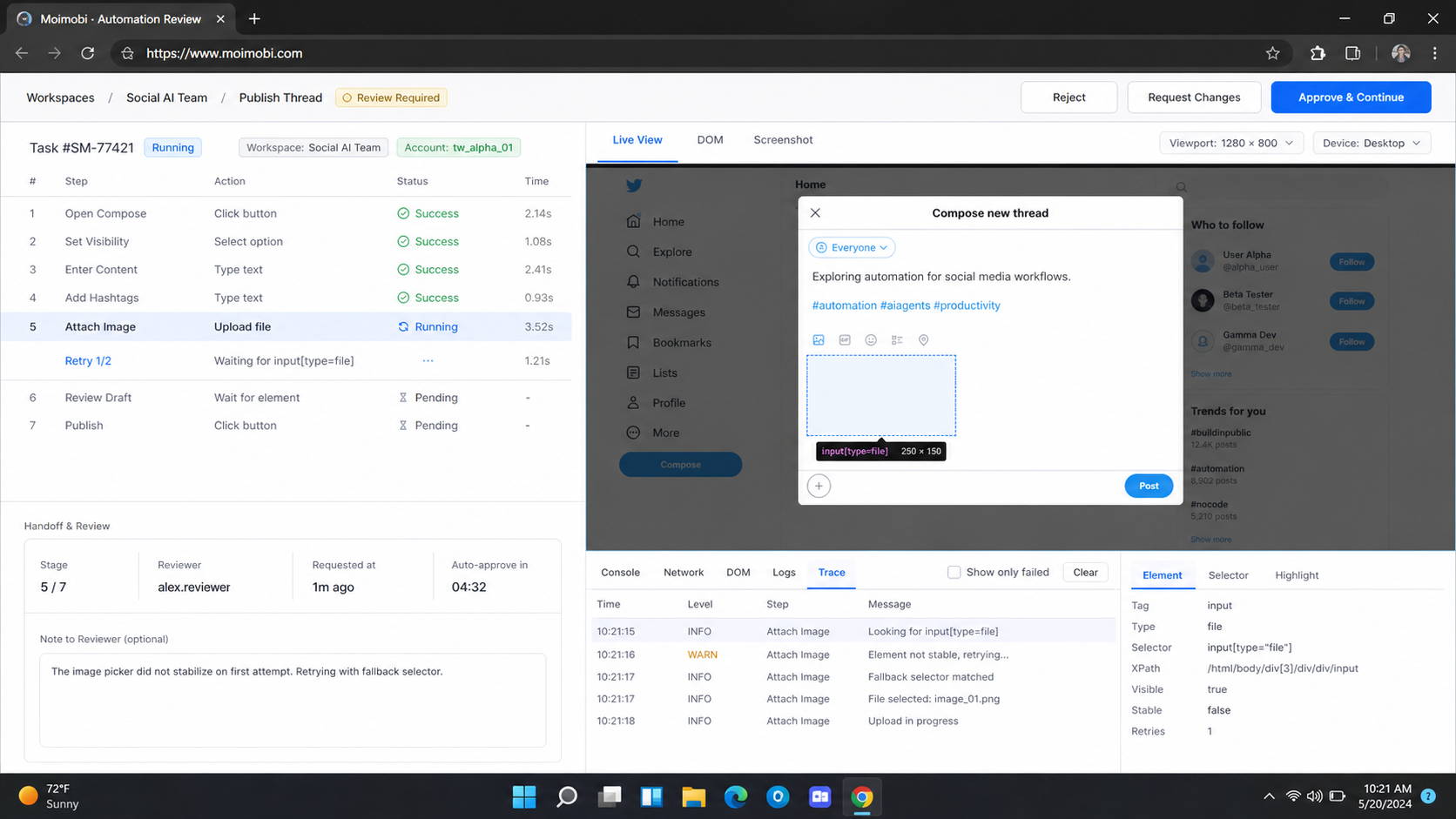
Build the workflow around an approved task, not a prompt. The agent should receive a narrow objective with structured inputs. For example, it may prepare an approved post for a designated account, collect a public status for a report, or open an inbox item for human review. Each action should have an explicit stop condition.
- Define the task. Record the approved purpose, target platform, account owner, source asset, and expected outcome.
- Select the valid route. Prefer an official platform API when it supports the authorized action. Use a browser task only when it is necessary and permitted.
- Assign an environment. Bind the task to the correct browser workspace or mobile environment, not to a shared anonymous session.
- Require a review gate. Pause before actions that publish, send a message, alter settings, or create a customer-facing outcome.
- Execute and record. Store the task ID, account scope, last confirmed action, result, and exception data.
- Recover deliberately. If the browser step fails, a human checks the result before a retry begins.
Playwright's browser-context model is useful for the environment boundary. Its documentation describes contexts as isolated environments with separate cookies, local storage, and session storage. Playwright isolation guidance supports the general principle that independent work should not silently share session state. For account-based operations, that isolation needs a corresponding ownership and approval model.
Moimobi can connect AI task instructions with AI browser automation and multi-account management. The useful outcome is not more autonomous activity. It is a traceable path from approved work to a recorded result.
Browser Automation API for AI Permission and Audit Contract
The API contract should make an unsafe request impossible to express. A good request contains a task identifier, account workspace identifier, allowed action, input references, approval state, timeout, and expected result type. It should not accept a free-form command that can silently change its own target or scope.
Use an action allowlist. For an internal reporting workflow, the allowlist may include open an approved URL, read a defined status field, capture a screenshot, and return a structured result. For a content workflow, it may include opening a prepared draft, attaching an assigned asset, and pausing for review. Publishing or messaging should be separate actions with their own approval token.
The audit record should answer five questions after any run:
- Which task and account workspace started the browser session?
- Which approved action was attempted?
- What was the last confirmed business result?
- Which evidence was captured for a failure or pause?
- Who may decide the next action?
These fields also help with privacy and access review. A team can remove a user's access, close an environment, or cancel an expired task without guessing which browser tab or shared machine was used. The API should fail closed when the task is expired, the account does not match, or a required approval is missing.
Data, Roles, and Platform Boundaries
Treat public content, account credentials, and task instructions as separate data categories. A research step may store a public URL and a short, approved note. It should not create a hidden archive of personal profiles. An execution step may reference an authorized account workspace. It should not expose session data or credentials to the AI prompt, task log, or ordinary support report.
Role separation keeps the workflow understandable. A planner defines the task. An operator owns the account environment. A reviewer approves customer-facing or high-impact actions. An administrator can revoke access and inspect audit records. In a small team, one person can hold several roles, but the task record should still show which decision was made in each role.
Platform boundaries remain in force even when the browser is technically capable of an action. A social platform may require an approved API integration, user consent, or a review path for a publishing feature. Use the platform's official documentation and terms as the governing rule. A browser automation API should help the team follow those boundaries, not create an alternative route around them.
Common Mistakes and Fit Boundaries
The first mistake is using browser automation where an official API already provides the authorized action. A platform API can supply permission, status, and product-specific behavior that a generic browser script does not expose. Start there whenever the API supports the task.
The second mistake is giving an agent a broad instruction such as "manage this account." That wording does not define what the agent may read, change, publish, or send. Replace it with a task plan that specifies the account, page, allowed action, required input, review gate, and success record.
The third mistake is treating a browser connection as proof of success. A session can open while the business action remains incomplete, rejected, or pending review. The record must show the last confirmed outcome, not only a technical connection event.
Strong fit
Teams with repeated, approved browser tasks that need a named owner, an isolated account workspace, and a recoverable task record.
Limited fit
Small teams with occasional web work. Start with a simple checklist and human execution before adding agent control.
Not a fit
Unapproved data collection, bulk messaging, attempts to bypass platform controls, or actions without a defined owner and review boundary.
Pilot Rollout, Measurement, and Recovery Checks
Start with one low-risk task that has a clear permitted end state. Good pilot examples include opening an approved dashboard, preparing a draft for review, checking a documented status, or collecting a result from an authorized platform flow. Avoid customer messages, financial actions, or broad publishing work in the first pilot.
Measure completion rate, time from task assignment to reviewed result, number of human takeovers, recovery time after failure, and tasks missing a clear owner. These measures show whether the API is reducing operational friction or merely adding another automation surface.
Use a recovery checklist when a task stops. Confirm the account workspace, inspect the last business action, read the error, and decide whether to resume, retry, or stop. Do not repeat a potential publish or message action simply because a session disconnected. Browserless documents a similar lifecycle concern for reconnectable browser sessions: the session state and the decision to reconnect are separate from the business outcome. Browserless session documentation is helpful for understanding the technical distinction.
For mobile-first approved steps, a cloud phone can provide a separate Android workspace. It does not change the same core rule: an environment is assigned to a task after the task has been approved, and the result must be reviewable.
Run a weekly exception review during the pilot. Sample completed tasks, paused tasks, and rejected tasks. Check whether the recorded reason matches the evidence, whether reviewers made consistent choices, and whether any action should move back to a manual process. This review is where the team improves prompts, action limits, and operating procedures without expanding permission scope.
Implementation Checklist Before a Team Expands Access
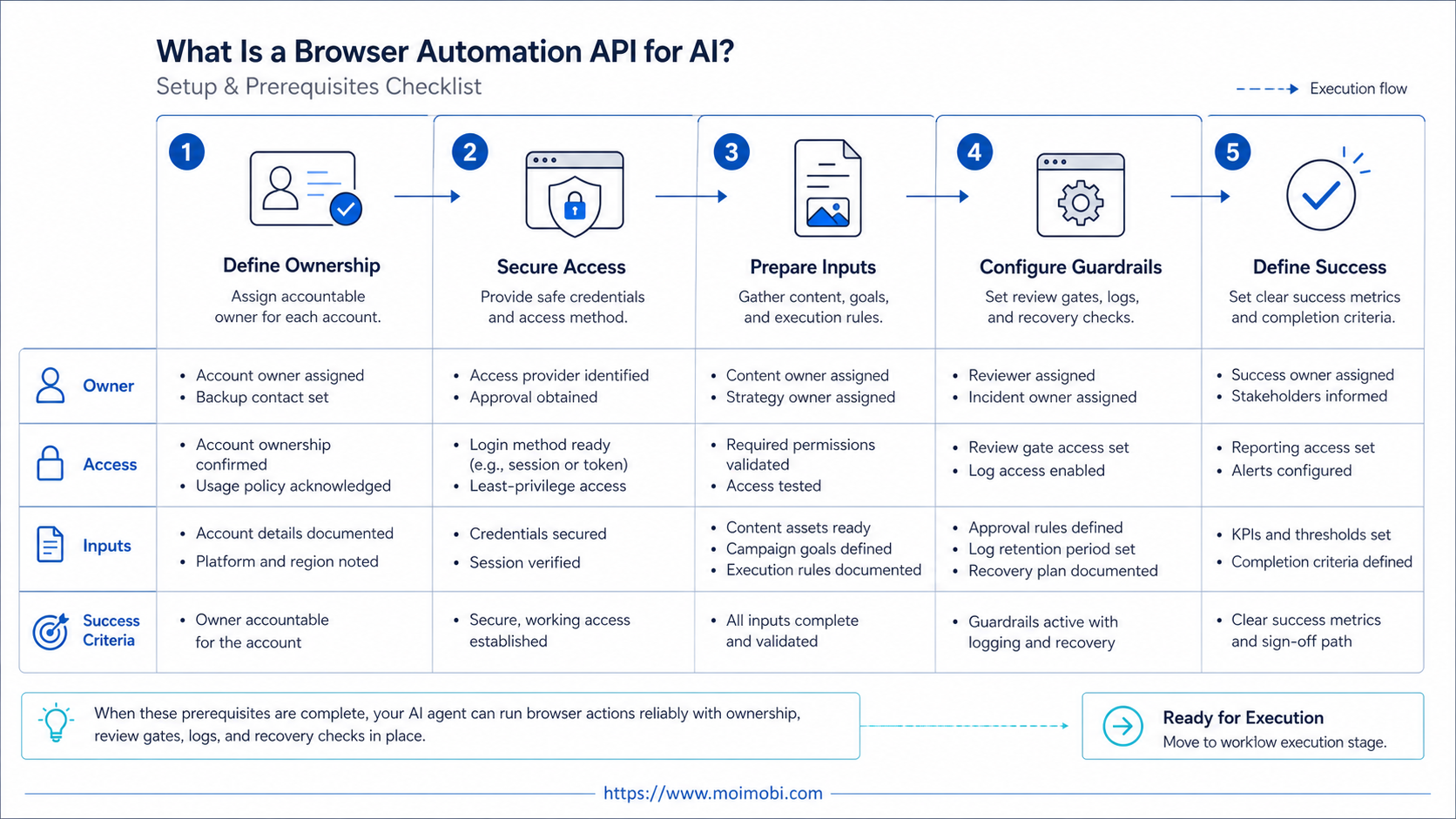
Before expanding a pilot, confirm that the browser automation API for AI has an enforceable contract rather than an informal set of prompts. Every task should identify its owner, account workspace, approved route, deadline, and expected proof of completion. The service should reject an action when any of those fields are absent or when the requested account does not match the assigned workspace.
Also test the operational failure path. Disable a test permission, expire a task, close a browser session, and simulate an unavailable page. The workflow should stop with a useful reason, preserve the last confirmed state, and allow a reviewer to decide what happens next. A retry is appropriate only when the reviewer can show that the earlier action did not produce the intended business outcome.
Finally, document the handoff. Operators need to know where to inspect a paused task, reviewers need to know which evidence is required before approval, and administrators need a direct way to revoke a workspace. This small amount of operating discipline prevents the API from becoming a hidden dependency that only one person understands.
Frequently Asked Questions
What is a browser automation API for AI?
It is an interface that lets approved software control defined browser actions. It should use action limits, session controls, task ownership, and structured results.
Should social media teams use browser control before official APIs?
No. Use an official API when it supports the authorized task. Browser control is a separate execution option for valid web-interface workflows.
Can an AI agent publish content by itself?
Only when the workflow, platform permissions, account ownership, and approval rules allow that action. Sensitive or customer-facing work should retain a clear human decision point.
Why does session isolation matter?
It helps prevent task state from silently mixing across accounts or operators. Isolation should be paired with an explicit ownership record and access boundary.
What should happen when a browser task fails?
Record the last confirmed business action, inspect the account and error context, then choose resume, retry, or stop. Do not automatically repeat an uncertain action.
Does this replace social media scheduling software?
Not necessarily. A scheduler can manage a content calendar and approvals. A browser execution layer handles specific web tasks when the scheduler or official API does not cover the approved workflow.
What is the safest first pilot?
Choose a low-risk internal task with an observable outcome, a single account owner, and a human reviewer. Expand only after recovery and audit records work reliably.
Conclusion
A browser automation API for social media AI agents is useful when it executes a defined, approved task inside the right account environment. It should sit behind official API choices, permissions, review gates, and a recoverable task record.
Start with a narrow pilot and measure whether ownership, evidence, and recovery improve. If the team cannot explain the task boundary and the last confirmed outcome, the automation is not ready to scale.
References