
Key Takeaways
- The best multi platform social media manager is the one that matches a team's publishing path, account ownership, and exception process.
- A calendar, inbox, analytics view, and API connection are valuable, but they do not cover every browser or mobile task.
- Test a shortlist with real accounts, approvals, failed-post recovery, and clear success measures before moving a full team.
A best multi platform social media manager is a system that lets a team plan, approve, publish, respond, and review work across more than one social channel. The right choice is not the tool with the longest feature list. It is the tool that makes the team's real operating path clear from content draft to confirmed outcome.
For a small brand, that path may be a calendar and an approval queue. An agency may also need client roles, shared inbox rules, and a record of which person handled an exception. A mobile-first team may need a separate operating environment for the final action. These are different problems, so they need different evaluation criteria.
Start with the platforms and actions that matter today. TikTok's official Content Posting API, for example, supports direct posting and upload-for-editing flows, but it requires authorized users and has product-specific rules. TikTok's Content Posting API shows why a feature labelled "publishing" can mean different things across platforms. A manager should make those paths visible rather than promising one identical workflow everywhere.
How to Evaluate a Best Multi Platform Social Media Manager
Avoid choosing from a logo wall. A platform may connect to many channels while still leaving the difficult work in spreadsheets, shared passwords, and chat messages. Evaluate the task path first, then compare features that affect that path.
| Decision area | What a team should check | Why it changes the choice |
|---|---|---|
| Publishing method | API posting, upload-for-editing, browser task, or mobile task | One workflow may need several controlled paths |
| Account ownership | Named account, role, workspace, and approval boundary | Prevents unclear handoffs and duplicated action |
| Content approvals | Draft, reviewer, client, and publish-ready states | Keeps review separate from the final action |
| Inbox work | Assignment, response history, escalation, and stop rules | Protects response quality when volume rises |
| Recovery | Failed-post record, retry rule, and last confirmed result | Prevents a missed or repeated action after an error |
First, map one campaign from creation to completion. List the person who drafts the post, the person who approves it, the account that carries the action, and the person who owns a failure. If two steps rely on "whoever is online," the tool selection is not yet the main issue. The team needs a basic operating rule.
Second, separate planned content from account-specific execution. A schedule can be enough when an approved platform connection supports the format and the final action is predictable. It may not be enough when an operator must check a native platform interface, resolve a prompt, or route a result to another role.
Third, inspect the supported action rather than the platform name. TikTok's Direct Post documentation requires creator authorization and describes client review requirements for broader visibility. TikTok's Direct Post reference is a practical example of why teams must validate the exact posting route. "Supports TikTok" is not a complete answer.
The Capabilities That Actually Change Outcomes in a Best Multi Platform Social Media Manager
The first capability is an approval model that matches the team. A content lead may approve campaign copy, while a regional operator confirms the final account action. Combining those responsibilities into one opaque button creates avoidable confusion. Look for a clear record of who approved content and who completed the final task.
The second capability is account context. A connected profile in a scheduler is useful for authorized API activity. A task that depends on a logged-in web or mobile environment needs an additional ownership boundary. For browser work, AI browser automation can provide a task-oriented workspace. For a mobile-only final step, a cloud phone can give the team a distinct mobile environment. Neither layer replaces a normal content calendar; they address different execution needs.
The third capability is a shared operating record. A good manager should let the team see the content status, account scope, task owner, time of action, and exception note. This is more useful than a generic status badge when a campaign has several assets and several destination accounts.
Use a simple workflow boundary:
- Prepare the asset, caption, links, and campaign labels in the content queue.
- Send the item to the named reviewer when approval is needed.
- Route the approved task to the authorized account workspace.
- Record the confirmed platform result or the reason the task stopped.
- Send unresolved work to a human owner with the prior action and next decision visible.
What not to do: do not make an inbox or scheduler the only source of truth for an account task. A calendar can show that content was planned. It cannot, by itself, show which account environment performed the action, what interrupted it, or whether retrying would create a duplicate.
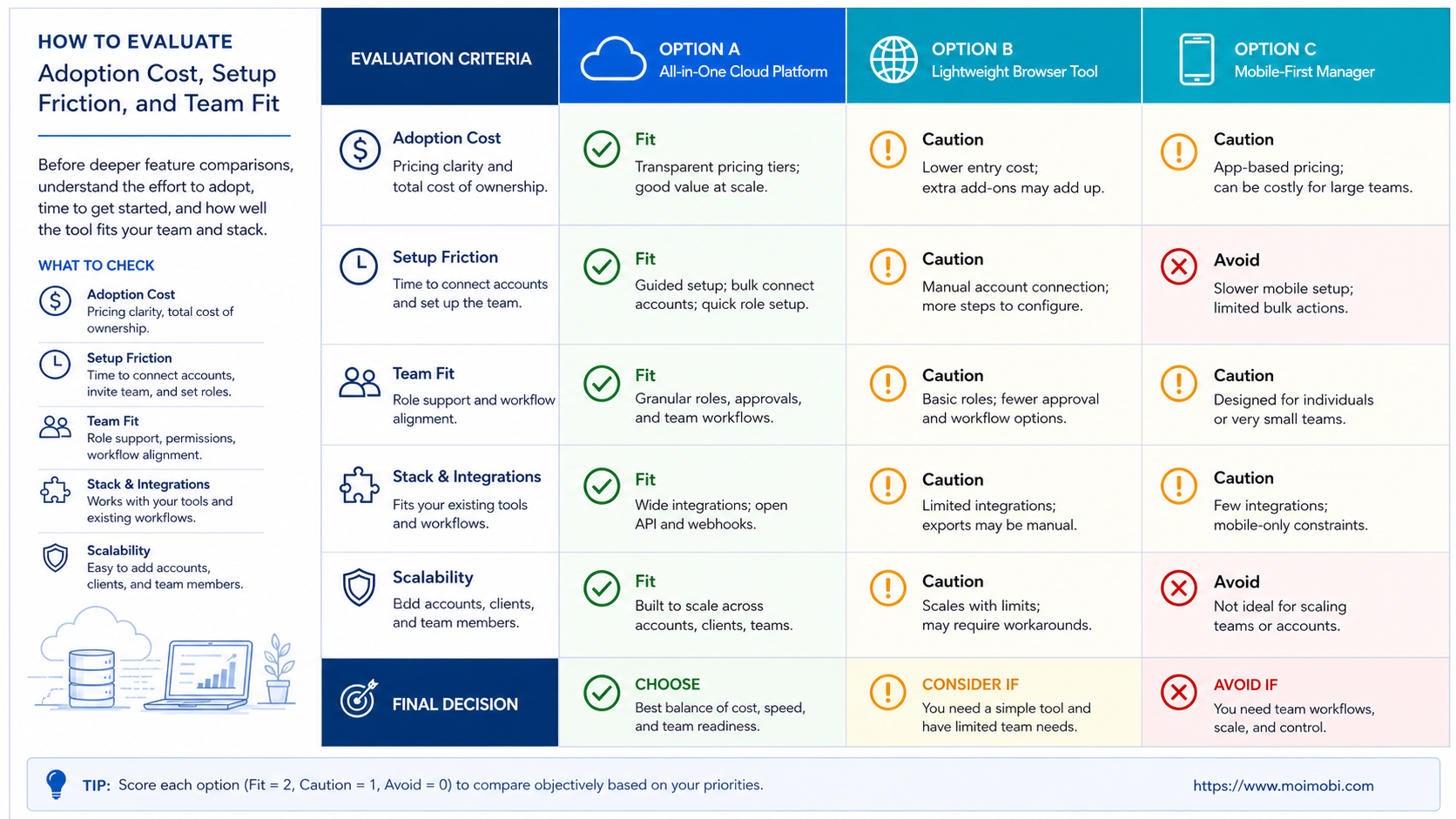
Adoption Cost, Setup Friction, and Team Fit
Adoption cost is more than a monthly subscription. It includes the time needed to connect accounts, teach roles, migrate a content calendar, define approval states, and clean up old operating habits. The wrong system often looks inexpensive because it hides the manual work in a team's daily routine.
Compare four cost layers before a purchase:
- Planning cost: calendars, asset preparation, approvals, and client review.
- Channel cost: connected accounts, seats, inbox volume, and analytics needs.
- Execution cost: browser or mobile tasks that fall outside an approved API route.
- Recovery cost: the time required to diagnose a failed task and decide whether to retry.
Teams should also check platform-specific limits before promising a workflow to stakeholders. TikTok documents that unaudited Direct Post clients face private-viewing restrictions, and its upload documentation notes that users must continue an editing flow in TikTok for draft uploads. TikTok's upload guide is a useful reminder that an integration can involve a user handoff rather than an automatic end state.
Do not add account environments simply because they sound more advanced. They are justified when multiple people work on recurring account-specific tasks and the team needs a clean handoff, task history, and review process. A single account with a weekly editorial calendar may need only a straightforward scheduler and an approval rule.
Which Option Fits Different Operating Scenarios
Calendar-first brand team
Best fit: an API-connected scheduler with approvals, asset tracking, and reporting. The workflow is predictable and publishing uses supported connected accounts.
Agency with client approvals
Best fit: a scheduler plus defined client-review roles, account assignments, and an exception record for each active brand.
Browser and mobile operations team
Best fit: a content calendar connected to [multi-account management](https://www.moimobi.com/en/use-cases/multi-account-management), with distinct browser or mobile workspaces for account-specific steps.
Not a strong fit
Do not buy a complex operations platform for one channel, one operator, and a simple scheduled-post workflow. The added process may outweigh the control gained.
The common myth is that a multi-platform manager must replace every social workflow. A more durable model is to give each layer a clear job. The content system plans, approves, and reports. The account environment completes tasks that require an authorized browser or device. The task record joins those two layers when a team needs accountability.
For example, an agency can keep a weekly calendar for campaign work, then assign final platform checks to the correct account owner. This helps client service teams distinguish "approved," "sent to task," "confirmed," and "needs review." It is more useful than reporting every item as simply scheduled or posted.
Best Multi Platform Social Media Manager Migration and Control Checks
Migration is where an attractive shortlist can fail. Do not move every account and every content calendar in the first week. Start with an account group that has normal posting volume, a known approver, and no unresolved historical access problem. That gives the team a baseline for comparing old and new operating paths.
Inventory the current system before connecting anything. Record the account owner, channel role, existing publishing connection, inbox responsibility, approval state, and any browser or mobile step that sits outside the current scheduler. This prevents a common migration error: treating accounts as identical when they have different permissions and different human owners.
Then define the cutover rule. Content already queued in the old system should either finish there or be deliberately recreated in the new system. Do not leave the same post active in both queues. For every migrated task, retain one status record and one final owner. That is the simplest protection against duplicate work and conflicting reports.
The first review should focus on control, not volume. Check whether the team can revoke access, transfer an account task, locate an approval, and resolve a failed action without asking the original operator. If those answers are unclear, pause the migration and fix the fields or roles before adding more platforms.
Keep a short migration log for the pilot. Include the account, previous owner, new owner, chosen publishing route, approval record, cutover time, and rollback decision. This gives operations and client teams the same evidence when they review a disputed status later.
Final Selection Checklist and Pilot Review
Test two or three candidates with one real campaign. Choose a limited account group and a normal content format. Do not use the pilot to test the highest-risk workflow first. The goal is to see whether the tool reduces manual coordination without hiding exceptions.
- Define the campaign path. Write the expected content, approval, account, and confirmation steps.
- Set ownership. Give every account task a named operator and a reviewer for exceptions.
- Test the supported route. Validate the platform's authorized posting or upload path with a real account and normal permissions.
- Force a recovery case. Pause one task or simulate a missing asset. Check whether the next operator can see the last confirmed action.
- Review the evidence. Compare completion time, missing ownership fields, approval delays, and unresolved exceptions.
Use four measures in the review: time from approved content to confirmed outcome, percentage of tasks with a named owner, number of exceptions that required manual reconstruction, and the number of duplicate or unclear actions. The best multi platform social media manager should make those measures easier to improve. It should not merely add another dashboard.
Frequently Asked Questions
What is a multi-platform social media manager?
It is software that helps a team manage content and social activity across several platforms. It may include planning, approvals, publishing, inbox, analytics, and account-workflow features.
Should every team use one tool for all social activity?
No. A scheduler can own planning and approvals while a separate execution layer handles account-specific browser or mobile tasks. Use one tool only when it covers the real workflow clearly.
How do we compare publishing support?
Check the exact action, account authorization, content format, review requirement, and outcome status for each platform. A platform connection does not mean every content type follows the same route.
Does a social media manager replace human review?
No. It can route work, show status, and record decisions. Sensitive replies, client approvals, policy questions, and unusual failures still need accountable human judgment.
When do teams need separate browser or mobile environments?
They need them when recurring work must happen in a named account context and several people need clean handoffs. A simple API posting flow may not need that extra layer.
What should an agency track during a pilot?
Track approval delay, account ownership, confirmed outcomes, exception recovery time, and whether client-facing status matches what happened on the platform.
Can a team automate replies across platforms?
Automation can assist with routing, drafting, and reminders. Teams should keep platform permissions, consent, approval boundaries, and escalation rules explicit before any response action.
What is the biggest selection mistake?
Choosing by the number of supported networks alone. Start with the daily workflow, its account boundaries, and how the team handles a failed or paused task.
Conclusion
The best multi platform social media manager is the one that gives a team a clear operating path, not the most feature badges. Start with the content-to-confirmation journey. Then choose the calendar, approval, account, and recovery controls that remove the actual bottleneck.
Run one small pilot before moving every account. If the team can show ownership, approvals, supported platform routes, and a recoverable task history, it has a foundation for scaling. If it cannot, simplify the workflow before adding more automation.



