
Key Takeaways
- Judge the tool by profile control, not vague stealth claims.
- AI automation needs stable browser profiles, named account owners, clear logs, and human review before sensitive steps.
- Map each account group before scaling.
- Pilot one workflow first, then measure completion, review effort, exception type, and recovery clarity.
A fingerprint browser is a browser environment designed to keep browser profiles, device signals, cookies, sessions, and account context separated. For AI automation, the best fingerprint browser is not the one that promises shortcuts.
It is the one that gives teams controlled profiles, stable sessions, reviewable task history, and clear ownership for each account workflow.
This matters because AI agents need a place to work. A browser agent may fill forms, check dashboards, collect leads, prepare replies, or monitor social accounts. Without a stable profile, the agent may open the wrong account, lose login context, mix task history, or leave the next operator guessing what changed.
MoiMobi treats the fingerprint browser as part of an execution platform. Browser profiles support web workflows, while cloud phones and mobile automation support app-based execution.
The goal is not only to open many sessions. The goal is to help teams run work in separated, repeatable environments, starting with one small task.
How to Choose a Fingerprint Browser
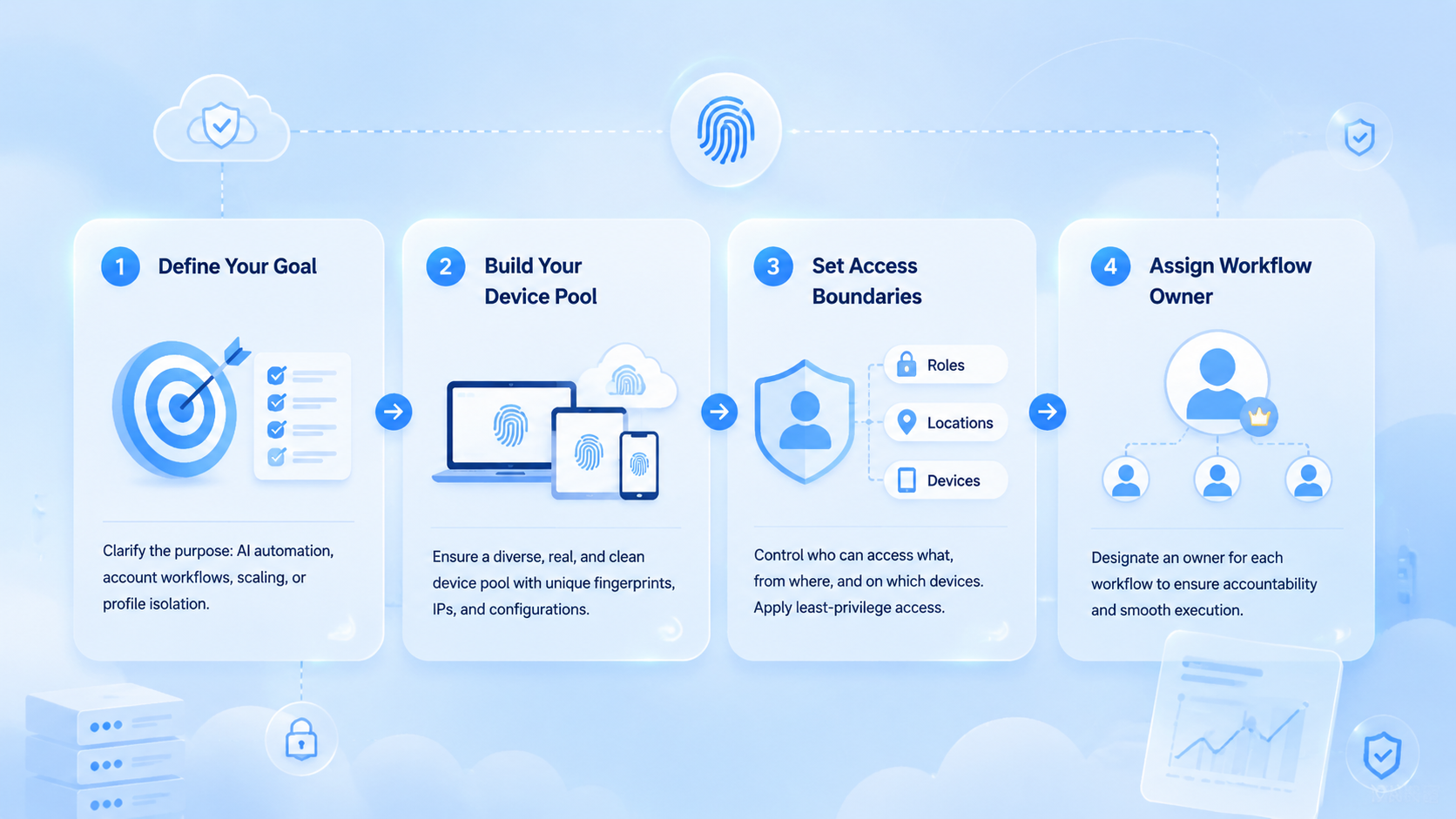
Start with the workflow. A team choosing a fingerprint browser for AI automation should first define what the AI worker will actually do. The answer may be account checks, CRM updates, social monitoring, ecommerce dashboard work, lead collection, or content preparation.
Use this selection path:
-
Map account ownership
Decide which account belongs to which profile, team, client, or workflow. Shared ownership creates messy handoffs. -
Define profile boundaries
Each profile should have a clear purpose. A browser profile for client A should not become a temporary workspace for client B. -
Check session persistence
Logged-in AI work needs profiles that can be reopened, reviewed, paused, and resumed without losing context. -
Design review points
Sensitive tasks should stop before sending messages, publishing content, changing settings, or editing customer records. -
Review recovery data
A failed run should show profile, account, task name, last successful step, error state, evidence, and next action. -
Test repeatability
Run one workflow several times before adding more profiles. If every run needs manual rescue, the workflow is not ready to scale.
Browser fingerprinting is a real web privacy and tracking topic. MDN explains browser fingerprinting as a way sites can combine browser and device signals into a profile that may identify a browser. For team operations, that means profile design should be handled carefully and responsibly. See MDN's fingerprinting glossary.
Capabilities That Matter for AI Automation
The common mistake is comparing fingerprint browsers only by how many profile settings they expose. More settings do not automatically create better operations. AI automation needs a controlled workspace that operators can understand.
Look for capabilities that change day-to-day results:
| Capability | Why it matters |
|---|---|
| Profile isolation | Keeps account work separated by profile or account group |
| Persistent sessions | Lets AI agents resume logged-in workflows |
| Role control | Separates operator, reviewer, and admin actions |
| Run history | Shows what the agent did and where it stopped |
| Human takeover | Lets a person inspect sensitive steps before action |
| Routing control | Keeps account routing visible and consistent |
| Recovery notes | Helps the next operator continue without guessing |
Playwright's official documentation shows why browser control is powerful for testing, scripting, and automation. A developer can drive browsers programmatically and build precise workflows. A team using AI agents still needs an operating layer above raw control: profiles, roles, logs, approvals, and handoff. See the Playwright documentation.
The best fingerprint browser for AI automation should make the workspace legible. A manager should know which profile ran a task, which account it touched, which result came back, and who reviews the next step. If that information is scattered across chat, screenshots, and memory, the platform is not ready for serious team use.
Fit and Not-Fit Guide
A fingerprint browser is a good fit when the team runs repeated web workflows across accounts. It is also useful when an AI worker needs a stable browser profile, login context, and a separate work lane.
Good fit:
- Agencies managing multiple client dashboards
- Social media teams preparing posts, replies, or monitoring tasks
- Ecommerce teams checking seller portals or marketplace dashboards
- Support teams working across account-based web inboxes
- Sales teams doing lead research in logged-in tools
- AI teams building browser agents with profile memory
- Operations teams that need clean handoff between people and agents
Weak fit:
- One-off public web research with no login state
- Tasks that change every time and cannot be reviewed
- Sensitive actions with no approval process
- Teams that have not assigned account ownership
- Workflows that need mobile apps more than browsers
- Projects that expect the browser to replace policy, content quality, or platform rules
The boundary is simple. Use a fingerprint browser when profile separation improves control.
Do not use it as a cover for careless automation or low-quality activity. Google Search Central's people-first content guidance is a useful reminder for marketing workflows: automation should support useful work, not mass-produce low-value output. See Google's helpful content guidance.
Fingerprint Browser vs Regular Browser vs Cloud Phone
A regular browser can be enough for one person doing one workflow. It becomes harder to manage when multiple operators, clients, accounts, or AI agents share the same machine or login context.
A fingerprint browser creates separated browser profiles for account-based work. It helps the team keep cookies, sessions, identity context, files, routing, and task history cleaner.
The value is not only privacy. The team value is simple: separation, ownership, and work that can run again.
A cloud phone is different from a browser profile. It gives teams a remote mobile workspace for app-based work, which matters when a browser dashboard is only the first half of the task.
In that case, the device isolation layer and cloud phone path may matter as much as the browser profile.
| Environment | Best for | Watch out for |
|---|---|---|
| Regular browser | Single-user browsing or simple manual work | Shared sessions become messy |
| Fingerprint browser | Multi-account web workflows and AI browser agents | Needs account mapping and review rules |
| Cloud phone | Mobile apps, Android workflows, app-based accounts | Needs device ownership and recovery rules |
| Combined execution platform | Teams using both web and mobile environments | Needs workflow design before scaling |
MoiMobi is strongest when teams need the combined model. Browser profiles can handle web dashboards and logged-in pages. Cloud phones can handle app workflows. The proxy network layer supports cleaner routing rules for account groups.
Multi-Account Fingerprint Browser Workflow Design
Multi-account teams should not begin by creating hundreds of profiles. Begin with the account map. Each profile should have a purpose, owner, review rule, and recovery path.
Use a simple profile record:
| Field | Example |
|---|---|
| Profile name | Client A TikTok research |
| Account owner | Growth operator 1 |
| Workflow | Daily dashboard check and draft notes |
| Review rule | Human approval before publishing |
| Routing rule | Assigned route group |
| Recovery rule | Reset after repeated login failure |
| Evidence | Screenshot and task result note |
The profile record helps teams avoid two common mistakes. Treating profiles as disposable tabs weakens the whole reason for using separate environments.
Another mistake is allowing every operator to touch every profile. That creates hidden changes and unclear responsibility, especially when an AI worker and a human operator share the same account lane.
AI workers need the same discipline. One AI worker should not freely move across unrelated accounts unless the workflow is designed for that handoff. A better model is one account group, one environment group, one task type, and one reviewer.
For teams running account-based campaigns, MoiMobi's multi-account management model gives a more practical frame than a simple browser tool. The question is not how many profiles exist. The question is whether the team can operate them without confusion.
Operating Example for an AI Team
Consider a growth team that runs weekly competitor research, content draft preparation, and inbox review across several client accounts. The team does not need one huge automation run. It needs a set of profile-based lanes that keep client work separate.
The first lane can handle research. An AI worker opens the assigned profile, reviews a small list of competitor pages, captures findings, and writes a structured note. The reviewer checks the note and saves the useful points into the campaign plan.
The second lane can handle draft preparation. The AI worker opens the right dashboard or publishing workspace, prepares captions or reply drafts, and stops before posting. A human reviewer keeps the final decision.
The third lane can handle inbox triage. The worker collects message context and groups replies by intent. It should not send sensitive responses without approval.
The operating rule is simple: each lane needs one profile group, one task type, one reviewer, and one recovery rule. Adding more profiles before that rule exists only creates more places for errors to hide.
Pilot Rollout and Recovery Checks
The first pilot should test control, not volume. Pick one repeated workflow and one account group. Give the workflow a clear success state, such as a completed dashboard check, a collected lead list, a prepared reply queue, or a saved content draft.
Track six signals:
- Completion rate: did the workflow finish without rescue
- Review time: did the output save or add reviewer effort
- Exception type: where did the run fail
- Profile drift: did work stay inside the assigned profile
- Handoff clarity: could another operator continue
- Recovery speed: how quickly could the team reset or rerun
Use a stop rule. Pause the pilot when the same failure appears three times, when review takes longer than manual work, or when operators cannot explain what changed. A smaller task is better than a large workflow that nobody can trust.
Recovery should be visible. A useful recovery record includes the profile name, account group, task name, last successful step, failure state, screenshot or evidence, owner, and next action. Keep it short enough that operators actually fill it out.
This is where many AI browser projects fail. They test whether an agent can complete a task once. They do not test whether a second operator can understand the result, approve the next step, and recover the same environment after an error.
A stronger pilot also checks daily behavior. Operators should know when to pause a run, when to ask for review, and when to reset a profile instead of trying another quick fix. Those habits matter because profile control is only useful when the team keeps using the same operating rules under pressure.
Keep the first run boring on purpose. Use a task that has a clear start, a clear end, and a clear owner.
Ask one person to run it, one person to review it, and one person to note what broke. Do not add more profiles until the team can say, in plain words, what worked and what failed.
Use plain house rules:
- Profile
- Account
- Task
- Approver
- Proof
- Next step
When the run stops, write the next action before anyone tries again so the work stays easy to audit.
Fingerprint Browser Buying Scorecard
Use a scorecard before comparing price. A low-cost browser profile tool may be fine for a solo operator. A team running AI automation needs more control.
| Buying question | Strong answer | Weak answer |
|---|---|---|
| How are profiles assigned | Profile groups map to account groups | Profiles are named loosely |
| How does AI run | Tasks run inside selected profiles | Agent opens whatever session is available |
| Where does review happen | Sensitive steps pause for approval | Review happens after damage is done |
| What proof is saved | Logs, screenshots, result state, and next action | Only a chat summary exists |
| How does recovery work | Reset and rerun rules are documented | Operators restart manually |
| Can the team scale | More profiles follow a tested workflow | More profiles are added before process design |
The strongest buying signal is plain-language control. A vendor should be able to explain profile ownership, review, and recovery without vague claims. Feature volume cannot fix weak operating rules.
Also check the handoff path. A browser profile used by an AI worker should be understandable to a human reviewer. The reviewer should know what the agent saw, what it changed, what it skipped, and what decision is needed next.
Frequently Asked Questions
What is a fingerprint browser
A fingerprint browser is a browser environment that helps create and manage separated browser profiles. Teams use it to keep account sessions, cookies, context, and profile settings apart.
Why does AI automation need browser profiles
AI automation needs browser profiles when work depends on logged-in sessions or account context. A stable profile helps the agent resume work and lets reviewers inspect what happened.
Is a fingerprint browser the same as an antidetect browser
The terms overlap in the market, but the safer business framing is profile isolation and account workspace management. Teams should avoid claims about bypassing rules or removing risk.
Who should use a fingerprint browser for AI automation
Agencies, ecommerce teams, social media teams, support teams, and AI operations teams should consider it when they run repeated browser workflows across accounts.
When is a regular browser enough
A regular browser may be enough for one person, one account, and one simple workflow. It becomes weak when profile separation, handoff, review, or multi-account ownership matters.
Can a fingerprint browser improve account safety
Yes, for the right use case. It can reduce confusion by separating workspaces and ownership, but it does not replace platform rules, careful content, quality control, or responsible operator behavior.
What should teams test before scaling profiles
Run one small test. Measure completion, review effort, profile drift, exception type, and recovery speed.
Add more profiles only when the first workflow can be reviewed by someone who did not build it.
How does MoiMobi fit this category
MoiMobi fits teams that need fingerprint browser profiles as part of a broader execution platform. It connects browser profiles with mobile execution, routing, account workflows, and team review.
Conclusion
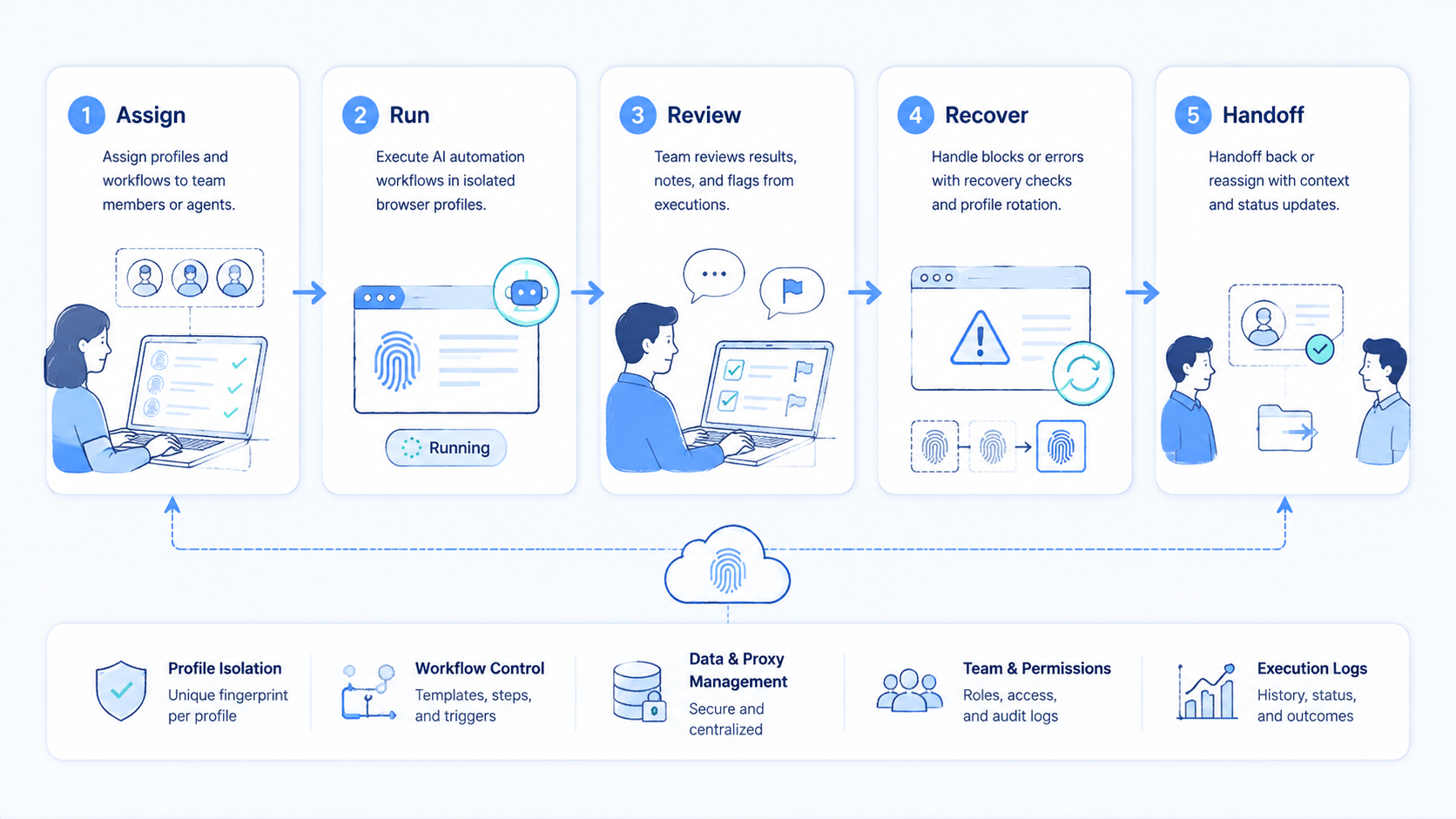
The best fingerprint browser for AI automation is the one that makes profile-based work clear, reviewable, and repeatable. Profile count is not the main decision.
The real decision is whether each account environment has an owner, a workflow, a review rule, and a recovery path.
Choose from the first workflow backward. Define the account group, assign the profile, decide what the AI worker may do, and set the approval point before scaling. Then run a plain handoff test.
The team should understand the result without asking the original operator what happened.
MoiMobi is a strong fit when browser profile control is only one part of the operating system. Use browser profiles for web tasks, cloud phones for mobile tasks, routing for account groups, and review rules for sensitive actions. Keep each lane easy to name.
Scale after the pilot proves the workflow can run, be reviewed, and recover cleanly.



