
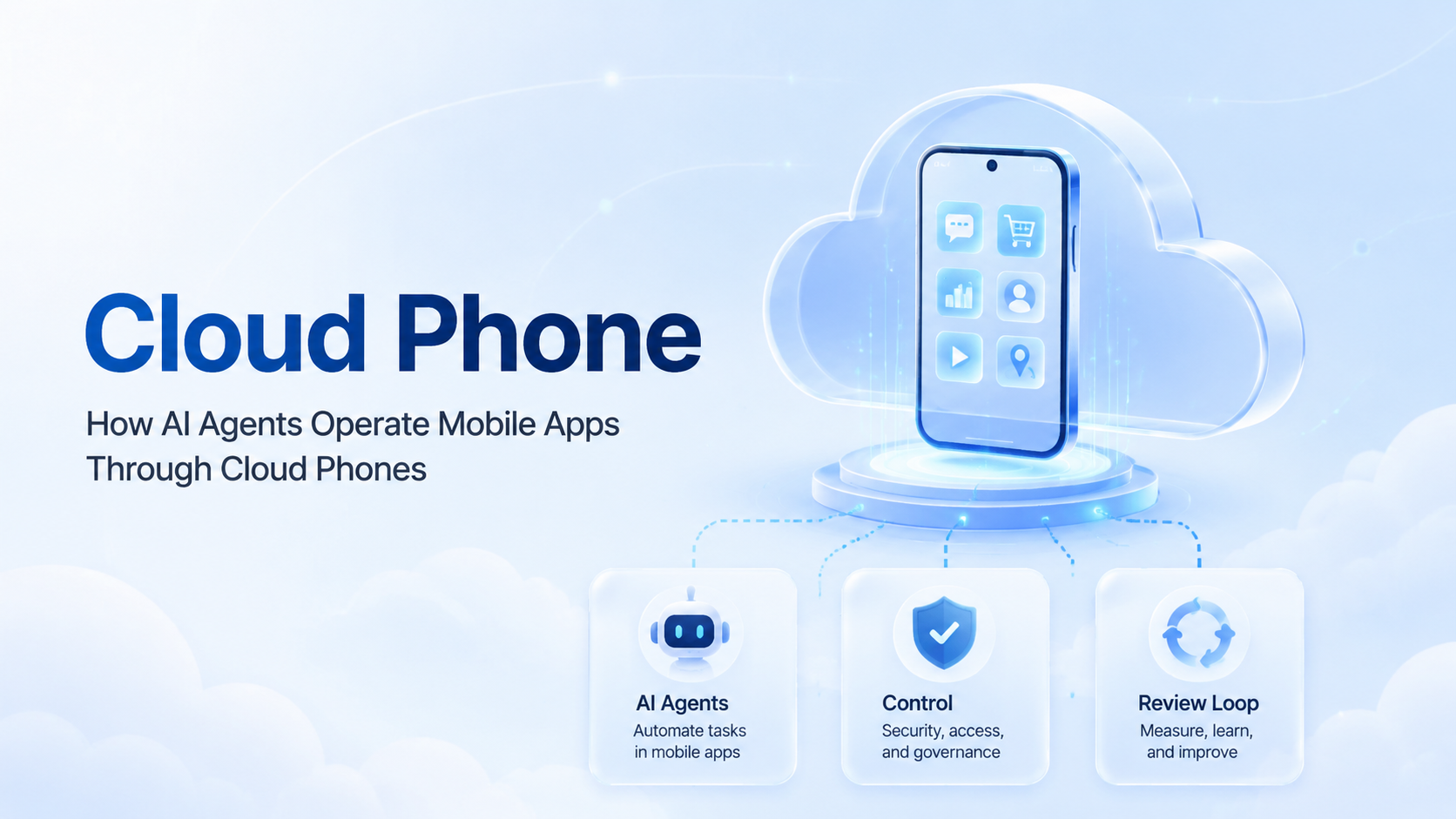
A cloud phone is a remote mobile environment that lets an AI agent operate an app through controlled device context, workflow rules, and review checkpoints. Start small. A useful agent does not need to own the whole phone stack. It needs a clear task, a reachable device session, permission boundaries, and proof of what changed.
Teams search for this topic because browser automation alone does not cover every mobile workflow. Some work stays mobile. Social apps, marketplace apps, messaging apps, and creator tools often expose different behavior inside Android than inside a desktop browser. The remote phone layer gives the team mobile execution, while the agent supplies planning, step selection, and repeatable task handling.
The hard part is not the first click. The hard part is knowing which account, device, content input, proxy route, task state, and reviewer are tied to each run. Miss that chain and the work turns opaque.
With that chain, teams can inspect outcomes, stop risky runs, and improve the workflow without guessing. That is the baseline.
Key Takeaways
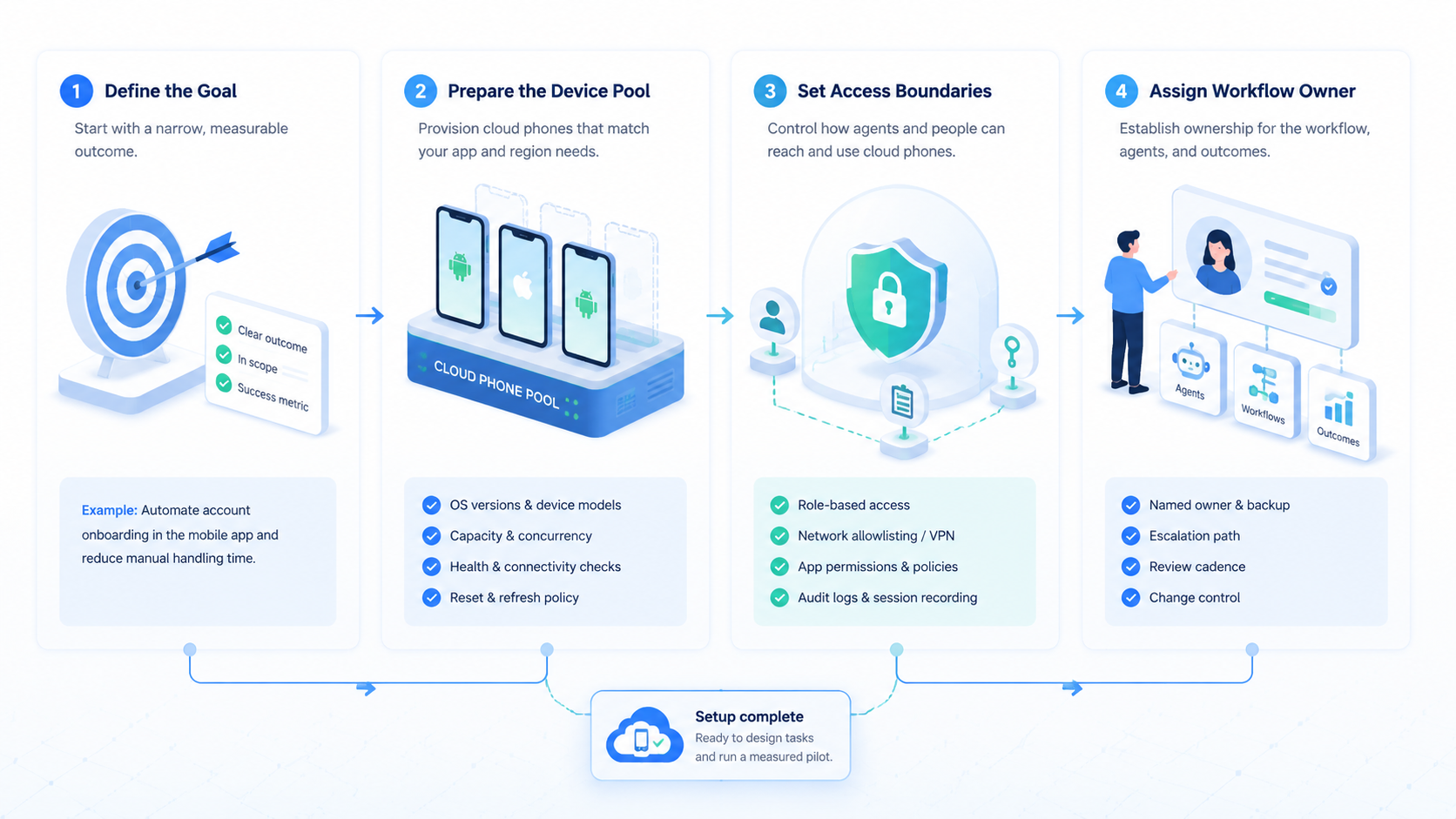
- AI agents need cloud phones when work must happen inside mobile app flows.
- The useful unit is a controlled task path with identity, device, content, proof, and review.
- Team workflows need stop rules, recovery fields, and human approval points.
- A pilot should measure repeatability before scaling volume.
The Core Idea Behind Cloud Phone Operation
AI agents operate mobile apps through cloud phones by turning a mobile task into a controlled execution path. The agent receives a goal, selects a step, interacts with the remote device session, records the result, and waits when the workflow requires review. The phone supplies app access. The workflow supplies boundaries.
This distinction matters. A team should not treat an AI agent as a free-form user that can wander through an app. Treat it as a task executor with named boundaries.
For example, a content team may ask the agent to open a campaign app, check whether a draft post is present, collect screenshots, and stop before publishing. The stop rule is part of the task, not an afterthought.
The device layer also needs a clean operational identity. The team should know which account is inside the app, which device environment is assigned, and what content package is being used. If the run later fails, the review should not start with a mystery. It should start with a task record.
Official quality guidance from Google Search Central is useful here because it rewards helpful, people-first content. For operations teams, that means documenting the actual workflow instead of producing generic automation claims. The same principle applies to internal process design: clear inputs beat vague promises.
Start there.
Where the Cloud Phone Fits in the Agent Stack
The mobile device layer is one execution layer, not the whole agent system. An agent still needs planning, tools, memory, policy checks, and a recovery path. The phone only answers one question: where does the mobile app action happen?
Use this simple stack model:
| Layer | What it controls | Failure signal |
|---|---|---|
| Task request | Goal, scope, and stop point | The task is too broad |
| Agent planner | Step choice and next action | The agent cannot explain its route |
| Cloud phone session | Mobile app state and device context | The app state differs from the expected state |
| Proof record | Screenshot, event, or saved field | The result cannot be reviewed |
| Human review | Approval, retry, or rollback | The team cannot assign ownership |
This table keeps the evaluation practical. If a vendor only shows app control, the team still has to ask how tasks are routed and reviewed. If a vendor only talks about AI planning, the team still needs to see the mobile execution environment.
MoiMobi positions cloud phones as part of execution infrastructure. That is the right frame for team use. The device is important, but the operating model around the device determines whether the workflow survives real work.
One device view is not enough when approvals, content inputs, account routing, and exception review all happen in different parts of the team.
Why Teams Search for This Topic
Teams usually ask how AI agents operate mobile apps because they already hit a boundary. A browser task may run well, yet the final action lives in a mobile app. One common example is campaign review: the brief starts in a spreadsheet, the asset sits in storage, and the approval state appears only inside the app. A creator workflow may need device-level review before a post moves forward.
Control drives the search. Leaders want auditability. Operators want replayable failures. Compliance-minded teams need account ownership, content rights, and platform rules to stay visible when an agent touches a mobile app.
Use this gate before a pilot. Treat it as required:
- Does the workflow truly require mobile app execution, or is the device layer only adding noise?
- Can the team name the account and device?
- Can the system pause before public, payment, account, or destructive actions?
When the answer is yes, a cloud Android environment can make sense. When the task only needs web research or page checks, a mobile device layer may add cost and review overhead without improving the outcome.
The Google Play Policy Center is also a useful reminder. Mobile workflows happen inside app ecosystems with rules, rights, and review expectations. Teams should not design agent runs as if mobile apps were open sandboxes.
Who Benefits Most and In What Situations
The strongest fit is a team that already runs repeated mobile workflows. Examples include app QA support, creator operations, marketplace checks, mobile content staging, lead response review, or social media operations. The shared pattern is simple: humans already perform the same mobile steps, and the team wants better routing, proof, and handoff.
Agencies can benefit when they manage many client workspaces. Label everything. Each client needs separate account context, content input, and review status.
A shared phone pool with loose labels is not enough because one unclear run can force the team to audit the wrong client, wrong device, or wrong content source. The team needs visible ownership and a clean path from request to proof.
Growth teams can benefit when the task is repetitive but sensitive. Human approval stays. The agent can prepare the context, collect evidence, and flag exceptions for review. Good boundary design removes busywork while leaving the human with judgment calls that need business context.
Fit is weaker when the work is mostly creative strategy, private conversation, or one-off troubleshooting. Remote mobile access does not solve unclear goals. It also does not remove the need for platform compliance, account governance, or content review.
Good fit:
- Repeated app tasks with named inputs and a visible result.
- Separate client spaces.
- Clear stop points before public, paid, account, or destructive actions.
- Proof matters.
Poor fit:
- Unclear goals with no repeatable route or owner.
- Web-only tasks.
- Work that depends on private judgment, relationship context, or negotiation.
- No reviewer.
Reviewable Cloud Phone Operating Records
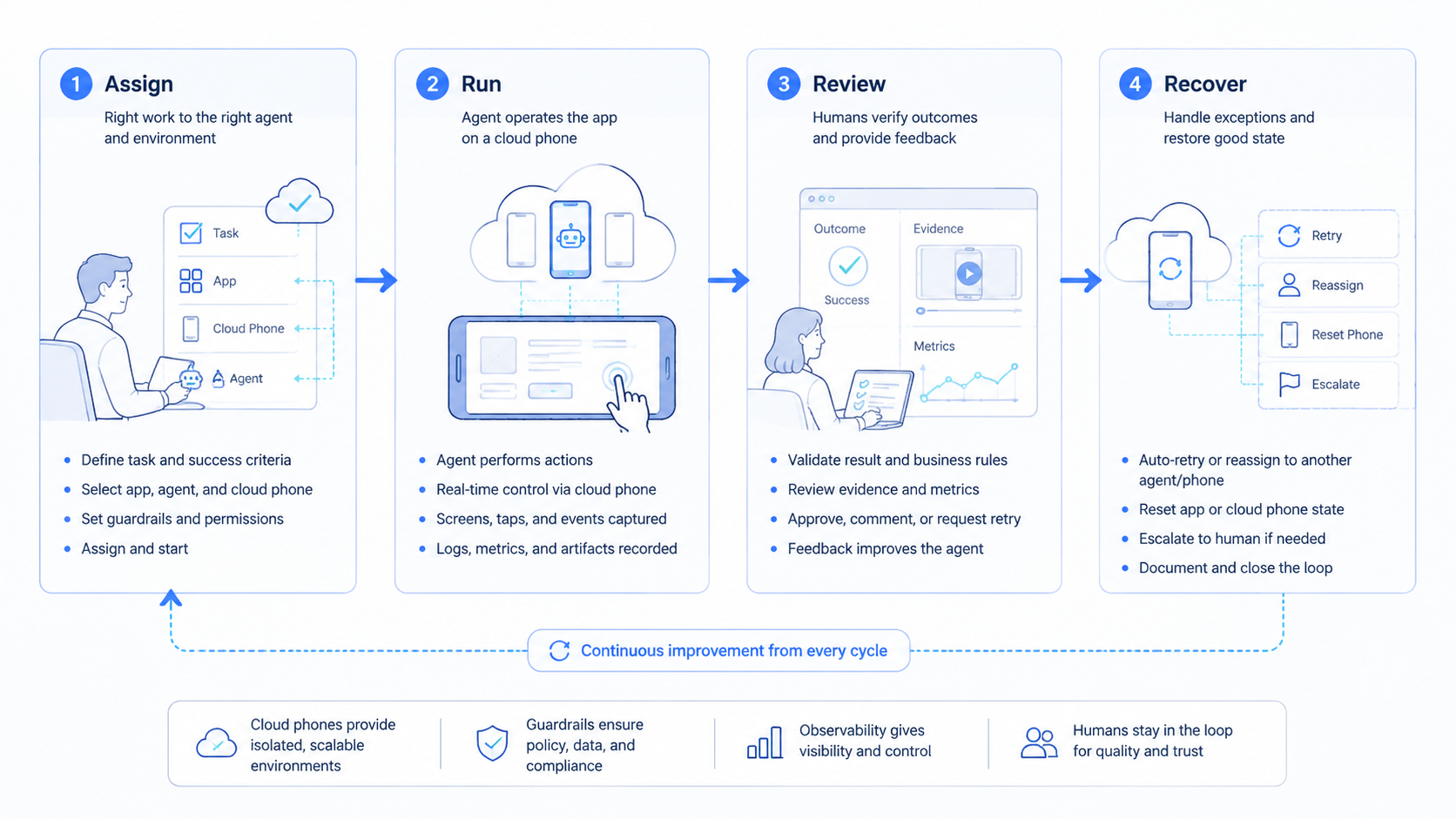
Reviewable mobile execution depends on records that survive after the device session closes. A screenshot helps, but it is only one piece of the chain. The team also needs the task request, the account owner, the device label, the input file or content source, and the stop reason.
Without those fields, a successful run may still be hard to trust. The operator may see that a screen changed, yet still not know which campaign brief was used. A reviewer may approve a result, yet still not know whether the right workspace was active.
Use a compact record for each run:
| Record field | Practical use |
|---|---|
| Request owner | Names who asked for the action |
| Account context | Links the app session to the right workspace |
| Device group | Shows which phone environment handled the task |
| Content input | Points to the source file, draft, or checklist |
| Allowed action | Limits what the agent may do |
| Stop reason | Explains why the run paused or ended |
| Review outcome | Records approve, retry, reject, or escalate |
This record does not need to be complex. It needs to be consistent. A team can improve a simple repeated record faster than a messy log full of screenshots and vague notes.
The record also supports recovery. When a run fails, the team can sort the cause into app state, device state, account state, content input, or workflow logic. That reduces blame and makes the next fix more specific.
For larger teams, this record becomes the bridge between mobile execution and phone farm capacity. Parallel devices are useful only when each task still has a clear owner and review trail.
Keep it boring. Boring records are easier to audit.
How to Evaluate or Start Using Cloud Phone Workflows
Start with the mistakes that break pilots. Avoid a large account pool at the beginning. Keep the chain visible.
Limit what the agent manages. Keep content creation, account routing, app execution, and publishing approval out of one unbounded run.
Use a controlled path instead:
-
Choose one repeatable mobile task. Pick a task with clear inputs and a visible result. Start here. A good first task is checking app state, staging a draft, or collecting proof.
-
Assign one account context. Record the workspace, account owner, device label, and task source before the run starts, especially when several client teams share one operating desk.
-
Define allowed actions. Name what the agent may click, type, upload, or inspect. Ban the rest.
-
Add a stop rule. Pause before posting, purchasing, messaging, deleting, changing account settings, or moving any action from private preparation into public visibility.
-
Capture proof. Save screenshots. Add structured fields, event notes, or app state changes when a screenshot alone cannot explain the result.
-
Review exceptions. Do not hide failed runs. Sort them by cause: device issue, account state, app change, content input, or workflow logic.
This sequence gives the team a practical baseline. Ignore the demo mood. The pilot measures whether the workflow is repeatable, not whether the first run looks impressive.
Tie the pilot to a broader mobile automation plan only after the first path is stable. A second workflow should reuse the same records where possible. Otherwise, the team builds isolated automations that cannot share learning.
Mistakes That Reduce Results
The most common mistake is treating cloud phones as a shortcut around process. They are not. They expose mobile app sessions, but the team still needs account governance, content review, device isolation, and recovery planning.
Another mistake is hiding the agent route. If the agent chooses a path, the operator should know why. A task log that says "completed" is not enough. Better proof says which app state was observed, what action was taken, and why the run stopped.
Device reuse also needs care. A team that uses the same environment for unrelated accounts may create confusing audit trails. A device isolation model helps separate workspaces and reduce operational confusion, but teams still need naming rules and review discipline.
Avoid these failure modes:
- Starting with too many accounts before the task is stable.
- Publishing without review.
- Mixing client content in one shared workspace where the reviewer cannot trace the source.
- Treating screenshots as proof without naming the task result.
- Ignoring app changes until the workflow breaks at scale.
The repair path is usually simple. Reduce the workflow to one task, one device group, one review rule, and one proof format. Scale only after exceptions are understood.
Do less first.
Pilot Measurement for Cloud Phone Workflows
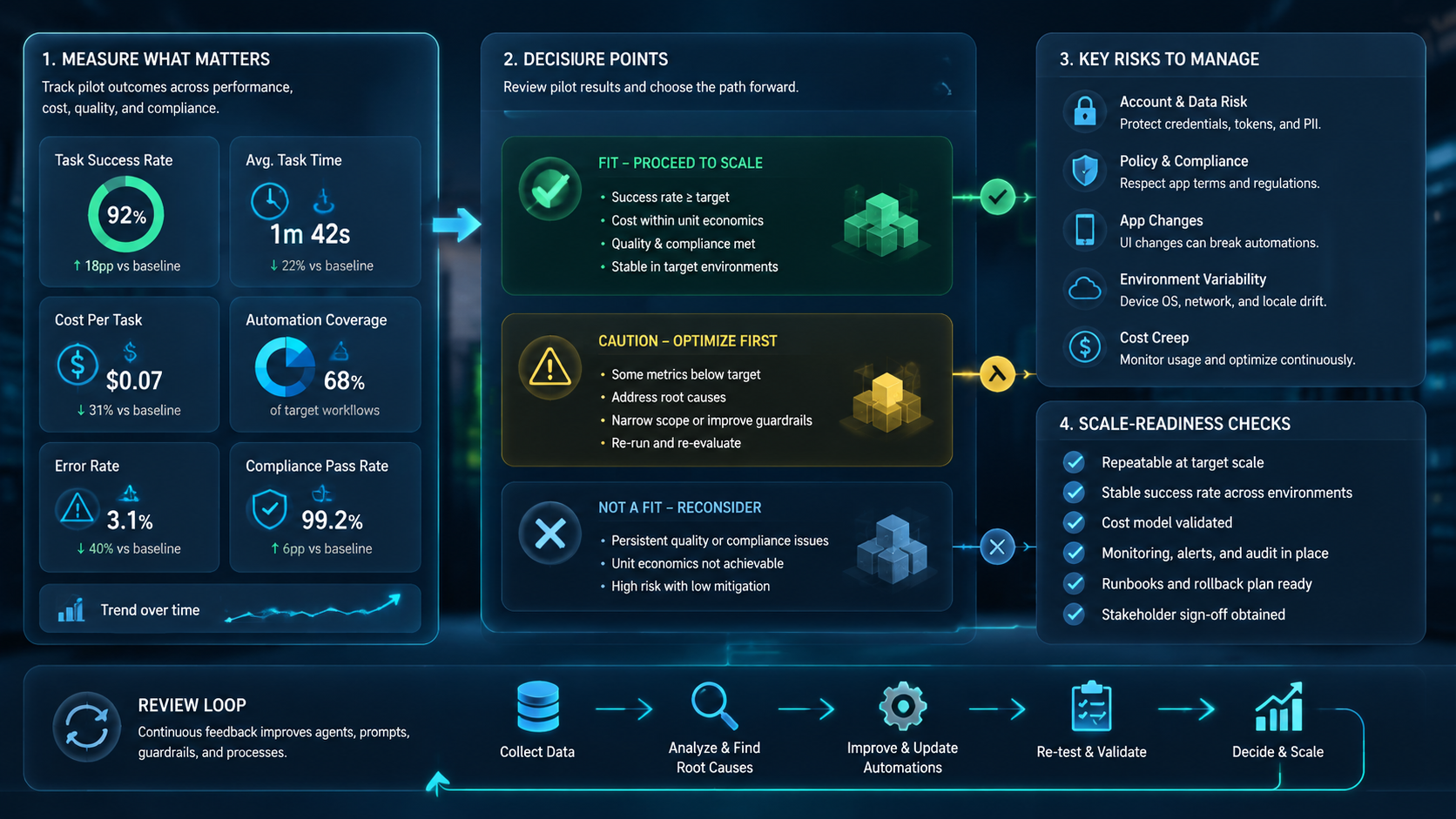
A practical pilot should run for a fixed number of task attempts, not for a vague time period. Twenty to fifty runs can be enough for a first read when the task is narrow. The goal is not statistical certainty. The goal is to expose failure categories before the workflow grows.
Track five fields:
| Field | Why it matters |
|---|---|
| Task type | Shows whether failures cluster around one workflow |
| Device label | Separates device issues from app or content issues |
| Account owner | Keeps handoff accountable |
| Stop reason | Shows whether the agent paused correctly |
| Review outcome | Creates a basis for changing the workflow |
Recovery should be part of the design. A failed app load may need a device retry. Wrong content needs a library fix.
Other failures need different responses. A blocked action may need human review, while a changed app screen may need workflow adjustment and a fresh selector check.
Connect this review to multi-account management when several accounts or teams share the system. Scale changes the question. The operational question becomes larger than one app task. It becomes a question of routing, ownership, and repeated evidence across many account contexts where mistakes may look similar but need different fixes.
Add one final review habit before scaling. Compare three runs that succeeded with three runs that failed. Look for the smallest workflow change that would reduce the next failure group. This keeps the pilot focused on system learning rather than raw completion count.
That comparison should be written down, because the same failure often returns when new accounts, new app versions, or new operators enter the workflow.
Frequently Asked Questions
Can AI agents fully control mobile apps through cloud phones?
They can operate defined app tasks when the device session, action scope, and review rules are available, but that does not mean the agent should roam freely. Full free-form control is a weak target. Team workflows work better when the agent has a bounded task and a visible stop point.
Is a cloud phone the same as an emulator?
This is a remote mobile execution environment, while an emulator is usually a local or virtualized test environment used for narrower testing needs. The practical test is device behavior, app compatibility, and workflow records.
When should a team use cloud Android for AI agents?
Use it when the task must happen in a mobile app and needs repeatable execution, clear proof, and a reviewer who can inspect the result later. Skip it for plain web research.
What is the first workflow to test?
Start with a read or staging task that has a visible result and a clean stop point before any public or account-level action. Keep it narrow. Examples include checking a campaign draft, confirming app state, collecting screenshots, or preparing content for human approval.
How do teams reduce operational risk?
Use scope, proof, and review as separate controls, because one control alone rarely explains why a mobile run succeeded or failed. The agent should know what it can do. The reviewer should know what changed. The system should preserve enough evidence to explain the run later.
Does this replace human operators?
Not for sensitive work where the final decision depends on business context, account judgment, customer tone, or policy interpretation. The role changes. The human moves toward setup, review, exception handling, and improvement.
What should buyers ask vendors?
Ask five concrete questions before buying or scaling: task assignment, device labeling, proof storage, exception review, and recovery after app changes.
Conclusion
AI agents operate mobile apps through cloud phones by combining agent planning with controlled mobile execution. The useful pattern is not "let an AI use a phone." The useful pattern is a bounded task path where device context, account ownership, action scope, proof, and review all remain visible.
Start small. Pick one repeated mobile task, assign one account context, define one stop rule, and measure the first set of runs. Then inspect failures before adding more accounts or more actions.
The next step is a practical readiness check. If your team can name the task, the account owner, the device context, the allowed actions, the proof format, and the reviewer, a cloud phone pilot may be worth running. If those fields are unclear, fix the operating model before scaling agent execution.



