
Title: Best Cloud Phone Platforms 2026 for Social Media Automation
Top cloud phone platforms in 2026 should give social media operators persistent mobile environments, account separation, routing control, and a practical way to review task results. The decision is not only about renting Android devices in the cloud. It is about whether the platform can support repeated social media work without turning every account into a manual exception.
For social teams, the real comparison is operational. TikTok, Instagram, WhatsApp, Telegram, Facebook, and YouTube workflows can involve app sessions, media uploads, profile checks, message replies, and account-level review. A cloud phone becomes useful when those actions need a controlled mobile workspace instead of a shared laptop, a local emulator, or a pile of physical phones.
Key takeaways
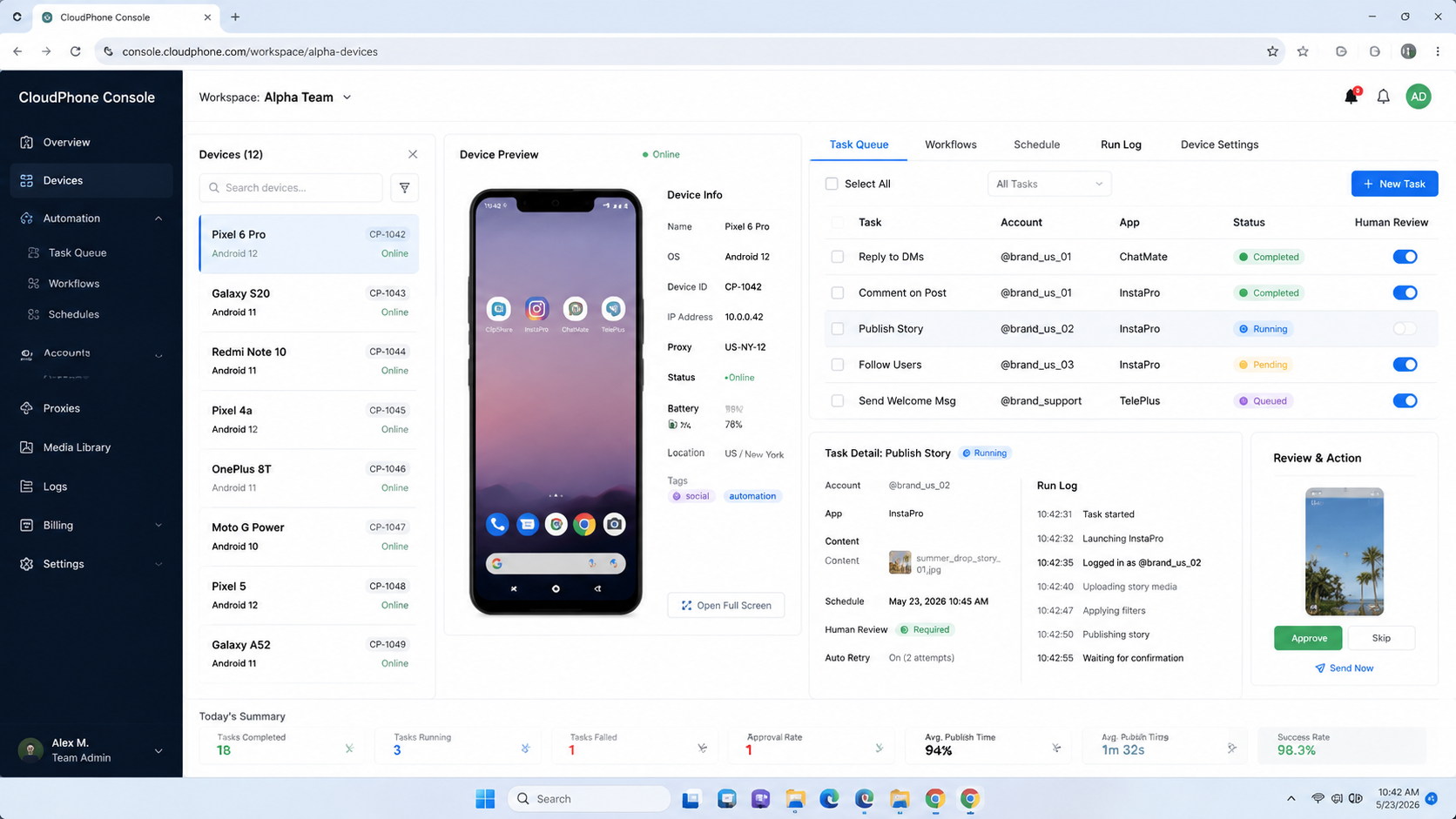
- The best choice depends on account separation, mobile execution depth, team controls, and recovery records.
- A cloud phone platform is stronger when workflows depend on real mobile apps.
- Browser profile tools still matter for web dashboards, but they do not replace mobile app execution.
- Physical phone farms can work, but they add hardware, charging, access, and maintenance overhead.
- Teams should pilot with one account group before moving every social workflow into a platform.
How to Evaluate the Best Cloud Phone Platforms 2026
Start with the workflow, not the vendor list. A team that only schedules posts through official web dashboards has different needs from a team that checks mobile app inboxes, uploads short videos, and reviews account status inside Android apps.
Use this decision order before comparing names:
- Map the action surface. List which tasks happen in mobile apps, web dashboards, browser profiles, or APIs.
- Separate account environments. Decide whether each account needs its own device, route, browser profile, or operator lane.
- Check execution controls. Look for start, pause, retry, handoff, and task history.
- Inspect media handling. Social teams need predictable upload, download, storage, and file transfer flows.
- Define recovery rules. A platform is easier to operate when failed tasks leave clear evidence.
AWS Device Farm is built for app testing, not social operations, but its documentation shows an important infrastructure idea: device availability, device pools, and run results affect execution. Social automation teams face a similar operating problem. The device layer matters when a workflow depends on a running mobile environment.
Comparison Matrix for Cloud Phone Platform Selection
The comparison should not stop at price per device. Low unit cost can become expensive when operators spend time recovering failed tasks or manually checking account state.
| Selection Area | What to Check | Why It Matters | Weak Signal |
|---|---|---|---|
| Account isolation | Device, session, route, and operator boundaries | Reduces accidental mixing across accounts | Many accounts share one vague workspace |
| Mobile execution | App access, media upload, task continuity | Supports real social app workflows | Only browser automation is available |
| Team control | Roles, assignment, review, logs | Keeps work traceable across operators | Everyone uses one admin account |
| Routing | Proxy or network route assignment per account group | Supports cleaner operational separation | Route changes are unmanaged |
| Recovery | Failure reason, retry, screenshot, status history | Helps teams fix issues instead of guessing | Only success or failure is shown |
This matrix is where MoiMobi should be evaluated. MoiMobi is positioned as execution infrastructure for teams that need mobile automation, device separation, and multi-account workflows. It is not only a cloud phone rental page.
Platform Categories and Team Fit
The market contains several platform shapes. Some tools focus on virtual Android access. Some focus on browser profiles. Some combine cloud phones, routing, team operations, and workflow control.
Cloud phone platforms
Best fit: Teams that operate mobile apps, social inboxes, media uploads, and account checks.
Not ideal: Teams that only need a single temporary Android test session.
Fingerprint browser tools
Best fit: Teams that mainly run browser login, web dashboards, and account profile work.
Not ideal: Workflows that must happen inside mobile-first apps.
Physical phone farms
Best fit: Operators with strict hardware requirements and local device access.
Not ideal: Remote teams that need quick scaling, shared review, and centralized control.
This fit boundary helps explain why comparisons like GeeLark vs cloud phone, MoreLogin vs cloud phone, and BitBrowser vs cloud phone can be misleading. They often compare different execution layers. The better question is which environment matches the task.
What Changes Outcomes in Social Media Automation
Execution reliability usually comes from boring controls. A team needs to know which account ran which action, which operator owned the task, which environment was used, and what happened after the task ended.
For social media automation, the highest-impact capabilities are:
- Persistent account workspaces. Operators should not rebuild app state every day.
- Controlled device assignment. One account group should not randomly move across environments.
- Media workflow support. Upload paths, captions, files, and review should be predictable.
- Human review points. Public comments, DMs, and sensitive account actions often need approval.
- Operational logs. Failed tasks need enough context for recovery.
Browser automation standards also show why execution systems need clear session boundaries. The W3C WebDriver specification defines browser automation through sessions, commands, navigation, cookies, windows, and elements. Mobile social workflows differ, but the same lesson applies: runtime state is part of the product.
Best Cloud Phone Platforms 2026: Shortlist Criteria
The shortlist should be built from operating criteria, not only brand familiarity. A platform that looks strong in a feature grid can still fail a social media team if the handoff between device, route, media, and operator is unclear.
Start by scoring each candidate against five practical questions:
- Can the team assign one account group to a persistent mobile environment?
- Can operators see whether a device is ready, busy, blocked, or under review?
- Can managers separate mobile app work from browser dashboard work?
- Can the platform support media movement without ad hoc file sharing?
- Can failed actions leave enough evidence for a second operator to recover?
This is where generic "cloud Android" access and team execution infrastructure separate. Generic access may be enough for one operator testing one app. Team execution needs naming rules, permissions, logs, and repeatable setup.
Buyers should also examine clear limits. For example, a provider may support remote Android access but not team-level review. Another may support browser profiles but not mobile app sessions. A third may support automation hooks but leave account ownership and recovery outside the product.
For social media automation, the winning platform is usually the one that reduces coordination work. Device access is only the base layer. The team also needs task context, account context, and a practical way to stop work when something looks wrong.
Adoption Cost, Setup Friction, and Team Fit
Cost is not only subscription price. Teams should count setup time, account migration effort, operator training, routing configuration, and recovery time.
A low-cost setup may work for a solo operator. It becomes fragile when several operators share accounts, devices, and task responsibility. A higher-control platform can make sense when the team needs repeatable work, not occasional device access.
Use this quick selection rule:
- Choose a lightweight setup when testing one app or one account group.
- Choose a cloud phone platform when mobile app execution is central.
- Choose device isolation when account separation is a core operating requirement.
- Choose a combined stack when the team needs browser work, mobile work, and review loops together.
Migration cost is highest when the old workflow has no clear owner. If account notes live in chat threads, media files live on local machines, and route assignments are undocumented, the platform rollout will expose those gaps. That is useful, but it slows the first phase.
Use a migration sheet before setup. Each row should include account name, platform, current owner, required app, current route rule, media source, review rule, and recovery contact. A team can then move accounts in batches instead of trying to rebuild everything inside the new platform.
The same rule applies to browser tools. MoreLogin, BitBrowser, and other profile-focused tools may help with web sessions, browser cookies, and dashboard work. They do not automatically solve mobile app execution. A cloud phone platform does not automatically solve web dashboard structure either. The operating stack may need both layers.
Pilot Rollout, Measurement, and Recovery Checks
Do not migrate every account at once. A better pilot starts with one platform, one account group, and one repeatable workflow.
Track five fields during the pilot:
- accounts assigned to each environment
- tasks completed without manual recovery
- tasks paused for review
- failed tasks and failure reasons
- operator time saved or shifted
After one or two weeks, review the failure log before scaling. If failures are caused by unclear ownership, fix the SOP first. If failures come from environment instability, review device assignment and routing. If public-facing actions need too much correction, add human approval before execution.
This is also where multi-account management should connect to the platform decision. The best cloud phone platforms 2026 teams use for social media automation should make account ownership visible, not hidden inside device names.
Add one recovery drill before calling the pilot successful. Pick a low-risk account and simulate a blocked upload, a missing media file, or a handoff to a second operator. The drill should show whether the next person can understand the account, device, task, and last action without asking the original operator.
Strong recovery checks usually reveal small process problems. The account name may not match the device label. The media folder may not match the task queue. The route note may be missing. Fixing those small issues early prevents larger confusion when the team scales to more accounts.
The review should end with a decision record:
- continue with the current account group
- expand to another similar account group
- reduce the workflow to fewer task types
- pause rollout until environment rules are clearer
This record matters because social operations change quickly. A platform that worked during a small test can become fragile once account count, content volume, and operator count all increase.
Operational Red Flags Before You Sign
Some risks appear before a team even starts the pilot. If the vendor cannot explain them clearly, treat the gap as a process risk rather than a sales objection.
Watch for these red flags:
- no clear way to assign accounts to device groups
- no role separation between operator and reviewer
- no visible task history for failed actions
- no practical route-change record
- no method to pause public-facing actions before review
- no answer for browser plus mobile handoff
These gaps do not always mean the platform is unusable. They mean the team must fill the missing control with its own SOP, spreadsheet, or operations dashboard.
For a small team, that may be acceptable. For an agency or distributed social team, missing controls create hidden labor. Someone will still need to track account state, recover failed tasks, and explain what happened after a workflow stalls.
The final evaluation should ask one plain question: can a second operator recover work from the records alone? If the answer is no, the platform may still provide device access. It is not yet strong execution infrastructure for social media automation.
Frequently Asked Questions
What are the best cloud phone platforms 2026 teams should compare?
Compare platforms that support persistent Android environments, account separation, routing control, team roles, task history, and recovery records. The best fit depends on the workflow.
Is a cloud phone better than a physical phone farm?
A cloud phone is often easier for remote teams to scale and share. A physical phone farm may still fit teams that need local device control.
Is a cloud phone the same as an Android emulator?
No. An emulator simulates Android on another machine. A cloud phone platform usually provides managed remote Android environments with operational controls.
Do social media teams still need fingerprint browsers?
Often yes. Browser profiles are useful for web dashboards and account admin work. Cloud phones are stronger when the workflow happens inside mobile apps.
Should every account get its own cloud phone?
Not always. Teams should decide by account value, platform sensitivity, workflow frequency, and review needs. High-value accounts usually need cleaner separation.
What should teams test first?
Test one account group, one social platform, and one workflow. Publishing, inbox review, or account checks are good pilot candidates.
Does MoiMobi replace every social media management tool?
No. MoiMobi fits the execution layer. Scheduling, analytics, creative planning, and CRM systems may still sit around it.
Conclusion
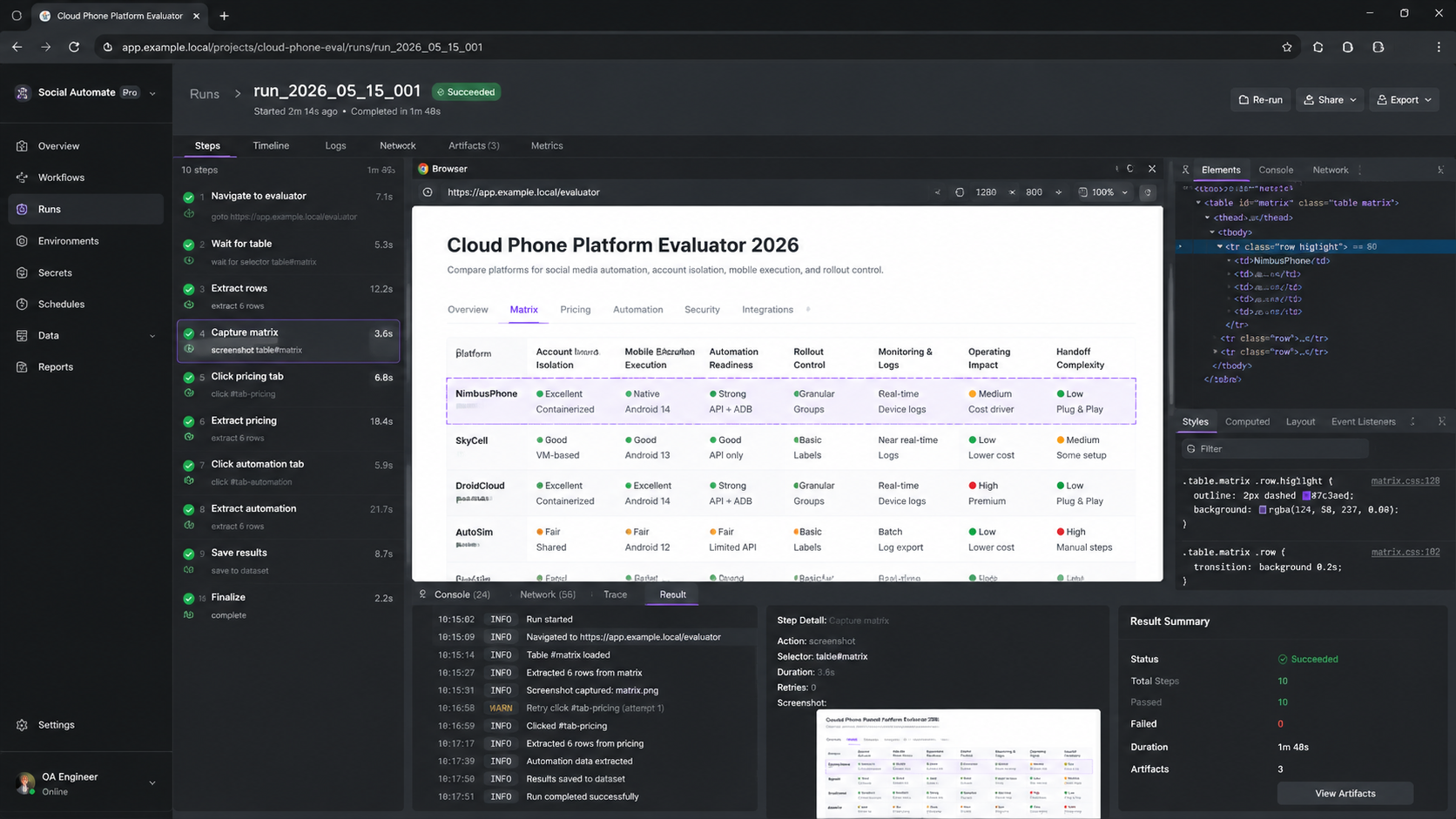
The best cloud phone platforms 2026 teams should shortlist are the ones that match real social media execution. Device count matters, but it is not the full decision.
Rank your next checks in this order: account separation, mobile app execution, routing control, team review, and recovery records. If those five areas are clear, the platform is easier to pilot. If they are vague, pricing comparisons will not tell the full story.
References:



