
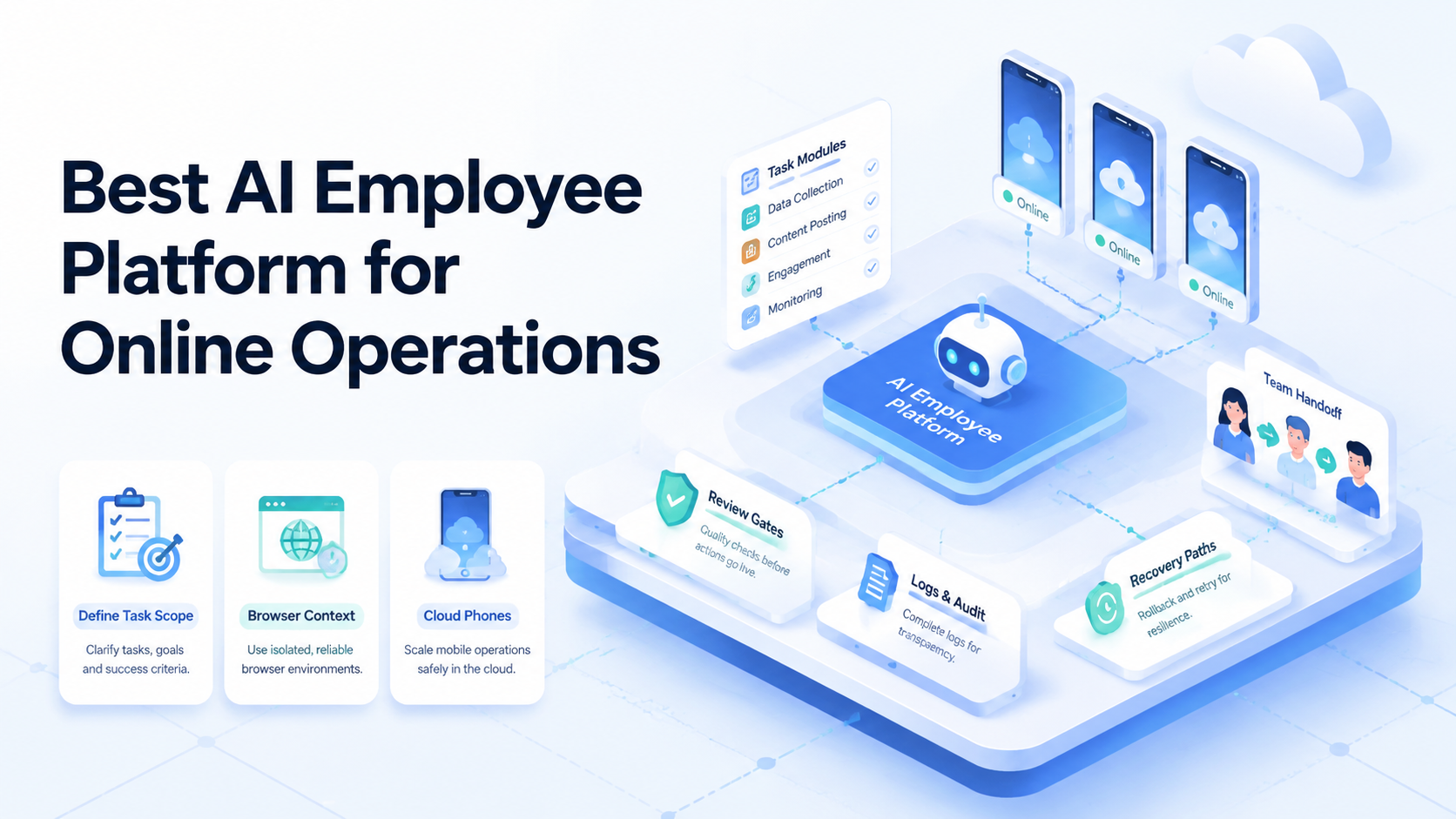
An AI employee platform is software that lets teams assign digital workers to bounded online tasks, run them in controlled environments, and review the results. The best platform for online operations is the one that makes execution context visible: worker, account, browser, phone, route, output, reviewer, and recovery.
Online operations are messy. A worker may open a dashboard, check a page, prepare a report, capture evidence, use a mobile app, or wait for a human approval before the final action. A generic chatbot does not provide enough control for that loop.
Google's helpful content guidance is a useful operating lens here. The work should be clear, useful, and easy for another person to inspect. Same rule.
Key Takeaways
- Choose an AI employee platform by operating fit, not feature volume
- Online teams need task records, browser context, mobile context, review gates, and recovery logs
- The best choice should separate low-risk preparation from high-impact actions
- A narrow 7-day pilot is safer than moving every workflow into AI workers at once
How to Evaluate an AI Employee Platform
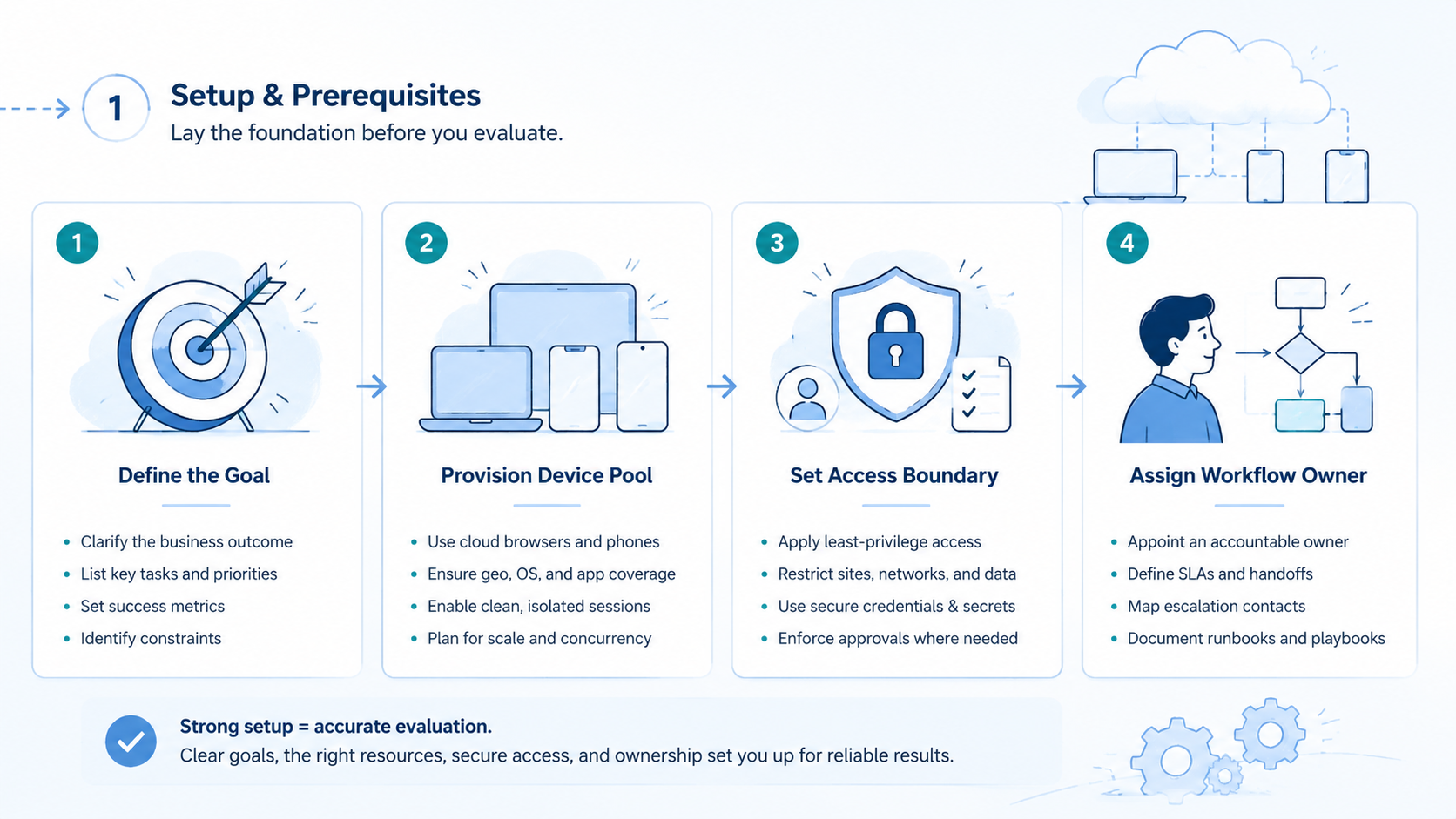
Start with the task, not the model. A strong platform should let the team define what the worker can do, where it can do it, and who reviews the output.
Use a step path:
| Step | Evaluation question |
|---|---|
| Task scope | Is the allowed work clearly bounded |
| Environment | Is the browser, phone, or account context visible |
| Output | Is the result saved where reviewers expect it |
| Review | Is there a human gate for sensitive actions |
| Recovery | Can another teammate understand a failed run |
This order matters. A platform can look impressive in a demo but fail in team operations if it cannot name the environment. A worker that produces output without a profile, account group, or stop rule creates cleanup work. Stop there.
For browser-heavy work, the platform should act like an AI browser execution platform. It should preserve session context, page state, and evidence. For mobile-heavy work, it should connect to controlled device environments, not only local browser sessions. Different surface.
MoiMobi is relevant when browser work and mobile execution need one operating view. Its mobile automation layer supports repeatable mobile workflows, while cloud phone infrastructure can provide the phone-side surface for AI workers.
AI Employee Platform Capabilities That Change Outcomes
Capabilities only matter when they change team behavior. A long menu of agent features does not help if nobody can review the run.
The core operating units are simple: worker ID, task ID, browser profile, phone ID, account group, route, output folder, reviewer, and stop condition. These fields create traceability. Traceability creates control.
Use this outcome map:
| Capability | Outcome it changes |
|---|---|
| Named worker | Makes ownership clear |
| Controlled browser profile | Keeps account context inspectable |
| Cloud phone assignment | Adds mobile execution context |
| Review gate | Prevents unapproved sensitive actions |
| Output folder | Speeds handoff and audit |
| Recovery note | Makes failed runs repairable |
Device and route context matter when online work touches multiple accounts. MoiMobi's device isolation page explains the product area around separated execution environments. For route planning, proxy network controls can be part of the operational record.
Treat these fields as operating controls, not admin clutter. They are what let a second teammate inspect the result tomorrow. Keep them visible.
Short proof beats long explanations.
Adoption Cost, Setup Friction, and Team Fit
Adoption cost is not only subscription cost. The real cost includes setup time, reviewer effort, failed-run recovery, and the work needed to maintain account boundaries.
Setup friction is useful when it creates control. Requiring task scope, environment labels, and reviewer assignment may feel slower at first. That friction prevents vague automation from reaching live accounts.
Team fit usually falls into 3 shapes:
| Team shape | Platform fit |
|---|---|
| Small internal workflow | Light AI employee software may be enough |
| Browser-heavy online operations | AI employee platform with profile and review logs |
| Browser plus mobile operations | AI worker software connected to cloud phones and account groups |
A team should avoid two mistakes. First, do not buy a worker platform for simple field movement. A workflow automation tool may handle that cleaner. Plain enough.
Second, do not use a simple connector for work that requires screen inspection. A connector can start a run, but it cannot replace account context, evidence capture, and human review when those are required.
Ask one practical question during evaluation. Can a second operator recover a failed task without calling the person who started it? Recovery is the test.
If the answer is no, the platform is not ready for online operations.
Which AI Employee Platform Fits Different Operating Scenarios
There is no single best platform for every online workflow. The right option depends on where work happens and what can go wrong.
For account monitoring, the platform needs clear account groups and low-risk data collection. The worker can gather visible state, save evidence, and flag exceptions. Final changes should stay behind review. Different queue.
For support preparation, the worker may open a dashboard, read a record, and draft a response. Keep the final send action manual unless the team has a stronger approval path. Review first.
For ecommerce or marketplace operations, the platform should track account group, listing context, browser profile, mobile device, and output folder. That record matters because a wrong account or missing context can create expensive cleanup.
For social and mobile-first teams, the browser is not enough. A web dashboard may control parts of the workflow, but mobile app state still matters. Mobile state changes the decision, so record the app surface, phone ID, account group, and reviewer in the same trail.
For research and reporting, the team may choose a lighter setup. A reporting worker collects pages, extracts findings, and saves notes. Lower risk can use lighter review.
Scenario fit table:
| Scenario | Better platform direction |
|---|---|
| Dashboard monitoring | Browser worker with saved evidence |
| Support drafting | Worker plus human approval |
| Account operations | Profile, account group, and recovery logs |
| Mobile app workflows | Cloud phone plus worker task queue |
| Reporting | Lightweight worker with output folders |
Fit and Not-Fit Rules
An AI employee platform fits online operations when the workflow is already knowable. The worker can execute the task, but the team must define the boundary.
Fits
- Repeatable browser or mobile tasks
- Account-based work that needs profile tracking
- Review queues for sensitive actions
- Evidence-heavy workflows with screenshots or output files
Does Not Fit
- Vague instructions with no stop rule
- High-impact work with no reviewer
- Simple data movement handled by connectors
- Runs that cannot be inspected after failure
The not-fit side protects the team. A poor workflow does not become safe because an AI worker handles it. Hard line.
A missing reviewer does not become acceptable because the output looks polished.
Define the boundary before the pilot. Name the input, allowed action, environment, output folder, reviewer, and stop condition. No shortcut.
If a boundary is missing, repair the workflow first.
AI Employee Platform Selection Checklist
Selection should force operational clarity. The best vendor demo is not a perfect run. It is a failed run that another teammate can recover.
Use this checklist:
| Check | Pass condition |
|---|---|
| Task scope | The worker boundary is explicit |
| Browser context | Profile and session are visible |
| Mobile context | Phone ID is visible when mobile work exists |
| Account ownership | Account group is part of the record |
| Review | Sensitive actions pause for approval |
| Recovery | Failure reason and next owner are stored |
Ask for proof in one view: task record, output folder, reviewer decision, and stop point. No hunt.
For security-minded teams, the NIST security and privacy controls catalog is a useful reference for thinking about access control, audit records, and change boundaries. The pilot does not need to become a compliance project. It does need a clear approval model.
That model should be simple enough for operators to follow during a busy shift without asking a manager for interpretation.
One warning: avoid "agent freedom" as a selling point for live operations. Freedom without logs becomes cleanup. Controlled execution scales better than broad permission.
Pilot Rollout, Measurement, and Recovery Checks
Start narrow. Use the first pilot as a control point, not as a launch campaign for every task the team hopes to automate.
One queue is enough for the first pilot. Pick work that matters but does not create irreversible impact.
A useful 7-day pilot has 1 owner, 1 reviewer, 1 task queue, and 3 outcome buckets. Green means completed and approved. Yellow means completed but needed extra review. Red means stopped, failed, or unclear.
Track these fields:
| Field | Why it matters |
|---|---|
| Task ID | Prevents run confusion |
| Worker ID | Shows assignment |
| Browser profile | Shows web context |
| Phone ID | Shows mobile context |
| Account group | Shows ownership boundary |
| Reviewer decision | Shows approval status |
| Recovery time | Shows cleanup burden |
Completion count is not enough. A worker that completes many tasks but creates unclear failures can slow the team down. A slower platform with clean logs may be better for account-based work.
Set stop rules before the pilot starts. Stop for wrong profile, missing account context, unclear output, sensitive actions, or missing reviewer. No guessing.
At the end, scale only green tasks. Fix yellow tasks with better labels or review instructions. Do not scale red tasks until the failure path is clear.
AI Employee Platform Roles and Review Model
Roles decide whether the platform becomes an operating system or another loose tool. Do not let one person own setup, execution, review, and retry for every workflow. That pattern hides errors.
A cleaner model separates 4 roles:
| Role | Responsibility |
|---|---|
| Workflow owner | Defines the task boundary and stop rule |
| Environment owner | Maintains browser profiles, phones, account groups, and routes |
| Reviewer | Approves output before sensitive actions |
| Recovery owner | Repairs failed runs and updates the workflow record |
Small teams can combine roles, but the record should still separate the jobs. The same person may set the task and review it during a pilot. Split the record.
The log should still show which action was setup work and which action was approval.
The review model should also match task risk. Evidence capture and internal research may use light review. Account settings, customer messages, refunds, payments, publishing, and deletion need stronger review.
Use a simple approval ladder:
| Risk level | Example | Default action |
|---|---|---|
| Low | Collect page evidence | Worker runs and saves output |
| Medium | Prepare a customer or listing draft | Reviewer approves before use |
| High | Change account setting or publish | Human owner performs final action |
This ladder keeps automation useful without pretending every task has the same impact. It also makes pilots easier to judge. A low-risk green task can scale sooner than a high-risk yellow task.
One more detail matters: handoff language. The worker output should not only say "done." It should name the task, environment, account group, evidence, and review status. Good handoff notes make online operations faster because the next person does not need to reconstruct the run.
For mobile-linked work, the handoff should include phone ID and account group. For browser-linked work, it should include browser profile and page state. For combined workflows, include both. That is the practical difference between AI employees software and a generic assistant.
Frequently Asked Questions
What is the best AI employee platform for online operations?
Choose the option that matches the workflow, risk, and review model. Not hype.
Look for task scope, environment records, approval gates, output logs, and recovery paths.
Is AI employee software the same as workflow automation?
No. Workflow automation moves defined steps between systems. AI employee software assigns workers to tasks that may require browser or mobile context. Different layer.
When should a team use AI worker software?
Use it when a task needs inspection, judgment, evidence capture, or review. Simple field movement usually belongs elsewhere. Keep that boundary because it prevents agent work from swallowing clean automation jobs.
How does a cloud phone fit into AI employee work?
A cloud phone gives the worker a mobile execution surface that can be assigned, inspected, and tied back to the task record. Phone context is only one layer.
The team still needs task rules, account groups, output logs, and review gates.
What should stay manual?
Publishing, payments, deletions, account settings, refund wording, and customer-facing replies should stay behind stronger review.
How should teams measure success?
Measure approved completions, failure reasons, reviewer effort, and recovery time. Track cleanup and rework, because those two numbers reveal whether the AI employee platform is saving operator time or simply moving work into review.
Volume alone can hide messy operations.
Can one platform handle browser and mobile work?
It can if the platform records both browser and mobile context. The record should show profile, phone, account group, output, and reviewer. Verify both before adding volume, because missing context turns a combined workflow into two disconnected queues.
What is the first safe pilot?
Start with evidence capture, report preparation, dashboard checking, or draft preparation. Keep the blast radius small while the team learns where the worker stops cleanly and where the reviewer needs better evidence.
Avoid irreversible actions in the first pilot.
What is the biggest selection mistake?
The biggest mistake is choosing for autonomy before choosing for control. Control first.
A platform that can act widely but cannot show environment, output, reviewer, and recovery will create operational debt.
Should teams connect AI employees to existing SOPs?
Yes. Existing SOPs give the worker boundaries and give reviewers a shared checklist. Without that structure, every run becomes a custom judgment call.
SOPs also make vendor evaluation more concrete. Instead of asking whether the platform is "smart," the team can test whether it follows a known task boundary, captures evidence, stops in the right place, and produces a handoff note another operator can use.
Conclusion
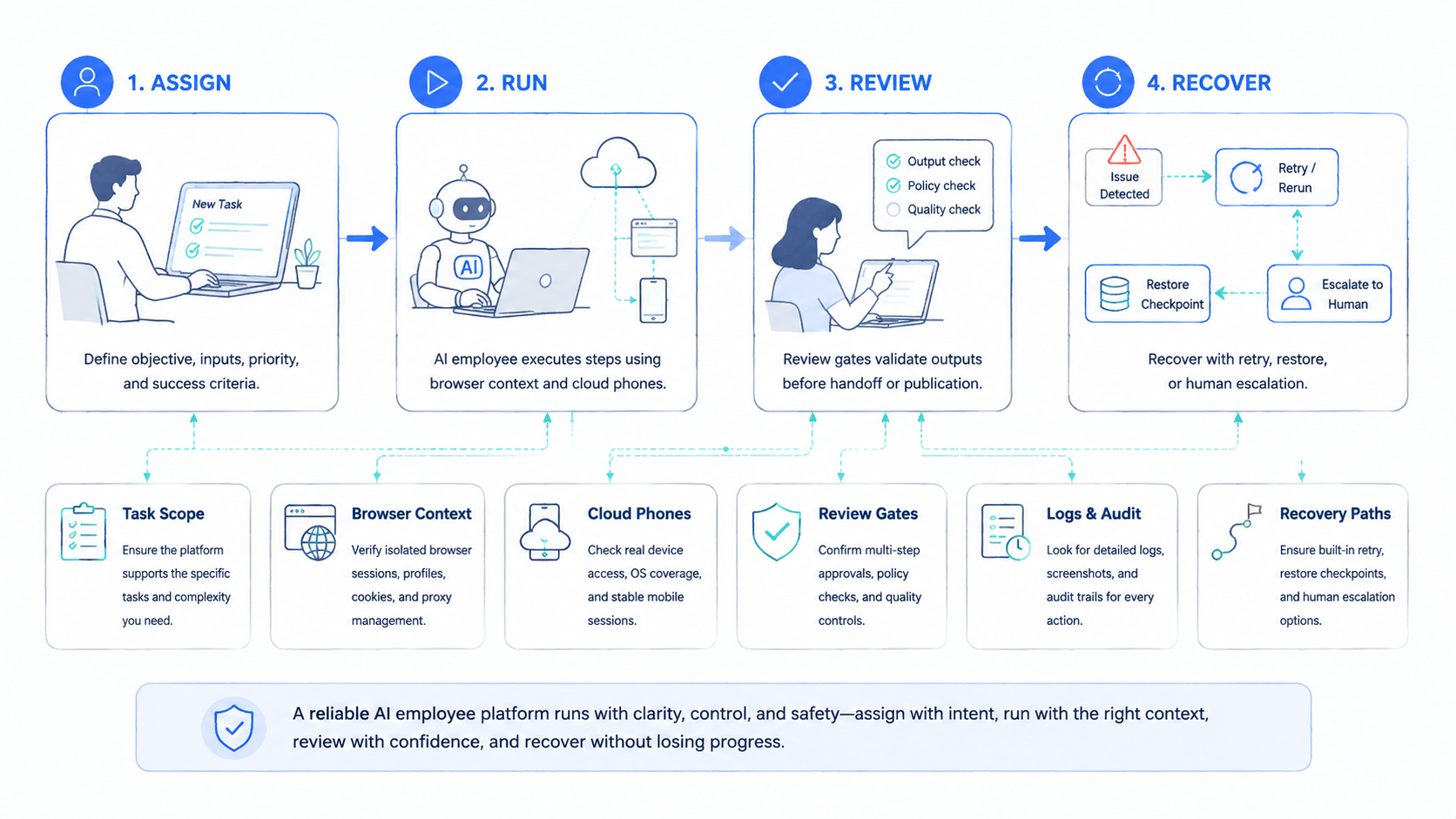
The best AI employee platform for online operations is the one that makes work inspectable. It should connect worker identity, browser context, mobile context, account group, output, reviewer, and recovery into one operating record.
Rank the next priorities in this order: define the workflow, set the boundary, name the environment, assign the reviewer, and test recovery. Then run a 7-day pilot before scaling.
If the work is simple data movement, use a lighter automation path. If the work requires browser or mobile context, evaluate an AI employee platform with stronger execution controls. For teams managing multiple accounts, connect the decision to multi-account management and mobile execution infrastructure rather than treating AI workers as isolated tools.



