
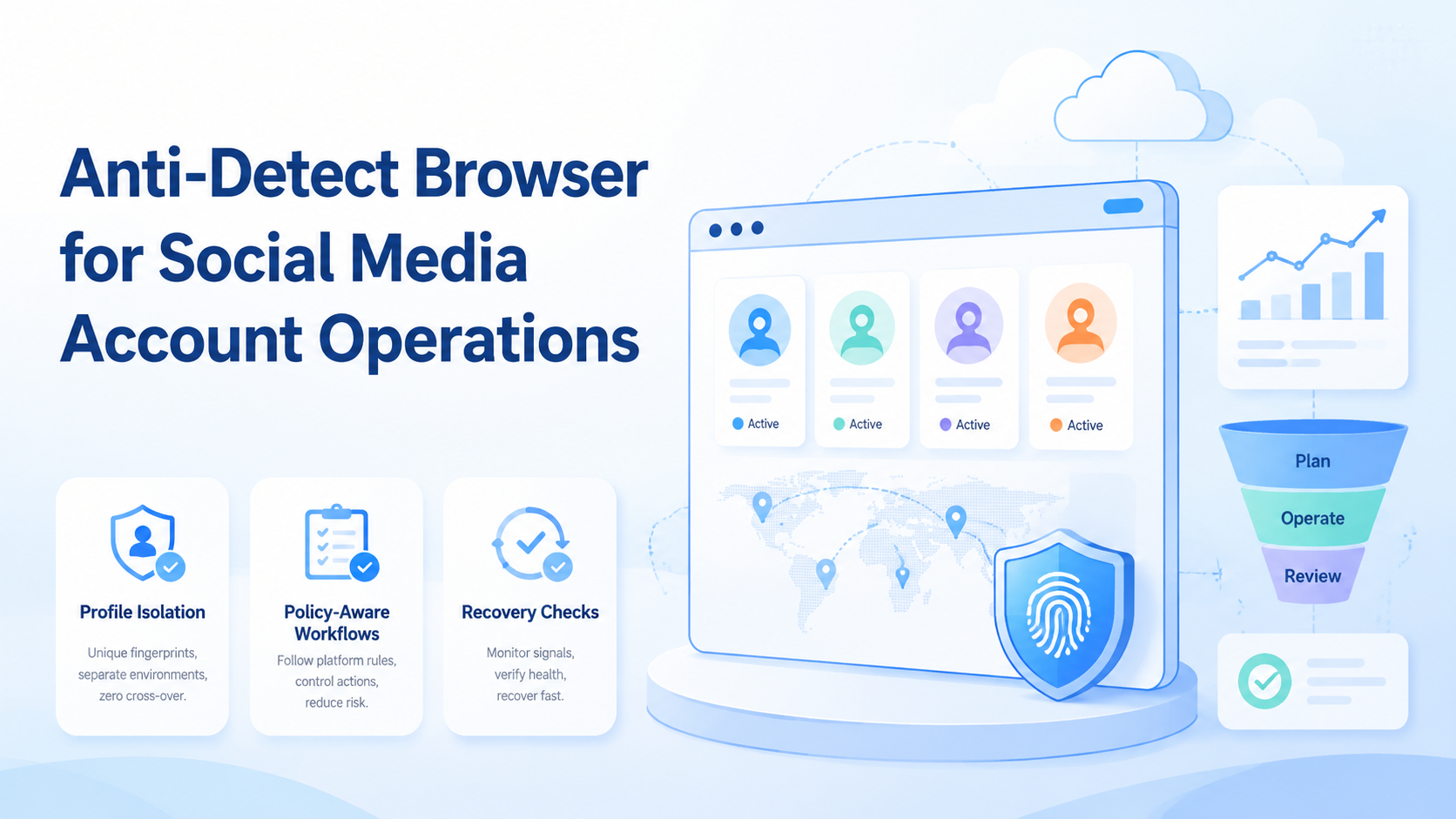
For social media account operations, an anti-detect browser is best understood as a browser profile system that separates account environments, browser state, and operational context. The useful goal is not "hiding from platforms." The safer goal is controlled workspaces, cleaner handoff, and fewer mixed-session mistakes.
Teams should evaluate this category with caution. Browser fingerprints, device signals, cookies, storage, IP routing, account behavior, and policy rules all matter. No browser profile tool can replace platform compliance, content quality, or careful account management.
Moimobi frames this as AI browser and mobile execution infrastructure. The browser is one workspace layer inside a broader account operations system.
Key Takeaways
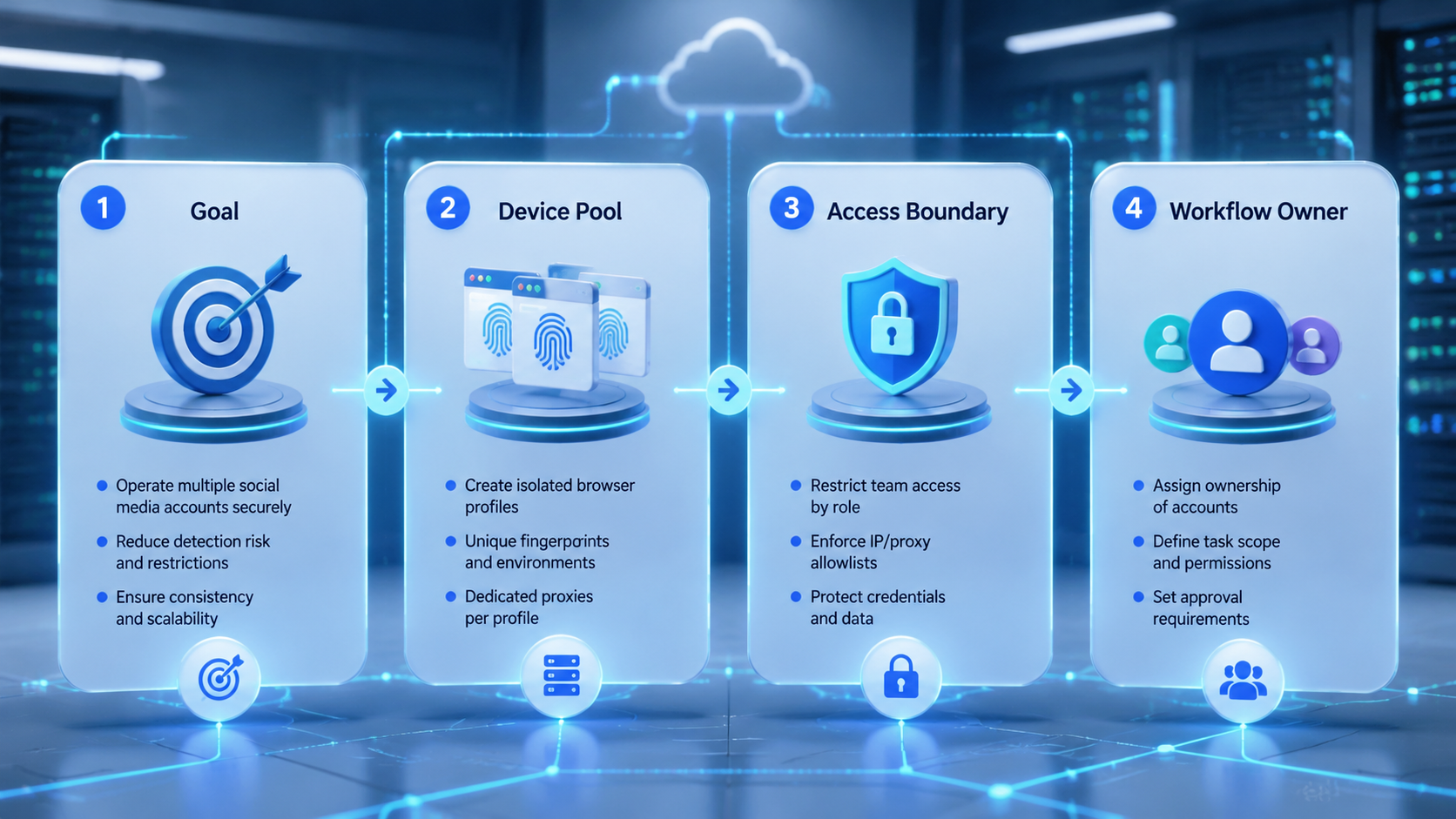
- An anti-detect browser should be evaluated as an account workspace tool, not a promise of account safety.
- Social media teams need profile isolation, routing consistency, task ownership, and recovery logs.
- Browser profiles work best when paired with policy-aware workflows and human review.
- Pilot with a few accounts before connecting many profiles to daily operations.
What Is an Anti-Detect Browser for Social Media Account Operations?
For social media operations, the category works as a browser profile manager used to separate sessions, storage, and environment settings by account. The practical value is profile isolation.
The W3C fingerprinting guidance explains that browser fingerprinting can use many observable surfaces. That does not mean teams should try to defeat every signal. It means account work should avoid accidental mixing and document which environment belongs to which account.
Playwright's browser context documentation is also useful. It describes isolated browser contexts where each context has separate cookies and local storage. Playwright is a testing framework, not an anti-detect product, but the concept is relevant: isolation is a known browser automation pattern.
For social teams, the browser profile should store:
- Account assignment.
- Profile owner.
- Proxy or routing rule.
- Allowed workflow types.
- Login and recovery notes.
- Task history and review status.
That makes the tool part of operations, not a standalone shortcut.
Why Anti-Detect Browser for Social Media Account Operations Matters
The real problem is account confusion. Operators open the wrong profile, reuse the wrong proxy, upload from the wrong workspace, or answer from the wrong brand voice.
Those mistakes happen faster when teams manage many accounts. A profile system reduces confusion when it makes ownership visible. It can also support controlled browser-based tasks such as dashboards, inbox review, publishing tools, and reporting screens.
Meta's Inauthentic Behavior policy is a necessary boundary. Teams should avoid deceptive coordination, fake engagement, and artificial account networks. A browser workspace should support legitimate account operations, not policy evasion.
The safer language is account isolation, profile workspace, and browser environment control. These phrases describe operational separation without promising outcomes that no tool can prove.
For teams comparing alternatives, the existing AdsPower alternative hub is useful because it connects browser profiles with mobile execution. Some workflows begin in a browser but must be verified in a mobile app.
Key Benefits and Use Cases
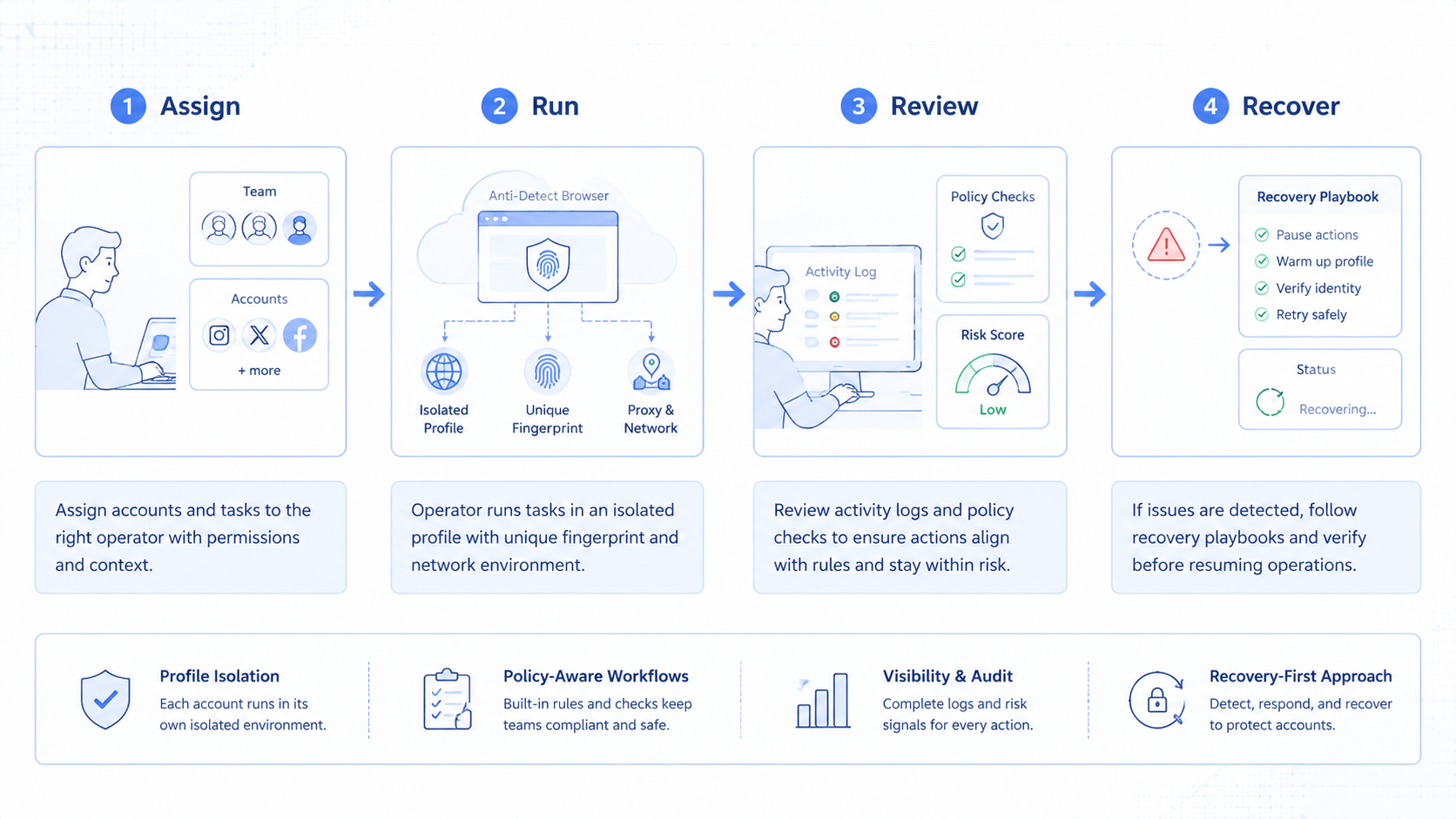
Separation is the main benefit. Each account has a defined browser lane, owner, and task history.
Handoff is the second benefit. When one operator finishes setup and another handles replies or publishing, the next person can see the profile, notes, and allowed actions.
Auditability is the third benefit. A manager can ask which account ran which workflow, which environment was used, and which task failed.
| Use case | Browser profile value | Extra control needed |
|---|---|---|
| Social dashboard work | Keeps account sessions separated. | Role permissions and notes. |
| Client account management | Separates client workspaces. | Client-specific approval rules. |
| Creator outreach | Keeps inbox and profile context clear. | Message review and escalation. |
| Reporting | Maintains dashboard access per account. | Export and evidence tracking. |
| Cross-device workflows | Connects browser and phone tasks. | Mobile environment mapping. |
Teams using browser and mobile together should review multi-account management. The profile is only one part of the account system.
How to Get Started with an Anti-Detect Browser Workflow
Start with account mapping. Do not create profiles before you know which accounts, platforms, and operators they belong to.
Use this setup path:
- Define account groups by brand, client, region, or platform.
- Create one browser profile per account or account lane.
- Assign one owner and one backup operator.
- Attach routing rules and document them.
- Define allowed workflows for each profile.
- Add recovery notes for login prompts and review states.
- Run a small pilot before daily use.
Connect browser profiles to device isolation when mobile execution is involved. A social account may need both a browser workspace and a cloud phone workspace. The mapping should be explicit.
For app-first work, pair the browser profile with mobile automation. The team should know which environment handles each step.
Common Mistakes to Avoid
The first mistake is treating a browser profile as a permission slip. It is not.
Another mistake is profile sprawl. If teams create too many profiles without owners, names, or logs, the tool becomes another messy directory.
Avoid these patterns:
- One profile used for several unrelated accounts.
- Many profiles with no owner.
- Proxy settings changed without notes.
- Same task repeated across profiles without review.
- Browser tasks and mobile tasks tracked separately.
- No record when login, captcha, or review prompts appear.
Do not use "anti-detect" wording in internal SOPs as if it solves account risk. Use operational terms instead: isolated workspace, account lane, routing rule, task log, and review gate.
Who It Fits and When It Is a Strong Match
The category fits teams that work inside browser sessions every day. Single-phone manual publishing teams usually need less infrastructure.
Strong fit
- Agencies managing client social accounts.
- Growth teams running many browser-based dashboards.
- Support teams reviewing inboxes across account groups.
- Teams that connect browser tasks with cloud phone checks.
Weak fit
- One person managing one account.
- Teams without documented account ownership.
- Workflows built around fake engagement or spam behavior.
If social operations are TikTok-heavy, compare browser profiles with cloud phone for TikTok workflows. Some tasks may be easier in the app environment.
Pilot Rollout, Measurement, and Recovery Checks
Pilot with a small account set. Five accounts are enough to test naming, routing, ownership, and recovery.
Track these signals:
- Profile-to-account mapping accuracy.
- Operator handoff time.
- Number of wrong-profile incidents.
- Login or prompt events per profile.
- Failed tasks with clear recovery notes.
- Browser tasks that require mobile verification.
Recovery notes matter because profile isolation is only useful when the team can learn from issues. If a task fails, operators should see the profile, account, step, owner, and next action.
Review the pilot before adding more profiles. If operators still ask "which profile is this?" the system is not ready to scale.
Governance for Browser Profile Workspaces
The strongest teams treat each browser workspace as a controlled operational record. The workspace is not just a login container. It is a place where account ownership, routing decisions, allowed tasks, and recovery history stay together.
Start by defining naming rules. A useful name may include client, platform, region, and account role. Avoid names like "profile 1" or "backup browser." Those names force operators to rely on memory, which is exactly what the system should reduce.
Then define profile roles. Some profiles may be used for publishing. Others may be used for analytics, inbox review, ad dashboards, or reporting. If every workspace can do everything, the team has no real control. Role boundaries help operators understand what action is expected inside each account lane.
Governance should also include change history. If a routing rule changes, if an operator sees a login challenge, or if a task fails, the note should stay with the workspace. A manager should not need to ask five people what happened. The record should explain the account, the environment, the task, and the next action.
A practical account workspace record includes:
- account name and platform;
- owner and backup owner;
- allowed workflow types;
- routing rule and last change date;
- linked mobile environment, if any;
- last successful task;
- open recovery notes;
- escalation contact.
With this structure, teams avoid profile sprawl and onboard operators faster. A new operator can understand the account lane before touching a live task.
Browser Workspaces and Mobile Environments Should Be Mapped Together
Many social workflows do not stay in one channel. A team may research, draft, and report in a browser, then verify or complete part of the workflow inside a mobile app. If those environments are not mapped together, account context can split across tools.
The solution is a one-to-one or clearly documented mapping between the browser workspace and the mobile workspace. The team should know which cloud phone or Android environment belongs with which profile. If the same account is used in both places, the two environments should share the same operational owner and recovery notes.
Moimobi is useful here as a broader execution platform. Browser workspaces help with web dashboards and account sessions. Cloud phones help with app-first tasks. The account management layer keeps the relationship visible.
Use this mapping before scaling:
- Browser workspace handles web dashboard access.
- Mobile workspace handles app-specific checks.
- Account owner approves the relationship.
- Task logs show which side executed each step.
- Recovery notes mention both environments when needed.
Audits become easier. If a post fails, the team can identify whether the issue happened in a browser dashboard, a mobile app, a content asset, or an approval step.
Safety Boundaries for Social Media Teams
Social operations should be designed around legitimate account management. Do not build workflows around fake engagement, deceptive coordination, or high-volume repetitive behavior. Tooling should improve clarity and execution, not encourage policy-violating activity.
A safer operating model has three boundaries. First, content and replies should be reviewed before they go live when brand risk is high. Second, account environments should be separated to reduce mistakes, not to hide abusive behavior. Third, automation should stop and ask for human review when prompts, sensitive messages, or unusual failures appear.
These boundaries are commercially useful. Teams that depend on long-term accounts need reliable operations. Shortcuts that create policy risk can damage the account base, the client relationship, and the workflow itself.
Frequently Asked Questions
What is an anti-detect browser?
A browser profile tool manages separated browser environments, sessions, and settings.
Is it the same as account isolation browser?
In operations, the useful concept is account isolation. The browser profile should map to a clear account lane.
Can an anti-detect browser promise account safety?
No. It can reduce environment confusion, but it cannot replace platform policy compliance or quality operations.
Should social teams use one profile per account?
Often yes, when account history, routing, and ownership need to stay separate.
What should be documented in each profile?
Document account owner, platform, proxy rule, allowed workflows, last task, and recovery notes.
When should teams use cloud phones instead?
Use cloud phones when the workflow depends on mobile apps, app sessions, or mobile media handling.
What is the first pilot metric?
Track whether operators use the right profile for the right account without manual clarification.
Conclusion
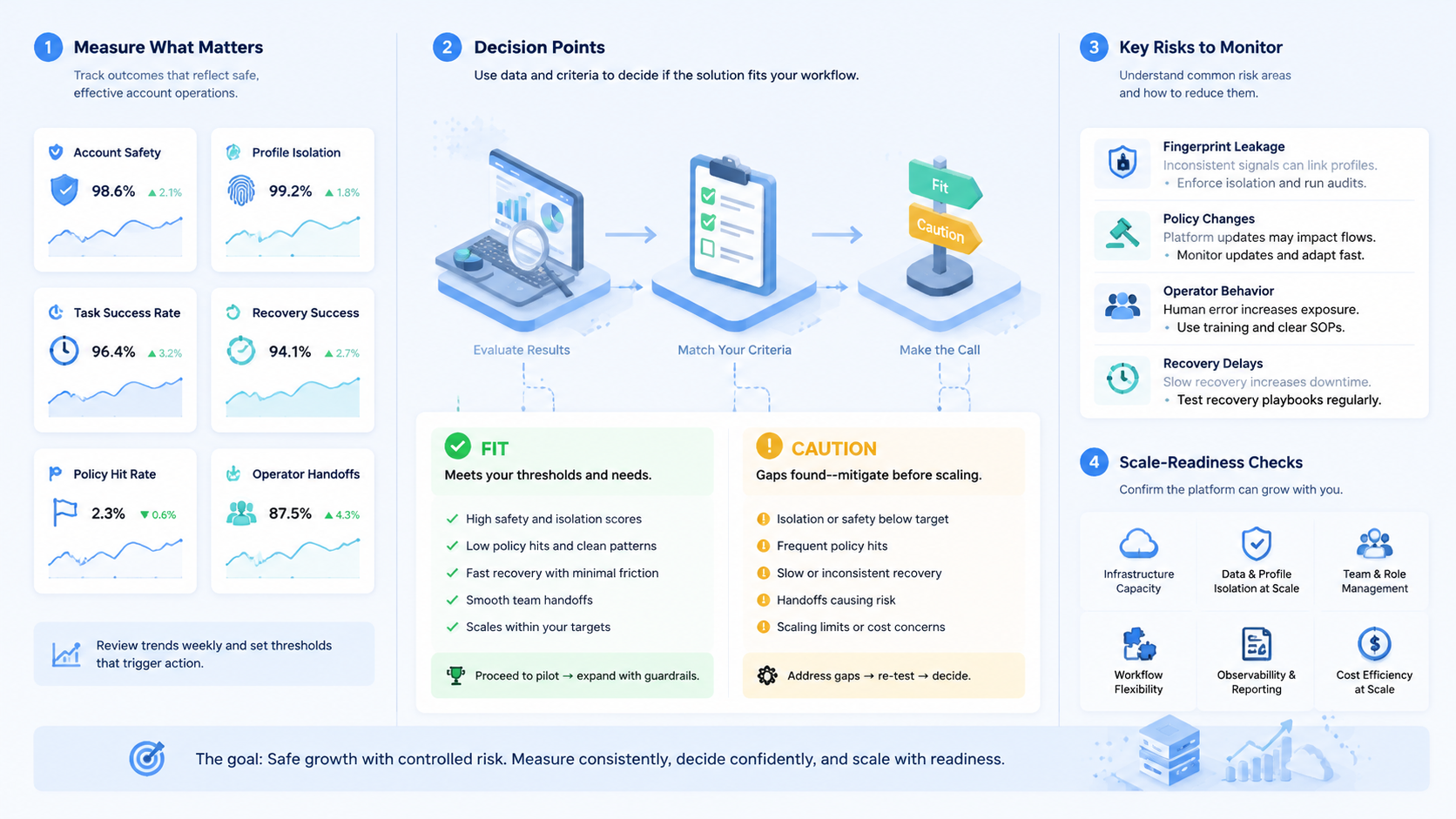
An anti-detect browser is most useful when treated as account operations infrastructure. Evaluate profile isolation, ownership, routing consistency, task logs, and recovery notes before scale.
Start with a small account group. If the pilot reduces wrong-profile work and improves handoff clarity, expand profile usage gradually. If not, fix the account map before adding more tools.



