
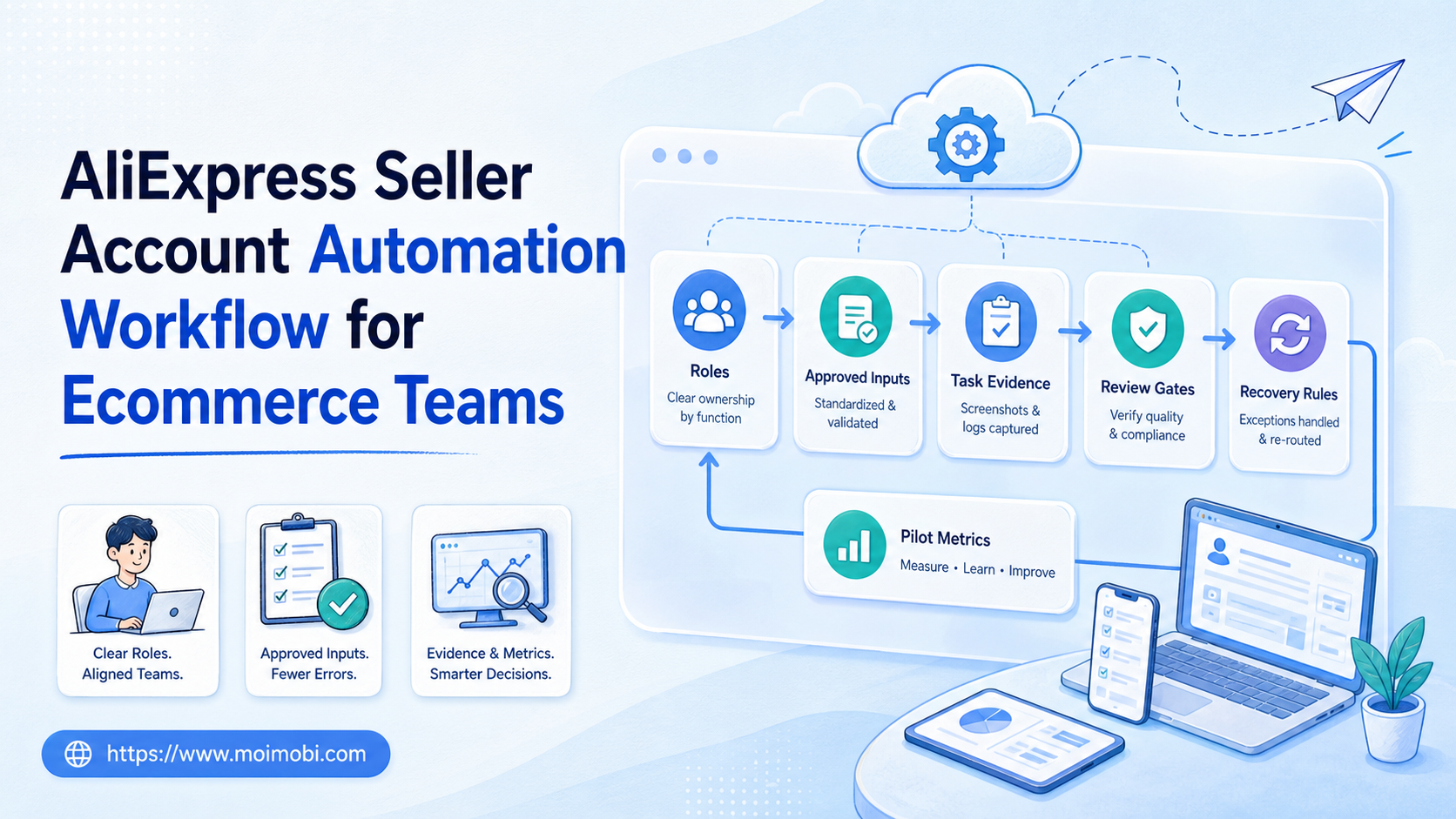
An AliExpress seller account automation workflow is a documented way for an ecommerce team to prepare, review, and record repeatable marketplace tasks. It should assign an owner, define allowed actions, preserve evidence, and stop when a task needs human judgment. The aim is reliable operations, not unattended activity or a workaround for marketplace rules.
For most teams, the useful starting point is not “automate the whole seller account.” It is a narrow workflow such as preparing a product-update checklist, routing a buyer question to the right person, collecting approved listing inputs, or producing a daily exception report. Each activity should remain subject to the marketplace’s current rules, the seller’s internal approvals, and the limits of the account role.
This guide explains how to build that operating model. It focuses on team ownership, account workspaces, task records, and recovery. It does not assume that the same method is permitted or suitable for every marketplace action.
Key Takeaways
- Start with one repeatable, low-impact seller task instead of a full account workflow.
- Separate the account owner, workflow operator, reviewer, and administrator roles.
- Record source inputs, approvals, task outcomes, and exceptions in one place.
- Keep customer-facing, financial, policy-sensitive, and deletion actions behind human review.
- Expand only after a small pilot can be reconstructed and safely paused.
The Core Idea Behind an AliExpress Seller Account Automation Workflow
The common mistake is treating automation as a single button that performs account work by itself. A workable system is closer to a controlled task lane. It receives an approved input, operates inside an assigned account workspace, follows a small set of permitted steps, and produces a result that a teammate can inspect.
That distinction matters because seller operations contain different levels of impact. A task that checks a product-data queue has a different consequence from one that changes inventory, sends a customer message, adjusts pricing, or exports order data. Combining all of them under one broad permission creates confusion when a task fails or a reviewer asks why it ran.
The W3C WebDriver specification describes a standard protocol for browser automation. A protocol is not an operations policy. Teams still need to decide which account actions are allowed, which require confirmation, and what evidence must be retained. That governance layer is where an ecommerce workflow becomes manageable.
Use a simple operating rule: the workflow may prepare, collect, check, route, or record only what its owner has explicitly approved. When a task crosses into customer communication, pricing, order handling, account settings, payment, deletion, or an unclear platform state, it should pause and escalate.
AliExpress Seller Account Automation Workflow: Start With Scope
Before selecting tools, write a one-page scope statement. It should answer five questions:
| Question | What to document | Example stop rule |
|---|---|---|
| Purpose | The business outcome and owner | The task has no approved operational purpose |
| Account role | Which seller workspace may be used | The account or market is not assigned |
| Input | Approved catalog, case, report, or content source | The source is missing or outdated |
| Allowed actions | Exact preparation, review, or reporting steps | The task requests publishing, changing, or sending without approval |
| Evidence | Task ID, owner, time, result, and exception note | A second operator cannot reconstruct the work |
Scope makes the first workflow smaller, but that is an advantage. A team can test one known path and learn where approvals or data checks are weak. It also makes handoffs clearer when several people support a marketplace operation across time zones.
Account environment is part of the scope. Use an assigned cloud phone or browser workspace only when that environment maps to a documented account role and team responsibility. Do not use shared credentials or generic sessions as a shortcut. Clear ownership is more valuable than opening more accounts at once.
Preflight Checklist for Ecommerce Account Operations
Run this checklist before the first live task:
- Name the accountable owner. The owner approves the use case and receives exception notices.
- Assign the account workspace. Record the marketplace, region, team role, and access boundary.
- Verify the input source. Use an approved catalog file, service case, report, or task brief with a version reference.
- Set approval gates. List actions that need a reviewer, such as customer replies, live listing changes, exports, or account settings.
- Define the stop route. Specify who receives a paused task and what information they need to decide next.
- Test the log. Confirm that the task record captures the input, operator, action, result, and exception without exposing secrets.
The NIST guide to log management treats useful logging as both an operational and security concern. Apply that principle to seller workflows: capture enough context to investigate a task, but do not copy passwords, tokens, or unnecessary buyer information into a shared task history.
Teams that work across browser and mobile steps should keep one task identity throughout the process. Mobile automation can be part of the same controlled flow when the work requires a mobile environment, provided that the owner, approval state, and recovery record remain consistent.
A Practical AliExpress Seller Account Automation Workflow
The first live process should have a short path from trigger to review. Consider a product-data review as an example. A category manager identifies a set of approved product changes. The workflow prepares a checklist and points to the relevant source records. A reviewer confirms the data before any material change is made. The result is then recorded as completed, rejected, or escalated.
- Receive an approved trigger. Start from a named task, a versioned product-data source, or a logged support case. Do not start from an ambiguous chat instruction.
- Open the assigned workspace. Confirm the account role and market scope before accessing the task. Stop if the expected environment is not available.
- Validate the source data. Check that required fields are present and that the source owner has approved the version being used.
- Prepare the permitted output. This might be a review queue, a draft, a change checklist, or an exception summary. Keep the task within its defined action boundary.
- Request review where required. A reviewer should approve any action that has customer, commercial, policy, or data-handling consequences.
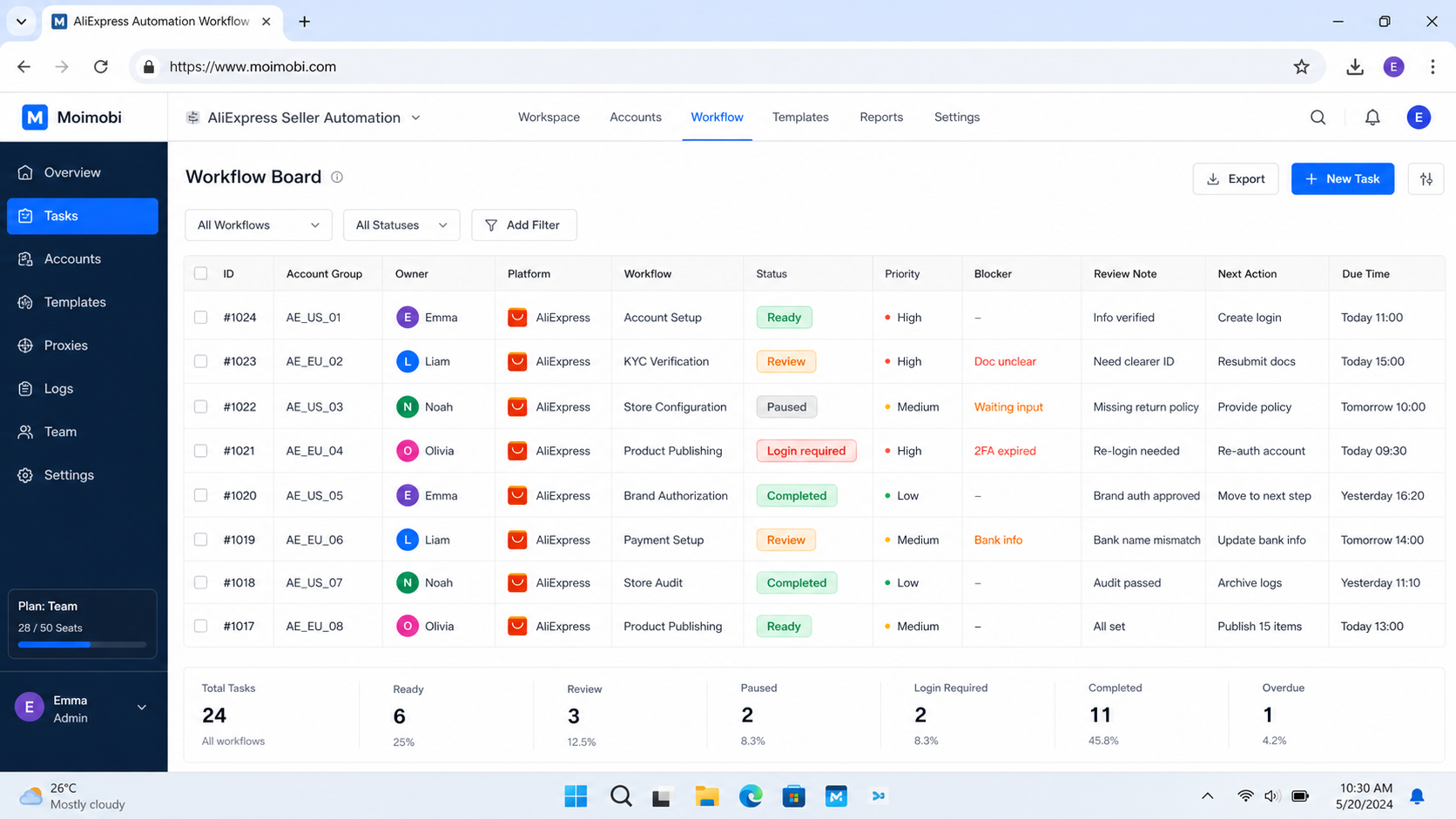
- Record the result. Save the outcome, timestamp, task owner, source reference, reviewer decision, and any exception reason.
- Close or route the task. A clean completion has a visible result. A pause has an owner and a next action, not a silent failure.
This workflow is intentionally conservative. It reduces the chance that a data-quality issue, unclear permission, or account-state change becomes an untraceable series of retries. It also gives managers a clean way to compare manual effort with the workflow’s actual contribution.
Who Benefits Most and When to Keep It Manual
- Teams with repeatable product, support, or reporting SOPs
- Named account owners and reviewers
- Approved internal source data
- Tasks that can pause without harming customers
- Unclear seller-account ownership
- Price, payment, or refund decisions with no review policy
- Customer cases that need context or discretion
- Work that depends on ignoring platform rules or consent boundaries
A growing seller team often benefits first from review queues and exception reports. These workflows reduce repeated navigation and make it easier to hand off work. They are also easier to audit than broad, unattended account actions.
Teams managing several legitimate business accounts need separate ownership and a clear view of which task ran in which workspace. Multi-account management is useful when it helps organize roles, approvals, and task evidence. It is not a reason to remove those controls.
Common Mistakes That Reduce Results
Starting with a high-impact action. Inventory changes, customer communication, pricing, exports, and account settings should not be the first automated step. Begin with preparation or reporting work where a pause is easy to handle.
Using one role for every responsibility. The workflow author, account owner, reviewer, and administrator may be the same person in a tiny team. The responsibilities should still be distinguished. Without that separation, a later handoff becomes difficult to audit.
Logging only success. A useful record includes rejected approvals, stale data, missing access, changed page states, and planned recoveries. Failure data tells the team what to tighten next.
Fixing a failure by changing everything. Preserve the original input and task record. Then adjust one variable, such as a source-data check or approval rule. A broad reset creates more uncertainty.
Treating a tool as the policy. The tool may execute permitted steps, but the business owner defines the purpose, access, data boundary, and stop rule. The OWASP Logging Cheat Sheet similarly emphasizes event context and careful handling of sensitive data; a log is useful only when it supports a real investigation.
Pilot Rollout, Measurement, and Recovery Checks
Do not judge a pilot only by the number of tasks completed. Start with a limited account role, one workflow version, and a fixed set of approved inputs. Record the baseline manual steps before the pilot so the team has something concrete to compare.
During the pilot, measure four things: task completion quality, review time, exception rate, and recovery clarity. Completion quality asks whether the result was usable without rework. Review time shows whether the approval gate is appropriately scoped. Exception rate exposes missing data or unclear instructions. Recovery clarity tests whether the next owner can act without guessing.
Run at least one deliberate pause test. Use a missing approval, a stale source version, a role mismatch, or an unexpected page state. The expected result is not “the system keeps trying.” The expected result is a clear stop, a task record, and a route to the right decision-maker.
Device isolation may help keep assigned workspaces distinct, but it does not replace a recovery plan. A team still needs to decide who owns an exception and when a workflow may resume.
Verification Checklist Before Expansion
Before adding another account role or task type, confirm each point below:
- The team can identify the owner, workspace, input, approval, and outcome for a completed task.
- A different operator can reconstruct a paused task from the record.
- The workflow stops on missing approval, wrong workspace, stale source data, or an unexpected state.
- Sensitive credentials and unnecessary customer details are not stored in general task logs.
- The pilot has a clear limit, rollback point, and review date.
- The next workflow is materially similar enough to reuse the same controls.
When any answer is no, improve the current workflow before expanding. That is usually faster than adding a second unreliable process and untangling both later.
Frequently Asked Questions
Is an AliExpress seller account automation workflow suitable for a new seller?
New sellers can start with internal checklists, approved content preparation, or reporting. Keep live account changes and customer-sensitive actions under human review until the process is stable.
Can the workflow send customer messages automatically?
Only if the marketplace’s current rules, the seller’s consent practices, and the team’s review policy allow it. Ambiguous or sensitive messages should route to a person.
What is the first task worth automating?
Choose a frequent, low-impact task with clear inputs and a visible outcome. Product-data checks, exception summaries, and review queues are often easier to control than high-impact changes.
Should every seller account use the same workflow?
No. Reuse a common control pattern, but document each account role, market scope, owner, permissions, and approval path separately.
What should the task record include?
Include a task ID, workflow version, owner, workspace reference, source input, action, result, reviewer decision, time, and exception note. Keep secrets out of the record.
How do we know the pilot worked?
The team can reconstruct normal and paused runs, identify the next owner, and compare the task result with the earlier manual process.
When should a task be paused?
Pause when the owner is unclear, an approval is missing, data is stale, the workspace does not match the task, or the intended action may exceed the approved scope.
Conclusion
The right order for an AliExpress seller account automation workflow is simple: define the task, assign ownership, approve the input, run a limited path, record the outcome, and test the pause route. Start with preparation, review, or reporting work. Add higher-impact actions only after the team can explain and recover each step.
This approach makes automation a dependable operating capability rather than an opaque account activity. The best next step is to select one existing seller SOP, write its scope and stop rules, and test it with a small approved task set.



