
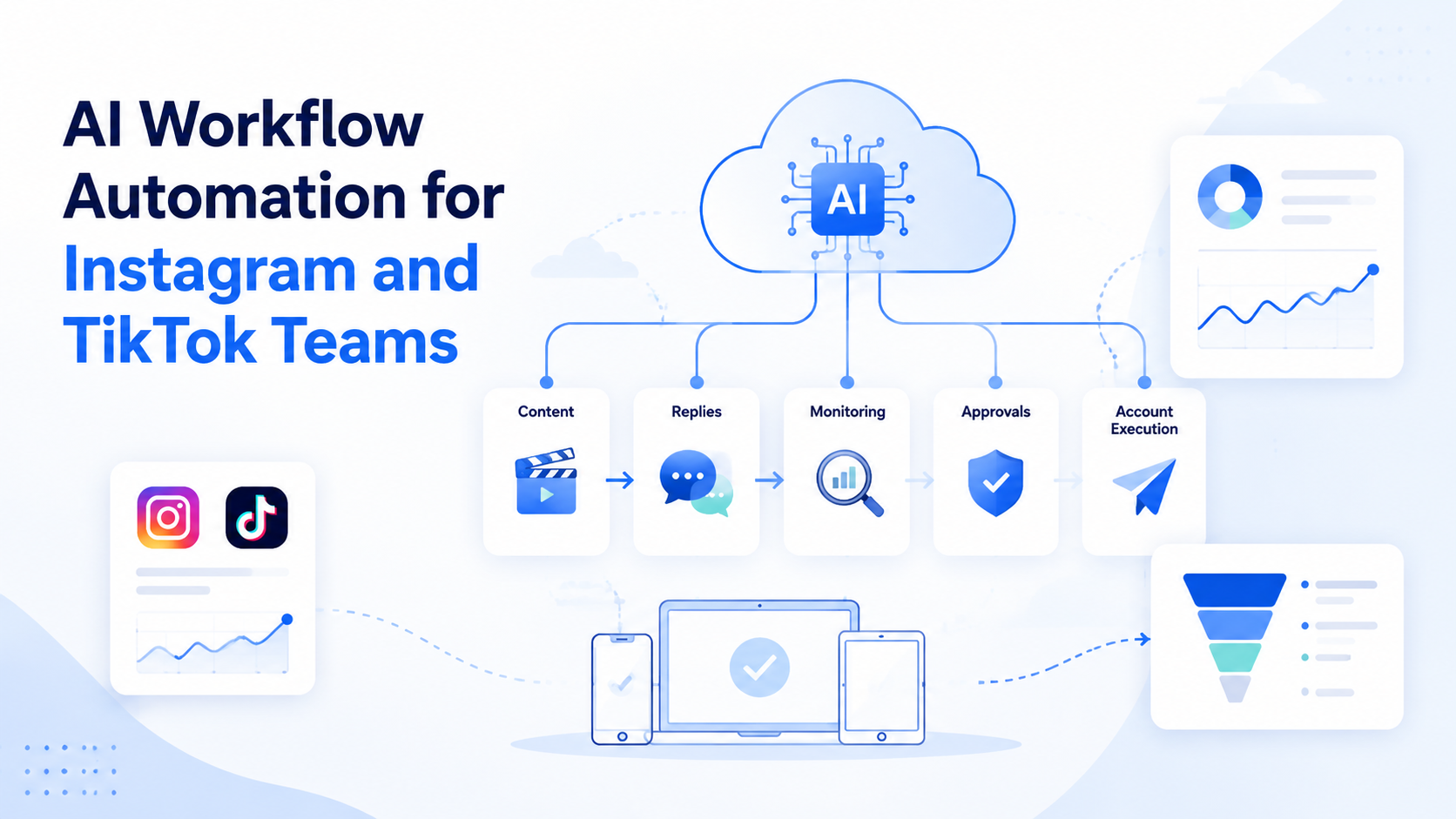
AI workflow automation is the use of AI-assisted planning, content preparation, task routing, execution environments, and review rules to run repeatable work. For Instagram and TikTok teams, the point is not to hand every decision to AI. The point is to organize the repeated work around content, accounts, replies, monitoring, and reporting.
Social teams often outgrow simple task lists. They need to prepare posts, check comments, route customer messages, monitor competitors, collect evidence, and report campaign results. When several accounts and operators are involved, the workflow becomes harder to control than the content itself.
Moimobi treats this as an execution problem. Teams can connect an AI browser and cloud phone platform, separated account environments, mobile execution, and workflow tracking. AI helps prepare the work. The execution layer decides where the work runs and when a human must review it.
Key Takeaways
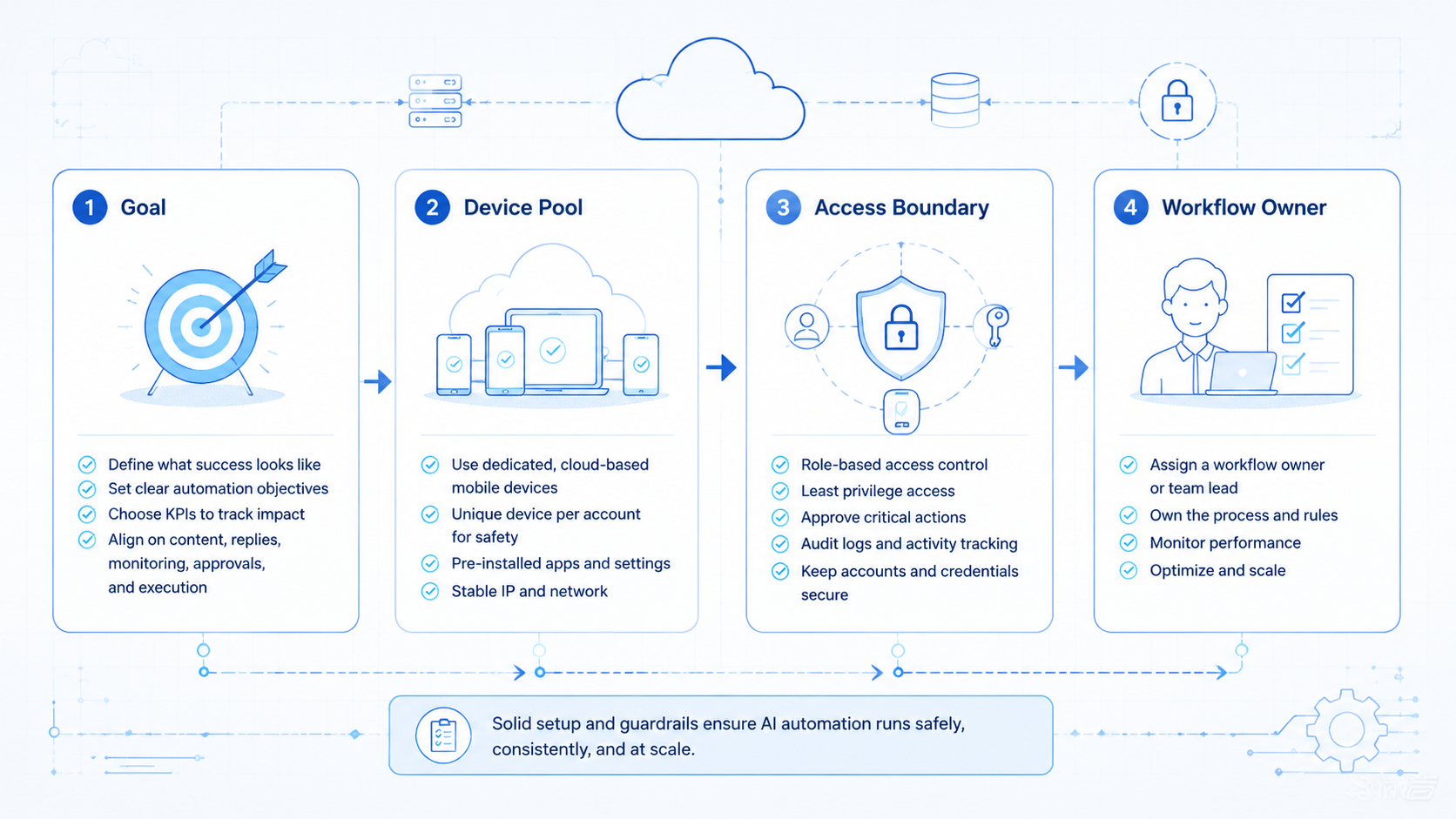
- AI workflow automation should connect AI planning with real browser or mobile execution.
- Instagram and TikTok teams need account mapping, approval gates, and recovery logs.
- The best first workflows are repeatable checks, draft preparation, and report collection.
- Public actions need stronger review than internal research or reporting.
- A pilot should measure completion rate, reviewer edits, exceptions, and account hygiene.
What Is AI Workflow Automation for Instagram and TikTok Teams?
AI workflow automation for Instagram and TikTok teams combines task planning with controlled execution. The AI layer may draft captions, summarize comments, classify messages, create task plans, or turn a campaign brief into steps. The execution layer runs those steps through browser profiles, mobile devices, cloud phones, or official platform paths.
The workflow is different from a standalone prompt. A prompt produces an answer. A workflow defines inputs, account assignment, execution path, approval rule, output, and recovery behavior.
For example, a daily monitoring workflow may:
- open assigned account workspaces;
- collect new comments and messages;
- classify urgent items;
- draft reply options;
- ask a human to approve sensitive responses;
- store the result in a report.
Browser automation standards such as W3C WebDriver and tooling such as Playwright's browser contexts show why controlled sessions and isolated contexts matter. AI workflow automation adds business intent and review logic around that control.
Why AI Workflow Automation Matters
Instagram and TikTok operations are not only creative work. They also include routine execution. A team may need to move approved assets, check account state, reply to common questions, collect public examples, and update internal trackers.
AI workflow automation matters because it turns repeated work into a visible process. Instead of relying on one operator's memory, the team defines a runbook. The runbook can be repeated, reviewed, and improved.
This does not remove platform responsibility. Meta's inauthentic behavior policy warns against deceptive identity and coordinated misuse. TikTok's Content Posting API documentation also shows that official publishing flows have defined permissions and scopes.
The practical lesson is simple. Use automation to make approved work more consistent. Do not use it to hide identity, fake engagement, or bypass rules.
Operating Model for Instagram and TikTok Teams
Teams need a model that separates planning, execution, and review. When those layers blur, operators start using private notes, copied prompts, and ad hoc browser tabs. That works for a short period, but it breaks when more accounts or campaigns enter the queue.
A stronger model assigns one owner to each account workspace. It also assigns one workflow owner for each task type. For example, a content operator may own asset readiness, while a support operator owns reply review. The automation then moves work between clear roles instead of creating a hidden process.
The operating record should show five fields for every run:
- account workspace;
- task type;
- input source;
- reviewer;
- final status.
Those fields make AI workflow automation easier to inspect. They also help managers understand whether delays come from missing assets, unclear instructions, review overload, or account environment issues.
Key Benefits and Use Cases
The first benefit is fewer handoff gaps. Content, account, reviewer, and task status can live in one workflow. That helps teams avoid the common problem where a video is approved, but no one knows which account should publish it.
The second benefit is faster preparation. AI can draft captions, reply options, report notes, and campaign checklists. Human staff can spend more time deciding what is correct, not formatting repetitive text.
The third benefit is cleaner account operations. A team can pair multi-account management with execution rules. Each account gets a workspace, task queue, owner, and review status.
Common use cases include:
- caption and hashtag draft preparation;
- comment triage and reply drafting;
- competitor content monitoring;
- campaign report collection;
- post-publish checks;
- account notification review;
- customer follow-up routing.
Teams with mobile-first tasks should also evaluate mobile automation. Instagram and TikTok workflows may involve mobile app surfaces that a browser-only workflow cannot cover well.
How to Get Started with AI Workflow Automation
Start with one workflow that already happens every week. Good pilots include comment triage, campaign reporting, competitor monitoring, or content readiness checks. Avoid starting with complex outbound messaging or sensitive customer support.
- Write the SOP. List the exact input, account, action, reviewer, and output.
- Choose the environment. Decide whether the task belongs in a browser profile, mobile device, cloud phone, or official API route.
- Add approval rules. Public posts, replies, and account-setting changes should require review.
- Log each run. Record completion, skipped steps, reviewer edits, errors, and next action.
- Review after a week. Keep workflows that save time and remove ones that create extra checking work.
This path keeps the first rollout narrow. It also gives the team a useful comparison between manual execution, scripted automation, and AI-assisted workflow automation.
For the first month, choose tasks where a failed run will not create public damage. Report collection, comment classification, and draft preparation are safer than automated posting or outbound messaging. After the team understands the exception patterns, it can move carefully toward workflows with more public impact.
This staged approach gives the team a clean baseline. It shows which steps are ready for automation and which ones still need clearer ownership.
Common Mistakes to Avoid
The first mistake is automating before the process is clear. If operators do not agree on account ownership, brand voice, approval standards, or escalation rules, AI will not fix the workflow. It will simply move confusion faster.
The second mistake is treating every task as an execution task. AI can prepare a reply, but a human should review sensitive customer conversations. AI can collect competitor examples, but a marketer should decide the campaign response.
The third mistake is using one shared environment for many accounts. Shared sessions make it harder to trace errors and recover from account changes. Moimobi's device isolation is designed for teams that need cleaner account workspaces.
Another common problem is weak exception handling. A workflow should stop when login state changes, permissions fail, content is missing, or the platform UI changes. A silent failure creates more work than manual operation.
Who It Fits and When It Is a Strong Match
AI workflow automation fits teams that already run repeated Instagram and TikTok operations. It is useful for agencies, cross-border sellers, creator teams, and customer engagement teams with recurring account work.
Repeated content preparation, comment triage, report collection, monitoring, and account checks.
Public replies, creator outreach, promotional claims, account settings, and customer complaints.
One-off strategy work, unclear brand direction, no account ownership, or workflows that change daily.
The fit improves when the team has a content library, account map, approval policy, and reporting habit. Without those basics, automation may create more coordination work.
For TikTok-heavy teams, the cloud phone for TikTok workflow is worth evaluating when mobile context matters. For broader social teams, social media marketing workflows should connect content, execution, replies, and reporting.
Pilot Rollout, Measurement, and Recovery Checks
A pilot should answer one question: does the workflow make real operations easier to run and inspect? It should not only show that AI can produce text or click through a page.
Track five practical metrics:
- Completion rate: how many workflow runs finish without repair.
- Reviewer edits: how much human correction the AI output needs.
- Exception reason: missing asset, login issue, unclear instruction, permission issue, or platform change.
- Account hygiene: whether work happened in the correct account workspace.
- Business value: whether the output helped a campaign, reply queue, or report.
Recovery checks are just as important. If a workflow fails, the team should know what happened and what to do next. The output should not be a vague "failed" label. It should state the stop reason, account, step, and suggested next action.
Use the pilot to refine the task, not only the prompt. Better instructions help, but better account mapping, cleaner inputs, and clearer approval rules usually matter more.
Frequently Asked Questions
Is AI workflow automation the same as a social media scheduler?
No. A scheduler controls timing. AI workflow automation can prepare content, route tasks, assign accounts, draft replies, collect reports, and manage review steps.
Can AI workflow automation publish to Instagram and TikTok?
It can support publishing workflows when permissions, execution routes, and approval rules are defined. Teams should use official routes where they fit.
What should stay human-led?
Brand judgment, sensitive replies, customer complaints, creator outreach, and final campaign decisions should stay human-led.
Does this require cloud phones?
Not for every workflow. Browser tasks may be enough for some teams. Mobile-first workflows may need cloud phone environments.
How should a team choose the first workflow?
Choose a repeated task with clear inputs and low public risk. Reporting, monitoring, and draft preparation are good first candidates.
What is the biggest rollout mistake?
The biggest mistake is automating an unclear process. Define account ownership, task steps, review rules, and stop conditions first.
How do teams measure success?
Measure time saved, reviewer edits, completion rate, exception reasons, and whether the output supports a real business action.
Can this replace human social media operators?
Usually no. It changes what operators spend time on. Humans still own judgment, review, escalation, and strategy.
Conclusion
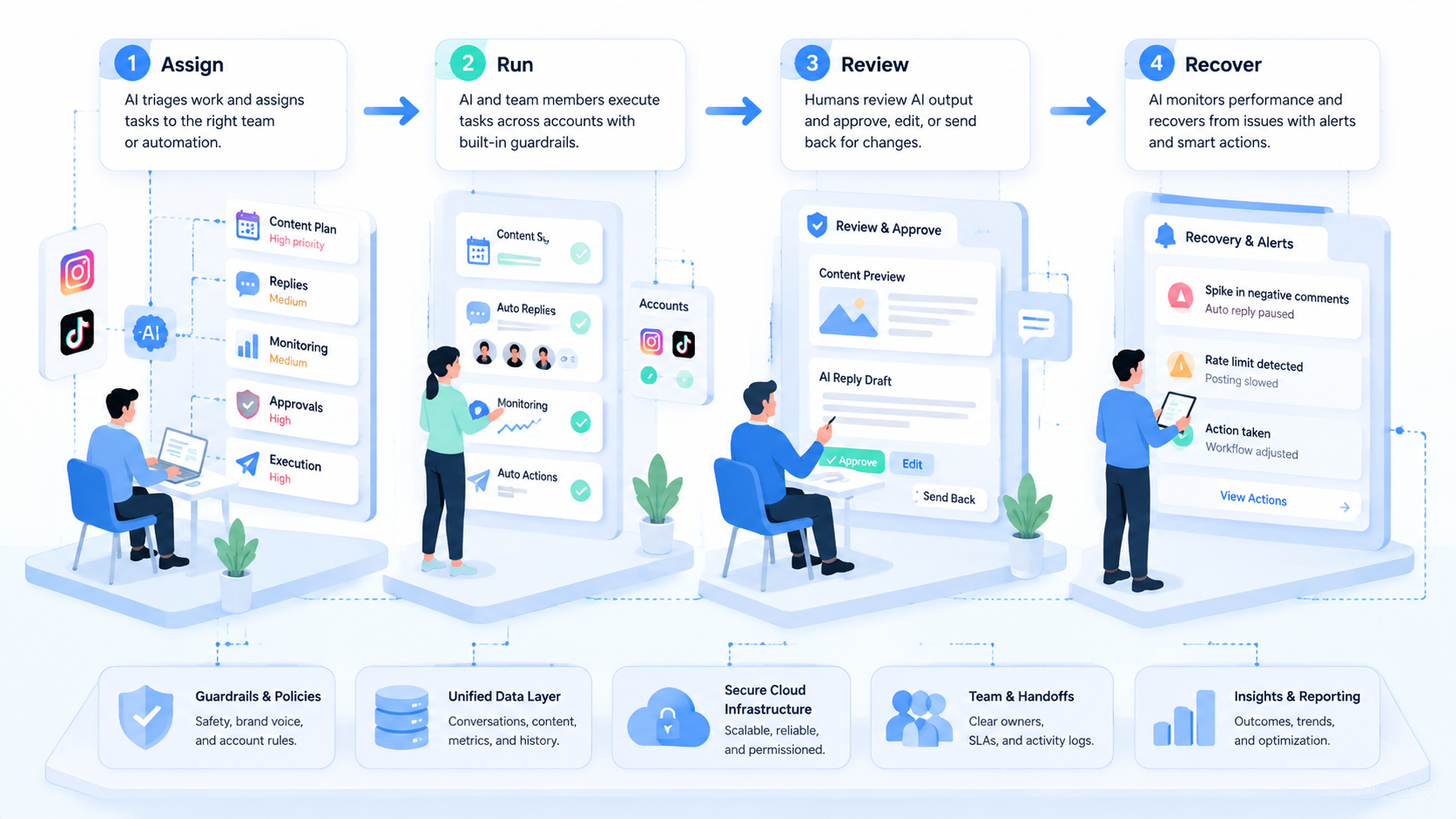
AI workflow automation works best when Instagram and TikTok teams treat it as an operating layer. AI prepares work, execution environments run controlled tasks, and humans review decisions that affect public accounts.
Start with one repeated workflow. Map the account, input, execution path, reviewer, output, and recovery rule. If the pilot improves visibility and reduces repetitive work, expand into more accounts and mobile execution capacity.



