
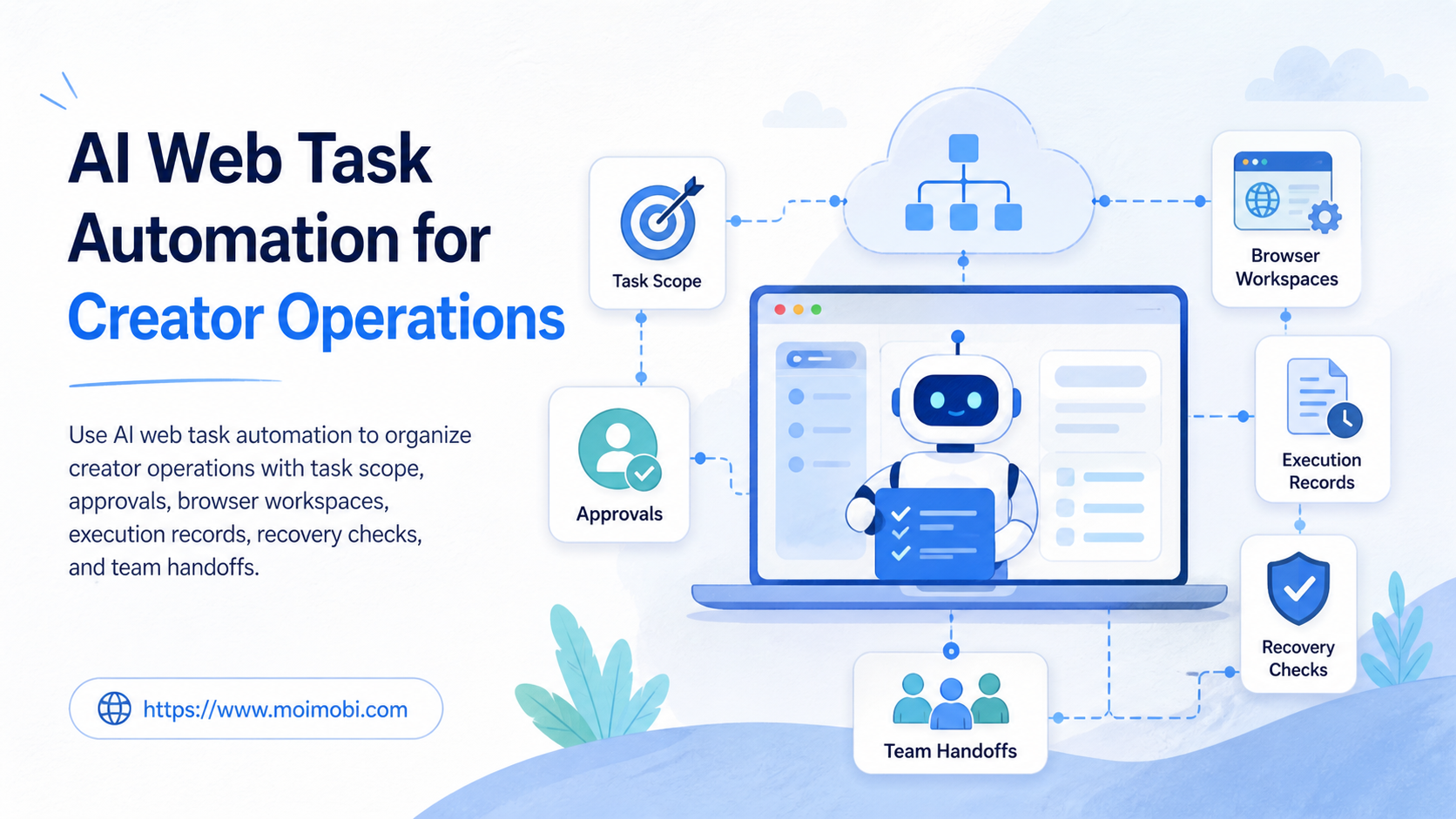
AI web task automation is the use of AI-assisted planning and controlled browser workflows to prepare, route, and record recurring web work. For creator operations, it can help teams manage content research, asset handoffs, publishing preparation, comment triage, and reporting without making every decision automatic.
The operating rule is simple: AI can assist with repeatable preparation, but a team still needs an owner, an approved action, and a record of the outcome. Creator work often crosses accounts, platforms, clients, and collaborators. A clear workflow prevents a useful tool from becoming a collection of unreviewable browser actions.
When a cloud phone or browser environment is part of the work, assign it to a task lane rather than treating it as shared capacity. That makes it possible to explain which account context was used, who owned the task, and what happened when the workflow paused.
Key takeaways
- Use AI to prepare and route defined work, not to erase approval boundaries.
- Keep the account, task owner, environment, and outcome in the same record.
- Separate routine creator tasks from decisions that require client, brand, or policy review.
- Test handoffs and recovery before expanding an automation workflow.
What AI Web Task Automation Controls
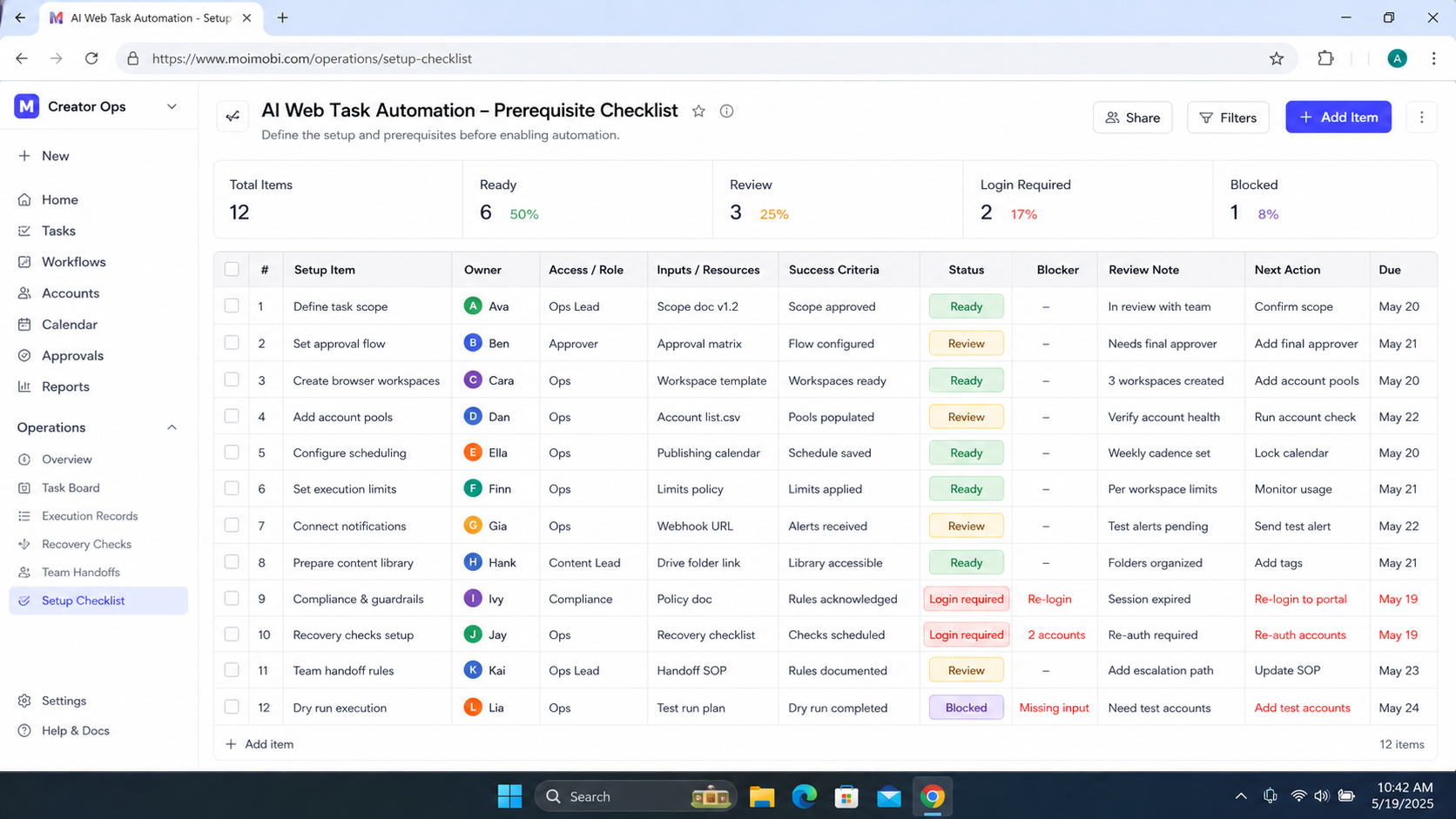
AI web task automation controls the operating sequence around a web task. It can classify an incoming request, prepare a draft checklist, suggest a next action, populate a task record, and route the task to an approved owner. The team decides which actions can proceed automatically and which must stop for review.
For example, a creator team may receive a request to update a campaign landing page, organize a content brief, or prepare a publishing package. AI can summarize the request and gather the required fields. A named reviewer still confirms the campaign scope, account lane, and final action before anything important changes.
The W3C WebDriver specification describes browser automation as a standard protocol for remote browser control. Its technical lesson is useful for operations teams: a browser action is an execution capability, not a substitute for authorization. See the W3C WebDriver Recommendation for the standard's official definition.
| Workflow layer | AI-assisted role | Human or policy control |
|---|---|---|
| Task intake | Classify request and collect missing fields | Confirm business scope and task owner |
| Preparation | Draft checklist, copy outline, or research summary | Approve claims, rights, and client-facing content |
| Execution | Route an approved task to its workspace | Confirm allowed action and account context |
| Review | Summarize result and flag missing evidence | Decide follow-up, correction, or escalation |
Build the Task Record Before Automating the Browser Step
The task record is the bridge between an AI suggestion and a real operational action. At minimum, record the request source, intended result, account or client scope, owner, approval state, assigned environment, and completion evidence. Avoid placing passwords, tokens, or unnecessary private data in the record.
This structure solves a common creator-operations problem. Without it, the team may know that a browser task occurred but not why it occurred or whether it matched the approved brief. A record gives the next collaborator a reliable starting point.
For teams handling several account lanes, a multi-account task ownership model can keep creator, client, and platform responsibilities separate. The purpose is clarity during handoff, not an attempt to hide account relationships or bypass platform controls.
A Practical AI Web Task Automation Workflow
- Define the task class. Identify whether the work is research, preparation, publishing support, comment review, reporting, or another approved category.
- Collect the required context. Add the client or account lane, asset reference, due date, owner, and expected output.
- Set the approval boundary. State whether the task can proceed, needs a reviewer, or must pause for missing information.
- Assign the workspace. Link the approved browser or mobile environment to the task rather than asking an operator to choose one informally.
- Execute the defined action. Keep the action within the approved scope and record the actual result.
- Verify the outcome. Confirm the result reference, unresolved issue, and next accountable person.
Start with a narrow workflow. A good first candidate is a task that repeats often but still requires human approval, such as preparing a creator brief for review or collecting a weekly list of content comments that need a response owner. Avoid starting with a vague instruction such as “manage the channel.”
AI Web Task Automation for Creator Operations: Fit and Limits
The approach fits teams with recurring web work, shared editorial calendars, client approvals, or several creators who need one operating record. It can also help a small team reduce the time spent translating unstructured requests into a clear task.
It is not a fit for actions that lack a valid business purpose, account authorization, or content rights approval. It is also not a substitute for a creator's judgment on brand voice, audience sensitivity, or a client commitment. AI can surface a decision; it should not silently make the decision beyond the agreed scope.
Recurring creator workflows with named owners, standard inputs, review points, and a defined result that another teammate may need to inspect.
New client commitments, sensitive audience responses, rights questions, policy notices, or actions where the team cannot state a permitted next step.
An account-specific browser workspace can support teams that need a clear separation between operating lanes. It supports an accountable workflow; it does not make an unauthorized task acceptable.
Common Mistakes in Creator Web Workflows
The first mistake is automating a browser click before defining the task evidence. The task may appear finished, yet the team cannot tell which content version, account, or approval was used. Write the completion record before adding the execution step.
Another mistake is letting AI-generated drafts move directly into public-facing work. A draft may be useful, but a reviewer still needs to verify factual claims, client scope, rights, and platform settings. Treat generated content as preparation unless the workflow explicitly allows a different state.
Teams also create rework when exceptions stay in chat. A missing asset, unclear account access, or policy question should change the task status to paused or review-required. The exception should not be left to the next operator to discover.
The OWASP Logging Cheat Sheet is a useful reference for the recordkeeping principle: logs should support investigation while avoiding exposure of sensitive data. Apply that principle to task outcomes, access notes, and exception records.
Permissions and Human Takeover Rules
Define permissions by task type rather than by a broad label such as “automation access.” A researcher may prepare a content summary but not publish. A publishing operator may submit an approved package but not change a client commitment. A reviewer may approve a sensitive response but not take over every routine task. These distinctions make the workflow easier to audit and simpler to hand off.
Human takeover needs an explicit trigger. Useful triggers include an unclear brief, a changed asset version, a client request outside the task scope, a platform notice, a rights question, or a browser step that produced an unexpected state. The operator should pause the task and record the condition instead of continuing through uncertainty.
The takeover record should contain the original task reference, the point where work stopped, available evidence, the reviewer assigned, and the expected next decision. This keeps the exception connected to the workflow. It also prevents a reviewer from having to reconstruct the situation from browser history alone.
Teams should review takeover events in a regular operating meeting. If the same reason appears repeatedly, the task template is missing a field or the SOP needs a clearer boundary. A repeatable exception is not just an interruption; it is evidence about where the workflow design is incomplete.
Preflight Checklist for Creator Web Tasks
Before an AI-assisted web task enters an execution queue, confirm the following points:
- Purpose is clear. The task states the business or creator outcome, not only the browser action.
- Scope is approved. The client, account, content version, and permitted action are present.
- Owner is named. One person is responsible for the next decision and the final record.
- Environment is assigned. The task points to the approved browser or mobile operating lane.
- Stop rule exists. The operator knows which conditions require human review before continuing.
- Evidence is defined. The workflow states what link, note, or result must be saved at completion.
The checklist takes only a few moments when task templates are well designed. Its value is avoiding a much longer recovery cycle after an operator has acted on incomplete information. It also gives a new team member a consistent way to decide whether they may begin work.
Reporting and Workflow Review
Creator teams need reports that describe the operating state, not just completed volume. A weekly report can list active task classes, completed records, paused items, approval waits, handoff gaps, and recurring exception reasons. That is enough for a workflow owner to identify where the process needs attention.
Use the report to distinguish capacity questions from quality questions. A backlog may mean the team needs another operator or more time. Repeated pauses may mean the brief lacks an approval rule. Failed verification may mean the completion evidence is not defined. Each signal leads to a different correction.
Keep reporting tied to the workflow rather than to individual surveillance. The goal is to improve task design, ownership, and recovery. A team that can see its process clearly can make measured changes without relying on anecdotal recollections.
Pilot Rollout, Measurement, and Recovery Checks
Run a pilot on one workflow for one creator team or client lane. Choose a process with a clear start and finish. During the pilot, measure missing task context, approvals requested after work began, handoffs requiring private explanations, and repeated exceptions.
Perform a recovery check after an interruption. A qualified teammate should be able to identify the task purpose, account lane, current owner, approved action, completed evidence, and next step without reopening an old chat thread. If they cannot, revise the task fields or SOP before expanding the workflow.
For tasks that include app-side work, a defined mobile task lane can keep the execution environment connected to the operating record. The team should continue to use normal platform access methods and follow applicable terms.
Operational Metrics That Improve the Workflow
Use operational metrics that show whether the team can govern the workflow. Useful starting measures include tasks missing an owner, tasks with no approval reference, tasks completed without outcome evidence, exceptions repeated more than once, and time needed to resume a paused item.
Do not rely only on the number of automated tasks. A high count can hide incomplete approvals or unclear ownership. The more meaningful question is whether the team can explain what each task was intended to do and why the recorded result was acceptable.
Review the measures with the workflow owner. If the same issue appears repeatedly, change the template, stop rule, or approval boundary. That makes automation a process-improvement tool rather than an additional source of operational noise.
FAQ: AI Web Task Automation for Creator Operations
Can AI web task automation publish content without a person reviewing it?
Only if the workflow explicitly permits that narrow action and the content is already approved. New claims, rights changes, client requests, and sensitive responses should have a human review path.
What is the first task type to automate?
Start with a recurring preparation or routing task that has stable inputs and a clear output. Content briefing and comment triage are often easier pilots than public posting.
Does browser automation replace creator judgment?
No. It can organize repetitive work and record results. Creators and accountable managers still decide on brand, audience, rights, and client commitments.
What should be in the task record?
Include scope, account lane, owner, approval state, assigned workspace, result evidence, exception note, and next action.
How do teams handle a failed web task?
Pause the task, preserve the relevant context, and assign a recovery owner. Do not repeat an unclear action without understanding the failure state.
Can several creators share one workflow?
Yes, when each task has a named owner and the account or client boundary remains visible. Shared work should not mean shared ambiguity.
How do we know the pilot is ready to expand?
Expand when another qualified teammate can resume a paused task from its record, exceptions have an owner, and the workflow has a reliable review point.
Conclusion
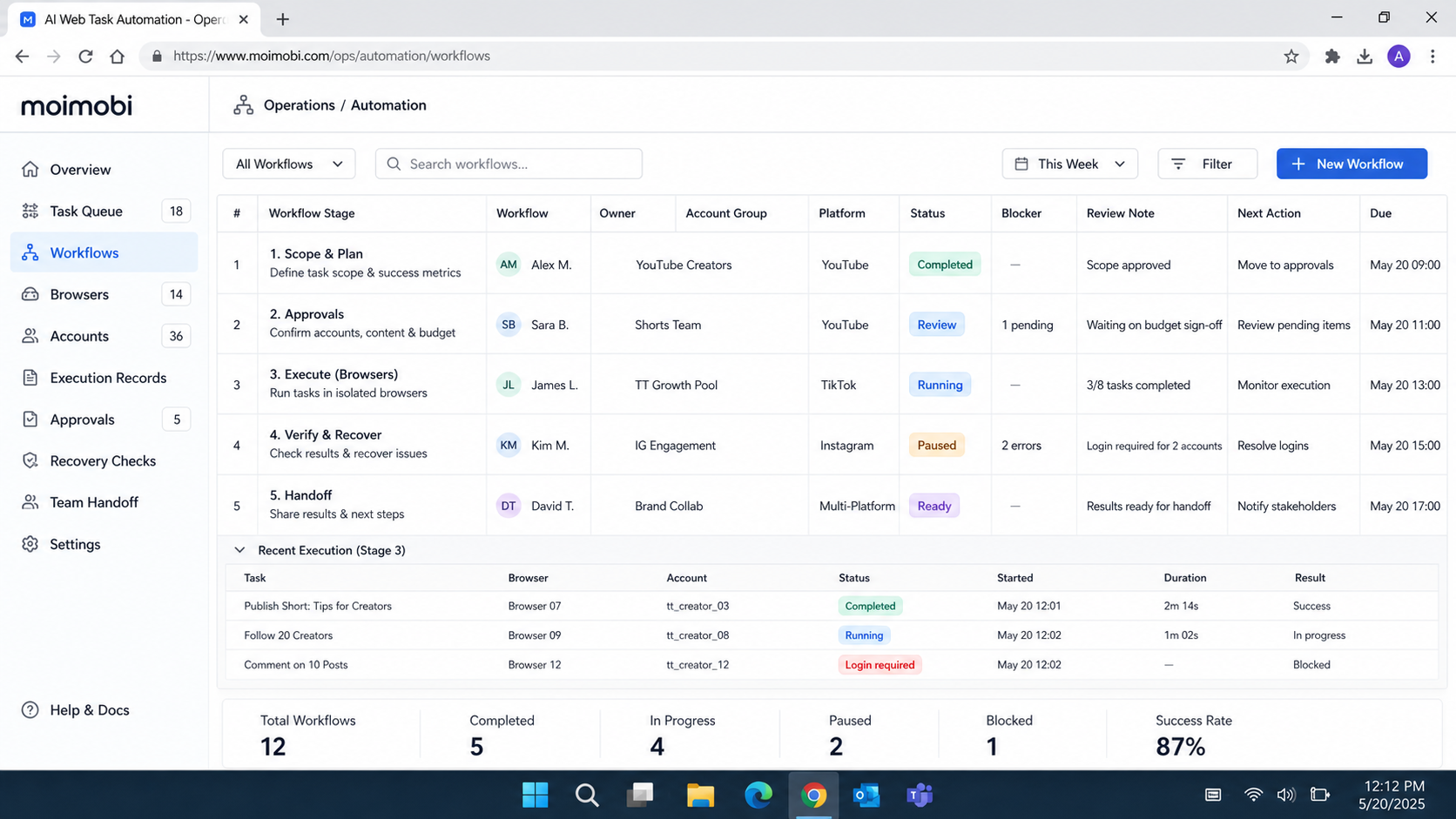
AI web task automation for creator operations is useful when it turns repeated web work into an accountable system. Define the task, collect the context, set the approval boundary, assign the environment, record the result, and make recovery possible.
Begin with one narrow workflow and review real handoffs. Expand only when the team can show that its automation preserves ownership, client scope, and operational evidence rather than obscuring them.


