
An AI social media worker is a digital operator that helps agencies prepare, execute, review, and report repeated social media tasks. It is not just a chatbot. The useful version connects AI planning with account workspaces, browser sessions, mobile environments, review queues, and task records.
Agencies need this category when client work becomes operationally heavy. A strategist may plan the campaign. A creator may prepare assets. An operator may publish or check comments. A reviewer may approve replies. The AI worker should reduce repeated execution work while keeping people in charge of judgment.
Moimobi supports this model as an AI browser and cloud phone platform. It connects multi-account management, social media marketing, mobile automation, and separated account environments.
Key Takeaways
- An AI social media worker should execute defined workflows, not replace agency strategy.
- Agencies need account ownership, review rules, and reporting before scaling automation.
- Browser and mobile environments matter when client work happens inside real accounts.
- Human review should remain in public replies, sensitive comments, and client-facing decisions.
- A pilot should measure completed work, review quality, failures, and handoff clarity.
- Moimobi fits agencies that need execution infrastructure across browser and mobile accounts.
What Is an AI Social Media Worker?
This role-based automation unit supports social operations. It can draft captions, prepare replies, collect account status, open queues, organize assets, and update reports.
The role should be narrow. A good worker has a named account, task type, environment, review rule, and success state. Without those fields, the AI becomes a general assistant with no clear operating boundary.
Browser automation standards help explain the execution side. The W3C WebDriver specification describes remote browser control through a platform-neutral protocol. For agencies, the lesson is that browser work should be visible and auditable.
Mobile execution adds another layer. AWS Device Farm describes cloud-based real-device app testing. Agencies are not running the same testing workflow, but client social work also benefits from controlled device access and clear ownership.
Why Agencies Need AI Workers Instead of More Tools
Agencies often have too many tools and too little execution structure. Content calendars, design tools, inbox tools, dashboards, spreadsheets, and client chats all hold part of the workflow.
The worker becomes useful when it connects those parts into repeated tasks. For example, it can prepare a campaign checklist, open the right account workspace, collect comments for review, and update a report after a task is complete.
The difference is ownership. A generic AI tool may produce text. A worker should have a role, queue, and environment. That turns AI into an operations layer instead of another tab.
Official platform documentation also matters. TikTok documents a Content Posting API for approved posting integrations. Meta provides the Instagram Platform for creator and business workflows. Agency workflows should respect official routes and add internal control around them.
Core Jobs for an Agency AI Social Media Worker
| Worker job | What it handles | Human checkpoint |
|---|---|---|
| Publishing assistant | Prepares assets, captions, and account queues | Final campaign approval |
| Reply assistant | Classifies comments and drafts response options | Public reply review |
| Monitoring assistant | Collects account or competitor observations | Insight interpretation |
| Reporting assistant | Updates task status and campaign records | Client narrative review |
| Operations assistant | Tracks failures, owners, and handoffs | Process improvement |
This model keeps the worker grounded. It does not ask one AI to run the whole agency. It assigns repeated jobs with clear review points.
Moimobi helps when those jobs need real execution environments. Browser profiles can support dashboard work. Cloud phones can support mobile-first account workflows.
Concrete Agency Scenarios
Specificity matters because agencies rarely fail from a lack of ideas. They fail when repeated client work has unclear owners, weak handoffs, or missing evidence.
Consider a small agency managing eight TikTok and Instagram accounts for three clients. The publishing assistant can prepare daily content queues, check whether captions match the approved campaign theme, and flag missing assets. The human reviewer approves final copy before anything goes live.
For a customer reply workflow, the worker can collect comments from active campaign posts, group them into product questions, complaints, praise, spam, and lead signals, then draft reply options. The reviewer decides which drafts are safe to publish and which comments need escalation to the client.
For reporting, the worker can collect completed task records from the day: accounts checked, posts reviewed, comments classified, replies approved, escalations opened, and failures logged. The account manager then turns that operating data into a client-facing summary.
Each scenario has a concrete boundary. The worker does not decide the brand strategy. It does not invent platform policy. It does not remove approvals from public responses. It performs repeated steps, keeps context attached, and records what happened.
Required Fields for Each Worker
Every AI social media worker should be configured with a small set of fields before it touches client work:
| Field | Example | Why it matters |
|---|---|---|
| Client scope | Client A Instagram and TikTok accounts | Prevents cross-client confusion |
| Task type | Comment collection for review | Keeps the worker narrow |
| Environment | Assigned browser profile or cloud phone | Connects work to the right account context |
| Review rule | Human approval before public replies | Protects brand and support quality |
| Success state | Queue updated and unresolved comments logged | Makes completion measurable |
| Failure reason | Missing asset, login issue, unclear instruction | Improves the next workflow cycle |
These fields turn a vague AI instruction into an operational unit. They also make it easier to add a second worker later without mixing roles.
How to Set Up the First Worker
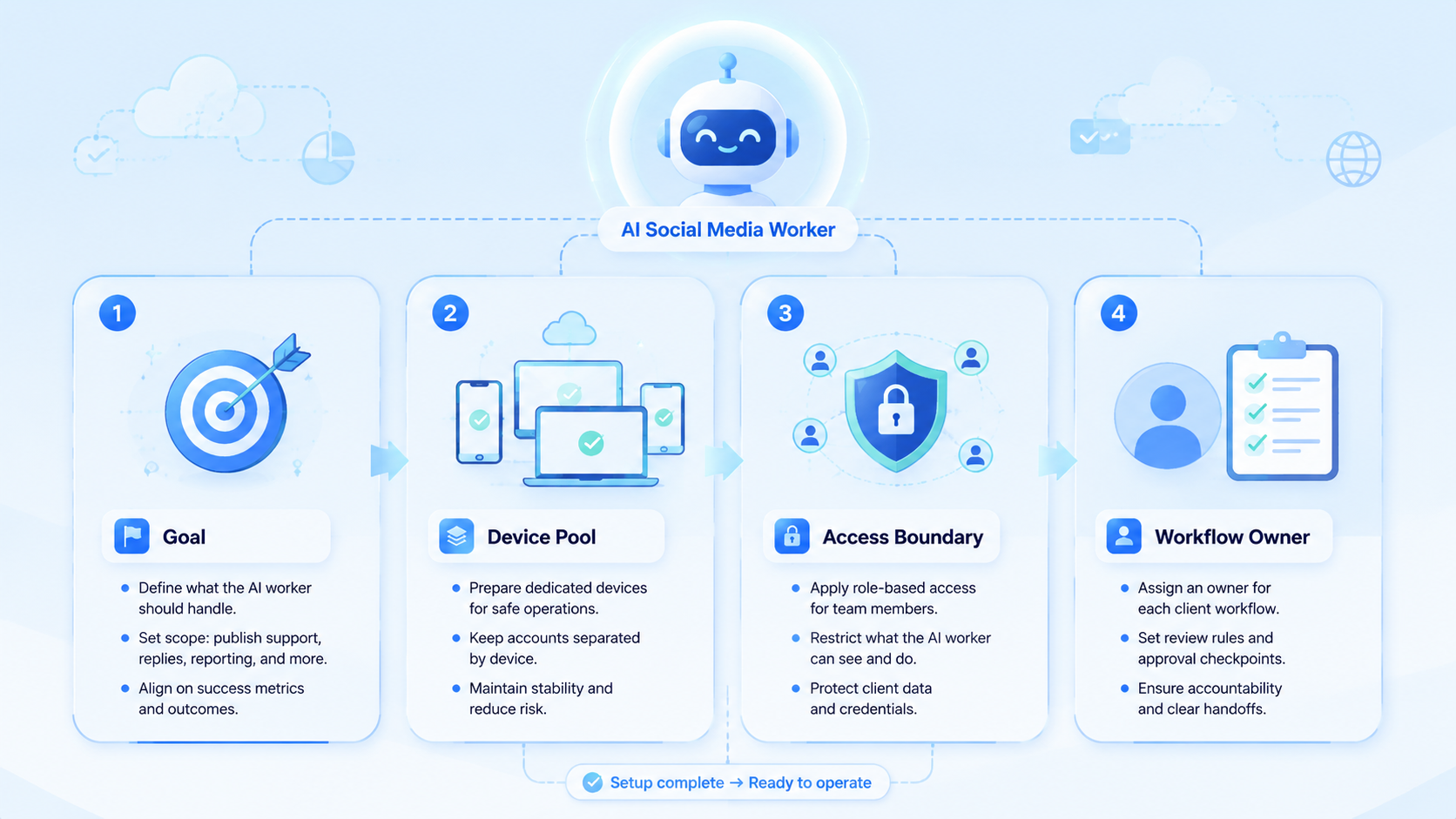
Start with one client, one account group, and one task. The first worker should prove workflow value before the agency adds more accounts.
Use these checkpoints:
- Role checkpoint: name the worker's job, such as comment collection or report updates.
- Account checkpoint: define which client accounts it can touch.
- Environment checkpoint: assign the right browser profile or mobile workspace.
- Review checkpoint: decide which actions need human approval.
- Result checkpoint: define what "done" means.
- Failure checkpoint: record why a task could not finish.
A good first task is low-risk and high-frequency. Daily status checks, comment collection for review, or reporting updates are better than immediate public reply automation.
For the first week, keep the worker in observe-and-prepare mode. Let it collect data, draft options, and create task summaries. After the team trusts the output format, allow it to move into execution support for approved tasks.
Common Mistakes to Avoid
Calling every AI prompt a worker creates confusion. A worker needs an operating role. It should have a task queue, account scope, and result record.
Avoid mixing client accounts inside one workspace. Client A's account, assets, and review rules should not blend into Client B's workflow. This is where device isolation becomes operationally useful.
Removing reviewers too early creates avoidable risk. Public replies, crisis comments, regulated claims, and client-sensitive posts should keep human approval. AI can draft and classify, but agencies still own the client relationship.
Another mistake is ignoring failure reasons. A worker that fails silently is not an operations asset. The agency should know whether the issue was access, missing content, unclear instructions, page change, or review delay.
Teams should also avoid assigning one worker to too many platforms at once. A TikTok comment review workflow, an Instagram publishing workflow, and a LinkedIn outreach workflow may look similar at a dashboard level, but they have different assets, tone rules, account states, and review risks.
Fit Boundaries for Agency Operations
An AI social media worker fits agencies that manage repeated work across clients, accounts, platforms, and reviewers. The fit is strong when tasks are frequent, rules are clear, and account work happens in multiple environments.
It is also a fit when the agency needs cleaner handoffs. A strategist should not chase an operator for status. A reviewer should not ask which account a draft belongs to. A manager should not rebuild reports from chat.
The fit is weaker for agencies with a small client list and mostly custom creative work. If every task is strategic and different, automation should stay limited to drafting and research support.
The decision rule is simple: automate repeatable execution, not client judgment. If the agency cannot write the task as an SOP, it is not ready for an AI worker.
Pilot Rollout and Measurement
Run the pilot over one client cycle. Use one worker role and one set of accounts. Keep the goal narrow enough to measure.
Track these metrics:
- Tasks completed.
- Tasks failed.
- Failure reasons.
- Review edits.
- Escalations.
- Time from task start to review.
- Time from approval to completion.
- Account or client affected.
The most useful metric is not speed alone. It is the quality of handoff. If reviewers understand the worker output without asking for context, the workflow is working.
At the end of the pilot, choose one action. Expand, revise, or retire the worker. Do not leave half-working workflows in production.
Reporting Structure for Agency Managers
Agency managers need a client-ready view and an operations view. The client-ready view shows outcomes. The operations view shows how work moved through the system.
The operations view should show account, owner, worker role, environment, task type, result, reviewer, and follow-up owner. This creates an audit trail for repeated work.
Reports also help improve prompts. If reply drafts require heavy editing, update tone rules. If publishing checks fail often, review account workspace setup. If reports are late, adjust task timing.
Moimobi is useful when reporting needs to connect to real execution. The platform can help teams relate tasks to browser or mobile environments instead of treating automation as detached text generation.
Frequently Asked Questions
Is an AI social media worker the same as a chatbot?
No. A chatbot answers or drafts. A worker has a role, task queue, execution environment, and result record.
What should agencies automate first?
Start with status checks, comment collection, draft preparation, or report updates. These tasks are repeatable and easier to review.
Can an AI worker reply to comments?
It can draft and organize replies. Public responses should keep human review when brand, client, or support risk exists.
Does every agency need cloud phones?
No. Cloud phones are useful when client work depends on mobile apps, account-specific mobile state, or mobile handoff.
How many workers should an agency start with?
Start with one. Add more only after the first worker has clear success metrics and failure logs.
What is the main setup risk?
The main risk is vague scope. A worker without account limits, review rules, and success states becomes hard to manage.
How does Moimobi fit?
Moimobi provides browser and mobile execution environments for account-based agency workflows.
Can this reduce client reporting work?
Yes, especially when the worker records task outcomes and failure reasons during execution.
Conclusion
Build the first AI social media worker around one repeated agency workflow. Give it a role, account scope, environment, review rule, and result log.
The priority order is clear: define the workflow, protect account boundaries, keep review in the loop, measure outcomes, then scale. Agencies that follow that order can turn AI from a writing assistant into a practical execution layer.
Moimobi is a strong fit when that execution layer needs real browser and mobile environments across client accounts.



