
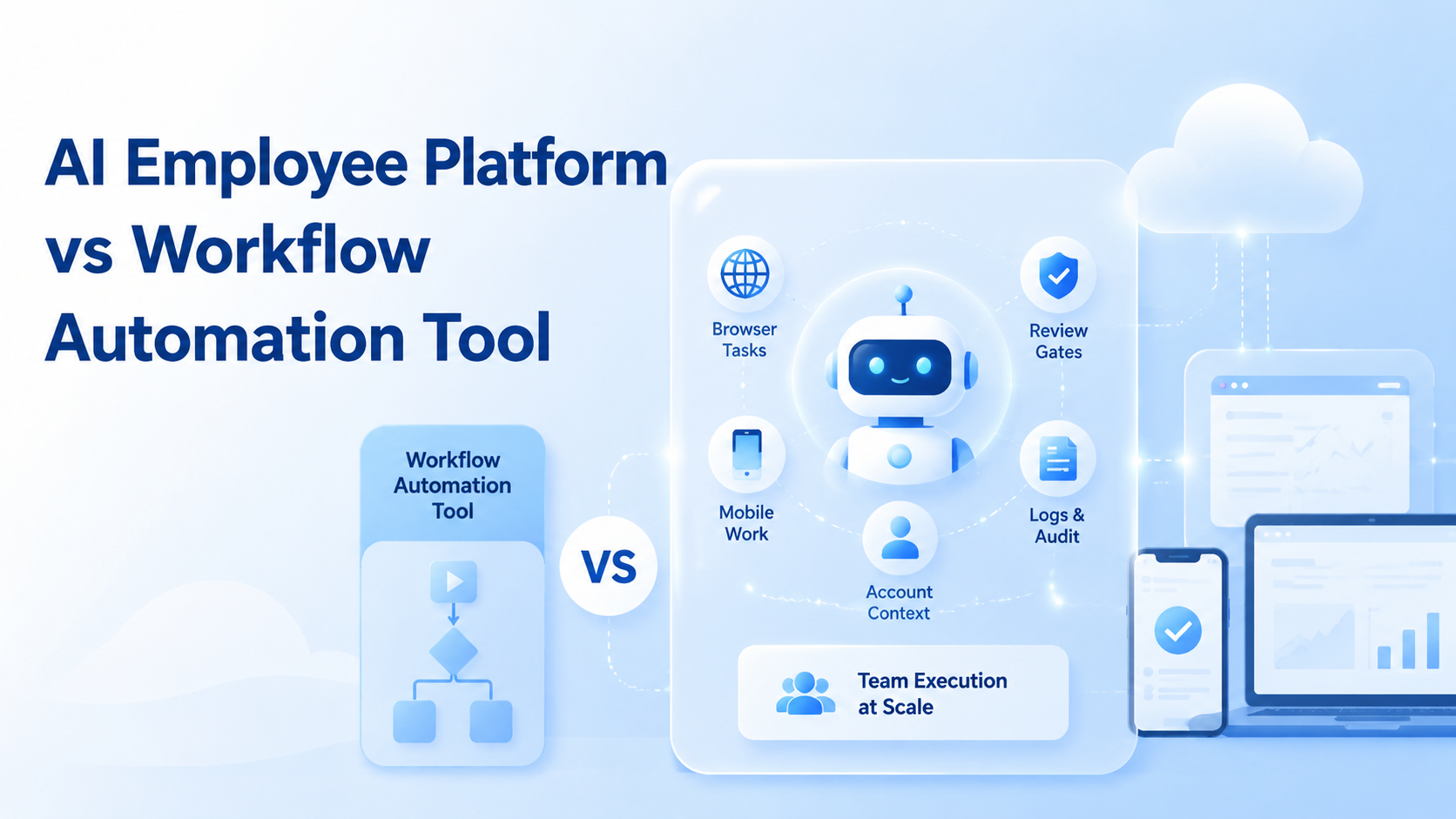
An AI employee platform assigns digital workers to bounded browser and mobile tasks, while a workflow automation tool usually connects predefined steps between apps. The difference matters when work requires account context, live browser sessions, mobile app state, review gates, and recovery notes.
Base first.
A workflow automation tool is strong when the process is already structured. It can move data, trigger actions, update fields, send alerts, and connect systems. Worker-platform infrastructure fits a different problem: work inside accounts, dashboards, websites, and mobile apps where the worker must inspect context before acting.
The decision is not about which category sounds newer. It is about the task shape. Event-based and deterministic work may only need workflow automation. Browser profiles, cloud phones, task ownership, account boundaries, and human review point toward the AI employee platform model.
Same goal, different surface.
Key Takeaways
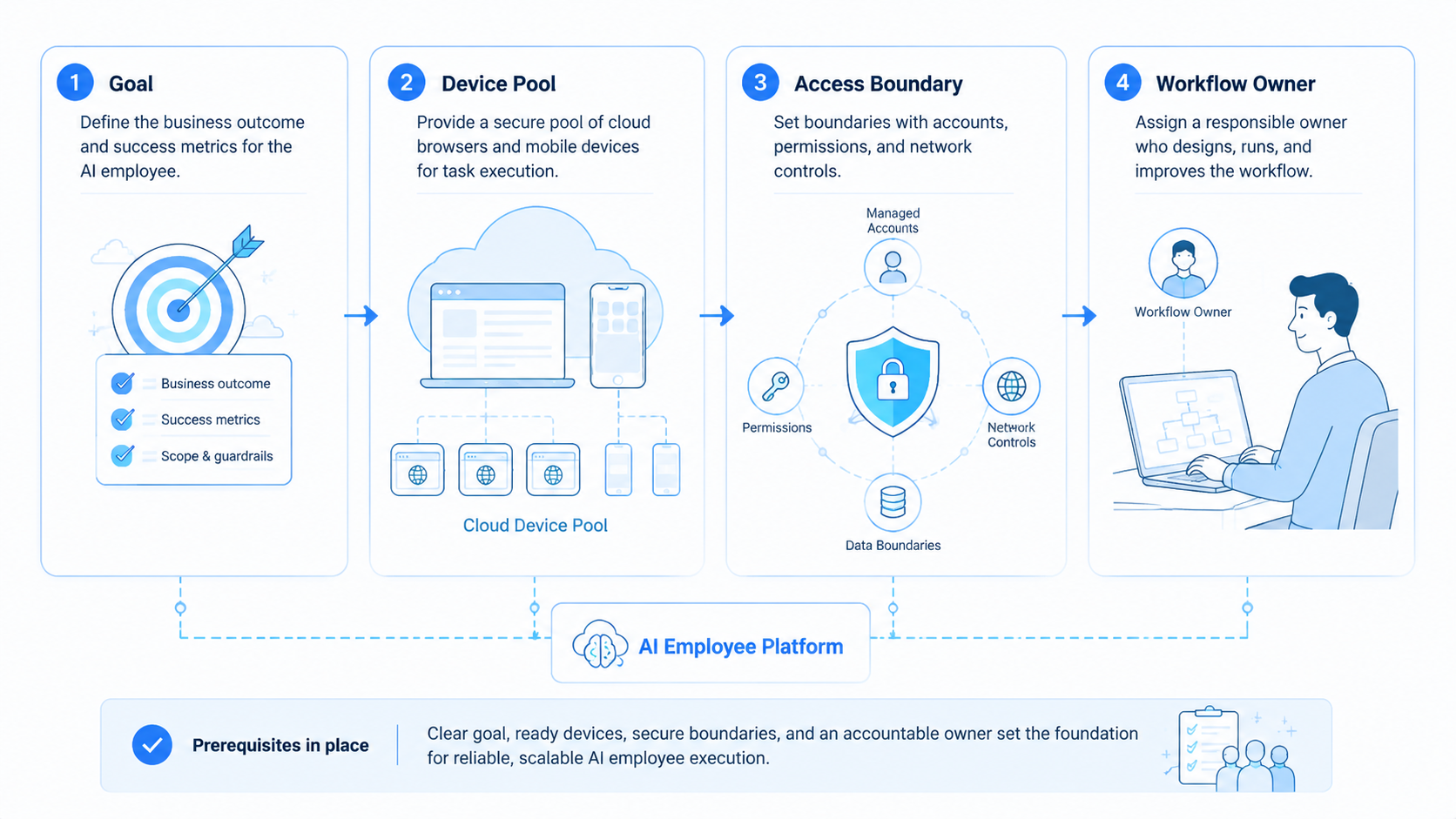
- Workflow automation connects systems; an AI employee platform assigns digital workers to controlled execution environments.
- Browser and mobile work need IDs for profiles, phones, account groups, routes, reviews, and recovery notes.
- Stable trigger-action flows belong in workflow automation; inspected task execution belongs in AI employee infrastructure.
- Pilot with 1 queue, 3 environments, and 1 named reviewer before adding volume.
What Is an AI Employee Platform?
The platform is not a chatbot with a task list. Too narrow. It is an operating layer for assigning digital workers to work that happens inside browser and mobile contexts.
A task record should name the worker, browser profile, phone ID, account group, route, output folder, reviewer, and stop condition. Those fields let the team understand what happened without relying on screenshots buried in chat.
MoiMobi should be framed as execution infrastructure. Its mobile automation layer helps teams connect controlled phone environments to repeatable mobile workflows. A cloud phone can become the mobile surface for an AI worker, but the task record still decides what the worker may do.
The useful mental model is simple: the worker executes, the environment provides context, and the reviewer controls the boundary. Without all 3, the platform becomes a loose automation agent.
Make the field list visible.
Google's helpful content guidance focuses on useful purpose and clear value. The same idea applies to operations. A system should make context and outcome clear to the people who depend on it. That is the bar.
What Is a Workflow Automation Tool?
A workflow automation tool is usually designed around triggers and actions. A new form response creates a CRM task. A status change sends a message.
A completed row updates a reporting sheet. The tool does not need to understand a screen if the data and step sequence are already defined.
That model is useful. It reduces manual handoffs and keeps simple operations moving. It also makes sense when the process has clean inputs, stable rules, and clear destinations.
The limitation appears when work leaves the API-style path. A person may need to log into a dashboard, compare visible account state, check a mobile app, capture evidence, or prepare a draft based on screen context. A trigger-action workflow may start that process, but it does not provide the execution environment by itself.
For browser work, controlled contexts matter. Tools such as Playwright show why sessions, pages, and state need structure when software acts in a browser. Team operations add another layer: ownership, review, and recovery, especially when the same queue touches multiple accounts or mobile sessions in one shift.
Workflow automation still has a place in the stack.
It can route tasks, update tickets, notify reviewers, and move outputs after a worker finishes. The difference is that workflow tools coordinate systems, while AI employee infrastructure coordinates execution.
AI Employee Platform vs Workflow Automation Tool: Core Differences
The strongest comparison starts with the work surface. Workflow tools operate on systems and records. AI employee platforms operate through controlled worker environments. Big difference.
| Decision area | Workflow automation tool | AI employee platform |
|---|---|---|
| Main unit | Trigger and action | Worker, task, and environment |
| Best surface | APIs, forms, databases, messages | Browser profiles, cloud phones, web apps, mobile apps |
| Context model | Data fields and step rules | Account, session, device, route, output, reviewer |
| Review model | Often after the action | Before or after, based on task risk |
| Failure record | Step error or integration error | Worker, environment, task, failure reason, recovery note |
This table is not a ranking. It is a fit map. A workflow automation tool can be the right choice for stable data movement. An AI employee platform is better when the team needs to know which environment performed the work and whether a reviewer approved the result.
The boundary becomes clear during handoff. If a second reviewer can inspect the task record and understand the browser profile, cloud phone, account group, output folder, and failure reason, the worker platform is doing its job.
AI Employee Platform vs Workflow Automation Tool Decision Matrix
Use the category that matches the highest-risk part of the work, not the part that is easiest to automate. Many teams make the wrong choice because the first step looks simple. A form submission may be simple. The later account review, mobile screenshot, browser confirmation, or customer-facing draft may not be simple.
Choose a workflow automation tool when the answer to most of these questions is yes:
- The task finishes without opening a browser or mobile app.
- Inputs already exist as fields, rows, tickets, or events with stable names.
- A short rule can describe the next step.
- Failed runs can retry without account-state investigation.
- Output lands in a fixed system with a predictable format and no screen judgment.
Choose an AI employee platform when the answer to most of these questions is yes:
- The worker must inspect a live screen before acting.
- Account group, browser profile, phone ID, route, or app state changes the task.
- Reviewers need evidence before approval.
- The same instruction could produce different actions in different accounts.
- Recovery notes must name the environment, not only the error.
The comparison is clearest when it is written as a routing rule. For known-value movement into a known system, workflow automation is usually enough. For controlled environment work that needs inspection, output preparation, and approval, the AI employee platform is the stronger fit.
This also changes ownership. In workflow automation, the owner usually maintains connectors and field mappings. In worker execution, the owner also maintains environment pools, account labels, device assignment, prompt boundaries, reviewer rules, and stop conditions. That extra ownership is not overhead when the work is account-based; it is the control layer.
For a buying team, the practical decision is simple. Do not ask which tool is more advanced. Ask which tool leaves a clearer record after a messy run.
A failed connector run tells the team which step broke. A failed worker run should tell the team which worker, profile, phone, route, account group, task, and reviewer were involved.
When Workflow Automation Is Best For the Job
Workflow automation is enough when the task has clean input, clean output, and little screen context. The process should be easy to describe as "when this happens, do that."
Good examples include routing lead forms, updating CRM fields, sending alerts, and creating support tickets.
Spreadsheet syncs and approved-file transfers fit the same pattern. These tasks usually do not require a worker to inspect a browser session or mobile app before deciding the next step.
Use workflow automation when 5 conditions are true:
- Clear trigger
- Known action
- Trusted data source
- Fixed destination
- Retry path that does not need deep account context
Keep it simple.
Adding an AI worker to a clean data pipeline may add unnecessary review work. When a deterministic connector can handle the job, use the connector and save the AI employee platform for tasks where environment and judgment matter.
When an AI Employee Platform Fits the Job
The worker-platform model becomes useful when the work happens inside real operating environments. The worker may need a browser profile, account login, cloud phone, app state, route, and review gate.
This fit is common in online operations. A worker checks a web dashboard, opens a mobile app, captures proof, prepares a draft, or compares visible information across surfaces. The result needs a record that a reviewer can inspect.
Use the worker-platform model when the task record needs environment fields:
| Field group | What it proves |
|---|---|
| Worker ID | Which digital worker handled the task |
| Browser profile and phone ID | Which controlled environment was used |
| Account group and route ID | Which account boundary and route applied |
| Output folder and reviewer | Where the result went and who checked it |
| Stop condition | Where the worker must pause |
These fields make the task auditable by the team. They also make recovery easier. A failure can be tied to the worker, task, profile, phone, route, account, or review rule instead of becoming a vague "automation failed" note.
Device boundaries matter here. Device isolation is practical because browser and mobile work often carries account context. The point is not a broad safety promise. The point is cleaner separation and review.
Common Mistakes in Choosing Between the Two
The first mistake is buying a worker platform for a simple trigger-action process. If all the task does is move a field from one system to another, a workflow automation tool is usually cleaner.
The second mistake is forcing workflow automation into account-based work. A connector may start the work, but it cannot inspect every browser state, mobile prompt, or account-specific screen without an execution layer.
The third mistake is skipping review. Both tools can move work quickly. Speed is not the same as control. A publishing action, payment step, deletion, account setting, or customer-facing reply should have a reviewer before it leaves the queue.
Use a stop rule:
- Browser profile or phone ID does not match the task.
- Account group, route, or output folder is unclear.
- Publish, payment, deletion, refund wording, or account-setting change is about to happen.
- Result lacks task ID, worker ID, environment ID, or reviewer.
Plan the pause.
This rule keeps tool selection grounded. Tasks that need these stop rules are usually execution-platform work, not only workflow-connector work.
Pilot Rollout and Measurement
A pilot should prove which model fits the work. It should not try to automate everything at once.
Start with 1 queue and 3 environments. One environment can handle browser collection. One can handle mobile capture.
A third environment can prepare review outputs. Use 7 days of work before adding more workers.
Track 6 fields in the pilot log:
| Field | Why it matters |
|---|---|
| Setup time | Shows operating cost |
| Completion result | Separates finished work from partial work |
| Failure reason | Makes repair specific |
| Environment used | Links output to profile, phone, and route |
| Reviewer decision | Shows whether the result was trusted |
| Recovery time | Measures cleanup burden |
Decide from evidence.
Continue with workflow automation if the task is mostly clean data movement. Continue with an AI employee platform if the reviewer needs browser or mobile context to approve the result.
For mobile tasks, route data may also matter. Teams using proxy network controls should log route ID with each mobile run. The record does not need to be complex. It needs to be visible.
Use a weekly scorecard:
- Green means task finished, reviewer approved, and no recovery was needed.
- Yellow means the task finished, but the reviewer needed extra context.
- Red means the task stopped because account, route, profile, phone, or output folder did not match.
Green tasks can scale slowly. Yellow tasks need better labels. Red tasks should not scale until the stop condition is fixed.
Cost, Risk, and Control Comparison
Cost is not only the monthly software price. A workflow automation tool may look cheaper because the first connector is quick to set up. That advantage holds when the team only needs field mapping, notifications, and simple retries.
The cost picture changes when people spend time recovering unclear runs. If a worker used the wrong account, missed a mobile prompt, saved output in the wrong place, or produced a result without review evidence, the cheap connector can create expensive cleanup. The issue is not the connector itself. The issue is using it for work that needs an execution record.
Risk follows the same pattern. Workflow automation risk is usually integration risk: a field changed, an API failed, or a destination rejected the payload. AI employee platform risk is operational risk: the worker acted in the wrong environment, skipped a stop rule, or lacked enough context.
Control should match that risk. For workflow automation, control means versioned recipes, field validation, retry limits, and notification rules.
For AI employee work, control means assigned profiles, cloud phone mapping, account groups, reviewer queues, and visible stop conditions. One control model is not better in every case. Each one fits a different surface.
Support also differs. A workflow automation owner investigates steps and connectors. A worker-platform owner investigates task records and environments.
Here is the practical question: when something fails late in the day, can the owner identify the broken piece in under 10 minutes?
Use that question in vendor demos. Ask for a failed-run walkthrough, not only a successful demo. The answer will show whether the product is built for system coordination, worker execution, or both.
Frequently Asked Questions
Is an AI employee platform replacing workflow automation?
No.
It handles a different layer. Workflow automation moves structured steps between systems, while the platform assigns workers to browser and mobile execution.
Can both tools work together?
Yes.
Workflow automation can route tasks and update systems. The AI employee platform can execute browser or mobile work that needs context.
Which is better for browser tasks?
It depends on context.
Use workflow automation for clean data updates. Use an execution platform when the worker must inspect browser sessions, account state, or dashboards.
Which is better for mobile tasks?
Use a worker platform when mobile context matters. Short answer.
A cloud Android for AI agents gives the worker a mobile surface. The team still needs task rules and review.
What should the first pilot test?
Start narrow. Then measure the handoff.
Pick one queue with clear inputs, output folder, reviewer, and stop rule. Do not start with high-impact actions.
What should stay manual?
Keep judgment manual.
Publishing, payment, deletion, refund language, account settings, and customer-facing decisions need stronger review.
How should teams measure success?
Measure traceability.
The reviewer should know which worker, profile, phone, account group, route, and output created the result.
How does this support multi-account work?
It adds boundaries.
Each account group can map to its own profile, cloud phone, route plan, task rule, and review trail.
Conclusion
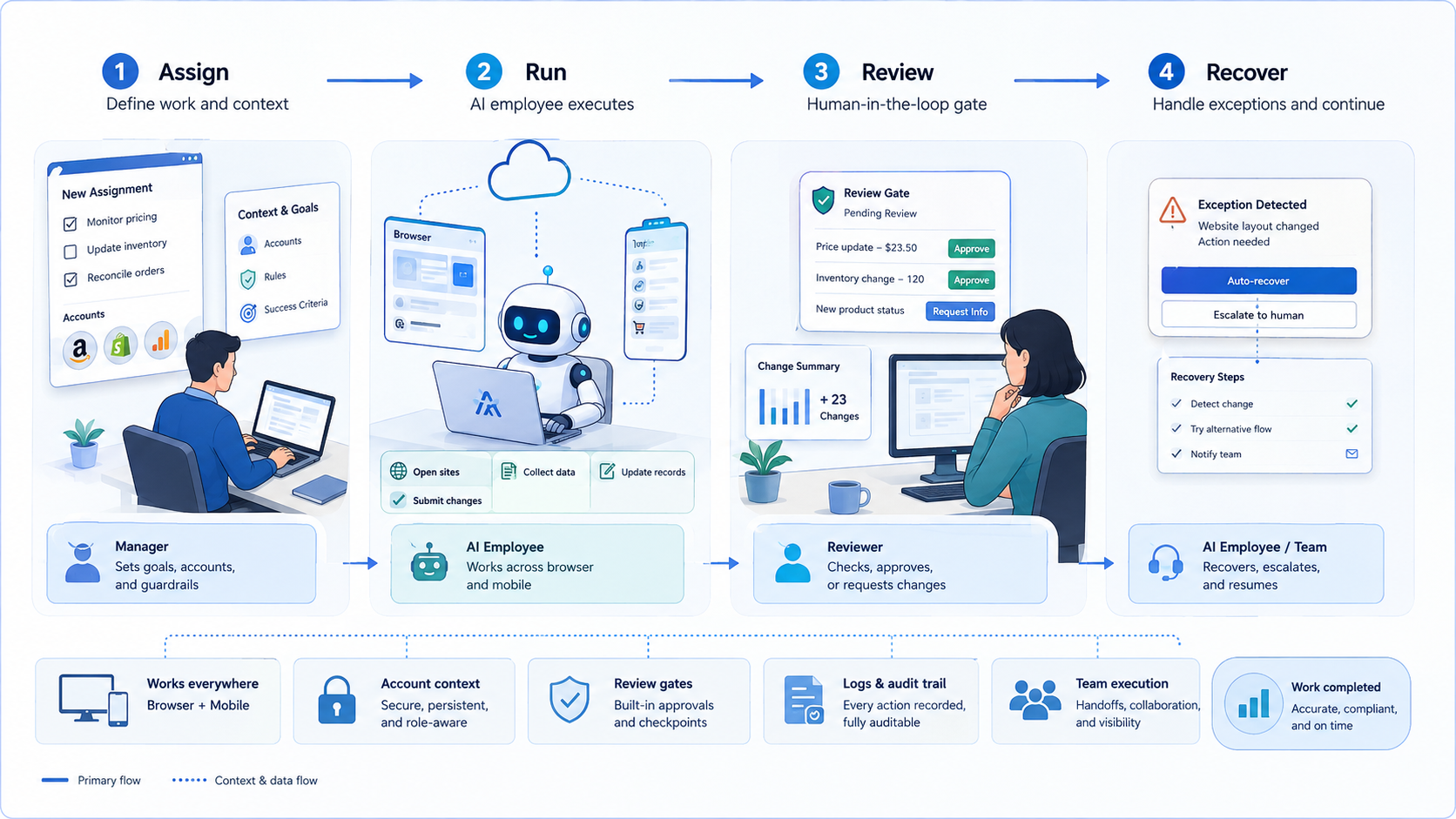
An AI employee platform and a workflow automation tool solve different parts of operations. Workflow automation is best for clean trigger-action flows. Worker-platform infrastructure is better when digital workers need controlled browser profiles, cloud phones, account context, review gates, and recovery records.
The next step is a fit test. Pick 1 queue, write the trigger, define the execution environment, name the reviewer, and list the stop conditions. Work that can run without environment context belongs in workflow automation. When reviewers need browser or mobile context to trust the result, evaluate the AI employee platform model.



