
Key Takeaways
- Execution platforms give AI workers a real place to run online work
- Daily operations need browser sessions, mobile devices, permissions, logs, and recovery paths
- The best first workflow is narrow, repeatable, and easy to review
- Moimobi connects browser and mobile execution environments for multi-account teams
An AI employee execution platform is software that connects AI-assisted workers to the environments where real online work happens. Instead of only generating text, it gives the worker a browser, device, account workspace, role, task log, and review path.
Daily online operations are full of small repeated tasks. Teams publish content, reply to customers, check dashboards, collect leads, review account prompts, and update records. The execution layer is what turns those tasks from chat output into trackable work.
What Is an AI Employee Execution Platform?
This type of platform gives digital workers controlled access to the systems they need for a task. A worker may need a browser profile for web dashboards, a cloud phone for app-based work, and a task history so the next operator can see what happened.
The phrase "AI employee" can sound broad, so the practical definition matters. This is not a magic staff replacement. Treat it as a repeatable work unit with a role, a workspace, task instructions, stop rules, and logs.
Browser automation standards show why execution environments matter. The W3C WebDriver standard defines a protocol for remote control of browsers (W3C WebDriver). Playwright documents browser contexts and pages as isolated units for automation and testing (Playwright Docs). Those tools are built for developers, but the operating point is the same: web work needs a browser surface with state.
Moimobi extends that idea beyond the browser. Some work belongs in an AI browser and cloud phone platform. Other work needs Android mobile execution, account isolation, or team-level assignment.
Why Daily Online Operations Need Execution
Most daily online work is not a single prompt. The workflow is a chain of small actions.
A social media operator may check a post queue, open a platform account, review comments, draft replies, send edge cases to a lead, and record the result. A support teammate may check a web inbox, open a mobile app, and confirm whether the reply landed in the right account.
That chain breaks when planning and execution live in separate places. The AI can suggest an answer, but the team still needs to know:
- Which account owns the task
- Which workspace should run it
- Who reviews sensitive actions
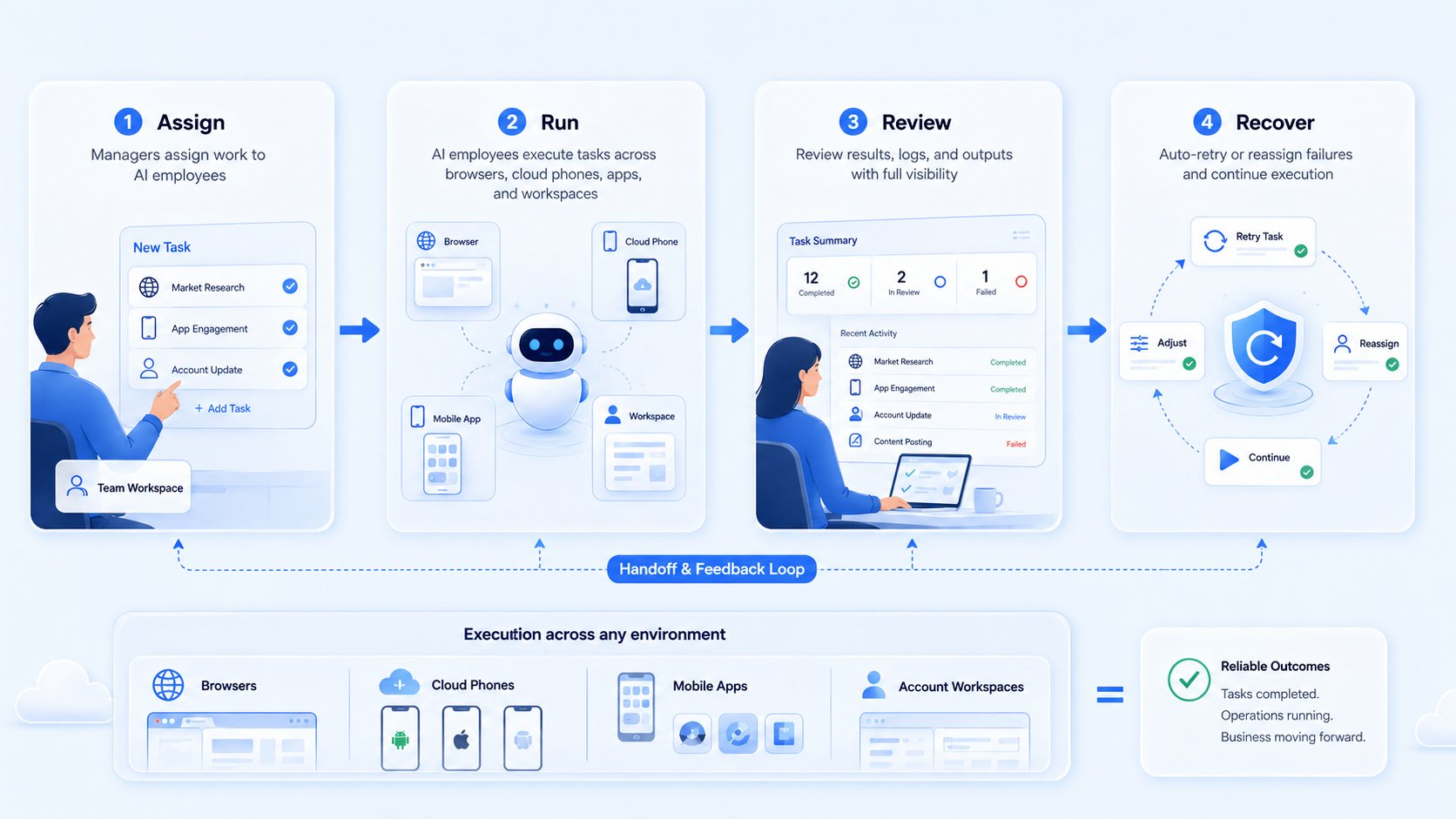
- What happens when a step fails
- Where the result is recorded
The platform gives the workflow a home. It keeps the task close to the browser, cloud phone, or account environment that carries the work.
Core Components of an AI Employee Execution Platform
Daily work needs more than a model call. It needs a small operating stack.
| Component | What it controls | Why it matters |
|---|---|---|
| Role | What the AI worker is allowed to do | Prevents vague, open-ended execution |
| Workspace | Browser profile, cloud phone, or mobile device | Keeps account work tied to the right environment |
| Account scope | Which account, client, or region is assigned | Reduces cross-account confusion |
| Skill or workflow | The repeatable task path | Turns instructions into consistent steps |
| Review rule | When a human must approve | Protects sensitive replies and recovery actions |
| Activity history | What happened and what comes next | Supports handoff and troubleshooting |
AWS Device Farm remote access shows how teams can interact with hosted devices from a browser session (AWS Device Farm). That pattern is useful for mobile operations because the device is remote, but the user still needs a controlled session and task context.
For Moimobi, the key is connecting these parts into one operating model. A team can use multi-account management for account assignment, cloud phone workspaces for mobile tasks, and browser profiles for web tasks.
Daily Online Operations for an AI Employee Execution Platform
The best fit is a task that repeats often and has a clear result. AI employee software should start where the team already has a loose SOP.
Strong examples:
- Daily social inbox review
- Comment triage and draft replies
- Lead list checks and CRM updates
- E-commerce dashboard monitoring
- Account prompt review
- Content publishing preparation
- Competitor or marketplace monitoring
The model is weaker for one-off strategy work. It also struggles when the task has no owner, no review point, or no clear success state.
Think in work units. "Handle social media" is too wide. "Review Instagram comments for Client A and send unclear replies to review" is narrow enough to test.
How to Start With an AI Employee Execution Platform Workflow
Start with a small workflow. A large rollout hides the source of failure.
Use this setup path:
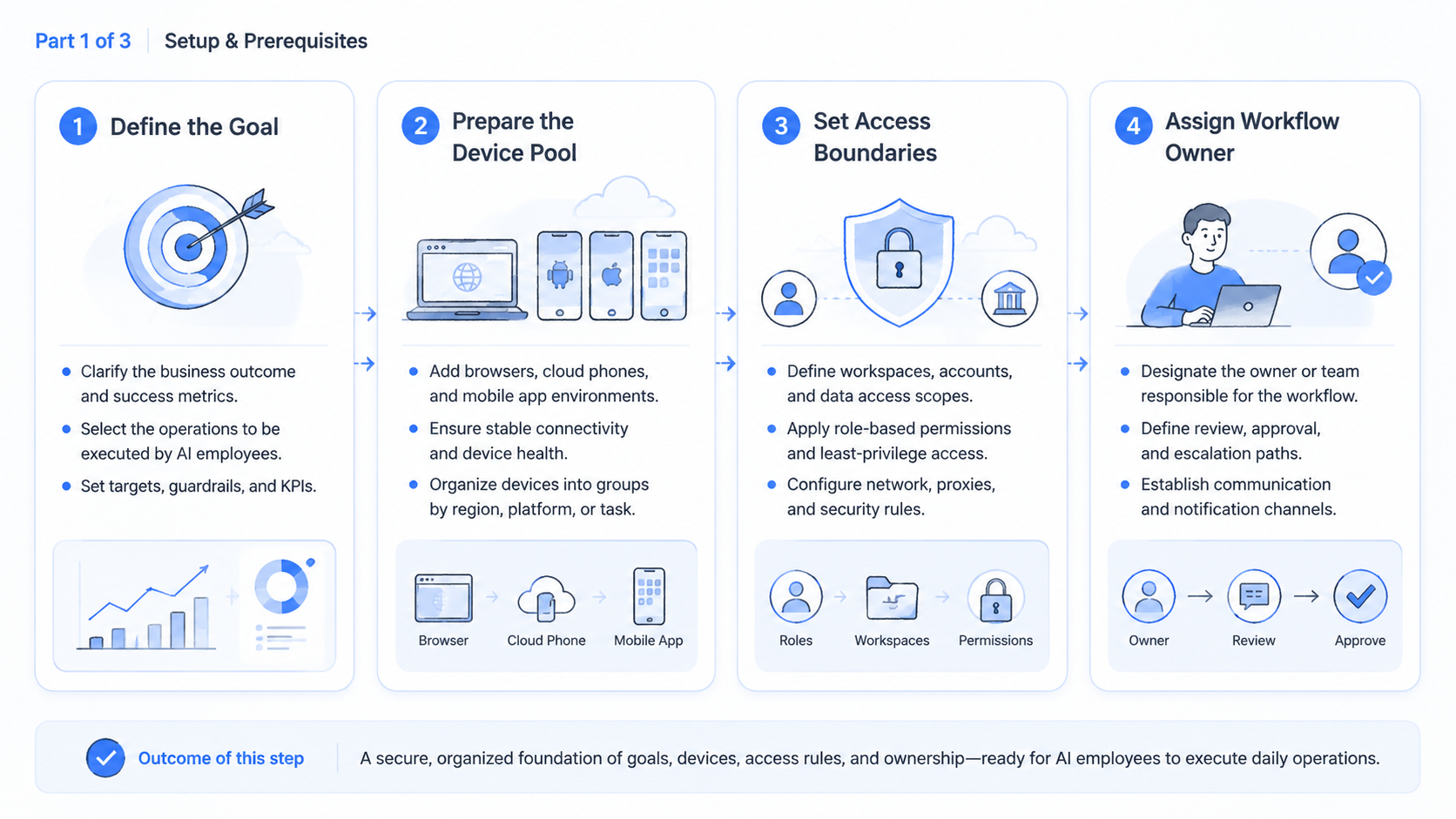
- Pick one daily task with a known owner
- Choose the execution environment: browser profile, cloud phone, or both
- Assign the account scope
- Write the input and output fields
- Define stop rules
- Run the workflow for 7 days
- Review logs before scaling
The stop rule is the most important part. The AI worker should pause for login prompts, payment prompts, identity checks, policy-sensitive replies, and unclear customer intent.
Microsoft Entra documentation explains how groups can help manage access at scale (Microsoft Learn). The same principle applies here. Teams should assign AI workers by role and account scope, not by giving every worker access to everything.
Common Mistakes to Avoid
The first mistake is building a worker before defining the job. A vague worker creates vague results. Give the worker a task name, account scope, workspace, and review rule.
The second mistake is skipping the human handoff. A good workflow should say when the AI worker stops and who takes over. Without that line, failed tasks become chat noise.
The third mistake is using one workspace for too many accounts. Account state matters. For browser work, use separated profiles when account identity and session state matter. For mobile work, use device isolation and assigned devices when app context matters.
The fourth mistake is measuring only task volume. Volume can rise while quality falls. Track completed tasks, review rate, recovery time, and unclear handoffs.
Pilot Rollout, Measurement, and Recovery Checks
A pilot should prove that the workflow can run without creating new confusion. Use three accounts, one role, and one task type.
Measure these fields:
- Tasks completed
- Tasks sent to review
- Failed tasks
- Average recovery time
- Human edits after AI work
- Account or device issues
- Next action owner
The recovery check matters most. If a task fails and no one knows the next owner, the platform setup is incomplete.
Run the pilot for 7 days. Keep the workflow if it reduces manual steps and improves handoff clarity. Rewrite it if operators spend more time explaining the workflow than using it.
Fit and Not-Fit Boundaries for an AI Employee Execution Platform
The strongest fit is repeated account-based work. Agencies, social media teams, customer support teams, e-commerce operators, and growth teams are common matches.
Good fit:
- Work happens across web and mobile platforms
- Multiple people share account tasks
- The team already has basic SOPs
- Review and recovery steps are known
- Account isolation matters
Weak fit:
- The task is purely strategic
- No one owns the workflow
- The team cannot define a stop rule
- The work has no repeated pattern
- All actions already live inside one mature internal system
For social workflows, Moimobi's social media marketing page is the closest next step. For technical Android work, the mobile automation layer is more relevant.
Frequently Asked Questions
What is an AI employee execution platform?
This system gives AI workers the roles, workspaces, tools, logs, and review paths needed to run online tasks.
Is this the same as AI employee software?
There is overlap, but execution is the key difference. The platform must connect AI work to browsers, cloud phones, accounts, and task records.
Why does an AI worker need a browser?
Many online tasks happen inside web apps. A browser workspace lets the worker act inside the same surface a human operator would use.
When does a workflow need a cloud phone?
Use a cloud phone when the task depends on a mobile app, mobile account state, or Android environment.
Can one AI employee manage several accounts?
It can during a pilot, but teams should keep account scope clear. Many operations teams eventually assign workers by account group.
What should humans review?
Review sensitive replies, failed tasks, account prompts, identity checks, and actions that change account state.
What is the best first workflow?
Choose a daily task with a written SOP, a clear owner, and a result the team can measure.
Conclusion
The model works when the team treats AI as part of an operating system, not a loose chatbot. The worker needs a role, a workspace, a task path, and a recovery owner.
Start with one daily workflow. Run it in a browser or mobile workspace for 7 days. Scale only when the team can explain each result, each failed step, and each next action without searching through chat.



