
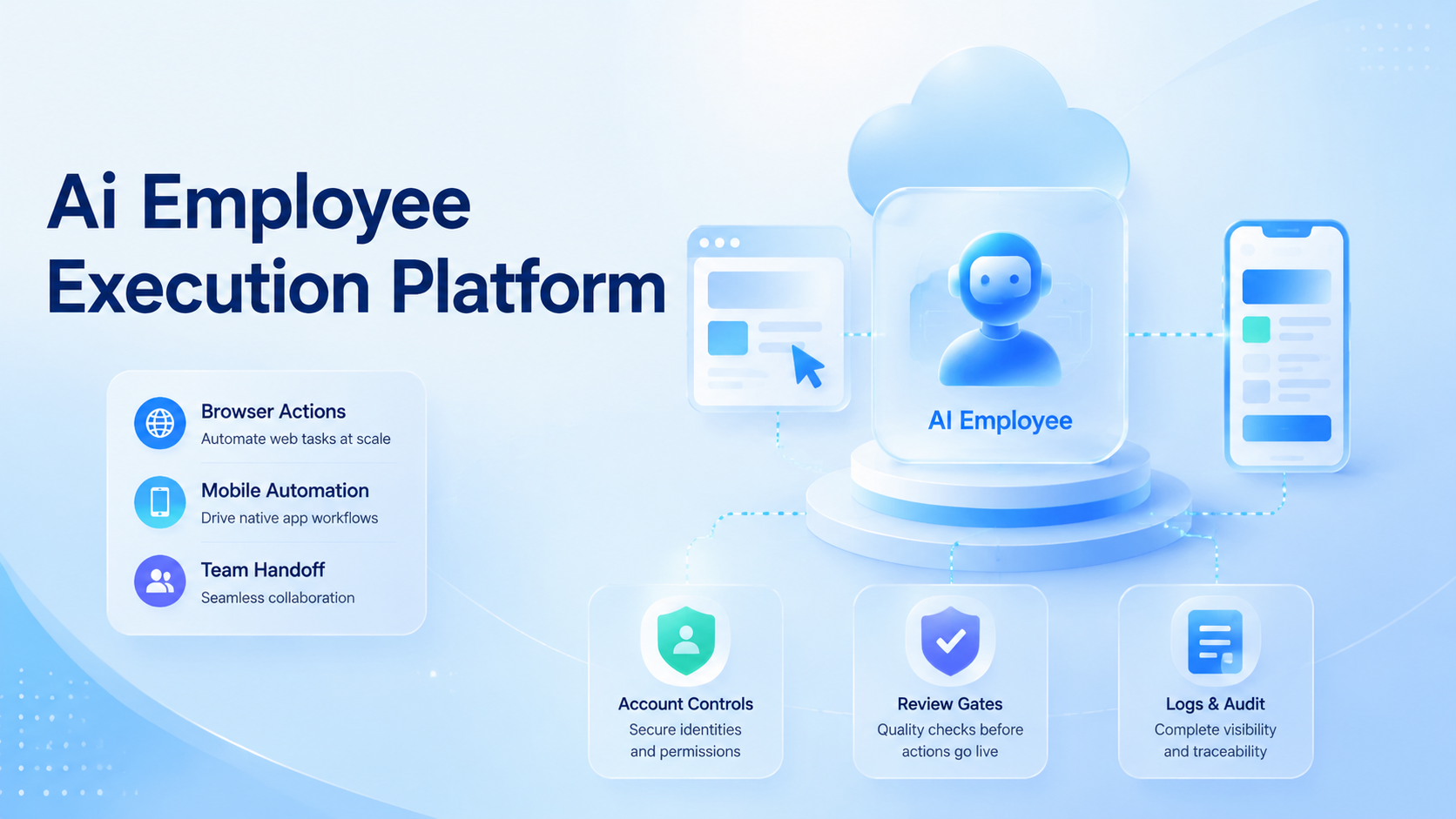
An AI employee execution platform runs browser and mobile work in one controlled system. Strategy stays with the team. The run layer gives that team a clear place to repeat digital tasks.
The browser side handles web dashboards, forms, internal tools, ecommerce panels, CRMs, and admin consoles. The mobile side handles app-only states, device-level sessions, push messages, account checks, and actions that cannot be finished inside a desktop browser. The value appears when both sides share one workflow, one permission model, and one audit trail.
Teams usually start with a narrow task. One support workflow may ask an agent to check order status across a web portal, then verify the customer app screen on a cloud Android device.
Growth teams see a different path. They may review campaign assets in a browser, then test the final landing flow on mobile. Those are not separate jobs anymore; they are one execution chain with checkpoints.
This matters because browser automation alone can break at the mobile boundary. Mobile automation alone can lose context when the decision starts in a web dashboard. An execution platform connects the two, then adds guardrails: device isolation, clean routing, logs, approval gates, and recovery steps.
Google's helpful content guidance emphasizes usefulness for people rather than content made only for search ranking. A similar operating principle works for automation design. The workflow should solve a real problem, not just look impressive in a demo. One question matters early: can the agent complete the work in a way the team can trust, review, and repeat?
Key Takeaways
- Browser and mobile steps need one run record
- App state, account context, and device sessions change the automation design
- Review gates decide what the agent may finish alone
- Device isolation, routing, and mobile capacity are infrastructure choices
- Pilot metrics should cover completion, exceptions, review effort, recovery time, and evidence quality
What Is an AI Employee Execution Platform for Browser & Mobile Automation?
The platform is a runtime for digital employees. It gives an AI agent the tools, accounts, environments, and operating rules needed to finish a business process. In plain terms, it is where instructions become controlled action.
Three layers usually matter first.
The first layer is the browser. The agent opens pages, reads structured information, fills forms, moves through dashboards, and records outcomes. Browser tooling such as Playwright is commonly used for reliable web automation because it can drive modern browsers and inspect page behavior through documented APIs.
The second layer is mobile execution. A cloud phone gives the workflow a real Android environment that can run mobile apps, keep app state, and support team access without moving physical devices between operators. This is where cloud phone for AI agents becomes practical rather than theoretical.
Control is the third layer. A team needs identity rules, device boundaries, network routing, human approvals, and logs. OWASP's LLM Top 10 is a useful reminder that agentic systems need explicit trust boundaries. A prompt, tool, plugin, or external page can steer an action in the wrong direction when the boundary is weak.
A weak setup treats these layers as separate utilities. Someone writes a browser script, another person rents phones, and a manager checks results in a spreadsheet. It may pass a demo.
Daily work exposes the gap. A stronger setup treats the browser, mobile device, network, and review queue as one execution environment.
Why an AI Employee Execution Platform Needs One Control Plane
Browser tasks and mobile tasks often belong to the same business process. The browser may hold the admin decision. The mobile app may show the customer-facing result. Splitting them across disconnected tools creates blind spots.
Consider a marketplace operations workflow. An agent checks a seller dashboard, confirms missing fields, updates a record, then opens the mobile app to verify what a buyer sees.
Failure needs a route back. If the mobile verification fails, the workflow should return to the dashboard with a clear reason. A screenshot folder is not enough. The system needs state, ownership, and a recovery path.
The same pattern appears in social operations. Teams may plan content in a web workspace, manage accounts through a browser, and validate app behavior on Android devices. MoiMobi's multi-account management use case is relevant here because execution quality depends on clean separation between accounts, devices, and operator roles.
One control plane also reduces handoff noise. Instead of asking whether a failed step was caused by the browser script, the app session, the proxy, or a manual review delay, the team can inspect one run record. The record should show the input, the tools used, the device assignment, the reviewer, the stop point, and the final status.
This is not only a convenience issue. The NIST AI Risk Management Framework frames AI risk as something teams should govern, measure, and manage across a system lifecycle. For AI employees, logs and controls should live near the execution layer. A separate policy document rarely helps during a broken run.
AI Employee Execution Platform Benefits and Use Cases
The main benefit is not that an AI agent clicks faster than a person. The real benefit is that the team can define a repeatable path for tasks that cross web and mobile surfaces. Speed follows only when the path is controlled.
| Use case | Browser role | Mobile role | Control needed |
|---|---|---|---|
| Account onboarding | Enter setup data in a web console | Confirm app login and profile state | Identity, device, and reviewer logs |
| Campaign QA | Check links, copy, tags, and records | Test mobile landing or app flow | Screenshot evidence and rollback notes |
| Support operations | Read tickets and customer records | Verify the user-facing app screen | Permission limits and redaction rules |
| Social execution | Prepare assets and account queues | Run app-only checks on cloud devices | Account isolation and routing policy |
For mobile-heavy teams, mobile automation becomes the bridge between a written SOP and a repeatable run. The agent can handle the easy steps. A human reviews sensitive actions. That pairing is more realistic than asking AI to own every decision end to end.
For distributed teams, a cloud Android for AI agents can also reduce device logistics. Operators do not need to ship phones, keep local machines online, or expose personal device sessions. They can assign controlled environments to workflows and revoke access when the work changes.
There is a boundary. A platform should not be used to hide abusive behavior, bypass platform rules, or mass-produce low-quality activity. The better use is operational consistency: fewer missed checks, cleaner evidence, and clearer responsibility when a task fails.
How to Get Started with an AI Employee Execution Platform
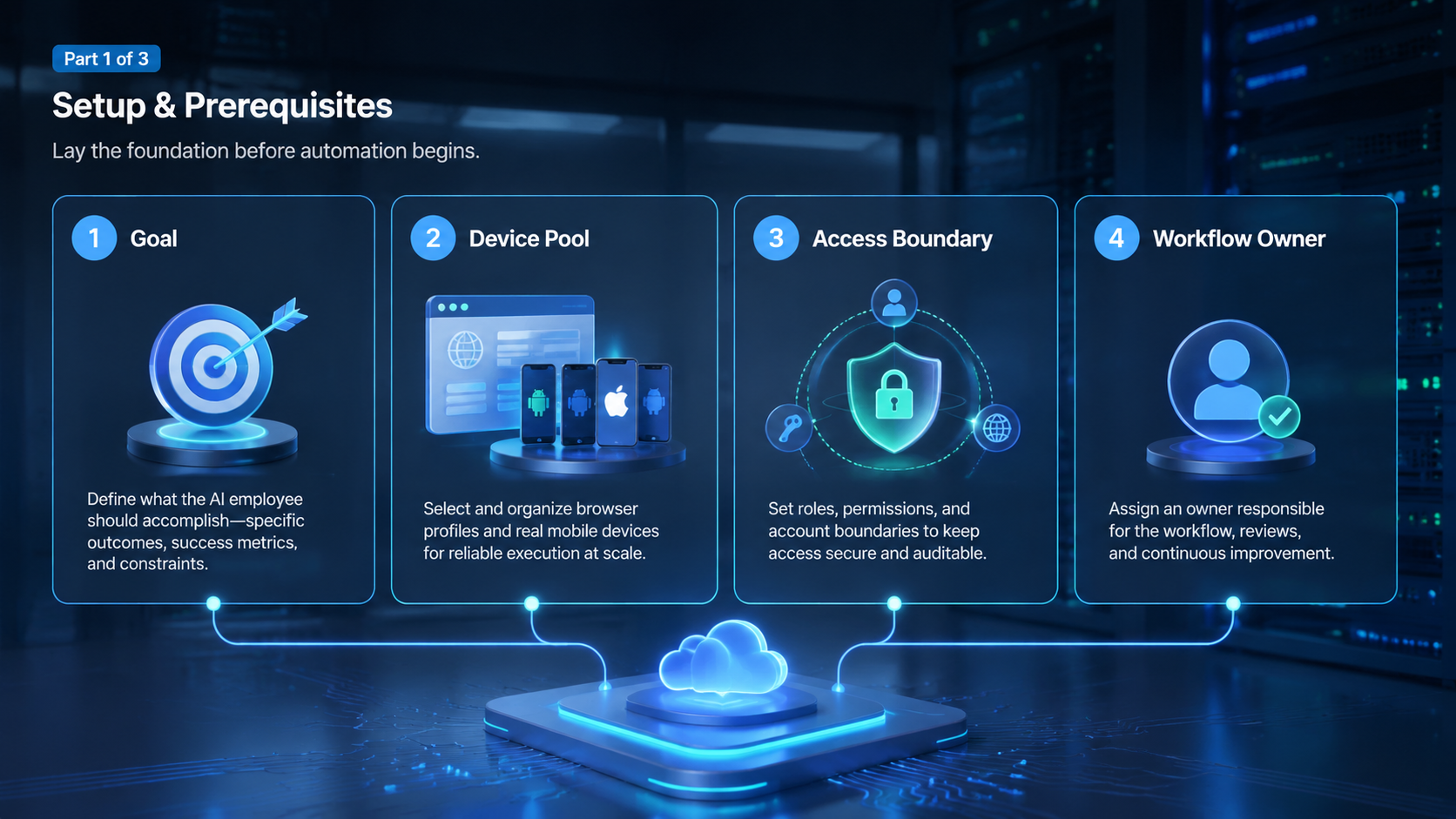
Start with the workflow, not the tool list. A vague command such as "manage this account" is too broad. A better pilot is a defined job with inputs, allowed actions, review points, and a success condition.
-
Pick one repeatable process. Choose a task that already has a manual SOP, such as mobile QA, account setup checks, listing verification, or support triage. Avoid a task with unclear ownership.
-
Split the process into browser steps and mobile steps. Mark which steps happen in a web dashboard, which happen inside an app, and which require a cloud phone or AI agent cloud phone environment.
-
Define tool permissions. The agent should know which pages, apps, accounts, files, and devices it may touch. Anything outside that scope should stop the run.
-
Add human review gates. A reviewer should approve actions that affect customers, billing, account reputation, or irreversible records. Review gates also make failures easier to diagnose.
-
Assign device and network controls. Teams that manage multiple accounts need environment separation before scale. Device isolation and routing policy should be set while the pilot is still small.
-
Capture evidence during the run. Store screenshots, page states, app states, errors, and final results. Evidence is useful only if it maps to the task step that produced it.
-
Review the exception list. A pilot should surface the confusing cases. If the exception list is long, improve the workflow before adding more agents.
A small pilot can be stricter than production. That is acceptable. The early goal is learning where the agent needs structure, not proving that every job can be automated immediately.
Common Mistakes to Avoid
The most common mistake is treating browser automation as the whole system. A browser agent can be effective inside web applications, but many business workflows continue on phones, apps, notifications, or account sessions. Ignoring that boundary creates false confidence.
Another mistake is starting with too much freedom. An AI employee should not receive broad account access, open-ended instructions, and a vague success metric. Tool access needs to match the task. The run should stop when the agent sees a screen, prompt, or decision outside the approved path.
Teams also underestimate recovery work. A failed login, blocked page, app update, missing field, expired session, or reviewer delay can break an otherwise good workflow. The platform should record failure categories, not just "failed." A useful failure label tells the operator what to fix next.
Network and identity controls deserve early attention. A proxy network can be part of a clean execution setup when routing must match account rules or regional workflows. It is not a substitute for responsible account behavior, platform compliance, or good operational design.
Avoid one more trap: building a demo that cannot be audited. A screen recording may impress a stakeholder, yet it rarely explains why a task succeeded. A production workflow needs step logs, inputs, outputs, reviewer notes, and clear ownership.
Who It Fits and When It Is a Strong Match
The best fit is a team with repeatable digital operations that cross browser and mobile surfaces. The strongest match is a workflow where the steps are known, the exceptions are manageable, and the cost of manual coordination is visible.
It fits operations teams that already use checklists. It fits agencies that manage multiple mobile-first accounts. It fits support or QA teams that need to verify the same web-to-app path many times. It can also fit internal automation teams that want one execution layer instead of scattered scripts.
Strong fit
- Tasks have repeatable inputs and expected outputs.
- Browser and mobile steps belong to one process.
- Human review can be placed at clear decision points.
- Account, device, and network boundaries matter.
Weak fit
- The process changes every day without a stable SOP.
- The agent needs unrestricted judgment for sensitive actions.
- No one owns failures, approvals, or recovery checks.
- The real goal is volume without quality control.
Software does not replace policy work. Teams still need rules for data access, customer communication, account usage, and reviewer responsibility. The platform can enforce boundaries, but leadership must decide where those boundaries belong.
One practical test helps. If a new teammate can follow the SOP with moderate training, an AI employee may be a good candidate for partial execution. If experienced staff still debate every step, automate the evidence capture first and leave final action to people.
Pilot Rollout, Measurement, and Recovery Checks
A pilot should measure the execution system, not only the agent. The key question is whether the team can run, inspect, improve, and repeat the workflow with less coordination cost.
Keep the first run small. Use one login, one app, one web path, and one human owner. Note what worked and what stopped.
Fix the runbook before you add more tasks. This plain loop keeps each test clear.
Use five measurements, but do not weight them equally. One clean metric can hide a broken handoff.
| Metric | What it proves | Bad sign |
|---|---|---|
| Completion rate | Runs can finish without rescue | Finishes rise while review errors rise |
| Exception rate | Stops are visible and categorized | Failures land in one generic bucket |
| Review effort | Humans spend less time correcting work | Approvals become a second manual process |
| Recovery time | Broken runs can be diagnosed quickly | Operators need chat history to understand a failure |
| Evidence quality | Logs and screenshots explain the run | The final status cannot be traced to a step |
Set a stop rule before the pilot begins. For example, pause expansion if exceptions exceed the team's review capacity, if logs cannot identify failure causes, or if account handoff becomes unclear. A stop rule protects the workflow from scaling before it is ready.
The review loop should be weekly during the early phase. Remove noisy steps first. Add checks where failures repeat.
Expansion comes later. Narrow permissions if the agent reaches irrelevant screens. Add capacity only after the run data shows stable behavior.
For mobile-heavy work, capacity planning should include device count, app state, session refresh, routing, and reviewer availability. A phone farm can support larger mobile execution pools. Capacity without workflow controls just increases the number of unclear failures.
Documentation should stay close to execution. The runbook, approval rules, device assignment, and exception labels should match what the platform actually records. When they drift apart, operators stop trusting the system.
Frequently Asked Questions
Is an AI employee execution platform the same as a browser automation tool?
No. Browser automation is one layer. The broader platform also manages mobile environments, tool permissions, review gates, logs, and recovery paths. The difference becomes clear when a workflow leaves the browser and continues inside a mobile app.
When does a team need cloud phone for AI agents?
A team needs cloud phone for AI agents when the workflow depends on app state, Android sessions, mobile verification, push behavior, or account separation. If all work stays inside web dashboards, browser automation may be enough for the first pilot.
Can an AI employee complete mobile work without human review?
Some low-risk checks may run without review after testing. Sensitive actions should keep human approval. The safer pattern is to let the agent prepare, verify, and document work while people approve irreversible or reputation-sensitive steps.
What should be measured during the first pilot?
Measure completion rate, exception rate, review time, recovery time, and evidence quality. Speed is incomplete. A faster workflow that creates unclear failures will cost more during review and recovery.
How does device isolation affect browser and mobile automation?
Device isolation helps keep account sessions, app state, and execution environments separated. Parallel teams need that boundary. It does not remove the need for proper policies and account handling.
What is the risk of giving agents too much access?
Broad access makes mistakes harder to contain. An agent might reach the wrong account, change the wrong field, or continue after an unexpected prompt. Narrow permissions and stop rules reduce the blast radius.
Is this only for large enterprises?
No. Smaller teams can benefit when they run repeatable browser-to-mobile work and need clean handoff. The starting point should still be small: one workflow, a few devices, clear approvals, and measurable exceptions.
How should teams choose between scripts and an execution platform?
Scripts are fine for narrow, stable tasks owned by one technical team. An execution platform becomes more useful when workflows need mobile environments, several reviewers, account controls, audit logs, and recovery reporting.
Conclusion
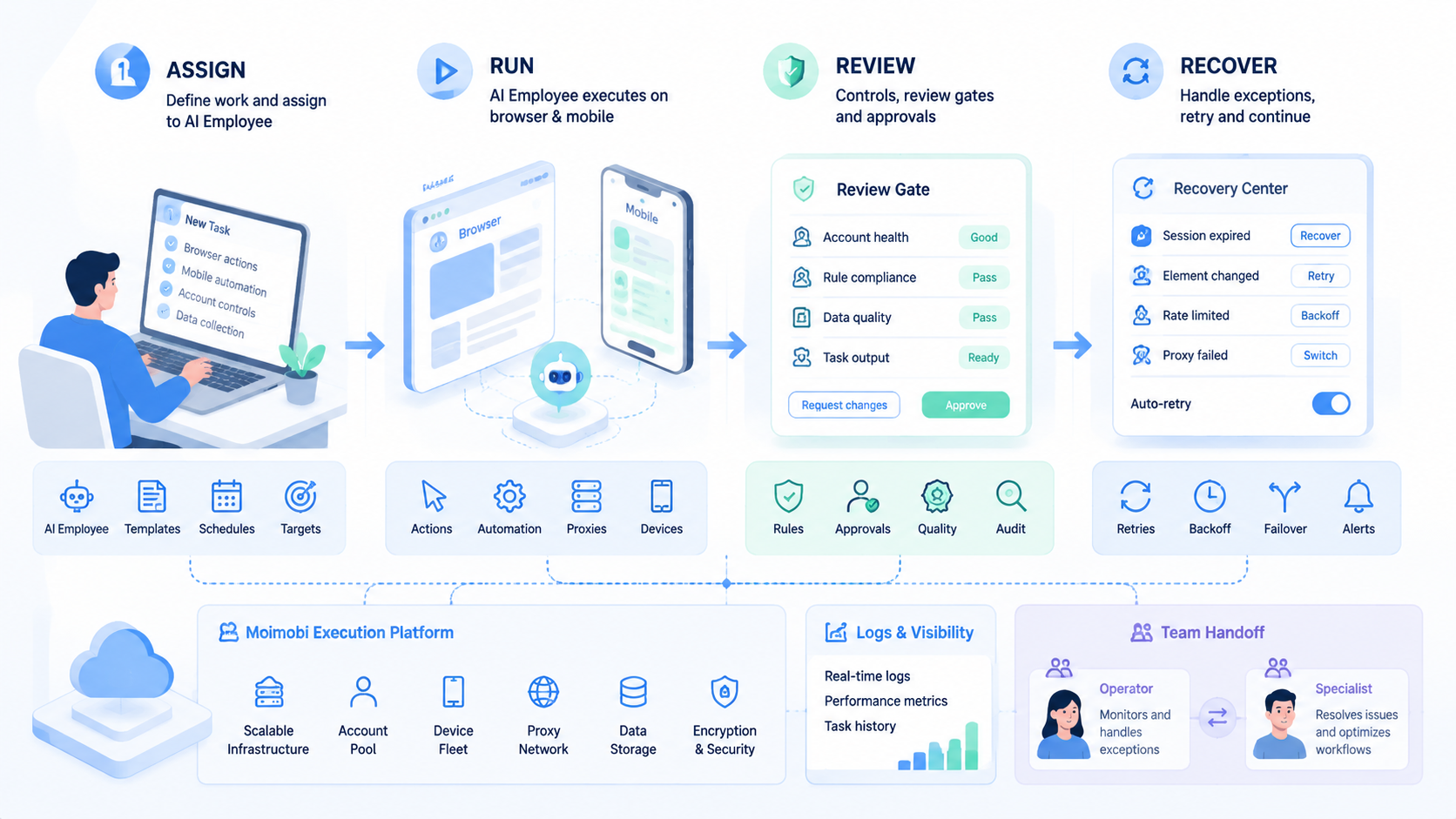
The priority order is simple. Define the workflow, control the environment, add review gates, measure failures, then expand capacity. Skipping that order turns an AI employee into another fragile automation script.
The strongest case appears when browser actions and mobile app steps are part of the same job. It gives teams a place to assign work, run it through controlled tools, inspect the result, and improve the path after every exception. That is the difference between a demo and an operating system for repeatable digital work.
For a first step, choose one workflow that already has a manual checklist. Mark the browser steps, the mobile steps, the account boundaries, and the review points. Then test whether a controlled cloud Android for AI agents can reduce handoff work without hiding errors. If the logs explain each run and the reviewer can recover failures quickly, the platform is ready for a broader pilot.



