
For business teams, an agentic browser is a controlled browser where AI agents read pages, operate accounts, complete tasks, and recover from workflow changes. Its value is not only page control. The larger aim is turning repeated online work into auditable execution.
Most teams do not need this kind of execution browser because they want another browser. They need one because normal scripts break, RPA flows are too rigid, and human operators spend too much time moving between tabs, accounts, dashboards, forms, and mobile steps. A good system gives AI workers a controlled place to execute those workflows.
Start small. Keep logs. Pause fast. Review often.
Key Takeaways
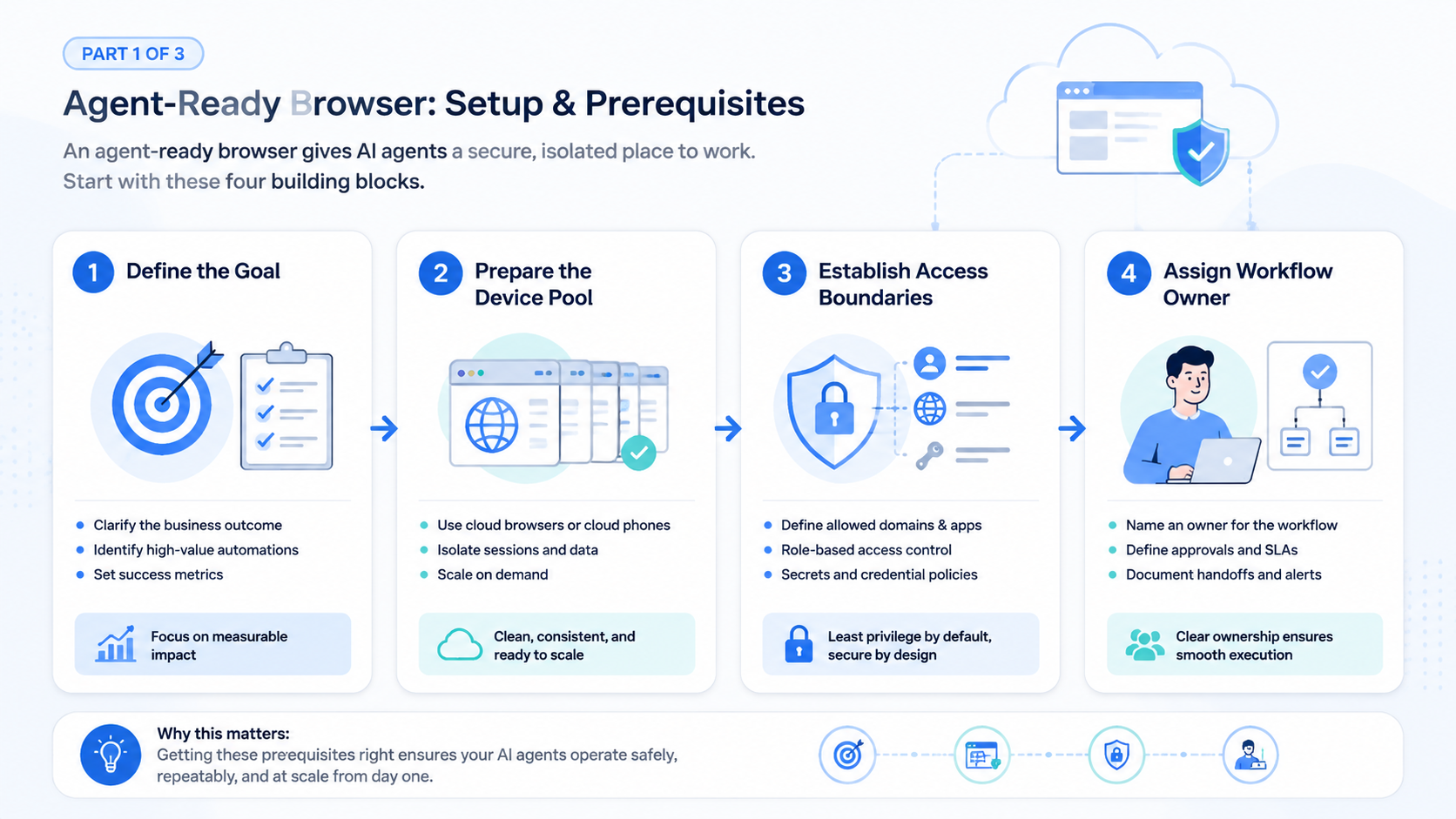
- An agentic browser helps AI agents execute browser-based work with context, identity, and workflow control.
- It is different from basic browser automation because it must handle accounts, permissions, exceptions, and review.
- Business teams should evaluate account isolation, audit logs, cloud phone support, human approval, and recovery paths.
- The best starting point is a narrow workflow pilot, not a full replacement of every manual process.
What is an agent-ready browser?
An agent-ready browser is built or configured for AI-driven task execution. It gives an AI agent a place to read pages, click buttons, fill forms, switch accounts, collect results, and continue work across multiple steps. The workflow is agentic because the automation is not limited to a fixed sequence of selectors.
Traditional browser automation follows instructions that developers define in advance. An agentic browser still needs guardrails, but it can interpret page state, select the next step, and adapt when a workflow changes. This matters when business tasks involve dashboards, content platforms, CRM tools, ecommerce portals, ad accounts, support inboxes, and social media systems.
The tool alone is not enough. Teams also need identity control, profile management, logging, error handling, approvals, and sometimes mobile execution. That is why this browser layer often belongs inside a broader AI execution platform rather than a standalone testing tool.
Why business automation needs more than scripts
Scripts work well when the task is stable. They are less reliable when a website changes layout, asks for a verification step, returns a different state, or requires judgment. Many business workflows have exactly those conditions.
For example, a growth team may need to check campaign dashboards, copy approved content, publish posts, review comments, log results, and escalate exceptions. A script can automate parts of this. The browser execution layer can help connect the parts, especially when the task requires interpretation.
The same pattern appears in support, marketplace operations, QA, and social workflows. A human operator often knows the goal but spends time translating it into clicks, checks, screenshots, and updates. AI-driven browser execution is useful when the goal is clear, the interface is variable, and the team needs a record of the work.
This does not mean teams should remove rules. The opposite is true. Agentic browser automation needs stronger boundaries because AI agents can act across real business systems. Teams should define allowed sites, account roles, action limits, review steps, and failure states before they scale.
Agentic browser vs RPA vs browser automation
This category overlaps with RPA and browser automation, but the operating model is different. RPA is often built around fixed workflows. Browser automation libraries are often built around code. The newer model is built around AI execution with business context.
| Capability | Browser automation | RPA | Agentic browser |
|---|---|---|---|
| Core model | Code-driven steps | Workflow-driven tasks | AI-guided execution |
| Best fit | Stable page flows | Repeated back-office flows | Dynamic online operations |
| Exception handling | Developer-defined | Rule-based | Context-aware with guardrails |
| Account handling | Usually custom | Depends on tool | Should be built into the platform |
| Human review | Added separately | Often configurable | Essential for business use |
The best choice depends on the job. If a test needs to click the same button every time, a script may be enough. If a team needs a bot to navigate changing dashboards and handle exceptions, an AI-ready browser environment becomes more useful.
For technical teams, Playwright remains useful for deterministic browser testing and automation. The official Playwright documentation explains how code-driven browser control works. That is a different operating model from AI-guided business execution, but many teams may use both in the same automation stack.
Agentic browser use cases in real operations
This browser model fits workflows that are browser-first, repetitive, and hard to fully script. It works best when the task has a clear goal but the page state may change. The agent can inspect the page, choose the next action, and record the outcome.
Common business uses include dashboard checks, approved content publishing, inbox review, simple data collection, CRM updates, account health checks, QA flows, and handoffs between web and mobile steps.
MoiMobi is relevant because many teams need browser execution and mobile execution together. A browser agent may handle the web dashboard while a cloud phone handles mobile app actions. That combined model is where browser automation becomes real operations instead of a fragile chain of disconnected helpers that nobody can observe, review, or safely pause.
Account isolation is a core requirement
Business automation often involves accounts. Accounts carry permissions, history, identity signals, customer data, and operational risk. A browser agent without account isolation can create more problems than it solves.
Teams should ask how profiles are created, assigned, stored, and reviewed. They should also define who can access each account, which agent can operate it, and what actions require approval. If multiple AI workers share accounts without rules, the team loses control.
This is why browser profile management matters. A useful system should support separated profiles, role-based access, task history, and clear ownership. When the workflow also uses mobile apps, cloud phone environments should follow the same principle: each environment needs a purpose, owner, and review path.
For teams evaluating this layer, MoiMobi AI browser automation is the relevant product context. It should be evaluated as execution infrastructure, not only as a browser.
Account isolation also affects measurement. When every task, account, and profile has a clear owner, teams can compare outcomes without guessing which environment created the result. That is important for agencies, growth teams, and operators who manage many accounts at once, especially when a single mistaken action can affect client trust, account health, or daily reporting.
Cloud phones extend browser-agent workflows
Many online operations do not stop in the browser. A task may begin in a web dashboard and continue in a mobile app. Examples include social posting, app-based account checks, marketplace operations, customer message review, mobile QA, and content verification.
Cloud phones extend the model by giving AI workers or operators access to mobile execution environments. The browser handles web tasks. The cloud phone handles mobile-first tasks. A central platform connects both into one workflow.
This matters because many businesses still run operations across fragmented systems. A human may use Chrome, a phone, a spreadsheet, a chat tool, and a CRM in one process. An AI execution platform should help reduce that fragmentation without hiding the steps from managers.
You can review MoiMobi cloud phone infrastructure and device fleet workflows to understand the mobile side of this operating model.
How to evaluate the platform
Evaluation should start with workflow fit. Do not begin with a feature checklist. Begin with the task your team wants to automate and the cost of doing that task manually today.
Use these dimensions:
| Dimension | What to check |
|---|---|
| Workflow clarity | Clear start state and end state |
| Account control | Profile owner, role, and permission boundary |
| Human review | Approval before sensitive actions |
| Logging | Visible action history and reason |
| Recovery | Clear fallback path for stuck work |
| Mobile support | App steps mapped to cloud phones or people |
| Integration | Results sent to CRM, sheets, tickets, or internal tools |
The platform should reduce operational uncertainty. If it only adds another interface without logs, approvals, or recovery, it will be hard to trust for business-critical work.
Teams can also compare the platform against general AI agent guidance. OpenAI’s public documentation for building agents is useful background for understanding tool use, action boundaries, and human oversight. Business teams should translate those ideas into concrete policies for accounts, profiles, approvals, and logs.
A pilot workflow for business teams
The safest way to adopt this technology is to run a narrow pilot. Pick one workflow with repeated steps and a clear business outcome. Avoid starting with high-risk account actions or customer-facing decisions.
A practical pilot can stay simple: choose one workflow, such as dashboard review or approved content publishing, then define the account profile and permissions.
Write the allowed actions, blocked actions, review owner, run schedule, success measure, and stop rule before deciding whether to expand, revise, or pause.
The most important pilot output is not a demo video. It is a clear answer to whether the system made the workflow more reliable, observable, and easier to scale.
Security and governance questions
Agentic browser automation touches real accounts. Teams need governance before scale. This includes access control, audit logs, credential policy, data handling, approval rules, and incident response.
Useful questions include profile creation, account access, readable data, approval rules, failure handling, log retention, and review ownership. Answer them before the first pilot. The answers should be short enough for operators to apply during real work.
For general security thinking, the NIST Cybersecurity Framework is a useful reference. It is not specific to agentic browsers, but it helps teams think about identify, protect, detect, respond, and recover.
Agentic browser governance checklist
Governance should be simple enough for operators to follow. Long policy documents rarely help if the daily workflow is unclear. A practical checklist works better because it ties every automated action to an owner, account, allowed task, and review rule.
Use this checklist before expanding from a pilot:
| Check | Pass condition |
|---|---|
| Profile ownership | Owner and purpose for each profile |
| Worker role | Defined role and task boundary |
| Approval | Review before sensitive actions |
| Credentials | No secrets in prompts or shared docs |
| Logs | Account, action, result, and reviewer |
| Failure path | Clear path to a person |
| Mobile steps | Cloud phone or manual owner |
| Stop control | Manager can pause work quickly |
This is not meant to slow the team down. The aim is to make automation safe enough to run repeatedly. Clear boundaries help teams move faster because people spend less time debating what the agent was allowed to do.
Agentic browser rollout metrics
Rollout metrics should measure control as well as speed. Time saved is useful, but it is not enough. A workflow that runs faster while creating more account confusion is not a good automation candidate.
Track four groups of metrics:
| Metric group | What to watch |
|---|---|
| Execution | Task completion, run time, failure reason |
| Review | Approval count, review time, changed outcomes |
| Account health | Unusual sessions, profile conflicts, permission issues |
| Business result | Leads reviewed, tickets resolved, pages checked, posts published, records updated |
These metrics help leaders decide whether to scale. If completion improves but review effort rises too much, the process may need narrower rules. If failures repeat in the same step, the team may need a better tool integration. If account conflicts appear, profile ownership should be fixed before more agents are added.
Keep the first review simple. Ask what worked, what broke, and what should stop before the team adds more accounts, sites, or actions.
For a 2026 pilot, set sample targets before the first run. Treat them as internal pass/fail rules, not public benchmarks. A small team might require 80% successful runs across 20 low-risk tasks.
Use a compact scorecard: fewer than 3 manual corrections per day; review time under 30 minutes; 0 unapproved account changes; workflow improvements before any scale-up.
Agentic browser operating model for small teams
Small teams should keep the operating model plain. Start with one task owner, one review owner, and one clear stop rule. This keeps the pilot easy to judge because the team can trace every run back to one owner, one reviewer, and one stop rule. It also prevents the agent from becoming another tool that nobody fully owns.
The first workflow should be boring on purpose. Pick a task that people already repeat every day. Good examples include checking a dashboard, collecting a status update, preparing a draft post, reviewing a queue, or saving a simple report. These tasks are useful because the team knows what a good result looks like.
Write the process in a short runbook before the pilot starts. The runbook should say which account to use, which sites are allowed, what data to collect, what action is blocked, and who reviews the result. Keep the wording simple. Operators should be able to read it during work, not only during setup.
After the first week, review the misses. Do not only ask whether the agent finished the task. Ask where people had to step in, which pages caused confusion, which account rules were unclear, and which output fields were missing. Those notes are the real value of the pilot.
After the small model works, add one new account or one new task at a time. This pace may feel slow. It keeps the system easy to manage, and teams that scale in small steps usually find errors sooner and spend less time cleaning up broken workflows.
Agentic browser day-to-day workflow design
Daily work should be easy to explain. A manager should be able to say what the agent does, when it runs, which account it uses, and who checks the result. If that simple story is missing, the team is not ready to scale.
Simple beats clever here.
A useful daily flow has five plain steps: task queue, profile selection, allowed page work, result save, and human review for failures or judgment calls.
Keep the output small at first. A short note, a status field, a screenshot, or a simple table is often enough. Skip the giant report. The useful result is the one that helps the next person act.
Good workflow design also includes a stop button. The task should pause if the page changes, an account looks wrong, or the result is unclear. Pausing is not a failure. It is how the team keeps control while the system learns which steps are safe to repeat.
Concrete workflow example: campaign dashboard review
Consider a team that checks ad and content dashboards each morning. The old process may be simple but slow. One person opens three platforms, checks spend, clicks into alerts, takes notes, sends a message to the team, and asks a manager to review anything unusual.
This workflow becomes clearer when the fields are defined first. The agent should not make campaign decisions. Its job is to collect the right facts, flag unclear items, and prepare a review packet.
| Field | Example value | Why it matters |
|---|---|---|
| Workflow name | Morning campaign check | Keeps the task easy to find |
| Account profile | Brand account A | Prevents work from running in the wrong profile |
| Allowed sites | Ad dashboard, analytics page, task tracker | Limits where the agent can act |
| Allowed actions | Read metrics, capture screenshots, draft notes | Blocks changes to live campaigns |
| Stop rule | Any budget, login, or policy warning | Sends risky cases to a person |
| Output | Status note with links and screenshots | Gives the reviewer useful context |
| Reviewer | Growth lead | Makes ownership clear |
This example shows the right level of detail. Each field is simple, but together they create control. The agent knows what to read, what not to change, where to save the result, and when to stop.
Use the same pattern for other workflows. A support team can review open tickets, a marketplace team can check order queues, and a QA team can run a daily smoke test.
The field names may change, but the rule stays the same: define the account, action, output, reviewer, and stop condition before adding more scale.
Common mistakes to avoid
The first mistake is automating an unclear process. A team that cannot explain the human workflow should not expect the agent to fix the ambiguity.
The second mistake is giving the agent too much access too early. Start with narrow permissions. Expand only after the team can review logs and recover from failures.
The third mistake is treating an agentic browser as a replacement for judgment. AI can help execute, but product decisions, customer communication, compliance review, and brand voice still need ownership.
The fourth mistake is ignoring mobile steps. Many workflows break because they look browser-only at first, then require a mobile app, message, verification, or customer response. Map the full workflow before selecting tools.
Frequently Asked Questions
Is an agentic browser the same as an AI browser?
They are closely related. An AI browser may include AI assistance inside the browser. An agentic browser is more specifically focused on AI agents executing tasks through browser environments with task state, account context, review rules, and recovery paths.
Can an agentic browser replace RPA?
Sometimes it can replace part of an RPA workflow, but not always. RPA may still be better for fixed back-office processes. An agentic browser is stronger when the web environment changes and interpretation is required.
Does an agentic browser need human review?
Yes, for business use. Human review is important for sensitive actions, account changes, customer communication, financial steps, and exception handling.
What teams benefit most?
Teams with repeated browser-based work, multiple accounts, distributed operators, and measurable workflows benefit most. The common examples are growth, ecommerce, agency, QA, support, and operations teams that already know the manual process well.
How does a cloud phone connect to an agentic browser?
A cloud phone gives the workflow a mobile execution environment. The browser can handle web dashboards, while the cloud phone handles mobile apps or mobile-first account steps.
What should a team automate first?
Begin with low-risk, repeated tasks that have clear success criteria. Examples include dashboard checks, data collection, approved publishing, QA flows, and structured monitoring.
What should not be automated first?
Avoid high-risk actions such as irreversible account changes, sensitive customer messages, financial decisions, or workflows with unclear rules. Add review before expanding.
Conclusion
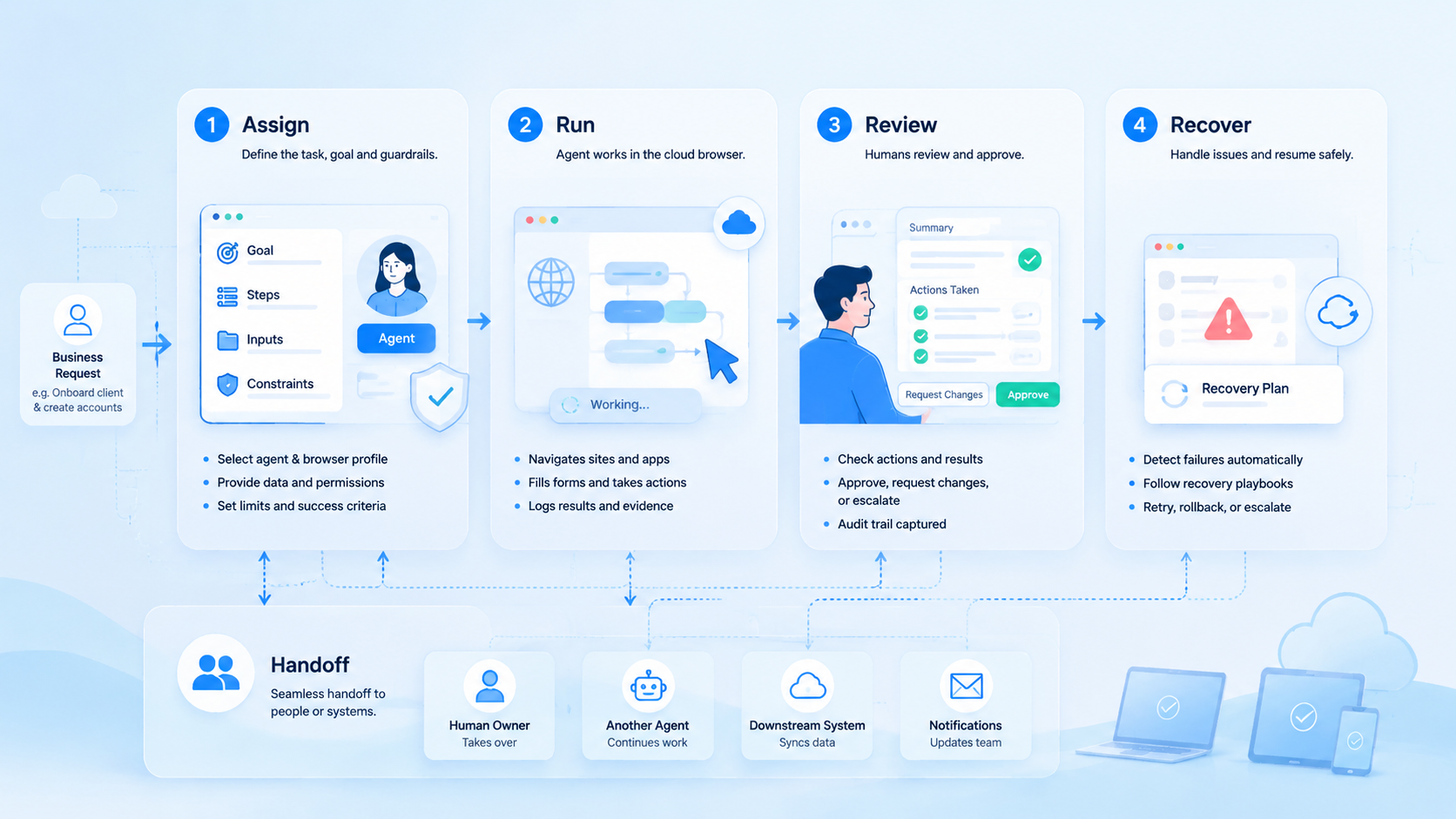
This technology can help business teams move beyond fragile scripts and rigid RPA flows. It gives AI workers a controlled environment for browser-based execution, but it must be paired with account isolation, logs, approvals, recovery paths, and workflow design.
For teams running both web and mobile operations, the stronger model is an execution platform that connects agentic browser workflows with cloud phones. Start with one workflow, prove control and visibility, then expand with discipline.



