Key Takeaways
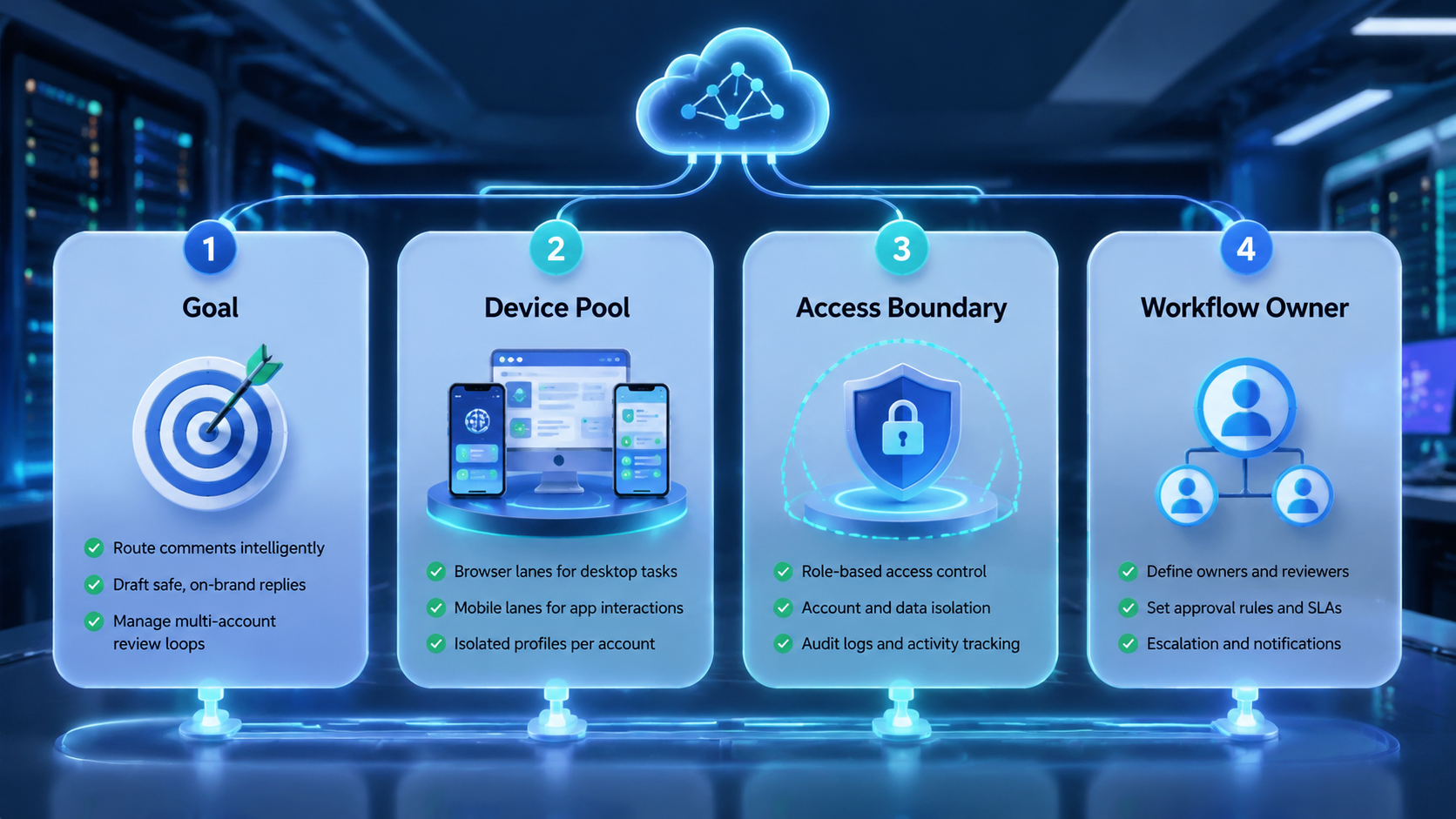
- AI comment reply automation is a workflow for triage, drafting, approval, and execution.
- Social teams should automate routing and preparation before they automate final public actions.
- Multi-account comment work needs clean ownership and separated account environments.
- A pilot should measure review quality, queue speed, and blocked-case handling together.
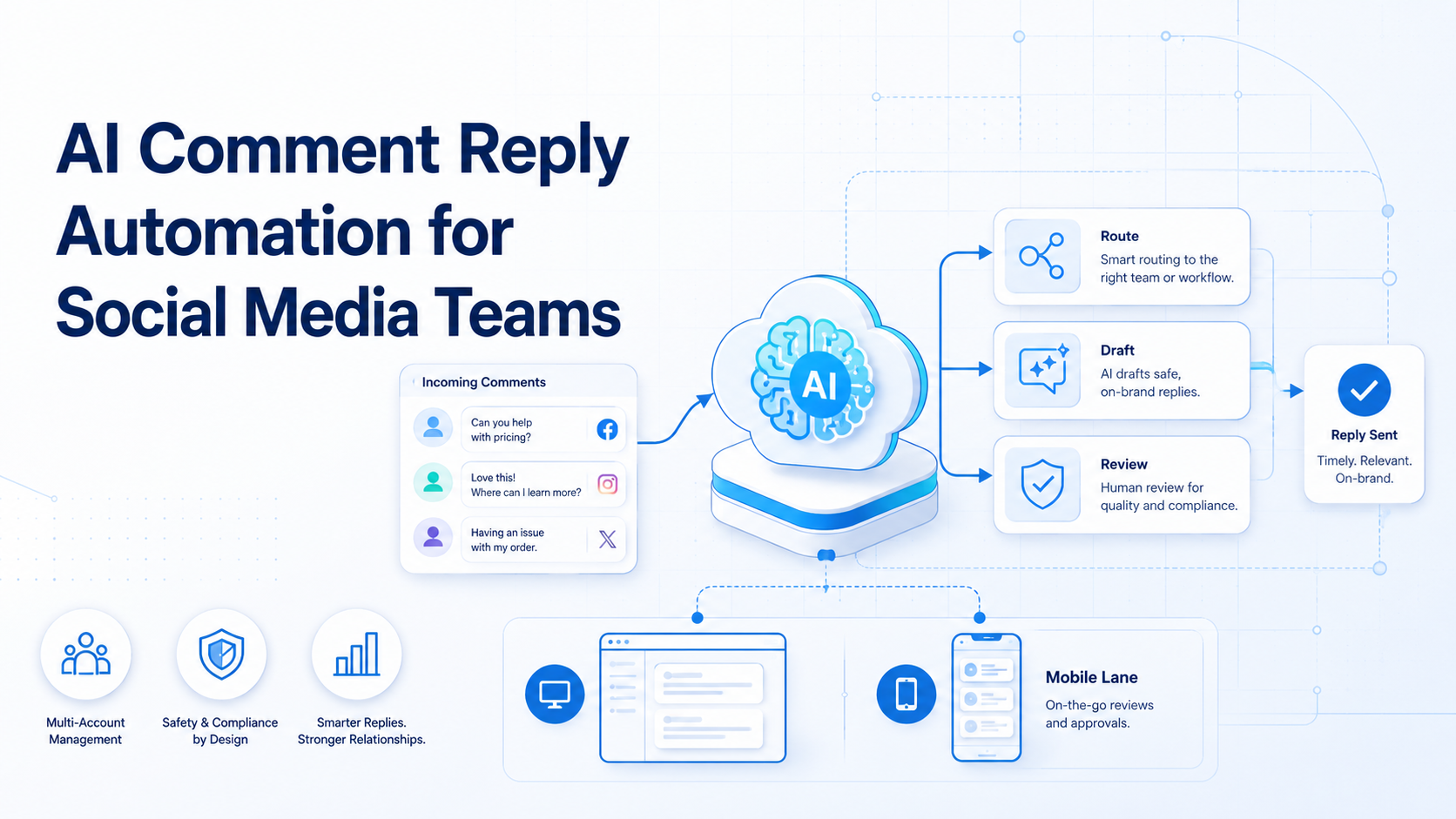
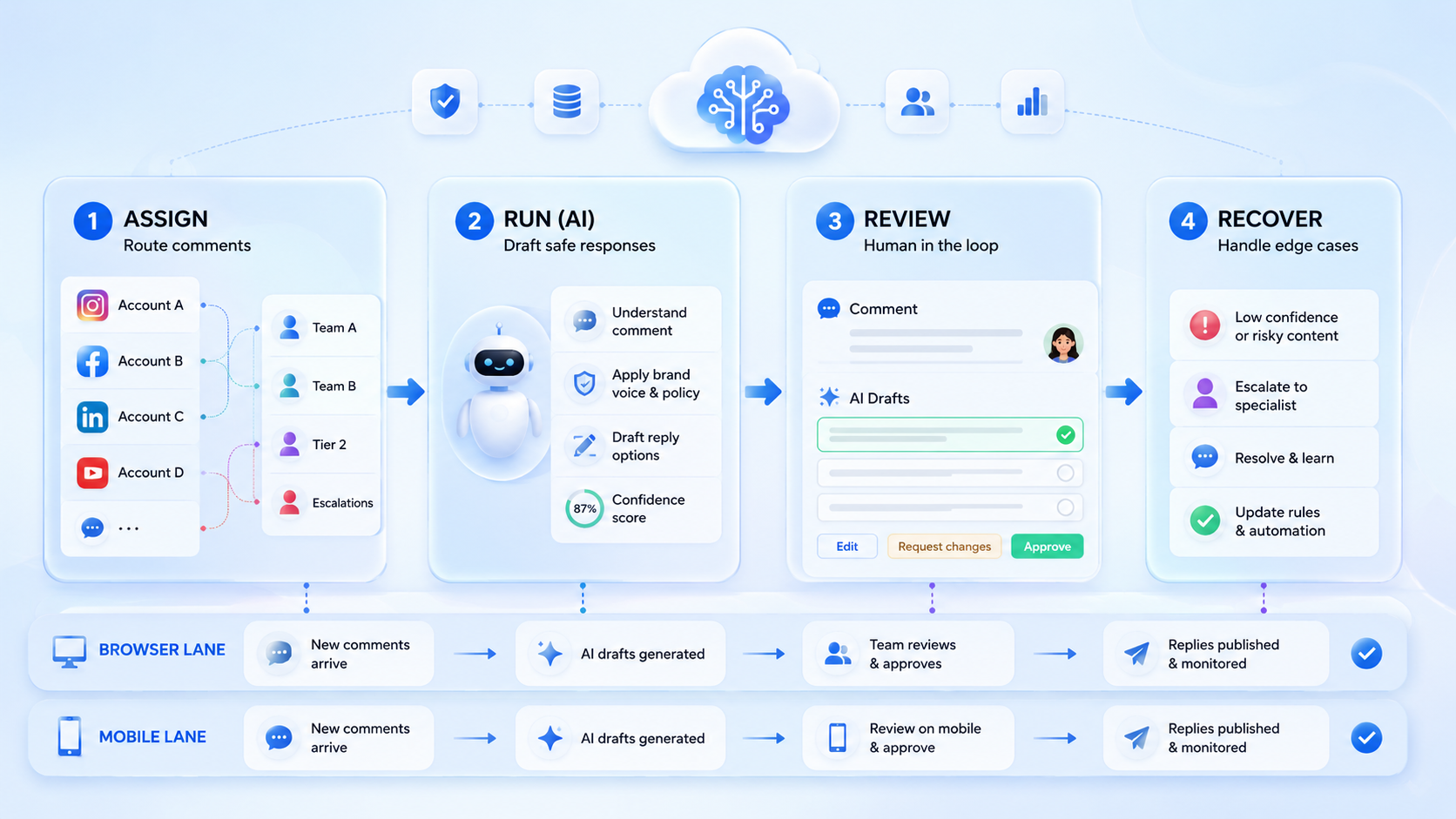
AI comment reply automation is a system that helps social media teams sort incoming comments, draft likely responses, route exceptions, and execute approved replies inside the right account lane. It is not just an AI text box under a post. A good setup connects language generation with review rules, queue ownership, and account-safe execution.
Comment volume creates operational pressure fast. One brand account may get a manageable stream. Ten accounts across several markets create a queue problem, a response-consistency problem, and an ownership problem at the same time.
That is why teams often connect comment work to a broader social media automation platform instead of using one isolated script. The objective is not only faster text generation. The objective is controlled comment handling across several accounts and surfaces.
Meta and TikTok both provide official support and business resources for moderation, account management, and platform-side operations.1 2 3 Those documents reflect the same reality: comment workflows live inside account-specific environments and policy-sensitive surfaces.
What Is AI Comment Reply Automation for Social Media Teams?
The wrong mental model is "AI answers every comment automatically." The better model is "AI handles the predictable parts of comment operations while the team keeps approval over edge cases."
The predictable parts usually include:
- intent tagging
- draft suggestion
- priority routing
- duplicate detection
- escalation to a named reviewer
| Workflow stage | What AI can do | What still needs control |
|---|---|---|
| Triage | Tag question, complaint, spam, or praise | Confirm unclear or sensitive cases |
| Drafting | Prepare a first reply | Approve tone and accuracy |
| Routing | Send to support, sales, or community owner | Check role mapping |
| Execution | Post approved reply in the right lane | Keep account separation intact |
This is why AI browser and cloud phone platform language can make sense in the article body. Reply automation is useful when the system can open the right surface and keep the task tied to the right account.
Why AI Comment Reply Automation for Social Media Teams Matters
Comment handling looks small until it becomes a queue. Once a team manages several accounts, comments arrive at different times, in different tones, and with different business value. A product question, a refund issue, and spam should not follow the same path.
Manual handling usually breaks in three ways. First, the queue slows down. Second, reply tone drifts across operators. Third, unclear cases bounce between chat messages, spreadsheets, and platform tabs.
An AI comment reply automation system helps by keeping the first pass structured. It can sort, stage, and route faster than a human can do from scratch. The team still decides where public risk needs review.
Another operational gain is consistency. Teams can keep the same comment classes, review paths, and handoff labels even when several operators or several markets share the workload.
Key Benefits and Use Cases
The main benefit is not "more AI." The main benefit is a cleaner operating rhythm.
Common use cases include:
- Community triage: sort praise, questions, complaints, and spam into clear lanes.
- Support handoff: route comments that need ticketing or customer follow-up.
- Sales qualification: tag product-interest comments for a closer response path.
- Creator account support: keep reply style consistent across several managed accounts.
For teams that also need mobile-side execution, cloud phone and mobile automation are the natural next pages. Some teams review comments in a browser lane, then complete the final reply or app-side step in a mobile lane.
This becomes more valuable when comments are an early signal for support, sales, or creator partnership work. The queue is no longer just moderation. It becomes a shared operating surface for several teams.
How to Get Started with AI Comment Reply Automation for Social Media Teams
Start with one queue and one approval rule.
- Choose one account group and one comment category, such as product questions or routine moderation.
- Create response classes. Keep them simple: answer, escalate, hide, ignore, or review.
- Draft reply templates or style rules before the model starts suggesting text.
- Assign one reviewer for public replies and one owner for blocked or unclear cases.
- Run the queue in one separated environment, then inspect the log before expanding.
Use one short field list in the task record:
| Field | Why it matters |
|---|---|
| Account lane | Prevents cross-account confusion |
| Comment type | Shapes the routing rule |
| Draft status | Shows whether AI prepared a response |
| Reviewer | Keeps approval visible |
| Next action | Prevents stalled tasks |
If browser-side profile separation matters, device isolation and browser profile and cloud phone workflow are useful follow-up pages.
Keep a few real examples during setup. One refund question, one product detail question, one spam message, and one complaint are enough to show whether the routing logic is too broad or still workable.
Common Mistakes to Avoid
The first mistake is auto-replying to everything. That creates more public risk than operational value.
The second mistake is letting the AI draft without a classification layer. If the system cannot tell a complaint from a basic question, it pushes too much cleanup work back to the team.
The third mistake is mixing comments from unrelated accounts into one working lane. Playwright contexts and W3C WebDriver both reinforce the importance of explicit sessions.4 5 The same discipline applies to reply work at account scale.
What not to do
- Do not route support, sales, and moderation comments into one undifferentiated queue.
- Do not let final public replies post without a review rule for edge cases.
- Do not reuse one environment across unrelated account groups.
- Do not treat queue speed as success if escalation quality drops.
Who It Fits and When It Is a Strong Match
This workflow fits teams that already have repeated comment traffic and at least a rough response policy. It is less useful when volume is very low or when every comment needs custom executive review.
Strong match
- Brands with several social accounts and recurring support or sales questions.
- Agencies managing creator or client communities at scale.
- Cross-border teams with language-based or region-based comment queues.
- Teams that already use structured reply rules and need faster first-pass handling.
Weak match
- Low-volume accounts with no queue problem.
- Teams with no reviewer or escalation owner.
- Workflows where every reply is highly custom and strategic.
- Setups that still operate from one shared account lane.
One practical example is a team that manages customer questions across Instagram and TikTok. AI can sort comments, draft likely answers, and move product issues to support. A human still reviews payment, safety, or complaint cases before the final action.
The fit improves further when the team already works with response templates or service-level targets. In that case the automation is helping an existing system, not inventing a new one from scratch.
Pilot Rollout, Measurement, and Recovery Checks
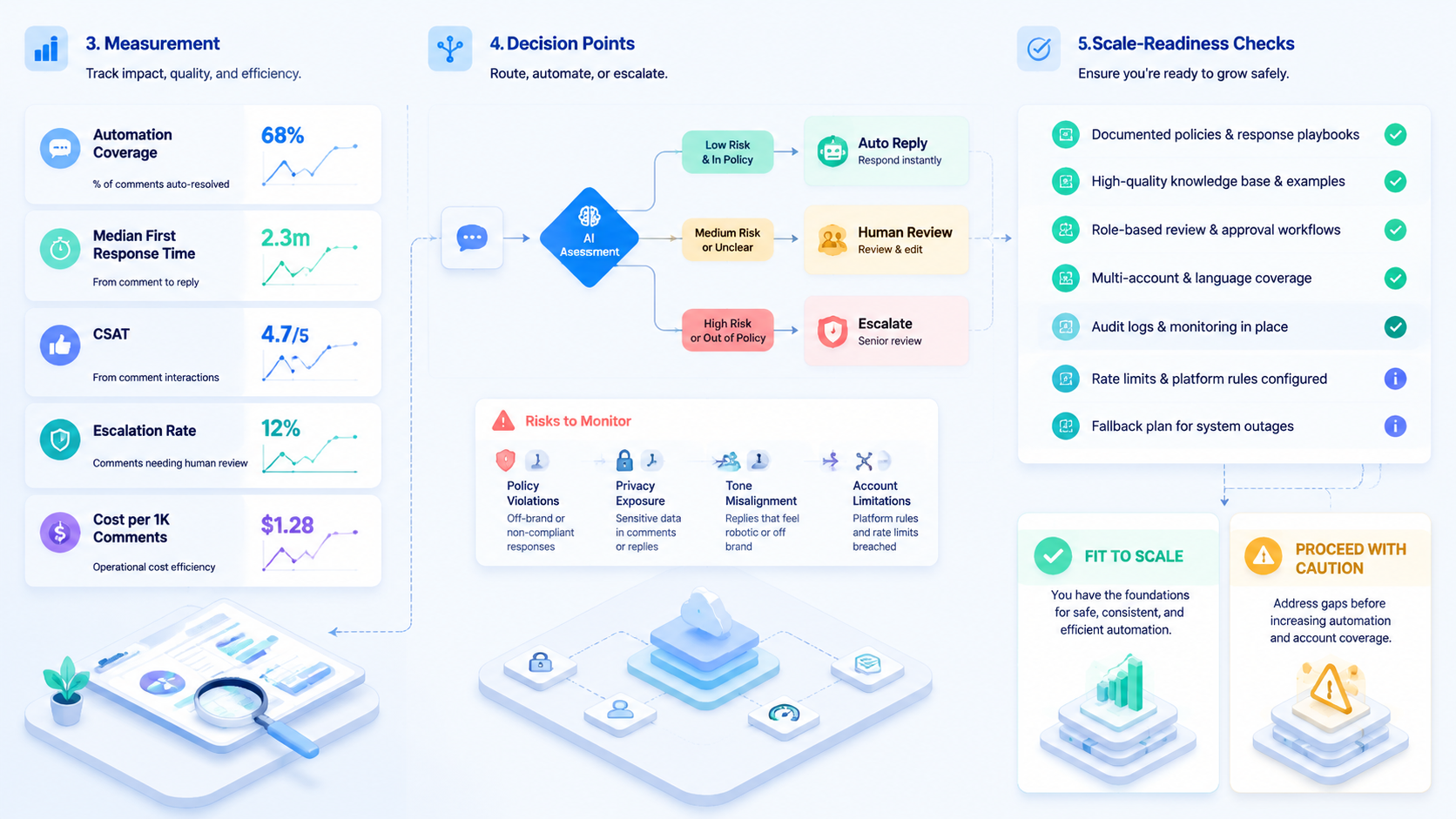
The pilot should prove that the queue becomes easier to control, not only faster to clear.
Use a two-week scorecard:
| Metric | Healthy sign | Warning sign |
|---|---|---|
| Queue time | Routine comments move faster | Speed improves but escalations pile up |
| Reply quality | Reviewers approve most routine drafts | Many drafts need full rewrites |
| Lane integrity | Each account stays in its own environment | Operators lose track of active account state |
| Blocked cases | Unclear comments reach a named owner quickly | Tasks pause with no owner |
| Expansion readiness | The same workflow works for a second account group | Manual rescue grows sharply |
AWS Device Farm and BrowserStack both highlight repeatability and result visibility in app workflows, which is a useful model for comment automation pilots as well.6 7 If the team cannot explain why a reply paused or who owns it next, the system is not ready to scale.
Add one more recovery check. Review whether the same escalation type keeps falling back to manual rescue. Repeated fallback usually means the queue needs another category or a tighter ownership rule.
Another useful sign is reviewer confidence. If reviewers start approving routine drafts faster without losing trust in the queue, the workflow is becoming durable rather than merely faster.
Frequently Asked Questions
Is AI comment reply automation the same as auto-comment posting?
No. It includes triage, draft prep, review, and routing, not only posting.
What should a team automate first?
Start with routine question handling or simple moderation categories.
Does every reply need human approval?
Not always. Many teams review only edge cases and sensitive topics.
Why does account separation matter?
It keeps replies tied to the right account context and ownership path.
Can this work across Instagram and TikTok?
Yes, if the workflow records lane, task type, reviewer, and next action clearly.
What is the first sign of a bad rollout?
The team clears comments faster but loses confidence in public reply quality.
What should the pilot measure?
Queue time, approval quality, lane integrity, and blocked-case handling.
Can this support sales and support teams together?
Yes, if the comment categories and owner rules are defined clearly enough to keep the queue from mixing unrelated tasks.
Conclusion
AI comment reply automation for social media teams works best when it starts with routing and review, not blind full auto-reply. The strongest setups keep comment classes clear, reply ownership visible, and account lanes separated.
Before expanding the system, confirm four things:
- routine comments are classified correctly
- reviewers can approve public replies quickly
- blocked cases reach a named owner
- each account queue stays in its own lane
If those checks hold, the workflow is ready for a larger rollout.
Sources