
Key Takeaways
- AI browser automation is useful for monitoring workflows when checks are visible and repeatable
- The workflow needs checkpoints, exception rules, and recovery ownership
- Browser agents should not act on unclear page states without review
- Moimobi connects browser execution with mobile and account environments for broader operations
Teams use AI browser automation to check web pages, dashboards, accounts, and workflows on a repeatable schedule. For monitoring workflows, the goal is not just to browse. The goal is to detect a state, record evidence, and route the next action.
Monitoring work often looks simple until it scales. A team may need to check many dashboards, account pages, publishing queues, support inboxes, or competitor pages. AI reads page signals. The browser gives the worker a place to run the check and save proof.
What Is AI Browser Automation for Monitoring Workflows?
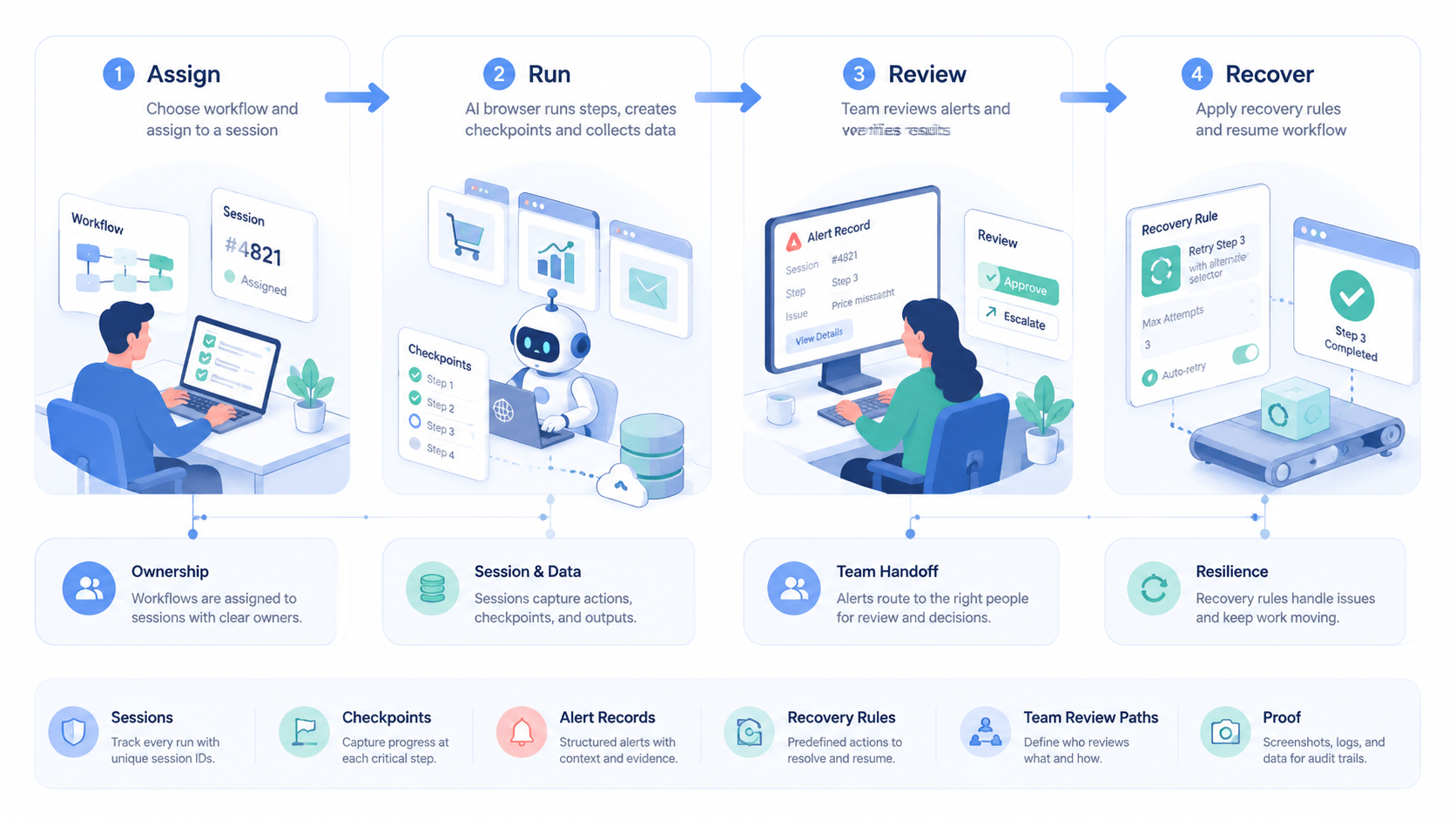
For monitoring workflows, the system combines three layers: a browser session, an AI interpretation step, and a reviewable task record. The browser loads the page. The AI compares the visible state against the expected state. Done or blocked, the workflow stores the result.
The browser layer needs structure. W3C WebDriver defines browser sessions and remote-control commands as a standard protocol for consistent browser control across tools and systems (W3C WebDriver). Playwright documents actionability checks before browser actions such as clicks and inputs (Playwright).
Those sources are not product advice. They show a basic rule: browser work needs state control. A monitoring worker should know which page it checked, which account was used, what changed, and whether the next step needs a person.
Moimobi positions AI browser work inside a wider execution system, not as a standalone script.
Why Monitoring Workflows Need More Than Screenshots
A screenshot can prove what the page looked like. It does not explain why the workflow passed, failed, or stopped.
Monitoring workflows need structured outcomes:
- Expected: the page matched the known condition
- Changed: the page state changed and needs review
- Blocked: login, permission, or page load stopped the check
- Escalated: the AI could not classify the state with enough confidence
This matters for team handoff. A night operator, support lead, or account manager should be able to open the record and see what happened. If the record only says "checked," the workflow is too thin.
NIST SP 800-53 includes audit event and accountability controls for organizational systems (NIST). Monitoring workflows can apply a lighter version: owner, timestamp, checked target, result, and next action.
Key Benefits of AI Browser Automation
This approach works best when the monitoring target is visible in a browser and the decision rule is repeatable.
| Workflow | What the worker checks | What triggers review |
|---|---|---|
| Publishing queue | Draft status, asset presence, scheduled time | Missing asset or failed queue state |
| Support dashboard | Unread count, SLA state, message category | Urgent or unclassified issue |
| Account operations | Login state, warnings, profile visibility | Unexpected prompt or permission change |
| Market monitoring | Page changes, pricing, availability, content updates | Material change from the last record |
For teams running social channels, browser monitoring often connects to social media marketing. For account-heavy operations, it should also connect to multi-account management.
How to Get Started with AI Browser Automation
Start with a checklist, not a full agent. The first workflow should prove that the browser can load the right target, identify the expected state, and produce a useful record.
Use these checkpoints:
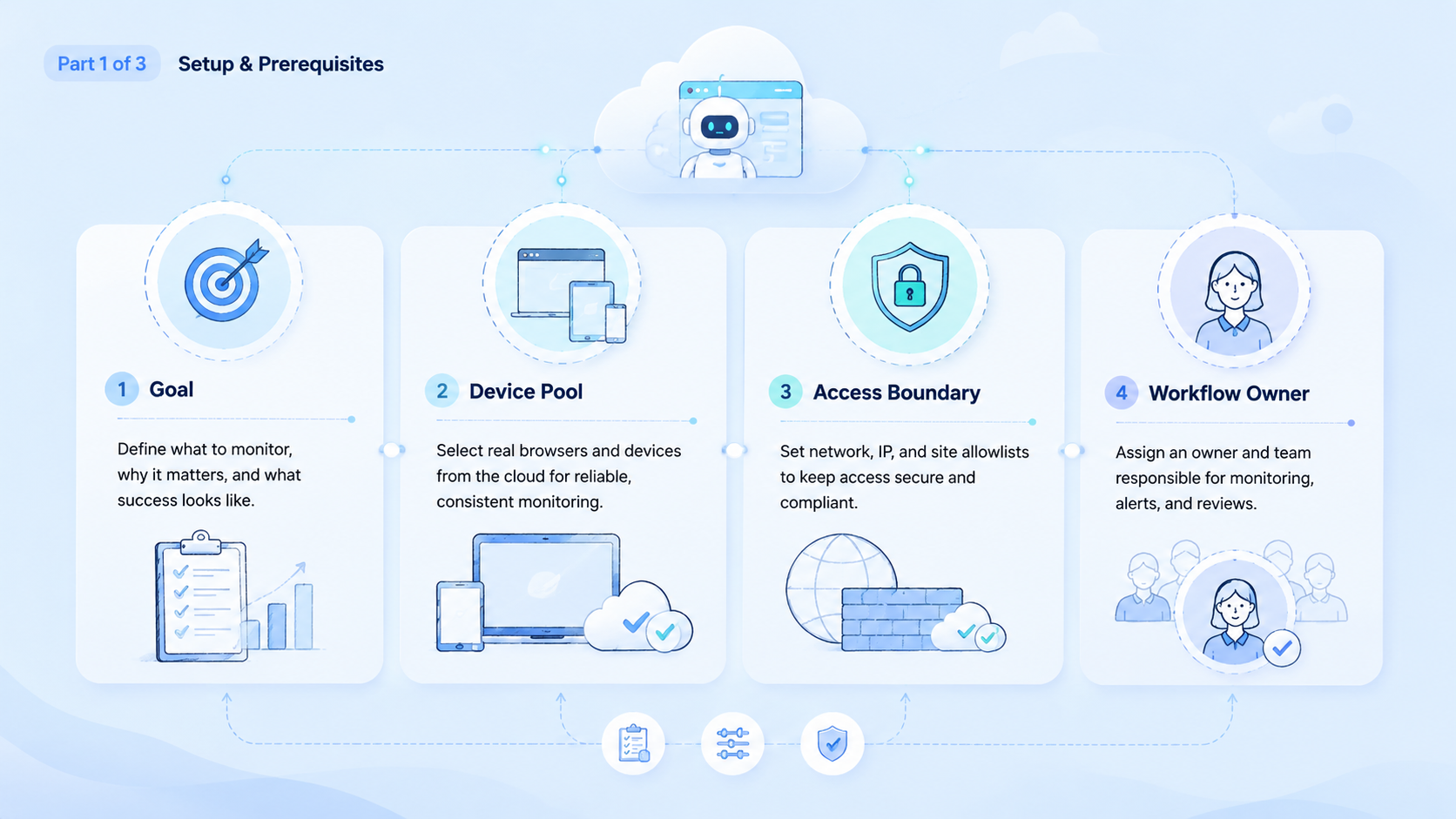
- Target list. Define the exact pages or dashboards.
- Session rule. Assign the browser profile or account group.
- Expected state. Write the pass condition in plain language.
- Evidence field. Save screenshot, summary, timestamp, and checked URL.
- Stop rule. Pause on login prompts, missing elements, or unclear state.
- Review owner. Assign the person or role that handles exceptions.
Chrome DevTools Protocol documents browser debugging and inspection domains for Chrome-based environments (Chrome DevTools Protocol). In practice, teams should treat inspection data as a support layer, not a replacement for business review.
Common Mistakes to Avoid
Scope first. A broad worker that checks every page and every account will create noisy results. A smaller worker with a clear target list is easier to tune and easier to review after a failed run.
Account context is the second trap. Monitoring a logged-in dashboard requires the right browser profile, permissions, and session state. Moimobi's device isolation helps teams separate workspaces when account state matters across several accounts, shifts, and review owners.
Do not merge detection and response too early. First detect and record. Then route the next action to a worker, queue, or human reviewer.
Who It Fits and When It Is a Strong Match
Browser-based monitoring is a strong match when the team already knows what a normal page state looks like. It is weaker when the page requires subjective judgment every time.
Good fit:
- Repeated dashboard checks
- Multi-account status reviews
- Publishing or queue monitoring
- Competitor page change detection
- Support inbox triage
Poor fit:
- One-off research with unclear targets
- Sensitive decisions without human review
- Pages that change layout constantly
- Workflows with no owner for exceptions
When mobile app checks are part of the same process, connect browser monitoring to cloud phone or mobile execution rather than forcing every step through a desktop browser.
Pilot Rollout, Measurement, and Recovery Checks
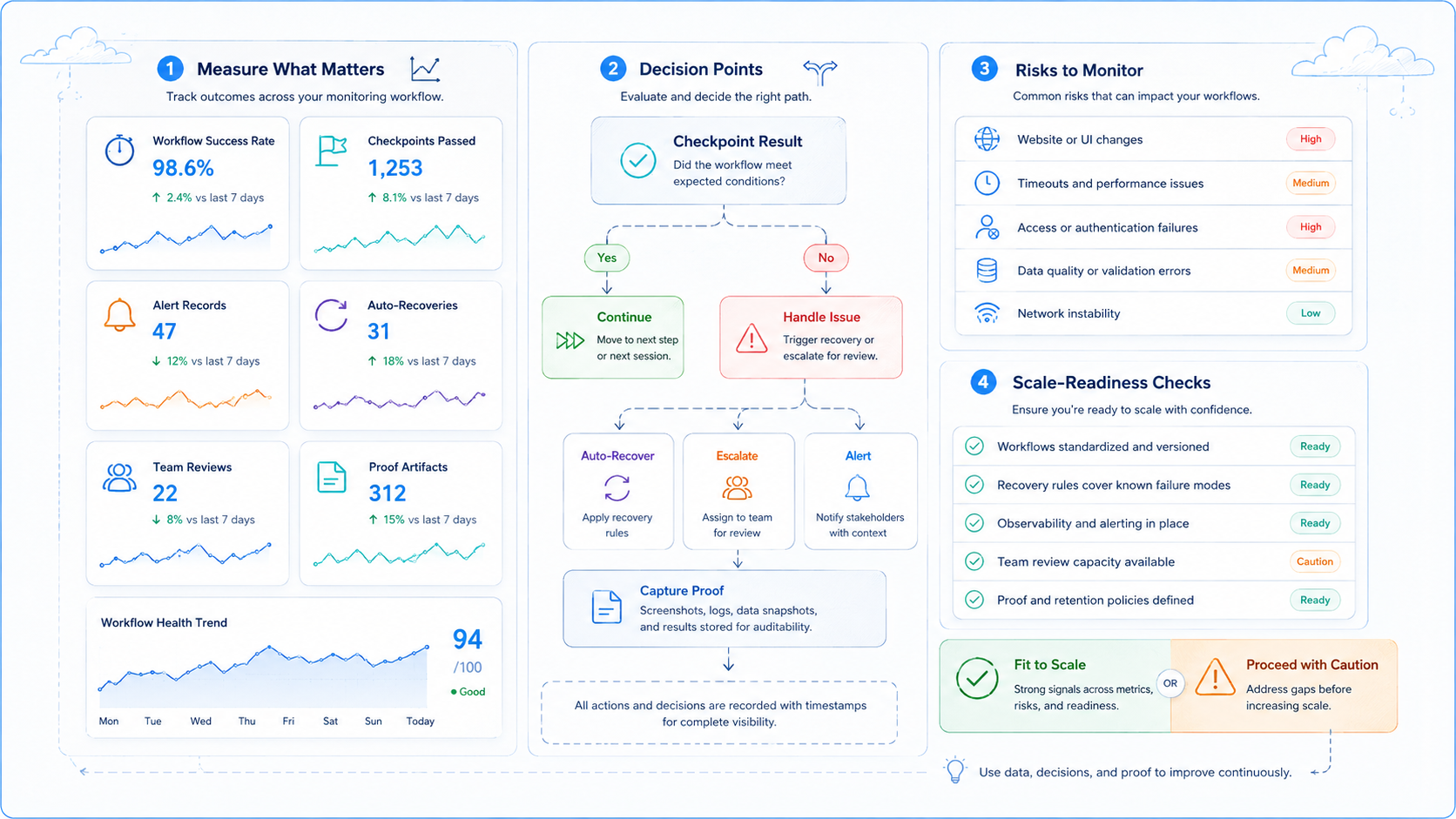
A useful pilot should run on a small target set for several cycles. The team should compare AI records against human checks before increasing coverage.
Track:
- Pages checked
- Successful checks
- Blocked sessions
- False alarms
- Missed changes
- Human takeover rate
- Average recovery time
The recovery check matters most. If a reviewer can open the task record and understand what failed, the monitoring workflow is improving. If the reviewer needs to rerun everything manually, the workflow needs better evidence capture.
Keep the pilot small until the review notes are clear. A second dashboard is easier to add after the first one produces reliable records.
Simple runs teach the team faster. One page, one expected state, and one owner are enough for the first week of testing.
A good run should feel plain. The page loads, the check runs, and the note says pass, changed, or blocked.
The next person can see the same facts and act without a long chat thread.
Frequently Asked Questions
What is AI browser automation?
It is web work. The worker reads a page, stores a result, and follows review rules.
Is it the same as web scraping?
No. Monitoring workflows focus on controlled checks and team records, not uncontrolled data extraction or bulk collection.
What should be monitored first?
Start with a small set of dashboards, queues, or account pages where the expected state is already known.
Does the workflow need human review?
Yes for exceptions. Unclear page states should pause, because a reviewer can judge the next step with more context.
Can it monitor multiple accounts?
Yes, if each account has a clear profile, permission scope, review owner, and stop rule.
What should a monitoring record include?
Use timestamp, target URL, account group, observed state, evidence, next action, and the person or queue that owns recovery.
Where does Moimobi fit?
Moimobi provides browser and mobile execution environments for teams that need repeatable monitoring across accounts.
Conclusion
Prioritize three things: target clarity, evidence quality, and recovery ownership. Those decide whether AI browser automation becomes a useful monitoring system or just another script.
Start with one workflow and one review owner. If the records are clear after repeated runs, add the next dashboard, account group, or mobile step.



