
A youtube downloader workflow is a controlled process for saving authorized video assets, research references, transcripts, thumbnails, metadata, and review notes for a content team. Treat it as an archive control system, not a shortcut for taking videos without permission. The workable model starts with rights, source context, storage rules, and a clear record of who used the file.
Content teams search for this topic because web research gets messy fast. A strategist may find an example video, a creator may need an approved brand clip, and an editor may need a stable reference while preparing a campaign. Source context must travel with the file.
Use caution before any download step. YouTube's Terms restrict downloading or using service content unless authorized by the service, written permission, or applicable law. YouTube Help also explains that video content normally belongs to the creator or right holder.
Start with permission. Then choose the tool.
Official guidance should shape the operating standard. Use YouTube Terms of Service, YouTube copyright guidance, Google Search Central helpful content guidance, and Playwright browser automation documentation as references for platform use, copyright awareness, content quality, and controlled browser testing.
For team execution, a cloud phone or browser workspace is only one layer. MoiMobi product paths such as mobile automation, device isolation, multi-account management, and resources show how execution, identity, and review can stay connected.
Key Takeaways
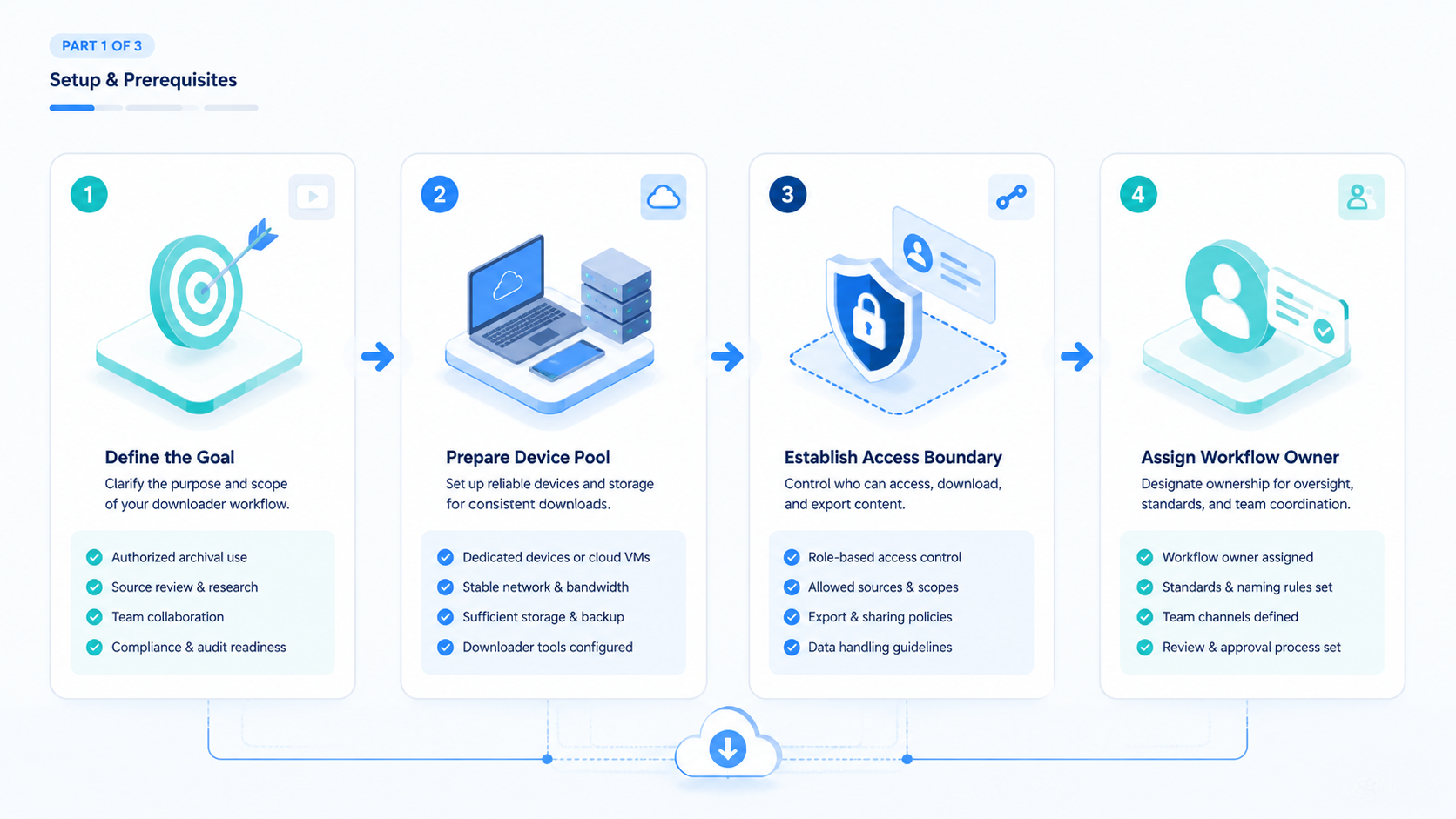
- A youtube downloader workflow should start with rights, source context, and review rules
- Teams should archive only material they are allowed to store, transform, or reference
- The most valuable asset is not only the file; it is the source record around the file
- Browser and mobile execution need account boundaries, storage paths, and reviewer gates
- A small pilot should measure permission clarity, metadata quality, and recovery time
What Is a YouTube Downloader Workflow?
A youtube downloader workflow is not the same thing as a single download button. The team version includes permission checks, source capture, file storage, metadata, owner assignment, and a review path. A solo tool may save a file. A proper workflow explains why the file exists and what may happen next.
The common misunderstanding is simple. People treat a download as the goal. For a content team, the useful outcome is a research packet that can be trusted later. That packet may include the original URL, creator name, capture date, usage status, project owner, transcript source, review note, and storage location.
This distinction matters when several roles touch the same reference. A strategist may collect examples, a researcher may tag themes, an editor may create notes, and a reviewer may approve or reject usage. Without a shared record, each person repeats the same legal and operational questions.
| Workflow field | Why it matters | Pass signal |
|---|---|---|
| Source URL | Keeps the original context visible | The reviewer can reopen the source |
| Rights status | Separates reference, licensed, owned, and public-domain material | The allowed use is written down |
| Owner | Prevents orphaned files | One person owns follow-up |
| Storage path | Stops duplicate local copies | The team knows which file is canonical |
| Review note | Explains whether the asset can move into production | Accept, reject, or hold is recorded |
Why YouTube Downloader Workflows Matter for Research Teams
Research work depends on traceability. A downloaded reference without context becomes a loose file. Weeks later, nobody may know whether it was owned, licensed, embedded, cited, or collected only for internal inspiration. That uncertainty creates rework before publication.
Content teams also need to separate research from reuse. Watching a public video for market learning is different from saving, editing, reposting, or using it in a commercial deliverable. A good workflow makes that boundary visible before creative work begins. It reduces the chance that an editor treats a reference file as approved production material.
The practical decision is whether a downloader is needed at all. Some references only need a link, screenshot, or note. Other projects need an authorized asset archive because the company owns the channel, has creator permission, or must preserve approved campaign material. Choose the lightest capture method that supports the task.
One example is a weekly competitor review. Researchers may save source links, thumbnails, claim summaries, and timestamps, but not store third-party video files. Label it.
A separate owned-media archive may save approved brand videos and raw exports. Mixing those two buckets is where confusion begins. Separate the buckets. A clean rule here saves hours later because reviewers do not need to reopen old chats, guess intent, or ask the collector why the item exists.
Key Benefits and Use Cases
The strongest benefit is a cleaner handoff. Researchers do not need to explain every source from memory. Editors do not need to guess which clips are approved. Managers can review a short packet instead of opening a folder full of unexplained files.
Three use cases are common in content operations:
- Owned channel archive: save videos, titles, descriptions, thumbnails, and publishing notes from assets the company controls.
- Research library: collect references, transcripts, timestamps, and source links for internal analysis without treating them as reusable media.
- Campaign review: preserve approved creator deliverables with permission records, usage windows, and reviewer decisions.
Each use case needs a different rule. Owned archives need version history. Research libraries need strong labels that say "reference only." Campaign review files need usage rights and dates. A single folder named downloads is too weak for all three.
A structured workflow also supports search and recovery. When a file name includes project, date, source, owner, and rights status, operators can find it later. Missing metadata turns the archive into storage cost instead of an operating asset.
YouTube Downloader Archive Naming and Review States
Archive naming should make the file understandable without opening a separate chat thread. A simple convention may include project, source, capture date, rights state, and owner. The exact format can vary, but every saved item should answer the same operational questions.
Use short labels that are hard to confuse:
-
owned: team-controlled source asset or channel -
licensed: documented permission or usage window -
partner-approved: creator or partner approved this specific use -
reference-only: research support, not production material -
hold: review required before use -
rejected: remove or keep only as a blocked example
This state model is more useful than a folder named downloaded videos. Editors can see what they may touch. Managers can see what needs review. Operators can see which files must be cleaned up later.
The naming rule should also cover derivatives. A transcript, clip note, thumbnail, and source file should share the same project and source identifier. Match the IDs.
That prevents a transcript from surviving after the related source file has been rejected. Simple names do heavy work.
YouTube Downloader Operating Model for Team Handoff
Handoff is where weak archives break. A researcher may save a source because it explains a trend. An editor may later see the same file and assume it can be reused. Allowed next steps should be obvious before creative work starts.
Use a four-role model once more than one person touches the archive:
| Role | Main job | Stop condition |
|---|---|---|
| Collector | Captures source context and initial label | Missing source or unclear permission |
| Researcher | Adds notes, timestamps, themes, and usage intent | Conflicting interpretation |
| Reviewer | Approves, rejects, or holds the item | Rights status is not documented |
| Producer | Uses only approved material in deliverables | Asset state is not approved |
This model keeps responsibility clear. The collector does not approve reuse by saving a file. Stop there.
The producer does not become responsible for reconstructing rights context during a deadline.
The same structure also helps with AI-assisted work. An AI workflow can prepare fields, suggest tags, or flag missing data. Preserve the gate.
It should not silently upgrade a reference-only item into an approved production asset.
How to Start a YouTube Downloader Workflow
Start with guardrails, not software. A tool choice is premature before saved, reference-only, and approval-required content classes are defined. Decide those classes first.
-
Define allowed sources. Separate owned content, partner-approved content, public references, licensed assets, and restricted third-party material.
-
Create a source packet. Capture URL, channel, title, date, project, intended use, and reviewer before any file enters the archive.
-
Choose the execution surface. Use a browser workspace, controlled device, or approved internal process. Avoid personal machines for shared archives.
-
Save to a controlled path. The first stored copy should land in the team workspace, not in an operator's downloads folder.
-
Add a decision label. Mark each item as approved, reference only, hold, expired, or rejected.
-
Review before production. Do not let archived files move into editing, ads, or publishing without a second check.
-
Record recovery actions. If a file is wrong, expired, or missing rights, write the reason and owner for cleanup.
Execution infrastructure helps at this point. A content team can run the same capture checklist inside an isolated browser or mobile environment. The run can pause when permission is missing, when a source is unclear, or when a required field is empty. Stop there.
Common Mistakes to Avoid
The first mistake is treating every public video as downloadable material. Public access is not the same as permission to store, edit, redistribute, or commercialize content. Classify first.
The second mistake is hiding files in personal storage. A local download may feel faster, but it breaks review. When the operator leaves, changes devices, or forgets the source, context disappears.
The third mistake is storing a file without a source record. A video file alone cannot prove where it came from, which version it represents, or why it was saved. Metadata is part of the asset. Keep it attached because a file without its record becomes hard to trust during review.
The fourth mistake is mixing research references with approved production assets. Use separate folders, labels, or database states. Separate them.
A reference file should not look like a ready-to-use creative asset.
The fifth mistake is automating the wrong step. Automation should enforce naming, capture fields, storage paths, and review pauses. It should not bypass permission checks or platform boundaries.
YouTube Downloader Fit: When It Is a Strong Match
The best youtube downloader workflow fits teams with repeated, reviewable research. It is a strong match when the team handles owned channels, creator partnerships, campaign archives, training examples, or documented competitive analysis. Those tasks need consistency more than speed.
It is not a strong match for casual one-off collection. A saved browser bookmark may be enough for a single reference. Do less.
A full archive workflow adds value only when several people reuse the source packet later. Save the process for shared work where the same record must survive handoff, review, edits, and cleanup.
The fit also depends on account and environment boundaries. Agencies, growth teams, and distributed content teams often need role separation. One person collects, another reviews, and another edits. A controlled workflow makes those handoffs easier to audit.
| Strong fit | Weak fit |
|---|---|
| Owned content archive | Unapproved third-party reuse |
| Creator deliverable review | Personal entertainment downloads |
| Recurring campaign research | Files with no source record |
| Training library with permissions | One-off research with no handoff |
YouTube Downloader Pilot Rollout and Recovery Checks
Use a small pilot before expanding the archive. Pick one project, one owner, one storage location, and one review path. Start narrow.
The goal is to measure whether the process creates cleaner records, not whether operators can save more files.
Track five fields during the pilot: permission status, missing metadata, duplicate files, reviewer changes, and recovery time. These fields reveal whether the process is usable. High download volume with poor metadata is not a success.
Add a second review after the first cleanup. Sample several accepted items, several rejected items, and several reference-only items. This check shows whether the labels are understandable after the original collector is no longer explaining them.
Use the review to improve the youtube downloader checklist. A missing owner may require a required field. Fix that first. Duplicate files may require a naming rule that blocks the same source from being saved twice under different names.
Unclear usage rights may require an approval state before storage. Each repair should make the next capture easier to inspect. Add these fixes to the next source packet, not to a private note that only one operator can find after the review meeting ends.
One useful final check is replayability. A reviewer should be able to open the record, find the source, understand the rights state, locate the stored file, and see the decision without asking the collector. When that replay works, the archive is ready for another project. Test it cold.
Add a planned failure to the pilot. Give one source an unclear rights status or missing owner. A good process pauses and routes the item to review before storage continues.
Silent storage means the system is not ready for larger use. Do not expand yet.
Review the archive after one week. Delete rejected files, update expired permissions, and merge duplicates. Clean first.
Then decide whether to expand to more projects. A small clean archive is better than a large folder with unclear rights. Scale the habit, not the mess.
Frequently Asked Questions
Is a youtube downloader workflow legal for teams?
Yes, with limits. Legality depends on source rights, platform terms, permission, and jurisdiction, so teams should use owned assets, creator-approved files, licensed material, or other clearly permitted sources.
Hold unclear items. Legal review is appropriate before commercial reuse when the allowed use is not already documented.
Should every YouTube reference be downloaded?
No. Many references only need a URL, timestamp, note, or screenshot.
Save a file only when storage is permitted and the team has a clear operational reason for keeping the asset beyond a normal source link.
What metadata should the team keep?
Use the core fields. Source URL, title, channel, date captured, owner, project, allowed use, storage path, review status, and expiry date should be visible in the same record.
That small expiry field can prevent an old approval from being treated as current.
Can an AI workflow manage this archive?
Yes, for process work. An AI workflow can collect fields, route review, flag missing data, and prepare a clean packet for the owner.
Do not let it decide legal permission on its own. Keep judgment with the responsible owner.
Where should files be stored?
Use shared storage. The workspace should have access control, a clear folder or database structure, and a naming rule that every operator can follow.
Avoid personal downloads folders for team assets.
What is the biggest operational risk?
Rights context is the main risk. A file without source and permission data can create confusion during editing, publishing, client review, and later archive cleanup.
Fix the record before reuse.
How should a team start?
Start small. Use one project, one checklist, and one reviewer. Limit the first run so every field can be checked by hand.
Test whether reviewers can understand each saved item without asking the collector for context. If they cannot, the workflow needs better fields before it needs more automation.
Conclusion
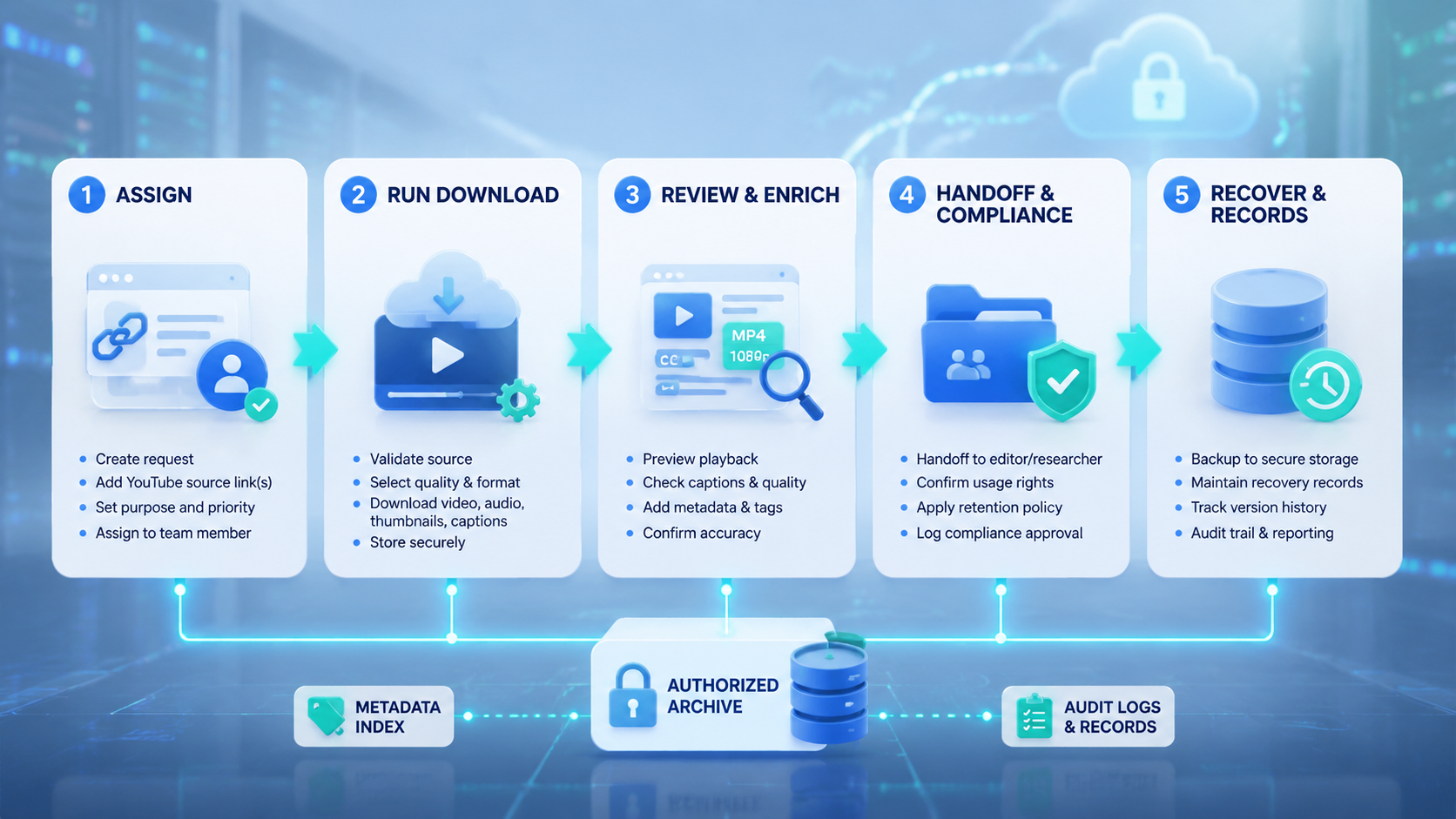
The useful youtube downloader workflow creates a trustworthy record around authorized content. The file is one part of the process. The stronger asset is the package of source, permission, owner, use case, storage path, and review decision.
Build the first version around boundaries. Decide what can be saved, what should stay as a link, and what needs approval before storage. Then test one controlled project with a clear recovery path. Expansion is reasonable only when every file can be found, every source can be explained, and every rejected item can be removed.



