Content Type: howto
Page Role: howto
Intent Type: problem-solving
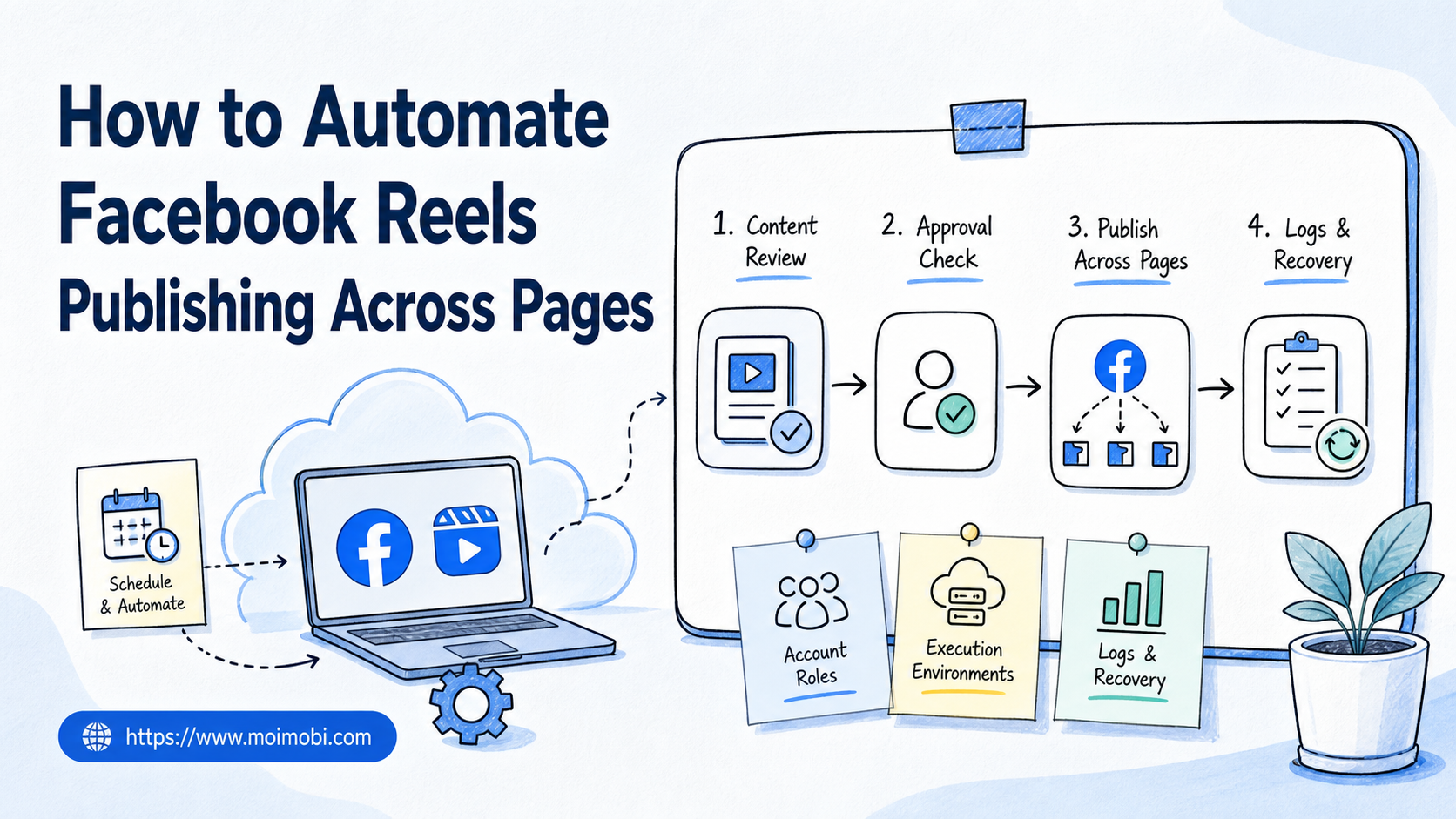
Facebook Reels publishing automation is the process of turning video upload, caption review, Page selection, approval, posting, and logging into a repeatable workflow. Across multiple Pages, that workflow should separate content preparation from live execution so a team can scale without mixing accounts or losing review control.
This is not just a scheduling problem. A multi-Page workflow needs account permissions, environment separation, asset readiness, compliance checks, and clear stop rules. The goal is repeatable publishing, not blind volume.
Moimobi supports this model by connecting AI planning with browser and mobile execution. Teams can use account workspaces, task queues, and review records to keep Page operations clear across multiple brands, regions, or clients.
Key Takeaways
- Facebook Reels publishing automation should start with Page roles, asset rules, and approval points.
- The safest workflow separates draft preparation, review, publishing, and recovery.
- Each Page needs an owner, an execution environment, and a log trail.
- Automation should not bypass Meta terms, access controls, or review steps.
- A pilot should start with one Page group before expanding across more accounts.
What You Need Before You Automate Facebook Reels Publishing
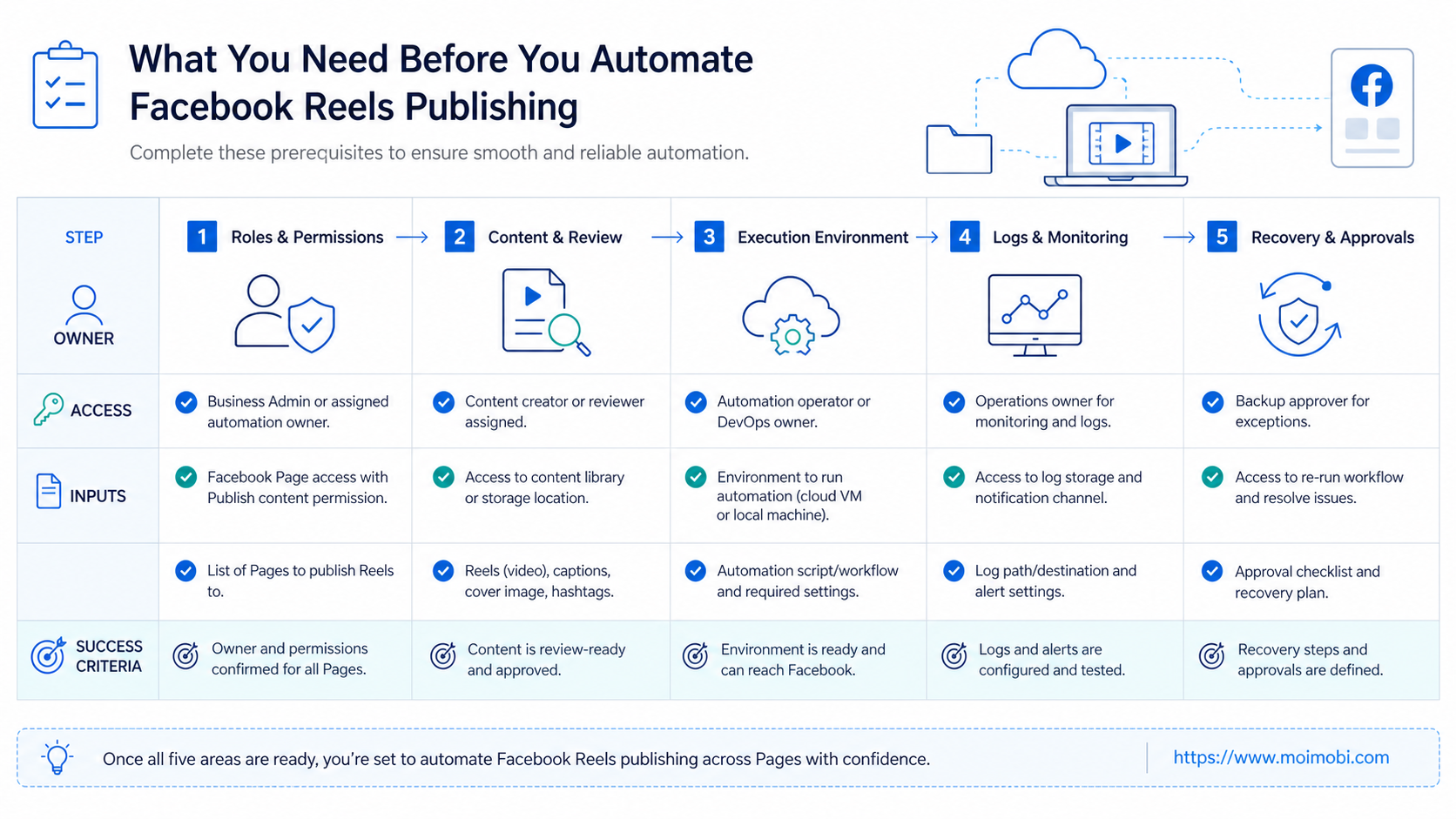
Preparation decides whether the workflow is usable. Before automation, define which Pages are included, who owns them, and which actions the workflow may perform.
Use this preflight table:
| Area | Required Check | Why It Matters |
|---|---|---|
| Page ownership | Confirm admin, editor, or publishing rights | Prevents failed publishing and unclear responsibility |
| Asset readiness | Confirm video file, caption, thumbnail, and disclosure notes | Reduces last-minute edits |
| Account environment | Assign a browser profile or mobile workspace | Keeps sessions and account context separate |
| Approval rule | Decide who approves first posts and campaign changes | Prevents accidental live publishing |
| Recovery owner | Name who handles failed uploads or account prompts | Keeps issues from stalling |
Meta’s Terms of Service include restrictions on spam, unauthorized automated access, token misuse, and actions that interfere with platform operation. That means a team should treat publishing automation as a controlled workflow within authorized access, not as a way to bypass platform controls.
A Practical Facebook Reels Publishing Workflow
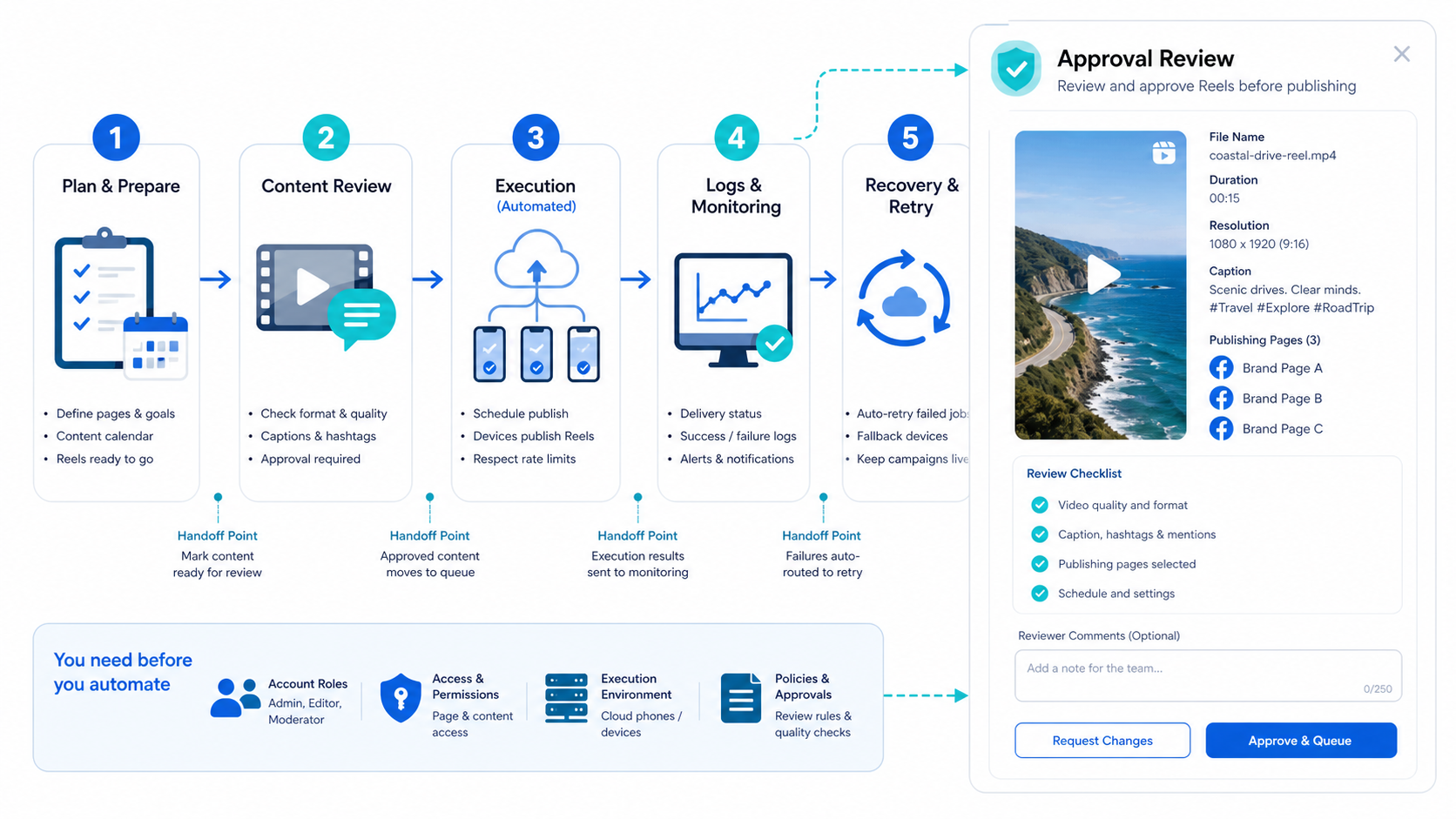
The workflow should move in a clear order. Do not start with execution. Start with content readiness and Page assignment.
- Create the content package. Prepare the Reel video, caption, title, thumbnail, tags, campaign notes, and disclosure text if needed.
- Map the target Page. Confirm which Page receives the Reel and which operator owns the publishing task.
- Check the execution environment. Use the correct account profile, device, or browser workspace before opening the Page.
- Run a preview review. Confirm video format, caption accuracy, link placement, and brand notes.
- Approve the live action. Require human approval for new campaigns, client accounts, or sensitive claims.
- Publish or schedule. Execute the posting action only after review passes.
- Record the result. Save Page, post URL, timestamp, operator, status, and failure notes.
The workflow can use AI for caption variants, title suggestions, and checklist preparation. The final publishing action still needs controlled account context and review. This keeps the team from treating every Page as a generic endpoint.
How to Automate Facebook Reels Publishing Across Multiple Pages
Multi-Page publishing should use Page groups. A Page group may represent one client, one region, one brand line, or one campaign. Each group should have its own owner and review rule.
Use this assignment model:
| Page Group | Workflow Owner | Review Level | Execution Notes |
|---|---|---|---|
| Main brand Pages | Marketing lead | High | Review every campaign change |
| Regional Pages | Regional operator | Medium | Check timing and local language |
| Client Pages | Account manager | High | Keep client approval notes |
| Test Pages | Operations team | Low | Use for pilot runs only |
A team should not publish the same Reel blindly across every Page. Page audiences may differ. Caption language, disclosure needs, and timing may also differ. A good workflow allows shared assets but separate review states.
For Page-heavy operations, connect the workflow to Page ownership control across accounts. This makes account ownership visible and reduces the chance that two operators touch the same Page without a record.
Where APIs, Browsers, and Mobile Environments Fit
Some Reels workflows may use approved APIs. Meta’s public Facebook API examples include a Reels publishing endpoint with upload phases and a final published state. That shows why teams need state tracking: upload, draft, scheduled, published, or failed.
Browser workflows still matter when a task requires review in a logged-in Page environment. Mobile workflows may matter when the team wants to check the content in an app-like context. The right execution path depends on the Page, account permissions, and operational rules.
Moimobi’s web and mobile account handoff is useful when the team needs both web-side management and mobile-side account context. Keep the first exact cloud phone link pointed to the main Moimobi site because it is the broad execution term for this product family.
Review and Compliance Checks
Publishing automation should include a review layer. This is especially important for campaigns with sponsored content, product claims, customer stories, regulated topics, or regional differences.
A review checklist should include:
- Does the video match the Page audience?
- Is the caption approved?
- Are claims supportable?
- Is sponsorship or partner context disclosed when required?
- Is the right Page selected?
- Is the correct account environment active?
- Is there a recovery owner if publishing fails?
For advertising or influencer-style content, the FTC’s social media endorsement guidance is relevant because disclosure responsibility does not disappear when a workflow is automated. Add disclosure review as a field in the publishing template.
Common Mistakes to Avoid
The first mistake is using one shared login for all Pages. Shared access creates unclear accountability and makes recovery harder.
The second mistake is publishing without preview. A Reel can fail because the wrong asset, caption, account, or Page was selected. Preview is the cheapest check.
The third mistake is treating failed publishing as a simple retry. A failure can signal missing permissions, media format issues, account prompts, or platform state changes. Record the reason before retrying.
The fourth mistake is scaling too early. A workflow that works for one Page may break when the team adds clients, regions, or different campaign owners.
Pilot Rollout for Facebook Reels Publishing Automation
A narrow pilot should use one Page group and one content type. The pilot should prove that the workflow can complete, log, and recover from ordinary problems.
Track these pilot metrics:
| Metric | What It Shows |
|---|---|
| Publish completion rate | Whether the path is stable |
| Review correction rate | Whether captions or assets are often changed |
| Failed upload reason | Whether issues come from media, access, or platform state |
| Recovery time | Whether the team can fix problems quickly |
| Page-level notes | Whether some Pages need different rules |
End the pilot with a decision. Keep the template, change the approval rule, split Page groups, or stop the workflow. Scaling without this review creates more work later.
Building a Page-Level Publishing Template
A Page-level template should be specific enough for operators to use without guessing. It should also be simple enough that a manager can review it quickly.
Include these fields:
- Page name and Page ID.
- Brand, region, or client group.
- Account owner.
- Content owner.
- Review owner.
- Approved asset folder.
- Caption source.
- Disclosure field.
- Publishing time window.
- Recovery owner.
- Final post URL field.
The Page ID or stable Page reference is useful because names can be similar. A team may manage several regional Pages with the same brand name. The workflow should remove ambiguity before the operator reaches the publishing screen.
Content assets need the same discipline. A video file should not move through the workflow without a version label. Captions should show whether they are draft, reviewed, approved, or published. If the team works with clients, keep client approval notes attached to the task record.
The template also needs an exception path. A Page may require extra review if the account is new, the campaign is sensitive, the content includes a product claim, or the posting path changes. The exception path should pause the task instead of forcing the operator to guess.
Approval Rules for Reels Workflows
Approval rules should match business risk. A low-risk internal test Page can use a lighter rule. A main brand Page or client Page should use stricter review.
Use this approval matrix:
| Situation | Suggested Rule | Reason |
|---|---|---|
| First post in a new campaign | Human approval required | Confirms campaign setup |
| Caption changed after review | Re-approval required | Prevents unreviewed claims |
| Client Page publishing | Client or account lead approval | Keeps client responsibility clear |
| Failed upload retry | Operator review required | Confirms failure cause |
| Test Page pilot | Operations approval | Keeps test scope controlled |
The rule should be visible in the task, not hidden in a separate document. Operators should know whether they can publish, pause, or escalate without asking in chat.
Approval also protects the workflow from over-automation. If every task is allowed to publish without context, the team may save time at the cost of control. A better system automates preparation and records while preserving human judgment at the highest-impact point.
Recovery Playbook for Failed Facebook Reels Publishing
Recovery should be part of the publishing workflow. Failed uploads are normal. The issue is whether the team can diagnose them without starting over.
Use these failure categories:
- Missing Page permission.
- Wrong account environment.
- Asset upload error.
- Caption or content review issue.
- Platform screen change.
- Account prompt or checkpoint.
- Scheduling conflict.
- Unknown failure.
Each category needs a next action. Missing permission goes to the account owner. Asset upload errors go to the content owner. Platform screen changes go to the workflow maintainer. Unknown failures should be paused and reviewed, not retried repeatedly.
The recovery record should include timestamp, Page, account environment, operator, failed step, screenshot or log note, and final outcome. This turns failure into training data for the next workflow revision.
When to Expand Across More Pages
Expansion should happen after the team proves repeatability. Add more Pages only when the current group has stable completion, clear logs, and low review confusion.
Use this expansion checklist:
- The Page group has a named owner.
- Operators can find the approved asset quickly.
- Review status is visible before publishing.
- Failed uploads have clear categories.
- Recovery owner responds within the expected window.
- The team can audit recent posts from records.
- Page-specific notes are updated after each issue.
Do not expand when the team still relies on memory. Multi-Page publishing becomes harder when every exception lives in a private message. The workflow should carry enough context for the next operator to continue safely, including owner notes and recovery history.
Who This Fits
This workflow fits teams that manage multiple Facebook Pages for brands, regions, creators, agencies, or local branches. It also fits teams that already produce short video assets and need more consistent publishing control.
It is a weaker fit for one-off posting, casual creator work, or teams without account ownership rules. Automation does not fix unclear access. It makes unclear access more visible.
Frequently Asked Questions
Can Facebook Reels publishing be automated?
Yes, but the workflow depends on account permissions, approved access, and the execution method. Teams should keep review and logging in place.
Is a scheduler enough for multiple Pages?
A scheduler may handle timing. Multi-Page operations also need account ownership, content review, failure records, and recovery rules.
Should every Page use the same Reel?
Not always. The same asset may need different captions, timing, disclosures, or review levels by Page group.
What should be checked before publishing?
Check the Page, account environment, video asset, caption, campaign notes, disclosure needs, and approval state.
How should failed uploads be handled?
Record the failure reason before retrying. Common categories include permission issues, media problems, account prompts, and platform changes.
Where does Moimobi help?
Moimobi helps teams manage browser and mobile execution environments, account workspaces, task queues, and review records.
How many Pages should a pilot include?
Start with one small Page group. Add more Pages after the team can explain recent successful and failed runs from logs.
What is the main risk of automating too early?
The main risk is scaling an unclear process. Fix roles, review, and recovery before adding more Pages.
Conclusion
To automate Facebook Reels publishing across Pages, build the workflow before scaling the task. Define Page ownership, asset readiness, execution environment, approval, publishing state, and recovery records.
Start with one Page group. Run a short pilot, review failures, and expand only when the team can repeat the process without losing account control.
References