
Content Type: guide
Discord bulk messaging is the practice of sending the same or similar messages to many users, channels, or communities at once. For serious teams, blast tactics usually fail because they ignore permission, context, user intent, moderation rules, and delivery limits.
The better model is not “send more.” It is build a workflow that routes messages to the right place, uses approved channels, records ownership, and stops when human review is needed. This matters for agencies, growth teams, and community teams that want repeatable Discord operations without turning their server activity into noise.
Discord itself gives teams signals about the right direction. Its developer documentation explains rate limits, bots, webhooks, Gateway events, and HTTP interactions. Its support content also explains that messages may be blocked by filters such as mention spam, spam content, suspicious links, and community rules. Those details make one point clear: teams should design around relevance and control, not volume.
Key Takeaways
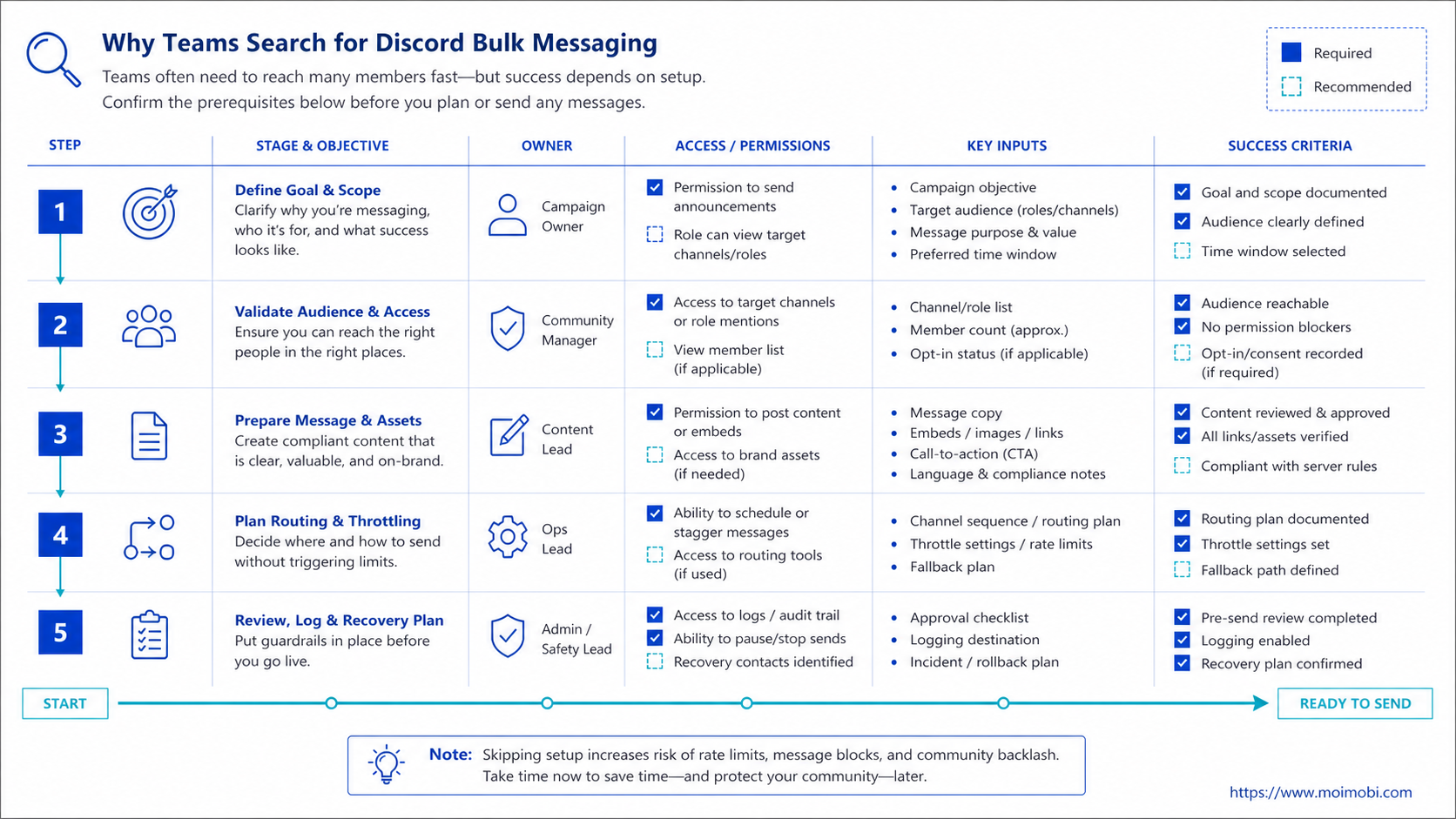
- Discord bulk messaging should not mean blasting strangers or every server member.
- Better workflows use opted-in channels, owner assignment, review, and logging.
- Bots and webhooks are tools; workflow rules decide when they should act.
- Rate limits and moderation filters make reckless scale fragile.
- A small pilot should prove reply quality, delivery clarity, and recovery control.
The Core Idea Behind Discord Bulk Messaging
The common misunderstanding is that bulk messaging is a growth shortcut. In practice, the tactic often creates more risk than reach. Repeated, untargeted messages can trigger community complaints, moderator action, poor response quality, and operational confusion.
A better approach is channel-based communication. Instead of sending the same direct message to many people, a team can route updates through announcement channels, role-based notifications, support queues, event threads, or bot-assisted opt-in flows. The message reaches people who expect it, and the team can track results.
Discord's developer documentation says bots can listen to events, respond to slash commands, moderate servers, send messages, and connect through Gateway WebSocket or HTTP interactions. It also notes that webhooks may be a better fit when a team only needs to push messages into a channel. That distinction helps teams choose the right tool before writing any automation.
The safer operating principle is simple: automate routing and preparation before automating sending. A workflow can identify the audience, prepare the message, assign a reviewer, publish to an approved channel, and log the result. That is very different from sending a generic message to every reachable account.
Why Teams Search for Discord Bulk Messaging
Teams search for this topic when manual community work becomes hard to coordinate. A product launch may need reminders. A support team may need to notify users about an incident. A creator community may need event updates. A sales team may want to follow up with qualified members.
The problem is that those needs are not the same workflow. An incident update belongs in an announcement channel. A support follow-up may belong in a ticket or thread. A partner message may require manual approval. A sales follow-up needs consent, context, and clear ownership.
Use this decision table before choosing any tool:
| Messaging goal | Better workflow | What to avoid |
|---|---|---|
| Community announcement | Approved channel post or role-based notification | DM every member |
| Support follow-up | Ticket queue, thread reply, or assigned owner | Duplicate replies from multiple accounts |
| Event reminder | Scheduled post with clear opt-in context | Repeated reminders across unrelated channels |
| Lead follow-up | Qualified handoff with reviewer approval | Cold outreach without context |
Discord's rate-limit documentation explains that limits exist to prevent spam, abuse, and service overload. It also says applications should parse response headers and handle retry timing rather than hard-coding assumptions. For operations teams, that means any workflow must treat failure, retry, and pause behavior as part of the system.
Who Benefits Most and In What Situations
The best fit is a team that already has a real community workflow. Automation should support a known process, not invent a reason to message people.
Good-fit situations include:
- community announcements that members expect;
- event reminders for opted-in roles;
- support triage that needs owner assignment;
- moderation summaries that need review;
- product updates where the channel and audience are clear;
- partner or customer follow-up after a known interaction.
Poor-fit situations are easy to identify. If the plan starts with “send the same pitch to everyone,” stop. If nobody owns replies, stop. If there is no record of who approved the message, stop. If the team cannot explain why the recipient should receive the message, stop.
For teams that manage Discord alongside TikTok, Instagram, Facebook, Telegram, and marketplace apps, the workflow may also need browser and mobile coordination. A cloud phone environment can support app-side work, while Discord announcements may run through web or bot-based workflows. The key is keeping each channel's operating rules separate.
How to Evaluate or Start Using Discord Bulk Messaging
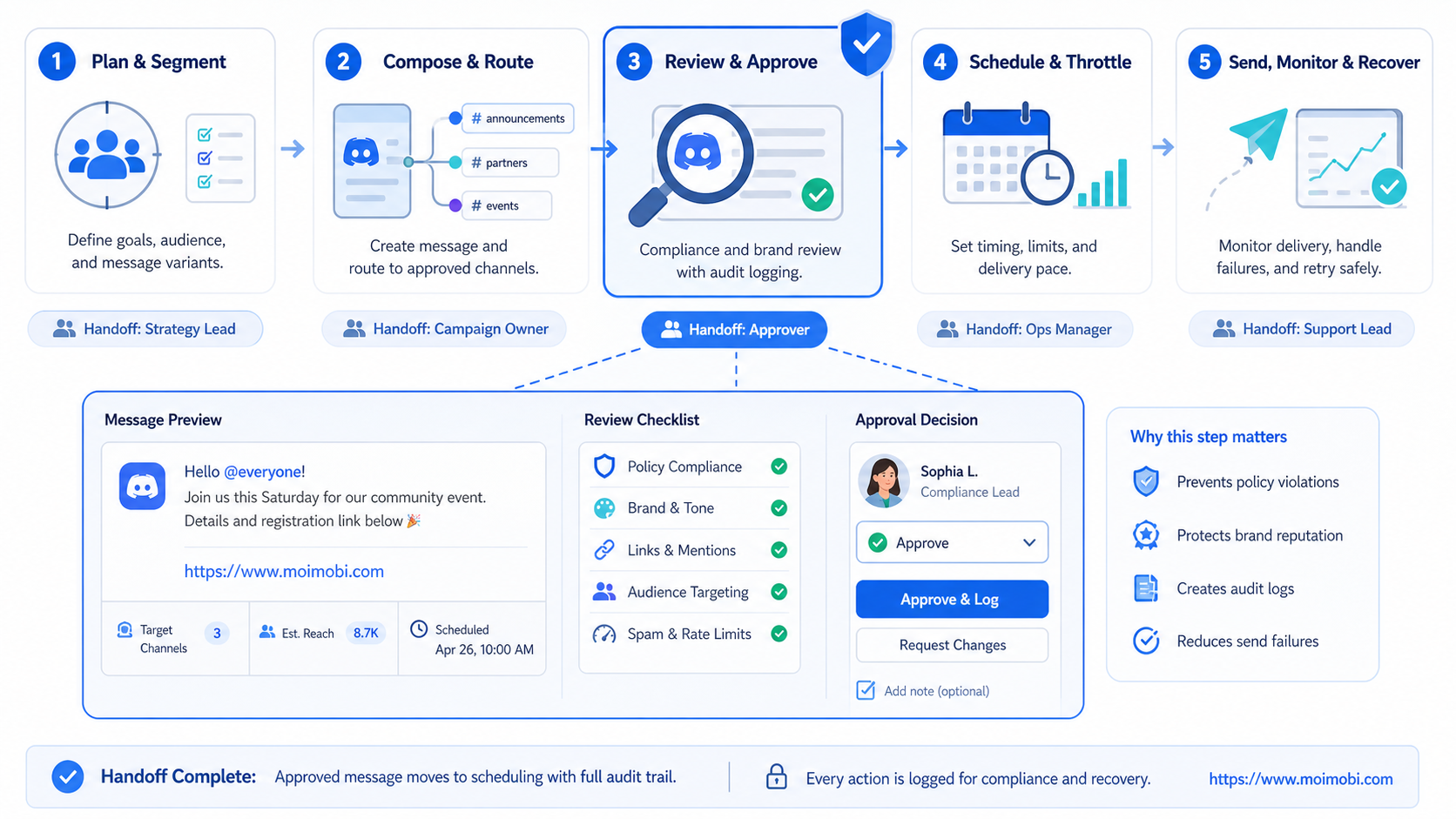
Start with a preflight checklist. This prevents the team from treating automation as permission to ignore community context.
- Define the audience. Confirm whether the message belongs to a channel, role, thread, ticket, or direct response.
- Define the trigger. Use a clear event such as signup, support request, event registration, or product update.
- Assign an owner. Name the person or role responsible for approval, replies, and exceptions.
- Prepare stop rules. Pause when delivery errors, complaints, or unclear context appear.
- Log the result. Record message type, account, channel, owner, status, and next action.
The workflow should use Discord's native model where possible. Bots can handle commands and event-driven routing. Webhooks can publish structured updates into a channel. AutoMod can help detect and block risky content before it reaches a community.
Moimobi fits the wider operating layer around that workflow. A team can connect Discord coordination to controlled mobile automation routines, account ownership, review queues, and reporting. The product value is not mass sending. It is making repeated social operations easier to control.
Mistakes That Reduce Results
The first mistake is treating rate limits as the only boundary. Rate limits are technical limits, not a content strategy. A message can be technically deliverable and still be irrelevant, disruptive, or poorly timed.
The second mistake is mixing account ownership. If several people use the same account or reply path without logs, the team loses context. The result is duplicate replies, unclear handoff, and weak follow-up.
The third mistake is ignoring moderation filters. Discord support explains that messages can fail when they are flagged by AutoMod filters, mention spam filters, spam content filters, suspicious link filters, or local community rules. A serious workflow should prepare content with those boundaries in mind.
The fourth mistake is failing to review outcomes. A Discord workflow needs more than a “sent” status. It should show replies received, failed sends, manual takeovers, complaints, and tasks waiting for human review.
If Discord sits inside a larger social media matrix, connect it to cross-channel social operations instead of treating it as a standalone blasting tool. Teams that also run mobile-first platforms may need an Android cloud provider evaluation before deciding which environment handles each channel.
Team Workflow Design Before Scale
Scale should begin with roles, not message volume. A Discord workflow becomes easier to manage when every task has an owner, a channel, a trigger, and a stop rule. Without those fields, the team cannot tell whether automation is helping or simply adding more activity.
Use four owner fields before the first larger rollout:
- Requester: the person or team that needs the message sent.
- Reviewer: the person who checks wording, audience, and timing.
- Operator: the person or workflow that posts, routes, or schedules the message.
- Responder: the person responsible for replies, objections, and follow-up.
This model prevents a common failure. One team prepares a campaign update, another team posts it, and nobody owns the replies. The message may be delivered, but the workflow still fails because members ask questions and receive no clear follow-up.
The operating system should also separate message types. Announcements, support updates, onboarding flows, event reminders, and partner replies should not share one generic template. Each type needs a different approval rule, retry rule, and response owner.
For example, an event reminder can use a scheduled channel post. A support escalation may need a ticket owner and manual confirmation. A community safety note may require moderator approval before any automation runs. The difference is not technical complexity. It is whether the team can explain the purpose and next step for each message.
Finally, keep an exception path visible. If AutoMod blocks a message, if a role receives the wrong notice, or if replies become sensitive, the workflow should switch to manual review. A responsible system makes that pause easy.
This also gives managers a cleaner audit trail. They can see which messages were planned, which were approved, which were sent, and which were stopped before they became a community problem.
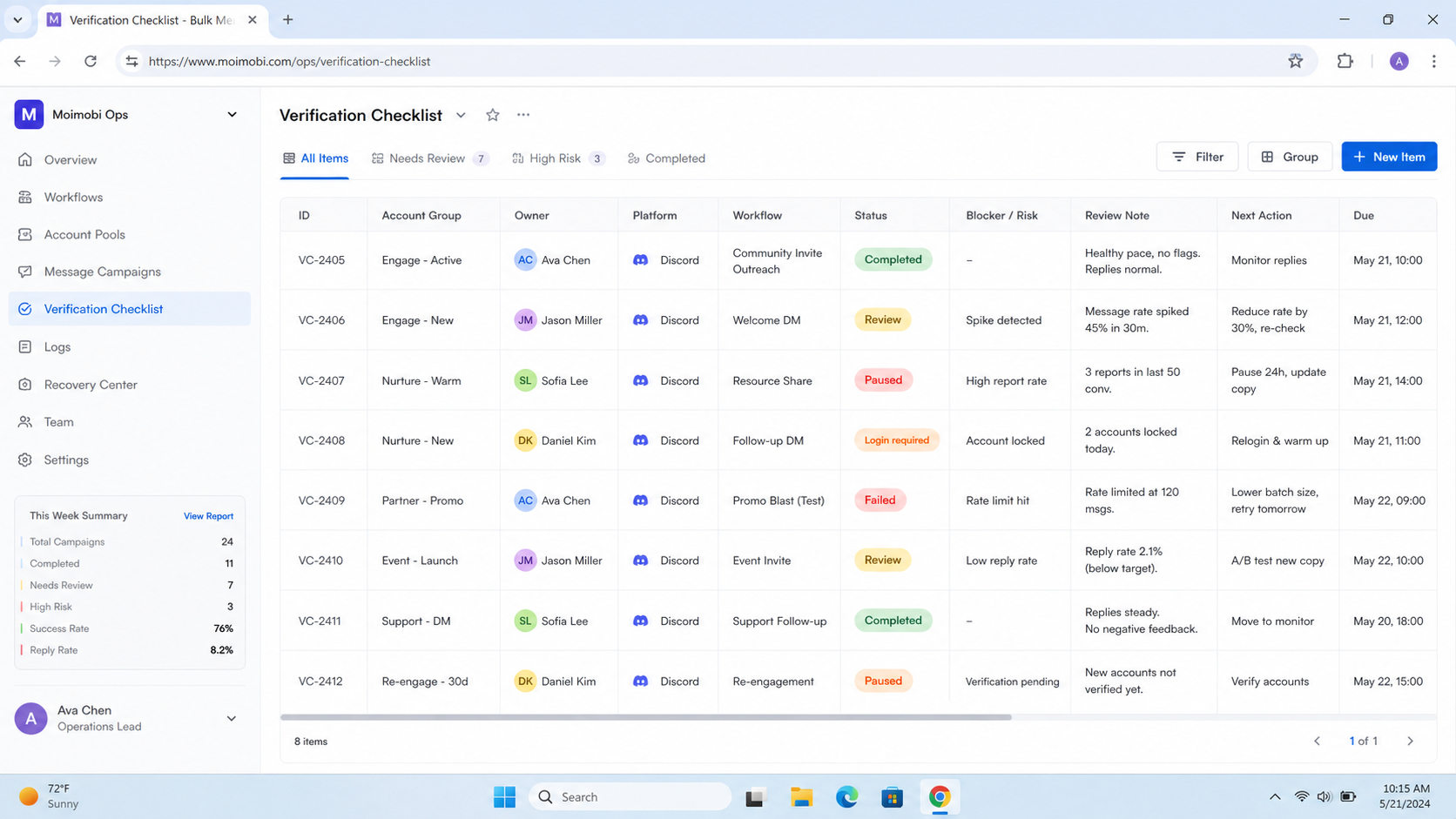
Pilot and Verification Checklist
A small pilot should prove that the workflow improves clarity. It should not chase the highest message count.
Use one server, one message type, and one audience. For example, test event reminders for an opted-in role or support routing for one product channel. Keep the pilot short enough that a person can review every result.
Track these fields:
- message type and trigger;
- target channel, role, or thread;
- owner and reviewer;
- delivery status;
- reply status;
- manual takeover count;
- blocked or filtered messages;
- next action after failure.
The pilot worked only if the team can answer three questions: who approved the message, who owns replies, and what happened when the workflow failed. If those answers are unclear, fix the operating model before adding more automation.
Frequently Asked Questions
Is Discord bulk messaging allowed?
It depends on behavior, context, and Discord's rules. Teams should avoid spam-like blasts and use expected, relevant, and reviewable workflows.
What is a safer alternative to Discord bulk messaging?
Use channel announcements, role-based updates, ticket workflows, bot commands, or opt-in notification paths. These models create clearer context.
Can a Discord bot send messages at scale?
Bots can send messages through Discord's API, but they must respect rate limits, permissions, and community expectations.
Should teams use DMs for outreach?
DMs should be used carefully. They make more sense after a user action, support request, or clear consent signal.
How do rate limits affect Discord automation?
Rate limits require retry handling, pause logic, and error tracking. Discord advises developers to use response headers instead of hard-coded assumptions.
What should a review queue include?
Include message draft, audience, trigger, owner, approval status, delivery result, and failure reason. Keep the fields simple enough for daily use.
How does Moimobi help with this workflow?
Moimobi helps teams coordinate browser, mobile, and account-based execution around social workflows. It is not designed to turn Discord into a spam channel.
When should a team stop the pilot?
Stop when complaints rise, context is unclear, filtered messages increase, or nobody owns follow-up. Those are workflow problems, not only tool problems.
Conclusion
Discord bulk messaging is a weak model when it means blasting people without context. A stronger model starts with audience permission, approved channels, owner assignment, rate-limit handling, moderation awareness, and recovery logs.
Prioritize the workflow in this order: define the audience, choose the right Discord surface, assign ownership, review content, log results, then scale slowly. If the team cannot explain why the message belongs in that place, it should not automate the send.
References:



