Content Type: guide
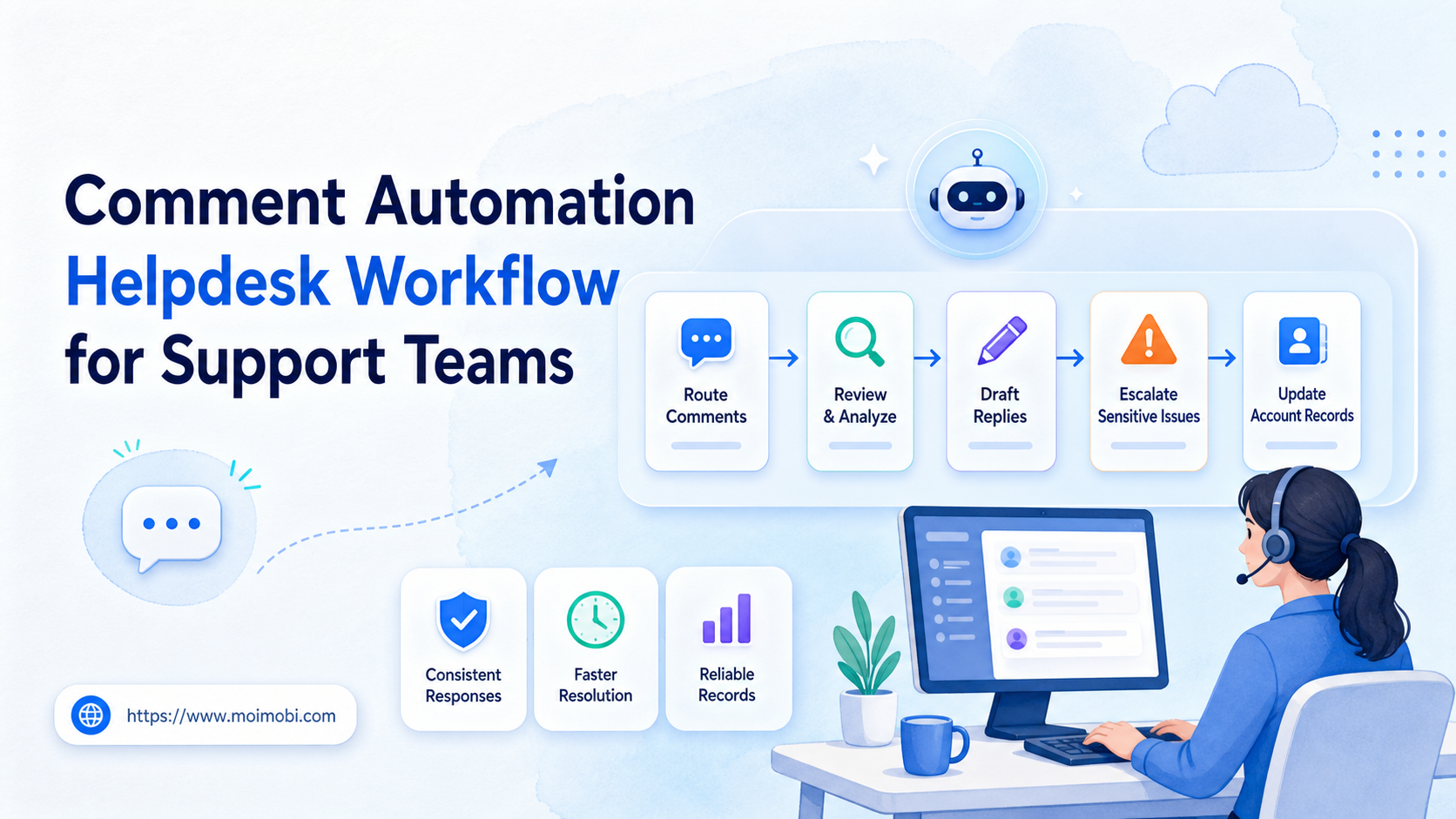
A comment automation helpdesk workflow is a controlled process for turning social media comments into support tasks, draft replies, escalation cases, and review records. It should help support teams respond faster without turning public comment sections into unmanaged auto-reply streams.
Support teams search for this workflow when social comments start behaving like customer tickets. A product complaint may appear under a TikTok video. A shipping question may appear under an Instagram Reel. A pricing objection may appear under a Facebook post. If those comments stay inside platform feeds, the team loses ownership, context, and follow-up history.
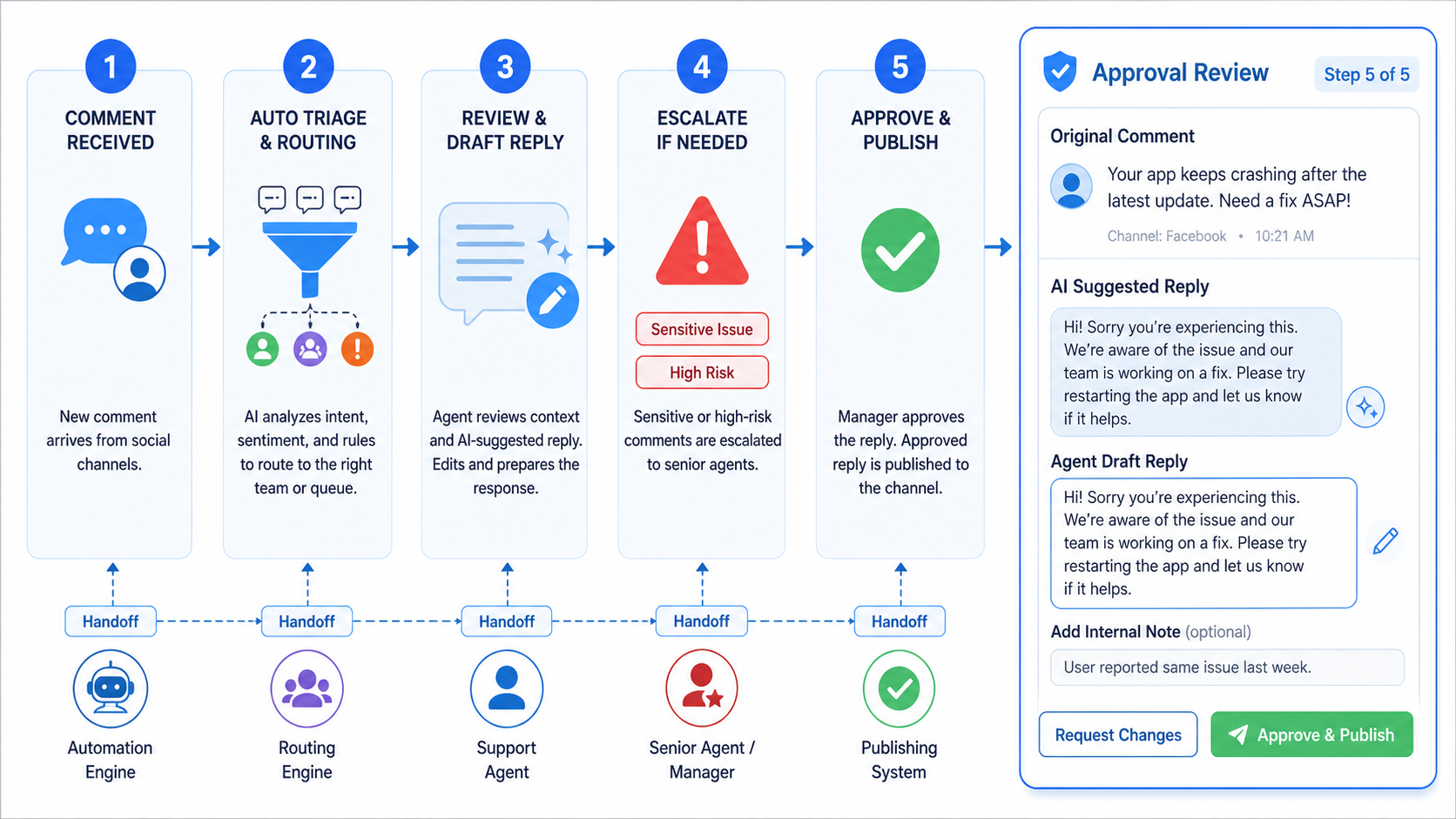
The practical model is simple: collect comments, classify intent, draft or route the response, review risky cases, publish only within approved boundaries, and record the outcome. Automation can support each step. It should not remove judgment from sensitive public replies.
Key Takeaways
- A comment automation helpdesk workflow connects social comments to support operations.
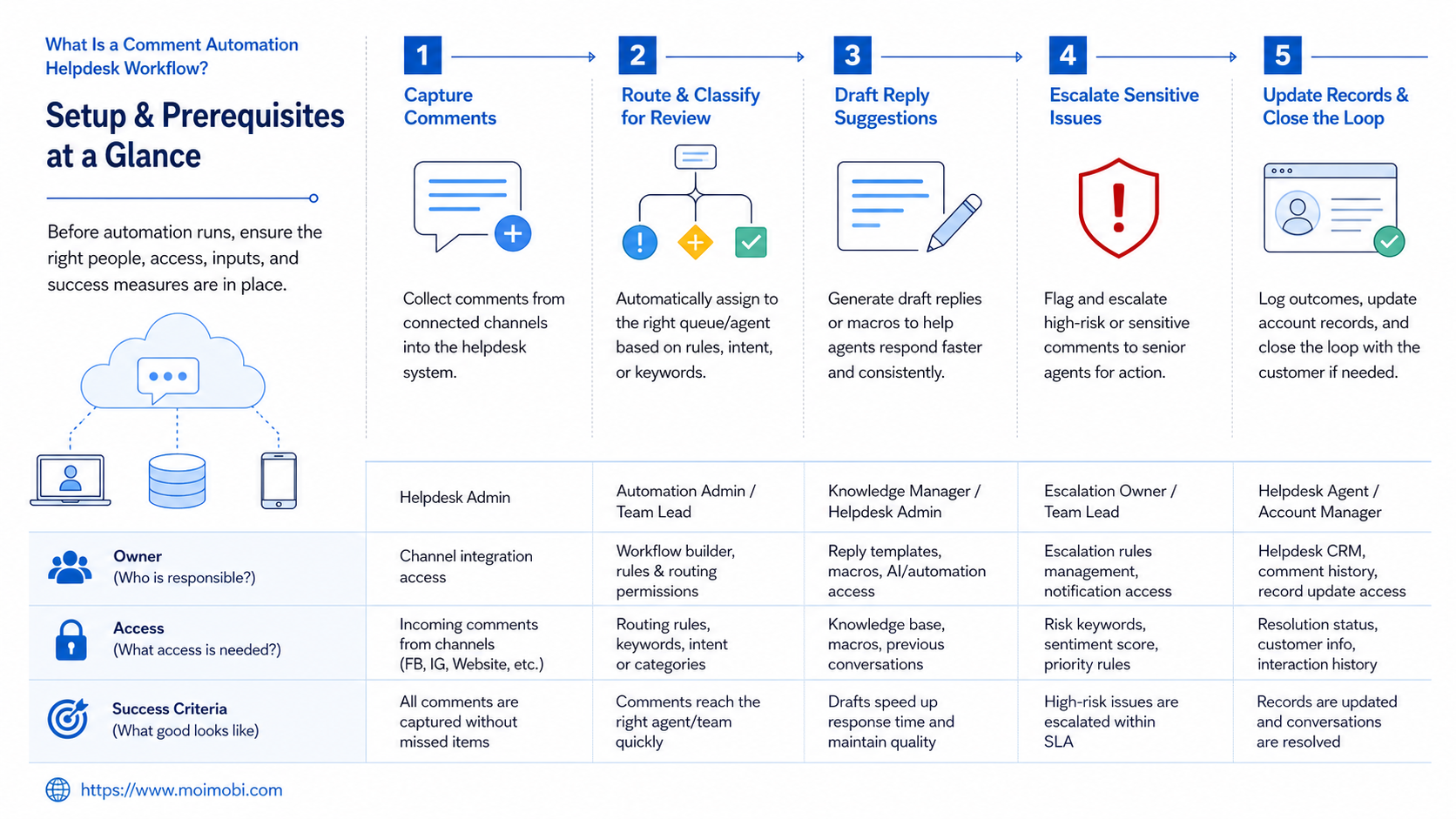
- Teams should separate comment intake, classification, reply drafting, approval, escalation, and logging.
- Automation is strongest for routing and preparation, not for unlimited public replies.
- Instagram and TikTok workflows need platform-aware rules because public replies affect brand trust.
- A pilot should measure response ownership, escalation quality, and recovery records.
What Is a Comment Automation Helpdesk Workflow?
A comment automation helpdesk workflow is not a bot that answers every comment. It is an operating model that helps teams decide which comments need a public reply, private follow-up, support escalation, or no response.
The misunderstanding starts with phrases such as “best instagram comment automation” or “instagram comment automation github.” These searches often focus on scripts. A support team needs a process before it needs code.
The workflow should answer four questions:
- Who owns the comment?
- What type of issue is it?
- Can the reply be automated, drafted, or escalated?
- Where is the result recorded?
Instagram's developer documentation includes comment-related endpoints for approved app use cases, and TikTok's Community Guidelines describe spam and platform-integrity boundaries. Those sources point to the same operational lesson: build review and limits around public interactions.
Why Comment Automation Helpdesk Workflow Matters
Comments are public support signals. A slow or inconsistent reply can affect more than one customer because future viewers can see the exchange. A rushed automated reply can also create a poor experience when the customer needs real help.
Helpdesk logic matters because social teams and support teams often work in different systems. Social operators see the comment first. Support agents know the issue categories. Managers need the record. Without a workflow, comments stay trapped in screenshots, direct messages, and personal reminders.
Use this model:
| Workflow Stage | Automation Can Help With | Human Review Is Needed For |
|---|---|---|
| Intake | Collecting comment URL, platform, account, post, time, and author handle. | Deciding whether the comment needs public attention. |
| Classification | Tagging refund, shipping, pricing, bug, complaint, or spam categories. | Ambiguous sentiment, legal claims, safety issues, or angry customers. |
| Drafting | Preparing a short answer from approved templates and knowledge base notes. | Final public wording, refunds, account issues, and promises. |
| Logging | Saving status, owner, reply text, escalation path, and next action. | Reviewing recurring issues and customer experience patterns. |
This workflow fits well inside a public-comment support workflow where social accounts, support tasks, and team owners can stay connected.
Key Benefits and Use Cases
The main benefit is accountability. Every comment with customer value gets an owner, a status, and a next step. That is more useful than only counting comments or likes.
Common use cases include product questions, complaint triage, campaign replies, creator partnership comments, marketplace support, and lead follow-up. Each use case needs a different reply boundary.
A shipping question can usually follow a structured answer. A refund complaint may need a private channel or support ticket. A safety issue should escalate quickly. A spam comment may require hiding, reporting, or no reply depending on platform rules and team policy.
For multi-brand teams, account separation also matters. One support agent may handle several social pages, but the reply voice and escalation rule may differ by brand. A support account assignment model helps keep account ownership visible.
Comment Automation Helpdesk Workflow Setup Checklist
Start with fields, not tools. A workflow with poor fields creates weak records, even if the automation runs correctly.
Prepare these fields before testing:
- Platform and account name.
- Post URL and comment URL.
- Comment text and timestamp.
- Category, urgency, sentiment, and language.
- Public reply status.
- Private follow-up status.
- Owner and backup owner.
- Approved reply template or drafted answer.
- Escalation reason.
- Final outcome and next action.
Then define ownership. Social operators can handle intake. Support agents can handle issue resolution. Managers can approve sensitive replies. Automation can move comments between those roles.
If comments come from logged-in browser sessions, profile separation matters. A browser profile and Android workspace can help teams keep account workspaces separate during browser-side review and mobile-side operations.
How to Get Started with Comment Automation Helpdesk Workflow
Do not begin with auto-reply rules. Begin with triage. The first version should route comments and draft replies, while a person approves public output.
Use this sequence:
- Choose comment sources. Start with one or two platforms, not every account.
- Define issue categories. Use practical tags such as price, shipping, bug, complaint, lead, spam, and praise.
- Set reply boundaries. Decide which categories may use templates and which need approval.
- Create approved reply snippets. Keep each answer short and avoid promises that support cannot fulfill.
- Route sensitive comments. Refunds, legal claims, safety issues, and angry complaints need escalation.
- Record every outcome. Save replied, escalated, hidden, ignored, converted, or unresolved.
- Review weekly. Check unresolved comments, repeated issues, and template quality.
This process can be connected to an account queue when multiple support agents share the same account pool. The key is to keep assignment visible.
Building the Comment Queue
The comment queue is the center of the workflow. It should not be a raw feed sorted only by newest comments. Support teams need a queue that shows urgency, owner, account, status, and context.
Start with a few queue columns:
- New: comments that have not been reviewed.
- Needs answer: comments that need a public reply.
- Needs support: comments that need private follow-up or a ticket.
- Needs approval: drafted replies waiting for review.
- Resolved: comments with a final outcome.
- Watchlist: comments that may become a larger issue.
Each queue item should include the original comment URL. Screenshots are not enough. A support agent may need to open the live thread, check follow-up comments, and see whether another user added context.
Queue design also affects staffing. If one person handles all comments, the process can stay simple. If several agents share work, the queue must show ownership and handoff notes. Without those fields, comments can bounce between people without resolution.
Reply Drafting Rules
Drafting rules protect the brand from overconfident replies. AI and templates can prepare a first answer, but the final wording should match the issue type.
Use three reply levels:
- Safe template: basic hours, shipping links, support channel reminders, or known FAQ answers.
- Assisted draft: product explanation, campaign question, order question, or complaint that needs review.
- Manual reply: refund dispute, legal concern, safety issue, angry complaint, or account-specific case.
The first level can move quickly. The second level needs a human check. The third level should bypass automation and route to the right owner.
Teams should also keep a “do not say” list. This list may include refund promises, delivery timelines, medical claims, financial claims, legal statements, or unsupported product commitments. The exact list depends on the business, but the principle is stable: comment automation should not invent commitments.
Integrating With Support Systems
A helpdesk workflow becomes more useful when comments can connect to support records. The goal is not to turn every comment into a ticket. The goal is to make ticket creation possible when the issue deserves follow-up.
Use a simple routing rule:
- Public answer only: general question or quick clarification.
- Public answer plus note: useful feedback or repeated question.
- Private follow-up: order, account, payment, address, or personal data.
- Support ticket: unresolved complaint, technical issue, refund request, or escalation.
- Manager review: safety, legal, policy, or high-risk brand issue.
This routing rule helps operators avoid two weak extremes. One extreme is replying publicly to everything. The other is pushing every comment into support, which creates noise for agents.
The better path is selective routing. Comments that need public clarity stay in the social workflow. Comments that need private data move into support. Comments that show product patterns become feedback for operations.
Add a weekly pattern review after routing is stable. Review which comments became tickets, which templates needed edits, and which categories created the most manual work. This helps the team improve the knowledge base instead of only reacting to the same questions again.
The review should also include one account-level check. Confirm that each account has the right owner, reply voice, escalation owner, and open issue list. Comment automation works better when account context stays current.
Fit and Not-Fit Boundaries
The workflow is a strong fit for teams with repeated customer comments, multiple social accounts, or several people sharing support responsibility. It also fits brands that need records for product feedback and campaign response quality.
It is a weaker fit for a small creator account where one person reads every comment directly. A lightweight spreadsheet or inbox process may be enough until the comment volume grows.
Use this fit grid:
Good Fit
- Multiple support agents handle comments.
- Comments include customer issues or leads.
- Public replies need review rules.
- The team needs records across accounts.
Not a Strong Fit
- One person handles all replies.
- Comment volume is low.
- There is no support escalation path.
- The brand only wants generic engagement replies.
Pilot Rollout, Measurement, and Recovery Checks
A pilot should prove that comments can move from public feed to support outcome without losing context. Start with a small account group and a limited category set.
Measure four things:
- Ownership rate: comments with a clear owner.
- Resolution clarity: comments with a final status.
- Escalation quality: sensitive comments routed correctly.
- Template safety: drafted replies do not overpromise.
Add one recovery drill. Pick a comment that was escalated, then ask another agent to reconstruct the case from records alone. If the agent cannot see the platform, account, comment, owner, reason, and next action, the workflow needs better fields.
Common Mistakes to Avoid
The first mistake is auto-replying to every comment. Public comments are not all the same. Some need no response, some need a short answer, and some need private follow-up.
Another mistake is using the same reply across platforms. TikTok comments may be informal. Instagram comments may connect to DMs. Facebook comments may involve page moderation. Match the reply path to the platform and issue.
Teams also create risk when they skip logging. A support agent may resolve a case, but the social team cannot see what happened. Records turn public comments into manageable customer signals.
Finally, do not treat automation as a shield from bad policy. TikTok and Instagram both publish rules about spam or harmful behavior. Support workflows should keep public responses useful, limited, and accountable.
Frequently Asked Questions
What is a comment automation helpdesk workflow?
It is a process that routes social comments into support tasks, drafts replies, escalates sensitive issues, and records outcomes.
Can AI reply to comments automatically?
AI can draft replies, but teams should review public responses for sensitive or customer-specific issues.
Is this useful for Instagram comment automation?
Yes, if the goal is support triage, reply drafting, and records. It should not be treated as unlimited auto-commenting.
Can this work with TikTok comments?
Yes, but teams should build platform-aware categories and review rules before testing automation.
What should be escalated?
Escalate refunds, safety issues, angry complaints, account problems, legal claims, and unclear product promises.
How should success be measured?
Measure owner assignment, resolution status, response quality, escalation accuracy, and unresolved comment count.
Does every comment need a reply?
No. Some comments need a reply, some need moderation, and some should be logged without public action.
What is the first workflow to automate?
Automate intake and classification first. Keep public reply approval manual until the process is stable.
Conclusion
Build the workflow in this order: intake, category, ownership, draft, approval, escalation, and record. That sequence keeps comment automation tied to support quality.
Do not start with public auto-replies. Start by proving that the team can capture comments, assign owners, review sensitive cases, and recover context later. Once that works, automation can safely reduce repetitive coordination with clearer ownership.
References