
Browser Use alternatives help teams run AI-assisted browser work with clearer scope, account control, evidence, and review. The best choice depends on whether the team needs a simple agent library, a test automation tool, an RPA system, or a full work platform that links browser actions with mobile checks.
-
Audit now.
-
This checkpoint keeps the next operator reviewer and recovery owner aligned before another browser run starts.
A good comparison starts with the task, not the brand list. Browser Use work should show the owner, input, allowed page, account space, stop reason, and final proof. A tool that cannot show those fields, it may be fine for experiments but weak for team operations.
-
Pause early.
-
A forced pause is better than a hidden action when the page account or input does not match the plan.
Use official sources to keep claims grounded.
Google Search Central helpful content, Playwright browser automation documentation, Android developer documentation, and Google Play policy guidance help frame browser control, content quality, Android context, and policy review.
MoiMobi paths such as cloud phone, mobile automation, device isolation, and multi-account management show related layers for teams that need more than browser actions.
-
Check proof.
-
The saved result should be clear enough for a teammate who never watched the session to approve or reject it.
Key Takeaways
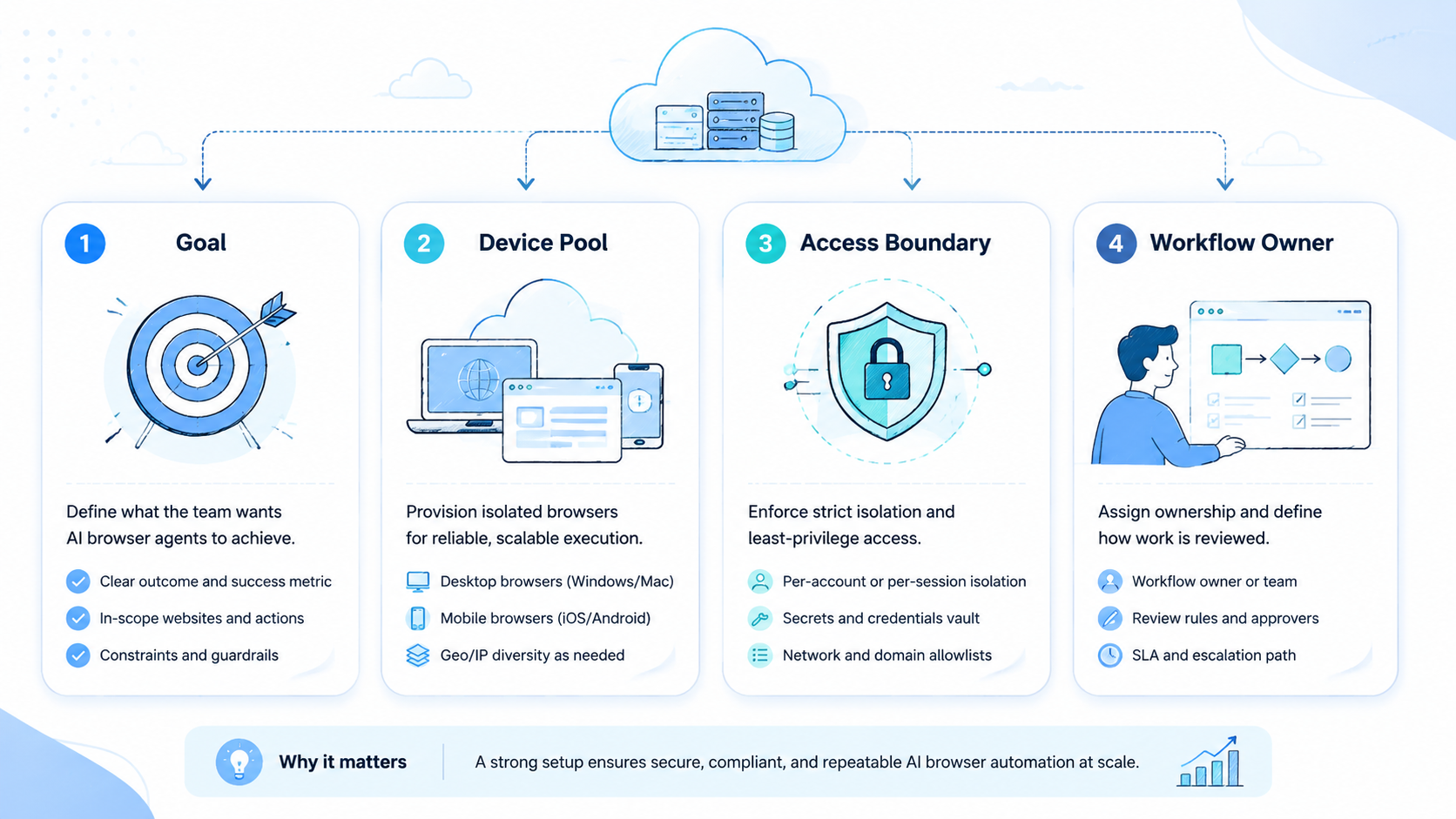
- Browser Use alternatives should be compared by workflow control, not only by agent speed
- Teams need account scope, stop rules, proof, and review before broad rollout
- Browser-only tools fit narrow web tasks; mixed browser and mobile systems fit app-side checks
- A strong pilot includes one repeated task and one planned failure
- The best shortlist favors clear recovery records over vague autonomy claims
Browser Use Alternative Types
There are several types of alternatives. Agent libraries give developers a way to drive browser actions, while test tools help teams control pages with scripts.
-
Name the owner.
-
One accountable person should know whether the next action is retry review cancel or workflow repair.
RPA tools run fixed workflows. Work platforms connect route selection, account context, mobile handoff, and review.
The right type depends on the team. A developer team may prefer an open library. A growth team may need task records and reviewers. An operations team with mobile app checks may need a platform that can move work from browser to phone.
-
Keep scope small.
-
Narrow scope makes the first production workflow easier to measure compare and improve after failed attempts.
| Alternative type | Best fit | Limit to inspect |
|---|---|---|
| Agent library | Developer experiments and custom browser tasks | Team proof may need extra work |
| Test automation | Repeatable checks on known pages | Business review is not built in |
| RPA tool | Stable forms and fixed workflows | Changed pages can create brittle runs |
| Work platform | Team tasks with accounts and review | Requires clearer setup before launch |
| Mobile-linked system | Browser tasks that end in app proof | Device assignment must be visible |
This category is useful as a category signal because it shows demand for AI browser execution. Teams should still ask whether the alternative handles ownership, scope, and recovery. Those needs decide whether a tool can run daily work.
-
Review the log.
-
A useful log groups browser runs by account route proof type and failure reason instead of raw activity.
Browser Use Scorecard for Teams
A scorecard should use one real workflow. For example, ask each alternative to check a dashboard field, stage a content update, verify a campaign page, or prepare a report from a logged-in system. The workflow must have a clear input and a visible end.
-
Save the state.
-
The state record should include the page account input and reviewer note before the team expands the workflow.
Avoid scoring only on whether the model clicks the right button once. Score whether the run leaves a useful record. A teammate should be able to read the record and know what happened without watching the whole session.
-
Mark the reason.
-
Clear reasons turn browser failures into fixes for input prep account mapping page scope or review rules.
| Score item | Question to ask | Strong answer |
|---|---|---|
| Route choice | Why did this task need browser work | The system names the browser path before action |
| Account scope | Which account or profile was used | The record shows assigned workspace and owner |
| Input readiness | What file, URL, or brief started the run | Inputs are attached before runtime |
| Stop rule | Where should the run pause | Login, payment, missing file, and unclear state are named |
| Proof | What shows the result | Screenshot, field value, URL, or reviewer note is stored |
| Recovery | What happens after failure | The next owner and reason are visible |
Use the scorecard twice.
This scorecard also protects buyers from shallow demos. A browser agent that works once can still fail as a team system. The review record is the real test.
-
Watch the handoff.
-
Mobile proof should return to the same task record when the app screen is part of final acceptance.
Browser Use and Mobile Handoff
Some alternatives stop at the browser. That works when the final result exists on a web page. It is not enough when a mobile app shows the true customer or account state.
-
Confirm inputs.
-
Ready inputs reduce noisy failure and make tool comparison more honest across repeated attempts.
A browser-to-mobile handoff should keep one task ID. The browser step might prepare content or change a dashboard value. The mobile step should check the app state, save proof, and return the result to the same record.
-
Test one failure.
-
A planned bad input shows whether the alternative can explain friction without inventing a false success.
-
Use browser-only work for dashboard checks, web forms, page review, and report capture
- Add mobile handoff when an app screen confirms the result
- Keep account labels the same across browser and phone steps
- Save phone proof near the browser proof
- Pause when the app screen does not match the expected state
- Assign a reviewer before public or customer-facing changes
This is where Browser Use alternatives differ sharply. Some tools only automate pages. Others can become part of a work system with device assignment, account boundaries, and human review.
-
Close the loop.
-
The buying decision should cite the pilot record not only the cleanest live demonstration.
Browser Use Alternatives for Account-Based Teams
Account-based teams need more than a working browser session. They need to know which client, brand, region, or account group the run belongs to. They also need a clear way to prevent one account's context from leaking into another task.
-
Audit now.
-
This checkpoint keeps the next operator reviewer and recovery owner aligned before another browser run starts.
An AI browser automation platform should map tasks to assigned environments. The record should show the profile, account owner, input packet, and reviewer. The operator should not choose from memory.
-
Pause early.
-
A forced pause is better than a hidden action when the page account or input does not match the plan.
| Account need | Operational rule | Bad pattern |
|---|---|---|
| Client boundary | One task belongs to one client context | Shared sessions with unclear owner |
| Region boundary | Region is named before execution | Operator chooses based on habit |
| File boundary | Approved file path is attached | Files are fetched during the run |
| Review boundary | Sensitive changes pause for a reviewer | Public update happens without proof |
| Recovery boundary | Failure reason names the next owner | Generic error creates guesswork |
Device isolation and account mapping do not promise that risk disappears. They make the work easier to inspect. That is the main value for teams comparing Browser Use alternatives.
-
Check proof.
-
The saved result should be clear enough for a teammate who never watched the session to approve or reject it.
Pilot Plan for Browser Use Alternatives
A pilot should be small and uncomfortable enough to reveal real behavior. Use one workflow, one account group, one reviewer, and one planned bad input. A tool that handles that cleanly, it has a stronger chance in production.
-
Name the owner.
-
One accountable person should know whether the next action is retry review cancel or workflow repair.
Run 10 task attempts. Record how many finish, pause, fail from missing inputs, need reviewer changes, or produce unclear proof. The numbers do not need to be perfect. They need to be honest.
-
Keep scope small.
-
Narrow scope makes the first production workflow easier to measure compare and improve after failed attempts.
-
Pick a repeated browser workflow with a known result
- Attach the source URL, account label, file, and expected output
- Define stop screens before the test starts
- Run the same task packet several times
- Add one missing file or changed page label
- Review the failure note and next owner
- Decide whether the alternative is ready for a second workflow
A clean pilot may feel slow. This pace is acceptable. Team browser work needs traceability before speed.
Shortlist Rules for Browser Use Alternatives
Shortlist the tools that can explain their own work. The alternative should show route choice, allowed action, environment, proof, and failure class. When it cannot, the team will have to build those layers around it.
-
Review the log.
-
A useful log groups browser runs by account route proof type and failure reason instead of raw activity.
Use this decision list during demos:
- Keep the tool if it shows the task route before browser action
- Keep the tool if it pauses on login, payment, missing files, and unclear page state
- Keep the tool if reviewers can reject a result and see the reason
- Keep the tool if mobile proof can link back to browser proof
- Remove the tool if it treats every request as browser work
- Remove the tool if it hides account context
- Remove the tool if failure notes are too vague for operators
- Remove the tool if proof lives outside the task record
These rules help teams avoid a common trap. The most exciting demo is not always the safest daily system. Browser Use alternatives need to work when the page changes and the operator is busy.
-
Save the state.
-
The state record should include the page account input and reviewer note before the team expands the workflow.
Team Roles After Selection
Implementation still needs human roles. Assign a workflow owner, account owner, reviewer, and recovery owner.
The workflow owner maintains steps, and the account owner approves which environment may run. The reviewer accepts sensitive results, while the recovery owner studies repeated failures.
-
Mark the reason.
-
Clear reasons turn browser failures into fixes for input prep account mapping page scope or review rules.
This role map keeps the tool from becoming an unclear queue. It also helps teams decide whether the issue is a bad prompt, missing material, changed page, or weak review rule.
-
Watch the handoff.
-
Mobile proof should return to the same task record when the app screen is part of final acceptance.
| Role | Owns | Weekly check |
|---|---|---|
| Workflow owner | Steps, stop rules, and task shape | Which runs paused for process reasons |
| Account owner | Profile, device, and access boundary | Which tasks used the wrong context |
| Reviewer | Proof and acceptance rule | Which results needed rework |
| Recovery owner | Failure labels and retry paths | Which error class repeats |
| Ops lead | Expansion decision | Which workflow can scale next |
Teams that define roles early get cleaner feedback. They can improve the workflow instead of blaming the model for every stopped run.
-
Confirm inputs.
-
Ready inputs reduce noisy failure and make tool comparison more honest across repeated attempts.
Browser Use Comparison Matrix
Use this matrix when the shortlist looks similar. It forces each Browser Use alternative to show the operating record behind the demo.
-
Test one failure.
-
A planned bad input shows whether the alternative can explain friction without inventing a false success.
| Decision field | Good answer | Weak answer |
|---|---|---|
| Browser Use route | The system explains why a browser was needed | Every task opens a browser by default |
| Account context | Profile owner and account group are visible | The session depends on the last active login |
| Input packet | URL file and expected result are ready | The agent searches for material during the run |
| Page scope | Allowed pages and stop screens are listed | The agent can wander through the site |
| Proof model | Field value screenshot URL or note is stored | The result only says done |
| Review rule | Sensitive changes pause for a named reviewer | The run continues through public changes |
| Mobile option | App proof can attach to the same task | Phone screenshots sit in another folder |
| Failure class | Missing input page change login or review rejection | Generic error leaves operators guessing |
| Retry link | The second run points back to the first failure | Retries create separate loose records |
| Team report | Managers can group runs by reason and owner | Only developers can read the log |
The matrix will not pick the tool by itself. It will show which option matches the team's work model. That works to remove tools that are only good at isolated browser demos.
-
Close the loop.
-
The buying decision should cite the pilot record not only the cleanest live demonstration.
Evidence Pack for a Browser Pilot
A pilot evidence pack should be ready before the first run. The pack makes every Browser Use alternative face the same test.
-
Audit now.
-
This checkpoint keeps the next operator reviewer and recovery owner aligned before another browser run starts.
-
One source URL or dashboard path
- One account group label
- One approved input file
- One expected field or screen result
- One forced missing input case
- One reviewer with accept and reject notes
- One export of paused runs by reason
- One decision memo after 10 attempts
This pack keeps evaluation fair. It also reduces tool bias because each option must work with the same task, same account shape, and same proof rule.
-
Pause early.
-
A forced pause is better than a hidden action when the page account or input does not match the plan.
Operator Review Prompts
Use these prompts at the end of each pilot week. They keep the review focused on visible work rather than model excitement.
-
Check proof.
-
The saved result should be clear enough for a teammate who never watched the session to approve or reject it.
-
Check route first
- The browser path should be chosen because the result lives on a web page not because the tool defaults to clicks
- Save the proof
- A teammate should read the task record and know which page account and field changed
- Test one bad input
- Browser Use alternatives reveal their real quality when a file is missing or a page label changes
- Keep review visible
- Public changes account settings and customer-facing screens should stop for a named human decision
- Compare recovery notes
- The best option explains login prompts page drift missing inputs and reviewer rejection without vague errors
- Watch account context
- A browser session is not safe for teams unless the assigned profile and account group are visible
- Favor boring logs
- Browser Use work becomes easier to scale when each run leaves a short useful operating record
- Decide after 10 runs
- A small evidence pack gives better buying data than one polished sales demo
Quick Selection Notes
The shortlist should end with one plain memo. Name the task, the chosen tool, the proof rule, the stop rule, and the first workflow owner.
- Decide after evidence.
Teams should avoid a tool when the only proof is a clean demo and no failed run record.
Frequently Asked Questions
What are Browser Use alternatives?
They are tools or platforms that run AI-assisted browser work. The category includes agent libraries, test automation, RPA, and team work platforms.
-
Name the owner.
-
One accountable person should know whether the next action is retry review cancel or workflow repair.
What should teams compare first?
Compare route choice, account scope, input readiness, stop rules, proof, review, and recovery. These fields matter more than a single smooth demo.
-
Keep scope small.
-
Narrow scope makes the first production workflow easier to measure compare and improve after failed attempts.
Is a browser agent enough for team workflows?
A browser agent can be enough for narrow web tasks. Team workflows often need account ownership, review gates, failure labels, and mobile proof.
-
Review the log.
-
A useful log groups browser runs by account route proof type and failure reason instead of raw activity.
When does mobile handoff matter?
Mobile handoff matters when the final state appears in an app. The phone step should stay linked to the same task record as the browser step.
-
Save the state.
-
The state record should include the page account input and reviewer note before the team expands the workflow.
How many tools should be tested?
Test a small shortlist against the same workflow. Three serious options are better than a long list with no shared task packet.
-
Mark the reason.
-
Clear reasons turn browser failures into fixes for input prep account mapping page scope or review rules.
What is the biggest red flag?
The biggest red flag is unclear failure. Tools that cannot explain why they stopped or what proof they saved, the team cannot scale it safely.
-
Watch the handoff.
-
Mobile proof should return to the same task record when the app screen is part of final acceptance.
How should a team start after choosing one?
Start with one production workflow, one account group, and one reviewer. Expand only after the first workflow has stable records and clear recovery notes.
-
Confirm inputs.
-
Ready inputs reduce noisy failure and make tool comparison more honest across repeated attempts.
Conclusion
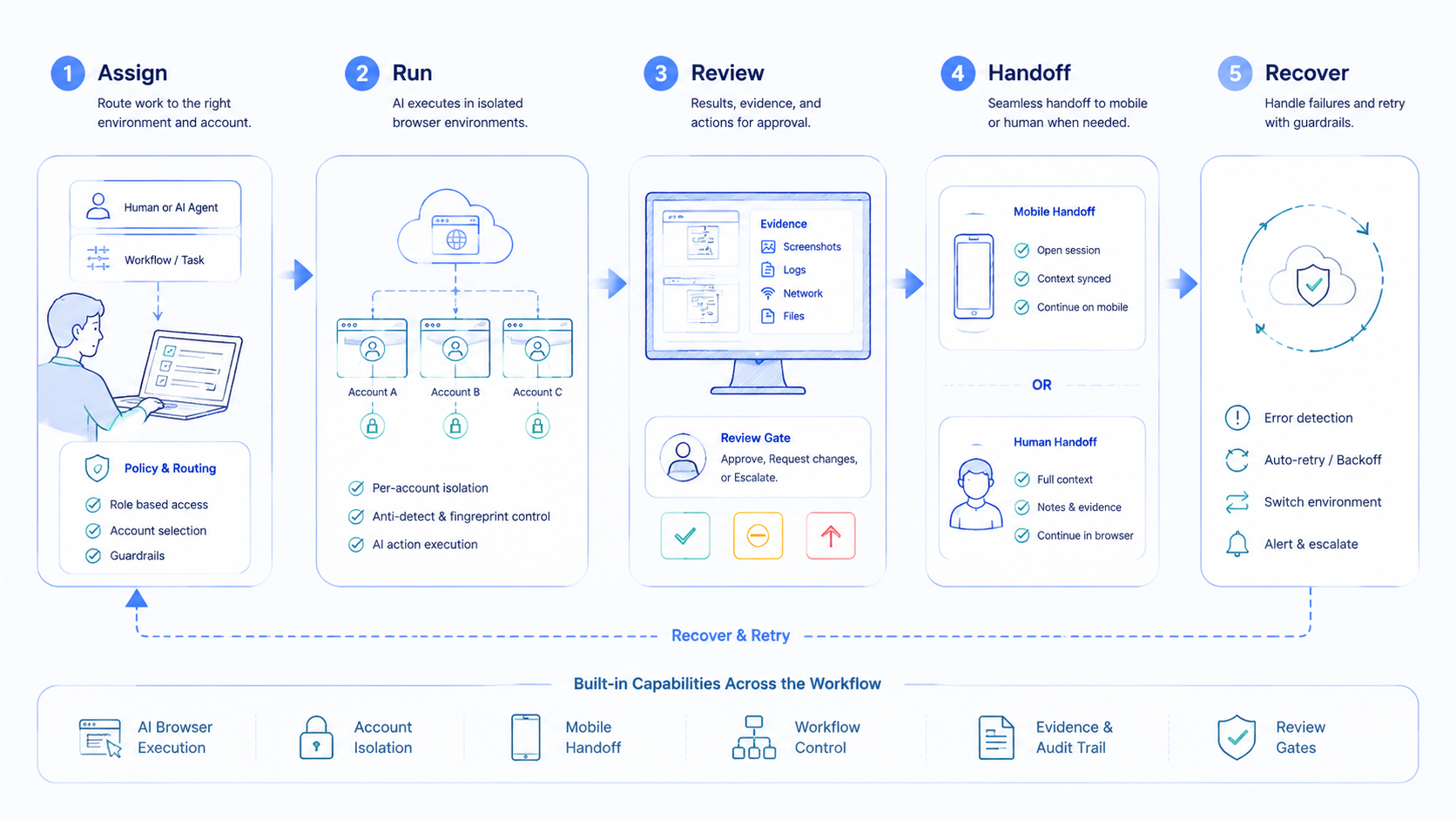
The best Browser Use alternatives for teams are not only tools that move through pages. They are systems that make browser work inspectable. They show the task route, account scope, input packet, proof, reviewer, and failure reason.
-
Test one failure.
-
A planned bad input shows whether the alternative can explain friction without inventing a false success.
Choose the alternative that fits your work shape. For developer-only control, a library may be enough. For daily growth or operations work, pick a platform that connects browser execution with account boundaries, mobile handoff, and review.
- Close the loop



