
Content Type: comparison
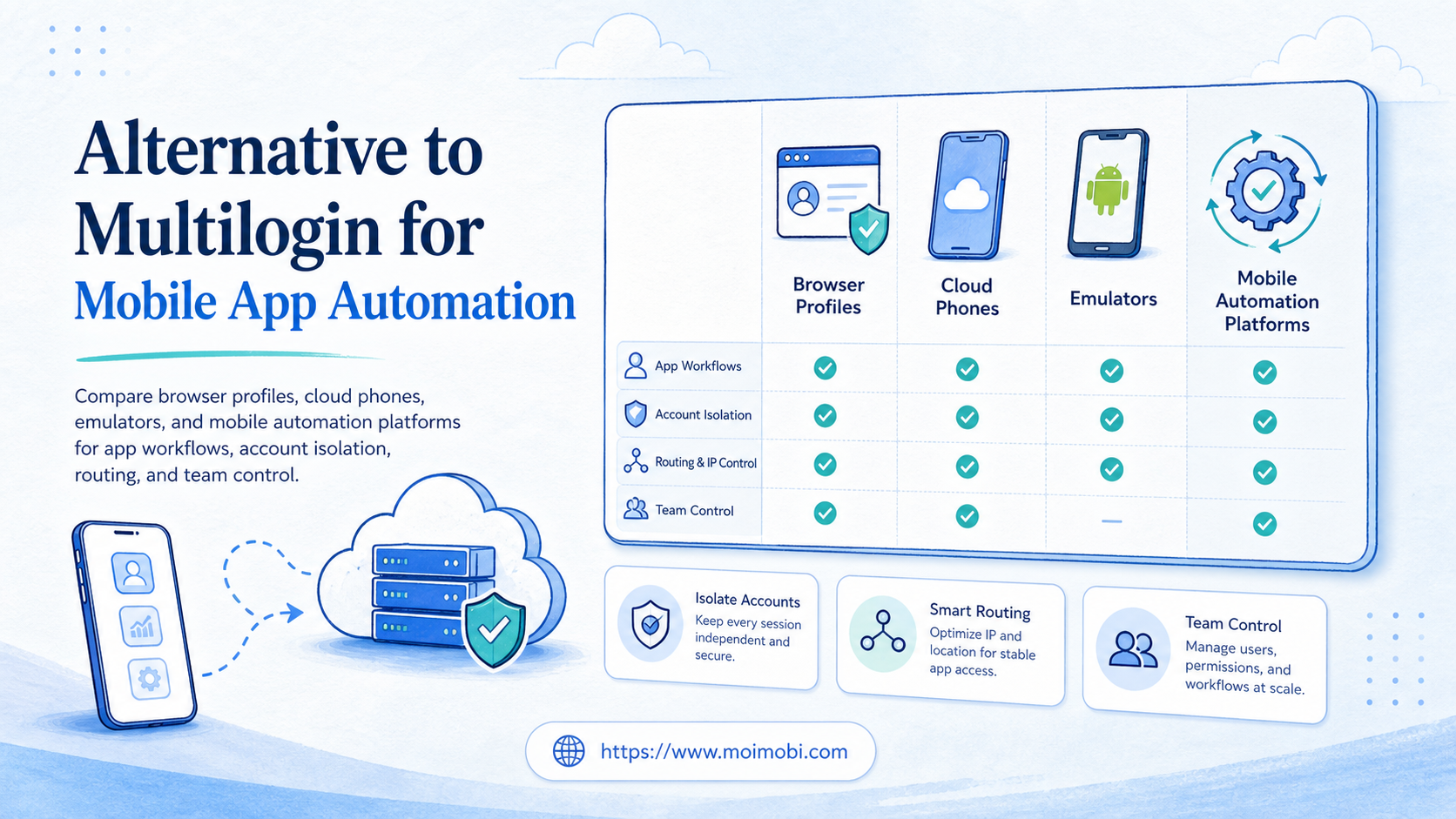
An alternative to Multilogin for mobile apps is a system that can run mobile-first workflows in app environments, not only manage browser profiles. The right choice depends on whether your team needs browser account separation, Android app execution, real device control, or a shared workflow layer for repeated operations.
Multilogin is relevant to this comparison because teams often start with browser profile procurement and later discover mobile app work has different requirements. That distinction matters. A team choosing an alternative should compare the execution environment first, then compare automation depth, account isolation, routing, and team controls.
For many mobile operations teams, the short answer is simple: use browser profile software when the work stays in websites, use Android emulators for testing builds, and use a cloud phone or mobile execution platform when the daily workflow depends on installed apps, persistent sessions, and repeatable account operations.
Key Takeaways
- A browser profile tool is not automatically a mobile app execution system.
- Android emulators fit development and testing better than account operations.
- Cloud phone platforms fit persistent mobile workflows, routing, and handoff.
- Physical phone farms can offer ownership, but add maintenance overhead.
- A pilot should measure failed runs, takeover count, and review time.
What to Compare Before Choosing alternative to Multilogin for mobile apps
The first comparison is not brand versus brand. It is execution environment versus workflow requirement. Mobile app operations have different constraints from browser-based work because the app state, device identity, app storage, routing, and user handoff all sit inside the mobile environment.
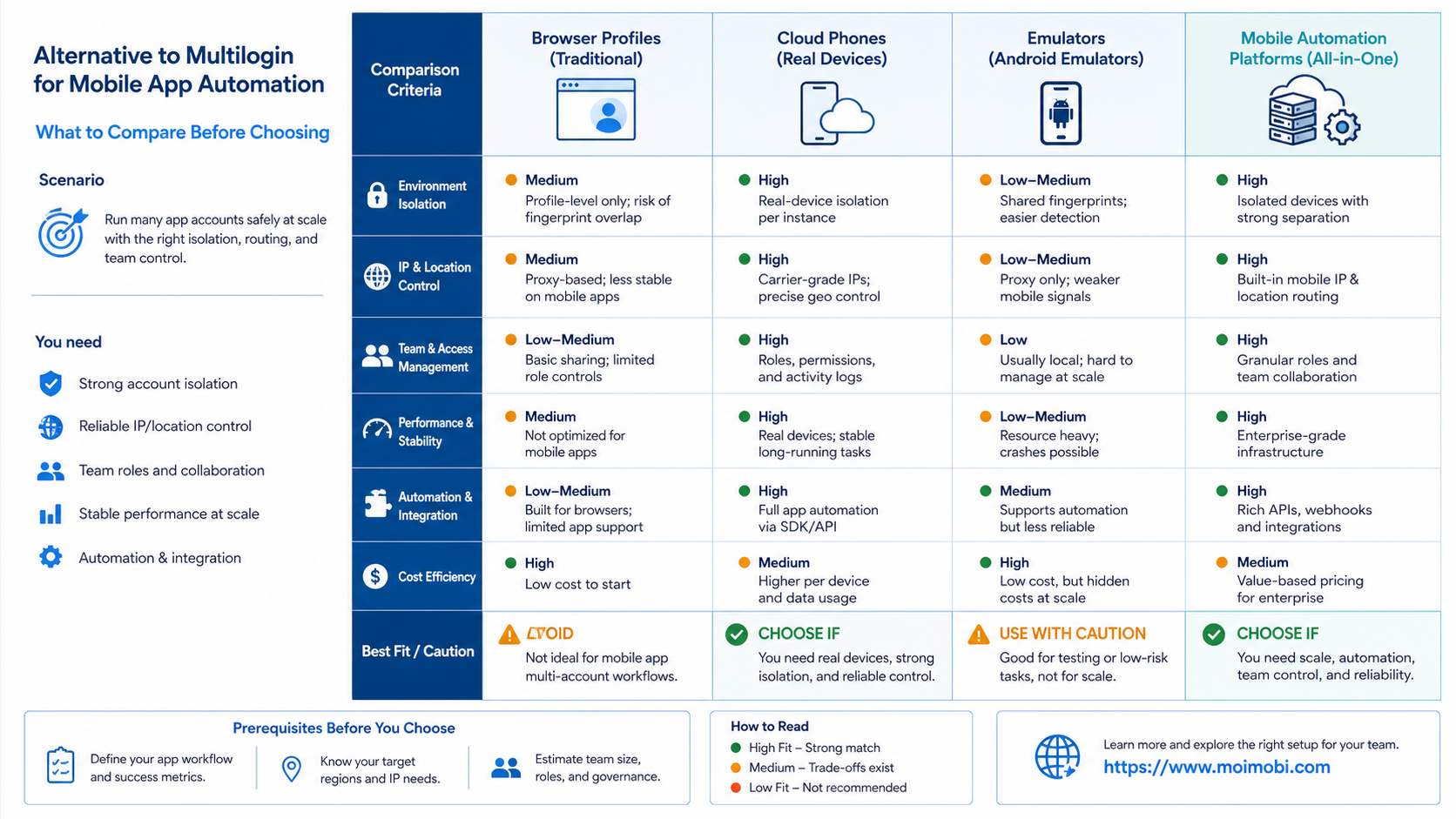
| Option | Best first question | Operational fit | Main caution |
|---|---|---|---|
| Browser profile platform | Does the workflow stay inside websites? | Web logins, browser sessions, profile separation | Not enough when the work requires native apps |
| Android emulator | Is the goal development or QA testing? | App testing, build checks, developer workflows | May not match operations teams that need persistent account work |
| Cloud phone platform | Does each account need a persistent mobile workspace? | App-based execution, account operations, team handoff | Needs clear routing, scheduling, and usage controls |
| Physical phone farm | Does the team need full hardware ownership? | Local control, owned devices, special app cases | High setup, monitoring, replacement, and maintenance work |
Start with the app requirement. If the workflow depends on TikTok, Instagram, WhatsApp, Telegram, marketplace apps, or mobile-only interfaces, a browser profile tool may only solve part of the problem. The team still needs a mobile environment where the app can run.
Next, compare control. A good mobile automation platform should make it clear who owns the task, which account ran it, what device environment was used, and how failures are reviewed. Without those controls, the team may only move manual work from one screen to another.
Key Differences Between Alternative to Multilogin for Mobile App Automation
The key difference is where the work actually runs. Multilogin documentation describes profiles that can be started and stopped, including mobile profiles and browser profiles. That is useful context because the buyer should not treat every profile tool as the same kind of execution layer.
Use these constraints to narrow the choice:
- App dependency: Native app tasks need Android or iOS execution. Browser-only profile tools are a weak fit for app-first workflows.
- Persistence: Daily account work usually needs sessions, app data, and task history to survive between runs.
- Routing: Multi-account workflows need routing decisions that match the account and region strategy.
- Handoff: Teams need role clarity when one person prepares content and another reviews or replies.
- Recovery: Failed tasks need logs, screenshots, or run history, not only a success or failure label.
The Android Emulator is a strong development tool. Android Developers explains that it simulates Android devices so developers can test apps across device types and API levels. That makes it useful for QA and app development, but it is not the same buying problem as daily account operations.
Device testing platforms also show the difference between test infrastructure and operating infrastructure. Firebase Test Lab, for example, is positioned around testing apps on hosted devices and device configurations. That helps engineering teams validate builds, while operations teams still need account workspaces, task ownership, and recovery logs.
WebDriver is another useful boundary marker. The W3C WebDriver specification defines browser automation through remote control interfaces. That makes it relevant to web automation, but it does not turn a browser profile tool into a native mobile app operations layer by itself.
Features, Workflow, and Trade-Offs and alternative to Multilogin for mobile apps
Features should be judged by the workflow they protect. A mobile team does not only need to “open more profiles.” It needs separated environments, controlled execution, clear status, and a way to repeat successful work without rebuilding the process every day.
For example, a social media team may prepare captions in one tool, publish through a mobile app, reply to comments later, and review account activity at the end of the day. A browser profile alone can help with web dashboards, but it cannot complete the mobile app portion unless the platform also provides mobile execution.
MoiMobi is built around that wider execution problem. Teams can combine account-separated mobile workspaces, routing, mobile workflows, and account management rather than treating the phone as a rented screen. The value is not only access to a device. It is keeping the repeated workflow understandable.
What not to do: do not choose a platform only because it can start many environments. That metric looks attractive in a demo, but it does not answer whether tasks are auditable, recoverable, or assigned to the right account owner. Capacity without control usually becomes operational noise.
Pricing and Operational Considerations
Pricing should be compared through total operating cost, not only seat price or device price. A low monthly price can become expensive when the team spends time restarting sessions, finding the right account, rebuilding failed tasks, or manually checking whether work finished.
The first cost bucket is environment cost. This includes cloud devices, browser profiles, proxies, storage, and any minutes-based usage. Multilogin’s help article notes that mobile profiles are billed per minute, which is a reminder to evaluate active usage patterns rather than only plan names.
The second cost bucket is people cost. A physical phone farm may feel direct, but someone must maintain devices, replace broken units, monitor power, manage routing, and document usage. For distributed teams, that hidden cost often matters more than the device purchase itself.
The third cost bucket is recovery cost. If a task fails, can the team see the account, device, step, and reason? A platform with better logs may reduce manual review time even if its headline price is not the lowest. That is why comparison work should include a small pilot, not only a feature checklist.
Migration cost deserves its own line item. A team may need to recreate account groups, move SOPs into workflow templates, train reviewers, and define who can pause or restart a mobile task. Those tasks are not hard, but they should be planned before the first larger rollout.
Procurement should also ask how many roles will touch the same account. A solo operator may only need access. A team needs owner fields, device assignment, handoff notes, and a clear rule for when a task returns to manual control.
Which Option Fits Different Teams
Different teams should choose different systems. The best fit depends on the work surface and the level of operational control needed.
- Choose a browser profile platform when the work stays in web dashboards, browser logins, and site-based account management.
- Choose an Android emulator when the main job is development, QA, or repeatable app testing.
- Choose a cloud phone platform when the work depends on mobile apps, persistent account state, and team execution.
- Choose physical phones when hardware ownership, local control, or a special app requirement is more important than centralized management.
- Choose a combined execution platform when the team moves between web dashboards and mobile apps during the same workflow.
This is also where the cloud phone vs physical phone farm question becomes practical. A phone farm can work for teams that want full local control. A cloud phone setup is often easier to coordinate when account owners, reviewers, and operators are not in the same room.
If the comparison includes GeeLark vs cloud phone, MoreLogin vs cloud phone, or BitBrowser vs cloud phone, avoid reducing the choice to a single feature. Map each option to the actual daily task: publishing, replying, monitoring, customer follow-up, or account maintenance.
Who It Fits and When It Is a Strong Match
MoiMobi is a strong match when the team needs app-based execution plus operational structure. It fits teams that run repeated mobile workflows across social, messaging, or ecommerce apps and need a cleaner way to assign, observe, and review work.
It is a weaker fit when the team only needs a temporary browser session. In that case, a browser profile product may be simpler. It is also not the right replacement for an engineering-grade test framework when the main job is automated QA for a mobile app build.
A practical fit test is this: list the daily workflow in five steps. If two or more steps happen inside a mobile app, and another person must review or continue the work later, a cross-account mobile workflow control layer becomes more useful than a standalone profile manager.
Teams comparing a remote Android provider comparison should apply the same filter. The decision is not only provider name. It is whether the platform can support the account, device, routing, task, and review model the team actually runs.
Pilot Rollout, Measurement, and Recovery Checks
A pilot should prove operating control before scale. Do not begin with every account, every workflow, and every operator. Start with a limited group where the outcome can be checked without disrupting the whole team.
Use this rollout sequence:
- Pick one app workflow, such as posting, replying, or monitoring.
- Assign a small account group and one owner per account.
- Define what a successful run looks like before automation starts.
- Record environment, routing, task owner, result, and failure reason.
- Review failed or unclear runs before adding more accounts.
The measurement layer should be simple. Track completed tasks, failed tasks, manual takeover count, review time, and repeated failure reasons. These fields reveal whether the platform is reducing work or only hiding it.
Recovery checks matter most when the workflow touches external platforms. A good pilot should answer who can pause the task, who can inspect the device, what evidence exists after failure, and how the next run avoids repeating the same issue.
End the pilot with a go, adjust, or stop decision. Move forward only if the workflow saves review time, produces clearer task records, and gives operators a practical recovery path. If the team still needs to ask where a task ran or who owns the next step, fix the operating model before adding more accounts.
Frequently Asked Questions
What is the best alternative to Multilogin for mobile apps?
The best alternative depends on whether your workflow needs mobile app execution. If the work happens in native apps, compare cloud phones, mobile automation, and device isolation before browser-only features.
Is a cloud phone better than a browser profile?
It is better for mobile app workflows. A browser profile is usually better for website sessions and web dashboards.
When should I use Android Emulator instead?
Use Android Emulator for development and testing. Android Developers positions it as a way to test apps across devices and API levels without owning each physical device.
Does Appium replace a mobile automation platform?
Appium can automate mobile apps, but it usually fits engineering teams. Operations teams may need task assignment, account workspaces, logs, and recovery controls around the automation.
How should teams compare MoreLogin vs cloud phone?
Start with where the workflow runs. If the work is browser-based, a browser profile tool may fit. If it requires mobile apps, a cloud phone workflow is more relevant.
What should a pilot measure?
Measure task completion, manual takeover, failed runs, review time, and repeated failure reasons. These numbers show whether the system improves operations.
Can one platform handle browser and mobile work?
Yes, if it supports separate execution environments for both. The key is keeping account identity, routing, task logs, and handoff clear across those environments.
Should small teams start with a physical phone farm?
Only when hardware ownership is required. Small teams often underestimate the time needed to maintain devices, routing, charging, replacement, and records.
Conclusion
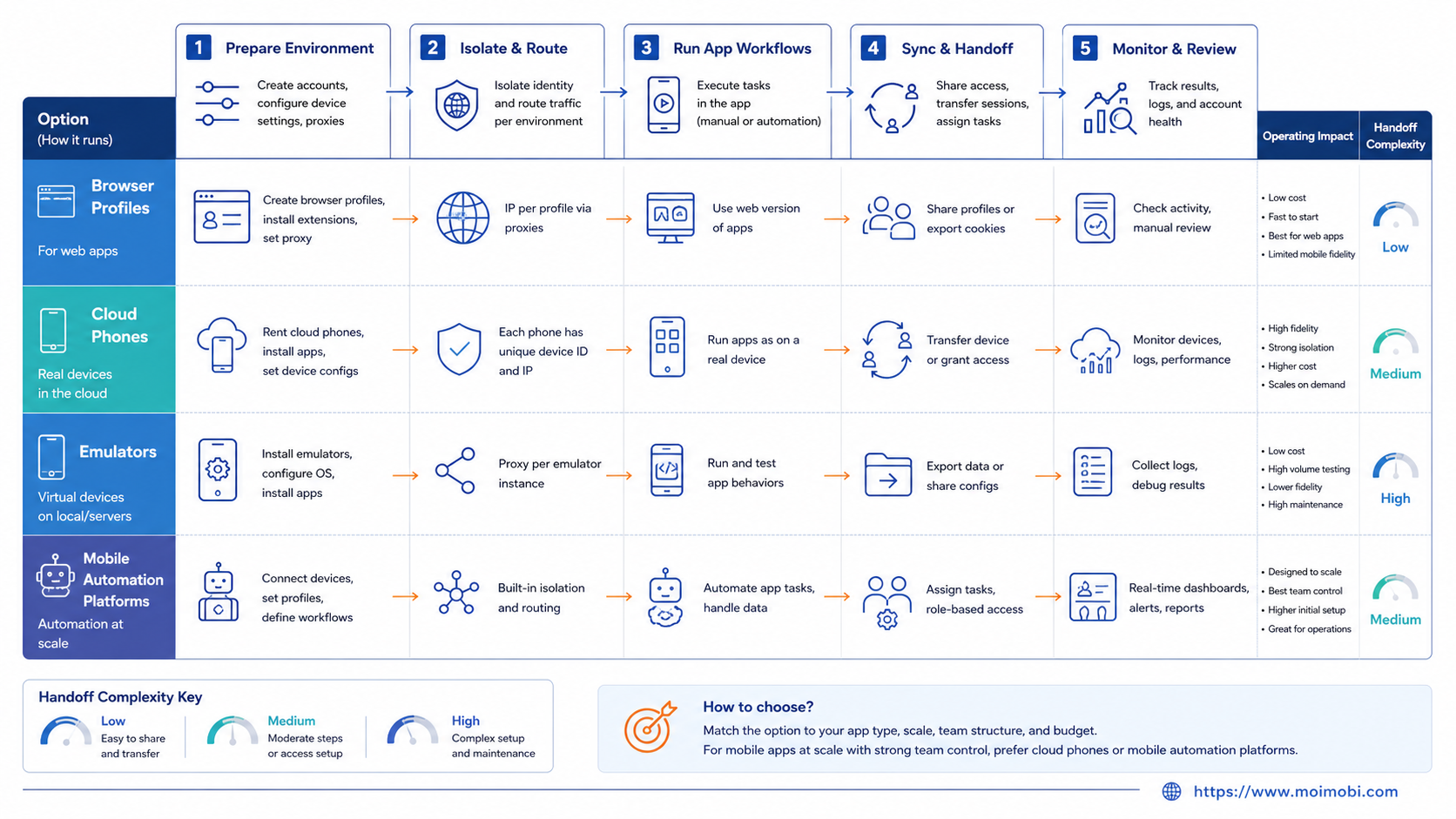
The right alternative to Multilogin for mobile apps is the option that matches the real execution surface. Browser profile tools fit web work. Android emulators fit app testing. Cloud phone platforms fit persistent mobile account operations. Combined execution platforms fit teams that move across both browser and mobile tasks.
Before committing, run a small pilot with one workflow, one account group, and clear recovery checks. The decision becomes easier once the team sees which setup keeps mobile work traceable, repeatable, and manageable.
References:



