

Content Type: guide
An AI social media agent requirements checklist is a practical way to decide whether an AI agent can support real social media work without creating operational confusion. The checklist covers accounts, execution environments, approvals, platform rules, content quality, handoff, reporting, and recovery.
The point is not to buy the most aggressive automation tool. The point is to know which work can be prepared by AI, which work needs human approval, and which work must run inside a controlled browser or mobile workspace. For teams, this distinction matters more than a long feature list.
Key Takeaways
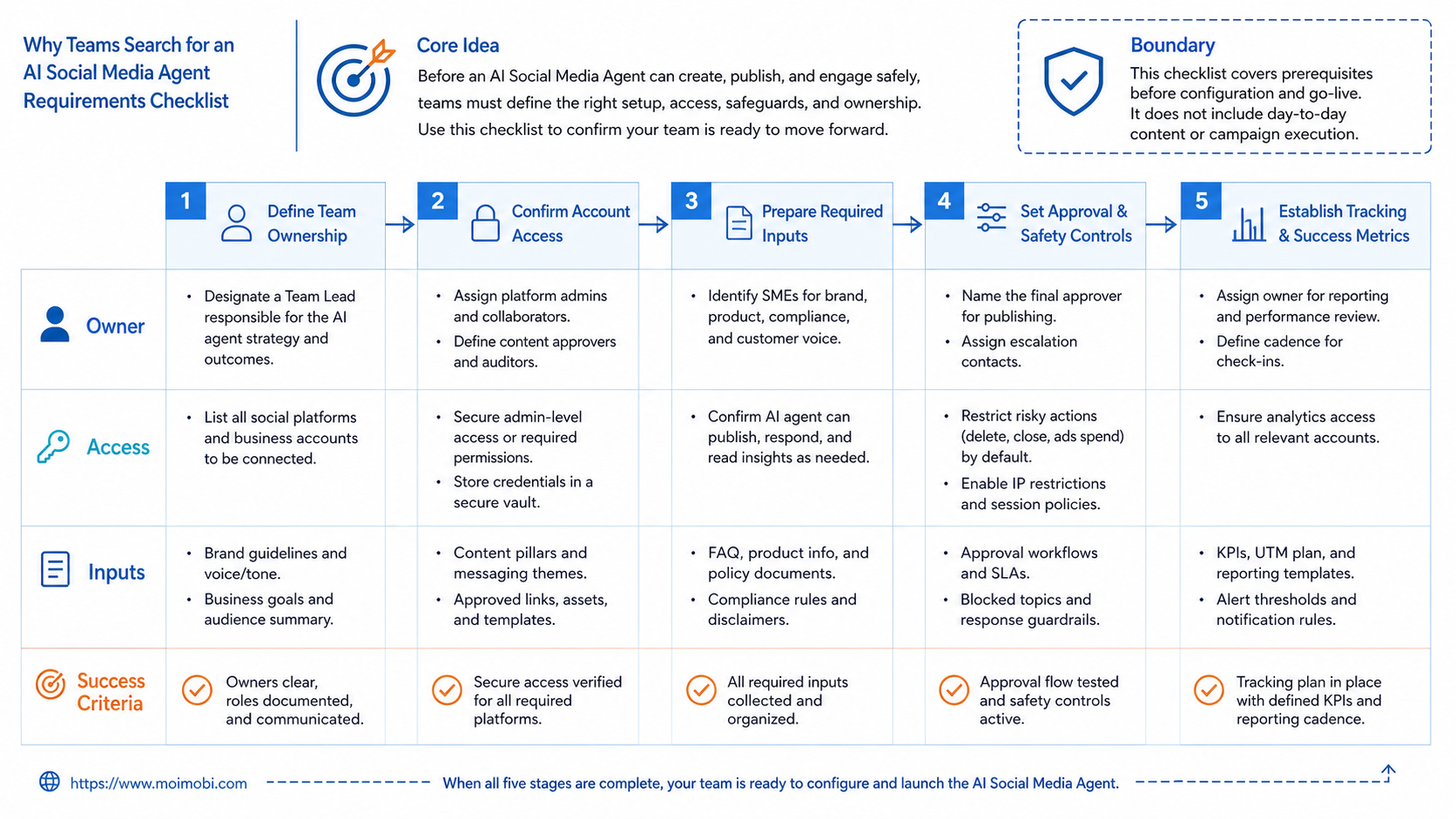
- A social media AI agent needs more than content generation.
- Account environment separation should be part of the evaluation.
- Approval, logging, and recovery rules are core requirements.
- Teams should pilot one workflow before scaling many accounts.
- Platform terms and user experience limits must shape the workflow.
The Core Idea Behind AI Social Media Agent Requirements Checklist for Teams
The common mistake is treating an AI social media agent as a smarter scheduler. That is too narrow. A scheduler plans content. An agent may help draft posts, read context, prepare replies, watch comments, collect leads, and move work between accounts.
That wider scope creates new requirements. The agent needs access to the right workspace, but it should not freely act across every account. It needs memory, but that memory must not mix brands, clients, or private customer conversations. It can prepare responses, but many teams still need review before public posting or direct messaging.
For social teams, the useful model is simple:
- AI prepares work: captions, replies, ideas, summaries, and task plans.
- Execution environments run work: browser profiles, mobile devices, or controlled app workspaces.
- People govern work: approvals, exceptions, escalation, and final accountability.
This is where a team social media operating model becomes more than a content calendar. It needs controlled execution paths. A team that runs TikTok, Instagram, Facebook, WhatsApp, and marketplace accounts needs to know who owns each account, where the session runs, and how every action is reviewed.
External rules also matter. Meta's Terms of Service restrict spam, unauthorized automated data access, and attempts to bypass technical limits. Instagram's own help content also explains that message delivery depends on recipient settings and message-request behavior. Those details do not mean teams cannot use AI. They mean the workflow should be built around consent, relevance, and review rather than blunt volume.
Why Teams Search for an AI Social Media Agent Requirements Checklist
Teams search for this topic when social work becomes too broad for manual coordination. One person may handle posting. Another handles comments. A third tracks leads. When the account count grows, handoffs begin to fail.
The checklist should answer three operational questions.
| Requirement area | What to check | Why it matters |
|---|---|---|
| Account ownership | Which person, role, or team owns each account? | Prevents duplicate replies and confused handoff. |
| Execution environment | Where does the account session run? | Keeps browser, mobile, and device context separated. |
| Approval boundary | Which actions require human review? | Reduces mistakes in public replies and customer conversations. |
| Recovery path | What happens when a task fails? | Prevents silent failures and repeated bad actions. |
The strongest AI agent setup is usually not the one with the most actions. It is the one that makes repeated work visible. Teams need to know whether the agent drafted a reply, posted content, failed to open an app, waited for approval, or escalated to a human.
Browser and mobile execution should also be evaluated separately. A browser profile may be enough for web dashboards and account management. A cloud phone may be required when the workflow depends on app-only screens, mobile notifications, or mobile-first account behavior. An AI execution platform should make that difference visible instead of hiding all tasks behind one generic automation button.
Who Benefits Most and In What Situations
This setup is not the right fit for every team. A solo creator with one or two accounts may only need a calendar, content assistant, and simple inbox routine. The evaluation changes when the work involves many accounts, many channels, or multiple operators.
The best fit is usually a team with repeated operational patterns:
- agencies managing client accounts;
- cross-border sellers handling multiple social and commerce channels;
- support teams replying to comments, DMs, and message requests;
- growth teams monitoring competitors and collecting leads;
- brands that need approval before publishing or replying.
The weakest fit is unmanaged mass outreach. If the workflow is mainly "send the same message to as many people as possible," the requirements checklist should stop the project early. That pattern creates poor customer experience and can conflict with platform rules.
- Recurring account-based tasks
- Clear reviewer ownership
- Separate browser or mobile workspaces
- Documented reply and escalation rules
- Cold mass messaging
- No approval workflow
- Shared account sessions
- No task logs or failure review
This is also where teams compare browser-only and mobile-first approaches. A role-based account workspace is more useful when it maps accounts to environments and people, not just login credentials. The checklist should force that mapping before any scaling decision.
For example, a support team may want AI to sort inbound comments by intent. A marketing team may want AI to prepare post variations for different accounts. A sales team may want AI to summarize warm leads from social conversations. Those are different workflows. They need different permissions, reviewer rules, and data fields.
The checklist should also separate brand accounts from operator accounts. A brand account may publish public posts. An operator account may only review drafts, approve replies, or collect reports. Mixing those roles makes it harder to audit a mistake. A clean design gives every account a clear job before automation starts.
How to Evaluate an AI Social Media Agent Requirements Checklist
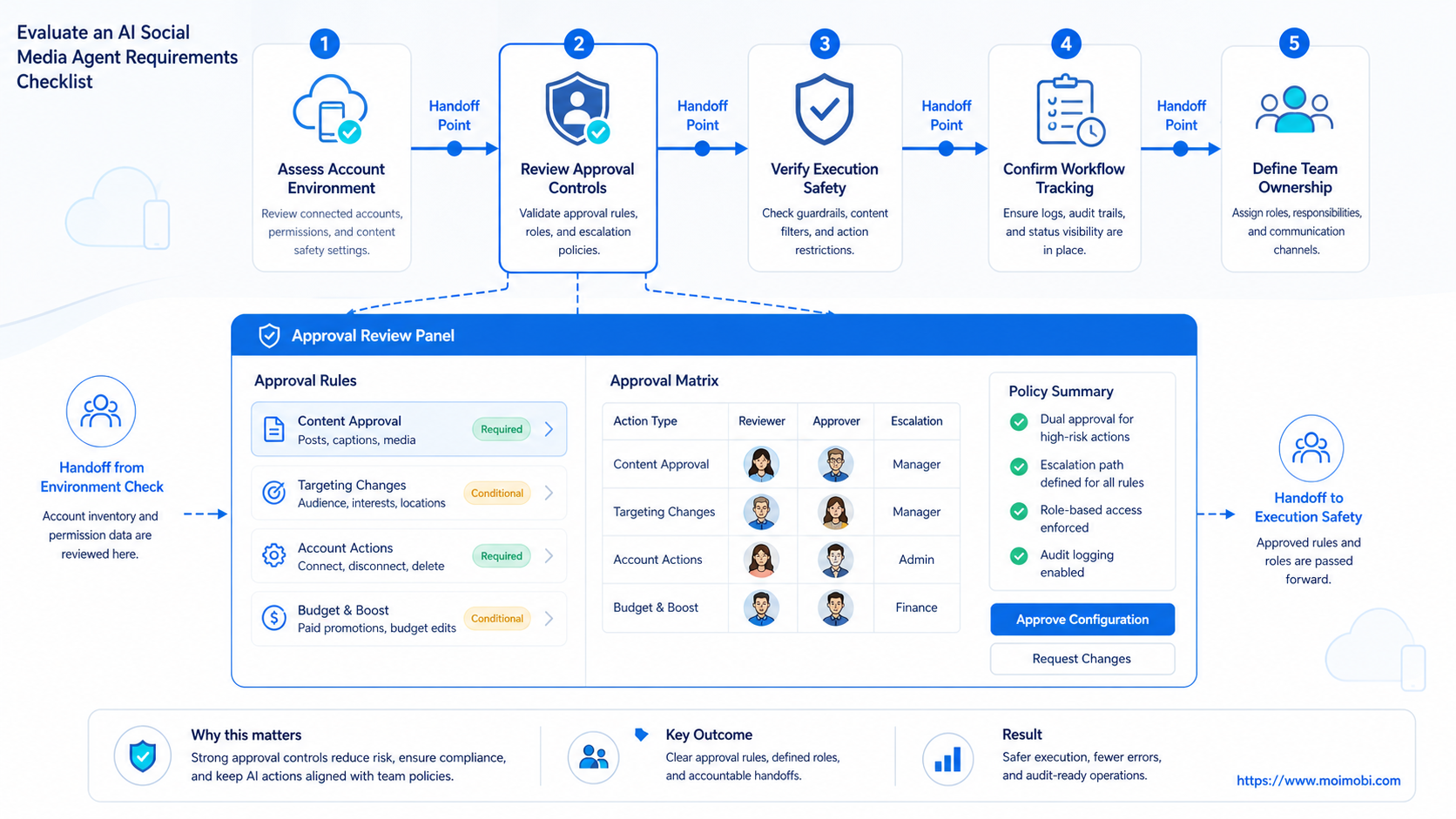
Start with a narrow workflow. Do not begin with every account and every channel. Pick one repeated task that already has a manual SOP, such as comment triage, caption drafting, lead summary, or weekly competitor monitoring.
Use this sequence before a pilot:
- Map the account set. List each account, owner, channel, login environment, and normal task type.
- Define allowed AI work. Separate drafting, summarizing, browsing, posting, replying, and data entry.
- Choose execution environments. Decide whether each task belongs in a browser profile, mobile workspace, or manual review queue.
- Set approval rules. Require review for first replies, sensitive replies, pricing answers, complaints, and public brand statements.
- Write stop conditions. Pause workflows after login issues, repeated failed actions, abnormal reply rates, or unclear customer intent.
- Track evidence. Store task status, reviewer, source account, output, failure reason, and next action.
Web automation standards show why execution control matters. The W3C WebDriver specification describes browser automation through sessions, commands, elements, timeouts, and user-agent control. Social workflows do not need to expose those technical details to operators, but the platform still needs session clarity and error handling under the hood.
If the task depends on mobile apps, evaluate app-side social task execution separately from browser workflows. The same AI instruction may require different runtime controls when it moves from a web dashboard to an Android app.
Before the pilot starts, write a small task contract. The contract should include the trigger, input fields, output format, approval owner, environment, and stop condition. This does not need to be complex. A simple row such as "new product comment -> draft reply -> support lead approves -> publish from assigned mobile workspace" is enough to expose gaps.
Teams should also define what the agent must not do. It should not guess pricing. It should not promise discounts. It should not contact the same person from multiple accounts. It should not continue when the page, app, or inbox state is unclear. These negative rules are often more valuable than broad feature claims.
Mistakes That Reduce Results
The first mistake is measuring only output volume. A team may publish more posts or send more replies while creating more cleanup work. Better measurements include approval rate, correction rate, response quality, failed task count, and time to handoff.
The second mistake is mixing account sessions. Shared browser windows, shared mobile devices, and shared operator logins make it harder to trace what happened. They also make it harder to pause one account without affecting others. For account-based operations, separate device workspaces are workflow controls, not only technical features.
The third mistake is giving the agent too much authority too early. Drafting a reply is different from sending it. Summarizing competitor posts is different from scraping private data. Preparing a content queue is different from posting across all accounts. Each action type should have a separate permission level.
The fourth mistake is forgetting recovery. Social workflows fail for ordinary reasons: expired sessions, changed layouts, missing assets, unclear comments, blocked actions, or weak network paths. A useful agent should show the failure and ask for the next step. It should not keep repeating the same broken action.
Pilot Rollout, Measurement, and Recovery Checks
A pilot should prove control before scale. Run one workflow across a small account group, then review the logs before adding more channels. The goal is to learn which actions are safe to automate, which actions need review, and which actions should stay manual.
Use this verification checklist after the first week:
- Did every task have an account, owner, and execution environment?
- Did reviewers understand which outputs needed approval?
- Did the workflow record failures clearly?
- Did the agent avoid duplicate replies or repeated customer contact?
- Did the team reduce manual preparation time without lowering reply quality?
- Did any platform rule or recipient-experience issue appear?
- Did the team know when to pause, retry, or hand off?
The review should include content quality and operational quality. Good captions are not enough if the account owner cannot trace who approved them. Fast replies are not enough if the customer receives irrelevant messages.
For mobile-first workflows, consider whether a mobile-first execution environment is part of the pilot. Use that evaluation for app-based execution, not as a generic answer to every social workflow. Some work belongs in browsers. Some work belongs on mobile devices. Some work belongs in human review.
The pilot review should end with a go, adjust, or stop decision. Go means the workflow can expand to more accounts with the same controls. Adjust means the team needs better prompts, clearer approval rules, or stronger environment separation. Stop means the workflow creates more risk than value, or the task is too judgment-heavy for automation.
Keep one recovery log for every pilot. Record the task ID, account, environment, failure reason, human decision, and final outcome. That log becomes training material for operators and a quality signal for future workflow design. Without it, the team only sees success counts and loses the context needed to improve execution.
Frequently Asked Questions
What is an AI social media agent?
This type of agent helps plan, draft, monitor, or execute social media tasks. For teams, the setup needs review controls and task tracking.
What should be in an AI social media agent requirements checklist?
Include account ownership, execution environment, permissions, approval rules, content quality checks, logging, recovery, and measurement. Add the person who can pause the workflow.
Can an AI social media agent publish automatically?
Some systems can publish, but teams should separate drafting from publishing. Public posts, first replies, and sensitive customer messages often need approval.
Is a browser profile enough for social media automation?
It depends on the task. Browser profiles can support web dashboards and logged-in web workflows. App-only tasks may require mobile execution.
How should agencies use AI social media agents?
Agencies should map each client account to an owner, workspace, approval rule, and reporting loop. Shared sessions and unclear handoffs create risk.
What is the biggest risk in social media AI automation?
The biggest operational risk is uncontrolled execution. Repeated actions without review can create poor replies, duplicate contact, and unclear accountability.
How many workflows should a team automate first?
Start with one workflow. Pick a repeated task with clear inputs, clear stop rules, and a reviewer who can judge the output.
Should an agent manage DMs?
An agent can help classify, summarize, and draft DM responses. Sending messages should be limited by consent, context, and review rules.
Conclusion
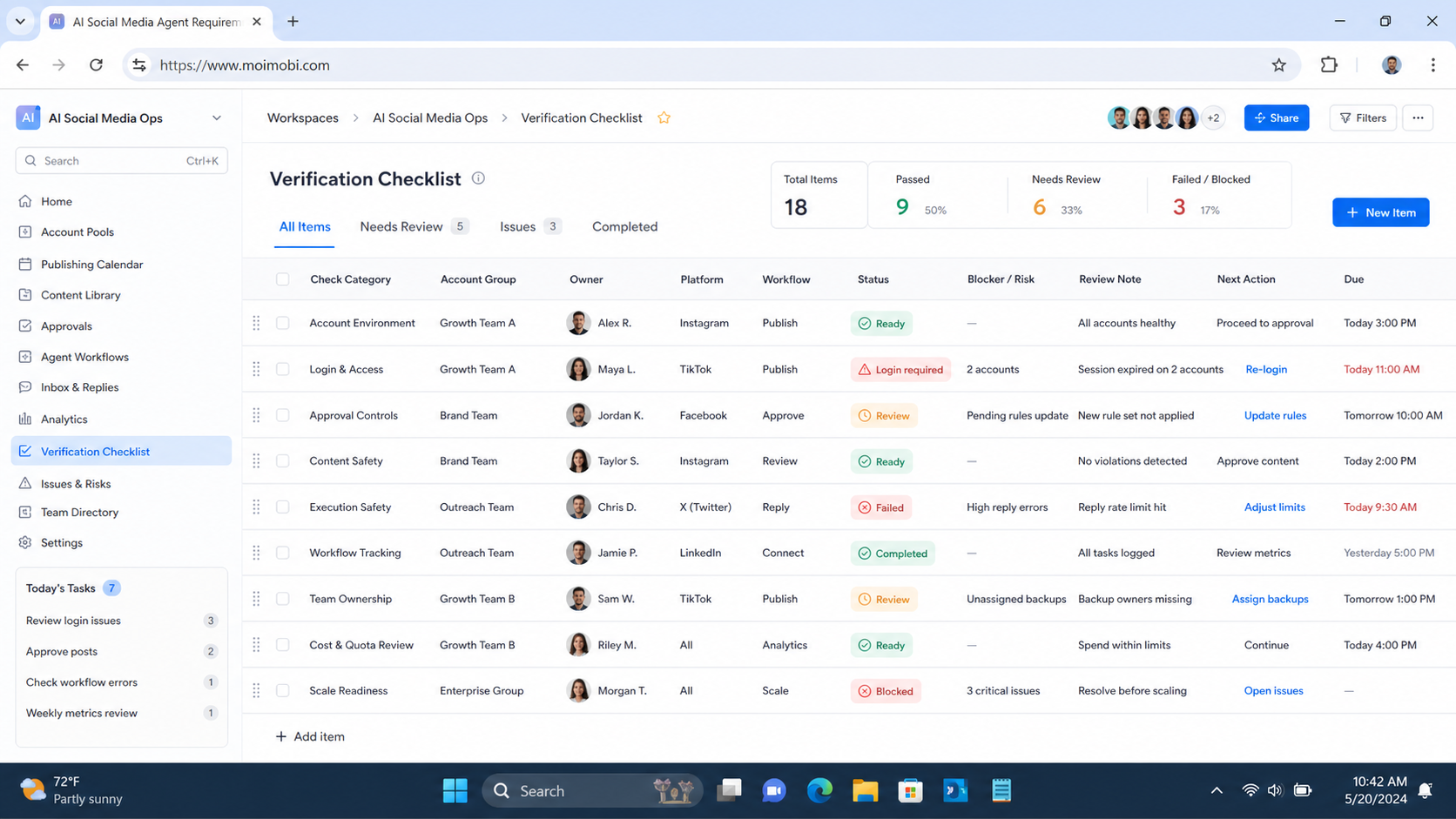
Use the AI social media agent requirements checklist to protect the workflow from vague automation promises. It should show which accounts are involved, where each session runs, what AI may do, what a human must approve, and how the team reviews failures.
Before scaling, choose one account group and one repeated task. If the pilot produces clear logs, useful drafts, fewer handoff gaps, and controlled exceptions, the team can expand the workflow with more confidence.
References:



