

A multi-account browser is enough when the allowed task can be finished and checked inside its supported website. Add a mobile environment when a needed step belongs to a native app, a system permission flow or another device-level screen. Keep the web path if it already meets the requirement.
The choice in multi-account browser and mobile automation is about the missing control, not the number of accounts. More profiles won't tell you whether an app button, permission prompt or device-side result is reachable. Find the first unsupported step before replacing the tool that handles the earlier web work.
Use this comparison to diagnose that boundary. It does not rank vendors, report a social account test or promise account protection. The scenarios are proposed review cases. App support, saved state and team controls still need evidence from the environment you plan to use.
Key Takeaways
- Compare the required interface, not just account capacity.
- Separate mobile websites from native app controls.
- Treat WebView access as one part of a hybrid app.
- Check denied permissions as well as granted permissions.
- Keep working browser tasks when only one step needs mobile access.
- Require a reviewable result before accepting a replacement environment.
Multi-account browser and mobile automation: compare the missing step
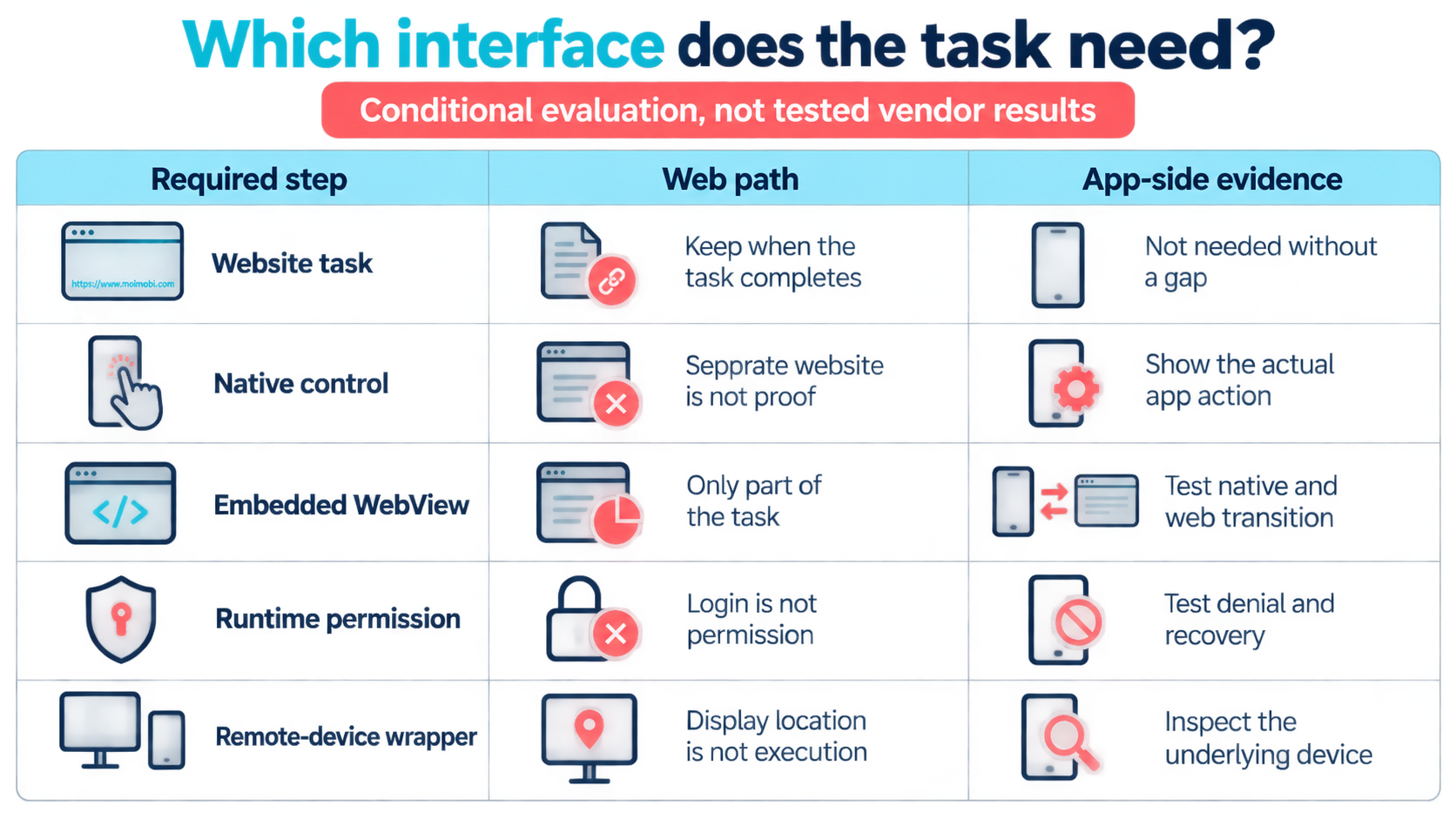
Start with a task someone can demonstrate manually. Record where it begins, the required action and the evidence that it ended correctly. Then name the first step the browser tool cannot reach. A claim that a workflow is mobile-first is too broad to guide a purchase.
The matrix compares task paths, not tested vendor products. Each choice depends on the tool exposing the needed controls. It doesn't establish that a named social platform offers every scenario or that a service supports it. Ask for the specific app build and test record behind a claim of support.
| Required task surface | Browser-profile path | Mobile-environment path | Decision condition |
|---|---|---|---|
| Supported website form or dashboard | Keep it when the full task and result are visible | Adds another environment without fixing a proven gap | Prefer the supported web path |
| App-native control absent from the website | Doesn't demonstrate access to the missing control | Candidate if the app and control are supported | Require an app-side demonstration |
| Embedded web content inside an app | May cover a separate website, not the full app frame | Needs the right web/native context handling | Test both sides of the transition |
| Android runtime permission state | Website access isn't evidence of app permission | Can be evaluated in the actual app environment | Test denial and recovery, not just the happy path |
| Remote device shown in a browser window | The outer web page is a viewing/control wrapper | The actual task still executes on the device | Inspect the underlying execution model |
A browser route fits the first row only when it finishes the task. Logging in or opening a form isn't enough. If the result is visible only in a native screen, include that screen in the test. An earlier click is progress, not the final evidence.
The opposite mistake is moving every task to mobile because one step needs an app. Keep research, draft preparation or reporting on the web if that path works. Use the multi-account workspace model to define where each account lane belongs without treating all its tasks as identical.
Identify native controls, WebViews and permission boundaries
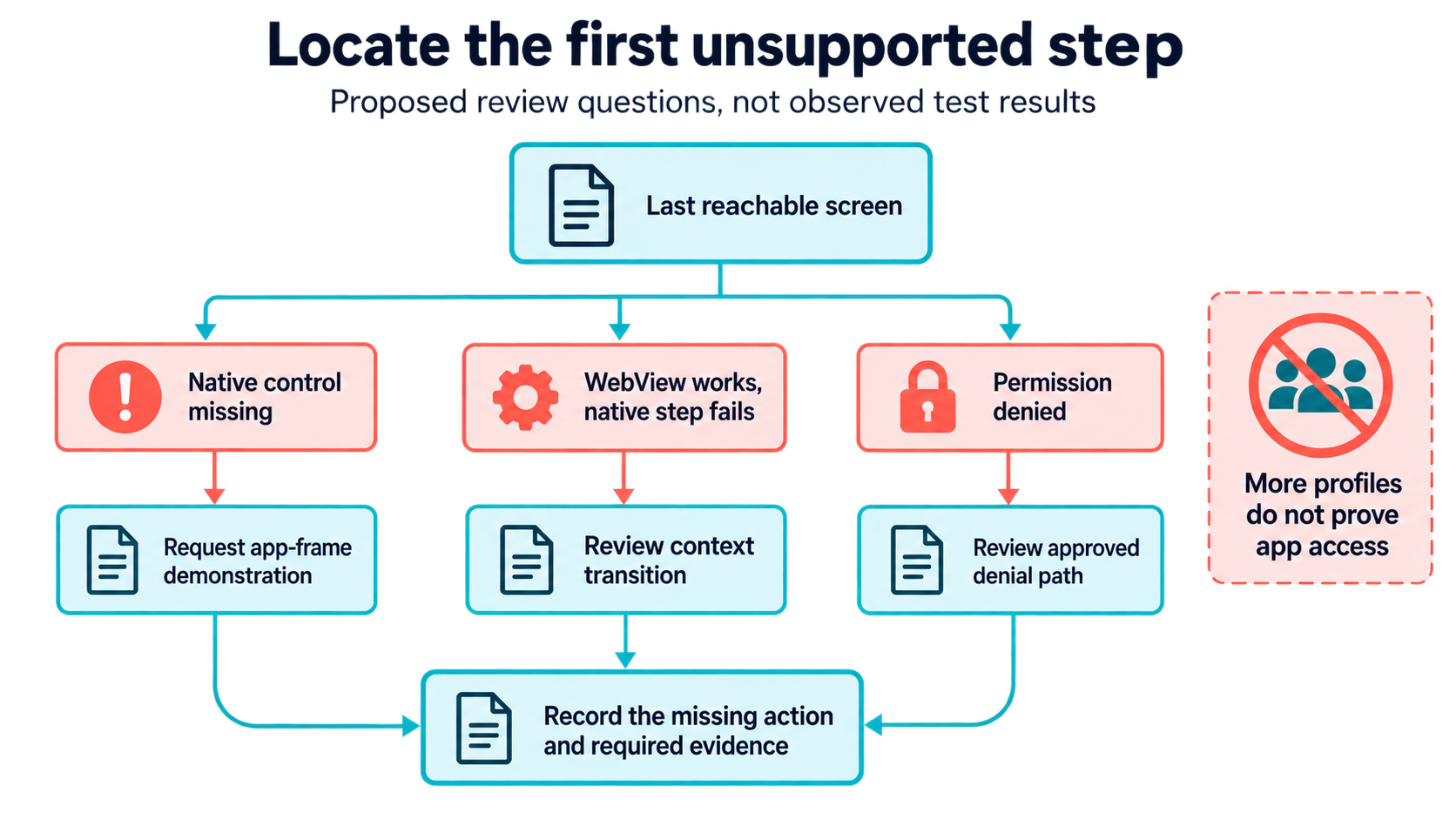
An app screen may mix interface types. Appium's context guide describes native and embedded-web modes that supporting drivers can expose. Available contexts and locator behavior depend on the driver. Access to a WebView is therefore not proof of control over every native element around it.
Consider a proposed draft-review task in a hybrid app. The draft text might be in embedded web content while the navigation or final control belongs to the native frame. Ask the supplier to show the transition on the actual app build. Don't accept a demonstration on a separate website as proof that the app transition works.
Keep the diagnosis narrow. A missing element could mean the task is in the wrong context, the control isn't exposed or the app changed. It isn't proof that the account needs another profile. Save the last reachable screen and first missing action before choosing another environment.
Compare these proposed diagnoses before replacing the whole workflow:
| Finding to investigate | Evidence to request | What not to conclude |
|---|---|---|
| Separate website works, app-native button is unreachable | Demonstration of that button in the app frame | More profiles will expose it |
| Embedded content is reachable, next native screen is not | Driver/context transition on the same app build | The entire app is supported |
| Action stops after permission denial | Approved denial path and a clear unresolved result | Login means permission was granted |
These are review questions, not observed test results. Keep the failed step and its proposed remedy together so a supplier doesn't substitute a different demonstration.
Android adds a separate access boundary. Android's permission guidance says required permission state must be checked when performing the relevant operation. Users may deny or revoke access, and apps should handle that case. Website authorization is not an app-side permission result.
For a proposed media-selection task, ask what happens when the needed access is denied. The operator should understand why the task stopped and what input is missing. Do not automate repeated permission acceptance or infer consent from an account login. Evaluate a permitted alternative when access isn't appropriate.
Useful supplier questions include:
- Which screen is web content and which is native?
- What app and environment versions were demonstrated?
- Does the control method reach the next required screen?
- What is visible when permission is denied or revoked?
- How does an operator resume without repeating an uncertain action?
These questions seek evidence, not a list of partner logos. Mark behavior unknown when the supplier hasn't shown it. A phone-shaped preview, a successful login or a large profile count doesn't answer what happens at the missing step. Reject a test that stops just before that step.
Multi-account browser and mobile automation: when a combined path fits
Keep browser-only execution when the complete task stays on the supported website. For example, a proposed operator check could read a dashboard field and save a reviewed finding. If the agreed result is visible there, moving to a native app may add maintenance without adding necessary access.
Evaluate a mobile path when the missing step is genuinely app-side. A cloud phone may be one candidate environment, but the label doesn't prove the app version, permission state or control method you need. Request a demonstration of the named task rather than accepting a general device tour.
For mixed work, keep the web portion and hand off at the first app-only step. Pass the account reference, allowed task and expected result. Avoid an open-ended instruction to finish everything. Ask the receiving operator to confirm the app-side account before continuing. Stop if it doesn't match.
Neither route fits when the task depends on bypassing an access restriction, claiming consent that wasn't given or operating an account without authority. A more capable device doesn't repair those conditions. Resolve the task's permission and scope with its owner before evaluating automation again.
Moimobi's product direction makes these boundaries relevant, but a plan isn't a passed test. Its current workflow baseline separates browser work from later or paused mobile-workflow work. Don't infer a ready-made cross-device link from that direction. Review the actual functions available in the version you will use.
Two adjacent decisions should stay separate: device boundary requirements and mobile task execution requirements. A workspace can meet your separation needs while still lacking a required app action. Conversely, a demonstrated action doesn't establish all the access or persistence boundaries around it.
Browser-hosted device access is still device work
A browser window can show a real device instead of executing a mobile website. AWS Device Farm's remote-access documentation describes real-time interaction with a selected physical device through a browser for testing. It also describes session evidence and recommends test accounts rather than sensitive account information.
That example clarifies the wrapper problem: where the screen is displayed is not necessarily where the task runs. Ask whether a supplier is exposing website controls, streaming a mobile device or combining both. Don't classify the whole service as browser automation just because the operator starts from a web page.
Treat a lab test as evidence about that test, not production acceptance. A test session and a business workspace need separate reviews. Ask the owner to decide live access, retention and support before moving real accounts. This is a proposed review rule; those operating conditions remain unverified here.
Keep a short environment record: actual task surface, supported app build, access method, owner and evidence location. List unknowns beside those fields. Check the record before accepting the replacement. A mobile-looking screen isn't enough if the native action that caused the original problem is still missing.
Evaluate multi-account browser and mobile automation before migration
Compare one failing path against the proposed replacement with test data you control. Name the required result before either demonstration. The objective is to prove the missing boundary is covered, not to collect attractive screenshots from different tools.
- Document the browser limit. Save the last supported step and why it can't meet the final requirement. Separate unavailable features from a temporary access failure.
- Demonstrate the missing surface. Show the actual native control, WebView transition or permission state involved. Record app and environment versions without assuming compatibility beyond them.
- Test the stop path. Use a denied permission, wrong test account or unavailable screen. Expect a clear unresolved result rather than a guessed completion.
- Review the handoff. Confirm that the web and app portions refer to the same authorized account and task. Keep observations from each side recognizable.
- Decide what to move. Migrate only the part that needs the new surface. Keep the existing path when it remains adequate.
Finish the review with one of these decisions:
- Keep the browser: the complete task already works on the allowed website.
- Add the app path: the missing control and result are demonstrated on the named app build.
- Fix access first: the trial stopped for missing authority or denied permission, not a proven tool gap.
- Leave the choice open: the supplier showed a device but not the missing action or its final result.
Attach the supporting test record to that decision. These labels are proposed review outcomes, not vendor response codes. Name who updates apps, reviews failed tasks and restores access. Compare actual offers and recovery work; no monthly cost or saving is established here.
Frequently Asked Questions
Does a multi-account browser replace Android app automation?
Not by profile count alone. Require evidence that it reaches the app-side action, whether directly or through a separate supported environment.
Is a mobile-sized website the same as a native app?
Treat them as different evaluation surfaces. Verify the actual controls and final result instead of relying on screen size.
Why does a WebView change the choice?
Part of an app may be web content while other controls are native. The cited Appium guide explains context-dependent behavior.
Should all accounts move to a mobile environment?
No. Keep supported web tasks where they work. Move the required app portion only after validating account identity and handoff.
What if the user denies an app permission?
Stop or use an approved alternative. Android recommends handling denied access; a browser login doesn't supply that permission.
Can a remote-device testing service prove the production setup?
It can help demonstrate the required interface. It doesn't prove production persistence, account authority or your team's recovery process.
How should browser and mobile account isolation be evaluated?
Ask for the actual storage and access boundaries. Keep that review separate from whether the required app action works.
What should the first supplier demonstration include?
The missing action, its result and a failure case on the specified app build. A general dashboard tour isn't enough.
Choose the environment that covers the actual gap
First identify the unsupported step. Next prove the required control surface and its stop behavior. Finally decide which portion needs to move. A browser can remain the right tool for most of an account's work while a specific app action needs another environment. Keep that decision tied to observed scope, not to a universal web-versus-mobile winner.


