

Android antidetect for multi-account workflows means using an Android workspace whose supplier claims to manage exposed device characteristics or separate account work. Treat the phrase as a category label, not proof of a particular control. Ask which data, settings and access boundaries the product actually manages.
It is not another name for Android's application sandbox. Nor does it establish that a service cannot recognize an account. The useful distinction is between keeping workspaces apart and changing what an app or website observes. Those questions need different evidence.
A team evaluating a cloud phone may encounter this term alongside device isolation and browser profiles. Hosting location answers where Android runs. The antidetect label concerns claimed environment controls. Neither label, by itself, answers whether the intended app works or whether its use is permitted.
Key Takeaways
- Ask what the supplier means by Android antidetect before assessing it.
- App separation, account separation and browser signals are different boundaries.
- A native app result cannot be inferred from a browser demonstration.
- Separate workspaces do not establish account anonymity or platform approval.
- Keep compatibility evidence tied to the app, environment and task reviewed.
Definition and scope of Android antidetect for multi-account workflows
Start with the thing being managed. Is the product offering a separate Android instance, an app workspace or a mobile browser profile? Those may support different tasks; a phone icon doesn't make them the same.
Here, Android antidetect describes a supplier's claim about workspace controls. It isn't a single switch. Ask how it works and what it leaves unchanged, rather than counting the settings that look editable.
Android's own baseline is more specific. Its Application Sandbox documentation, updated September 30, 2026, describes a user ID, or UID, assigned to each app. Linux process and permission boundaries enforce the app sandbox. That concerns apps, not a separate sandbox for every business account inside one app.
Keep that limit with the source. An Android architecture document can explain the base model, but it doesn't validate a supplier's product. Ask for product evidence when the claim moves from apps to account workspaces.
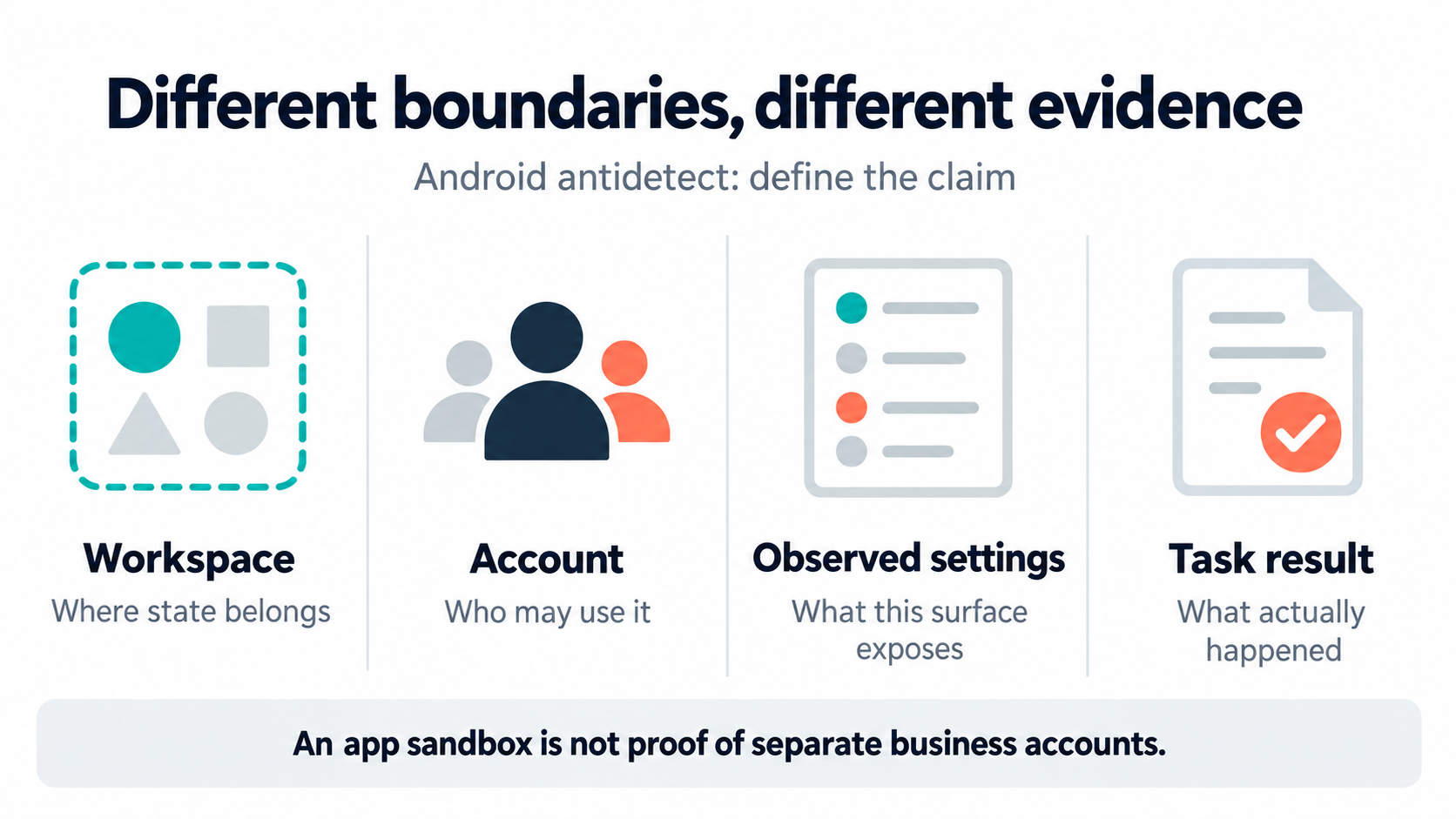
Keep four meanings separate:
- Workspace boundary: where the app and its stored state belong.
- Account context: which authorized business account the operator is using.
- Observable environment: what the relevant website or app can inspect.
- Task result: what the permitted operation actually produced.
For example, a screenshot with a workspace name answers only a labeling question. It says nothing about the files kept after closing that workspace. A sign-in shows access at that moment, not which state survives a restart or how another operator will reach it.
The term also needs a scope statement. Ask whether a feature applies to a browser, native app or the whole hosted workspace. Keep the supplier's answer with the supported version and the test that backs it; a browser demo isn't a native storefront-app test.
When reviewing an Android antidetect capability description, turn each broad claim into a bounded question:
- Which data stays inside this workspace?
- Which settings can its operator change?
- Which app paths have been tested?
- What falls outside the claim?
A clear limit gives the team something to assess. A promise that each account has a different identity leaves the mechanism and evidence unexplained.
How Android antidetect for multi-account workflows is supposed to work
Think of the mechanism as separate layers, not one switch. The workspace holds task state, while its controls cover only their stated scope. The operator still selects an account and performs an approved task. A change in one layer doesn't establish a result in another.
Stored state comes first. Name what should persist when an operator leaves. The team might need an approved draft to remain available, while another client's files stay out of view. Write those needs before the demo; a tidy workspace list doesn't prove either condition.
Visible settings are a different layer. The W3C Privacy Working Group's fingerprinting guidance is a Group Note dated September 25, 2025. It explains how browser settings and other visible traits can identify visits. It is Web guidance, not a native Android app test or product certificate.
Treat a browser test as a browser test. If a supplier changes a setting on a web page, ask what that page now sees. Don't infer a separate device, independent app storage or a new account identity from that result.
App acceptance is another layer. Google's Play Integrity overview, updated April 20, 2026, describes app, licensing and device verdicts. An app that uses the API can apply responses on its backend alongside other signals. That isn't proof that every app uses it or that a named hosted workspace passes.
Keep the consequence narrow: the workspace label can't stand in for app acceptance. Ask for a permitted app test and retain its actual result. A failed check or account challenge belongs in the unresolved record, not a plan to bypass it.
Task review closes the loop. Once the workspace opens, check that the right account and task are selected. A launch can succeed while the wrong client context stays active. Keep the task result separate from the workspace's launch status.
The evidence for those layers should answer different questions:
- State record: what remained after the approved close-and-reopen test?
- Setting record: which value changed, and on which supported surface?
- App record: which app build and environment were checked?
- Task record: which account and result did the reviewer actually see?
These are proposed evidence labels, not vendor API fields. They keep a reviewer from accepting one launch screenshot as an answer to four different questions.
A profile count may describe capacity, not saved state, access or app support. Ask the provider to place each claim in the layer it controls. Leave unanswered items unknown instead of borrowing evidence from a neighboring feature.
Where the definition stops applying
Android antidetect is not a substitute for business permission. A team should establish account ownership, delegated access and allowed activity before choosing an environment. No device configuration can supply missing authorization. If several people need one business account, assess the platform's supported team-access options first.
It also isn't a synonym for anonymity. The W3C guidance on fingerprinting explains limits to technical measures against linking visits. Use that Web-focused warning to question broad browser claims, not to invent a list of signals used by an unnamed native app.
Avoid these category errors:
- A different workspace name is not proof of separate stored data.
- A fresh app view is not proof that an account has no prior history.
- A browser result is not proof of native app compatibility.
- A changed network route is not evidence that all other observations changed.
- A completed automation job is not proof of the intended business result.
Suppose a supplier offers to show isolation by clearing an existing workspace. That may destroy the state the team needs to keep. Ask for a controlled test workspace instead and agree on what the reset should remove.
Before that test, name the owner who can approve the reset and the records that must remain. Don't test data loss on a client's working environment. A failed retention check is useful evidence, not a reason to hide the test and start again.
The term doesn't establish a pricing model either. Ask what the workspace fee covers and what needs extra work. Tie the quote to the named task rather than assuming a low instance price includes the full workflow.
Useful scope questions include app setup, review time and help with failed runs. Request clear exclusions, not a made-up savings figure. A resource fee and the cost of running a client service answer different questions.
For a browser-only task, adding Android may solve nothing. A supported website dashboard could already provide the required view and result. Explore the browser-profile versus Android workspace comparison when the missing step is genuinely app-based. Keep the working web path when the task doesn't require a mobile environment.
Finally, a product design document isn't an acceptance test. Moimobi's current documentation separates fingerprint-browser work from paused mobile and cloud-phone workflow integration. This explanation doesn't announce a shipped Android automation bridge. Check the deployed product and its current support scope before planning client work around it.
An example: separate client workspaces without inventing new identities
Consider an agency reviewing draft storefront images for two clients who have authorized its work. One operator must inspect each client's draft in the relevant Android app. The goal is correct context and file handling, not making related operators appear unrelated. This is a proposed example, not a customer result.
Before choosing an environment, the agency can describe the expected boundaries. Each client has an assigned workspace, permitted account access and an approved image reference. The operator should be able to explain which client is open before selecting an image. The reviewer should be able to trace the inspected draft afterward.
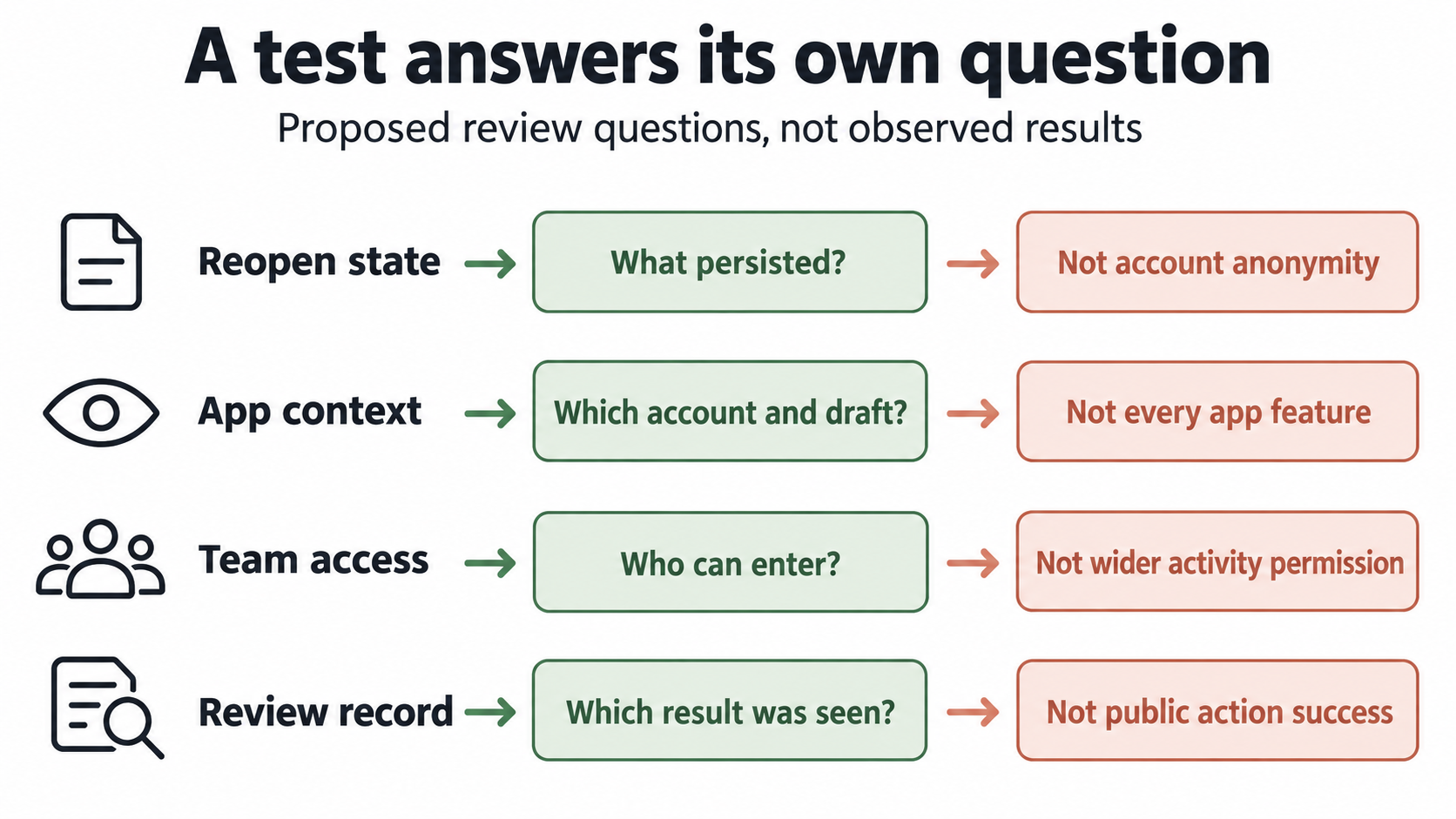
Use the following questions as an evidence worksheet. They are proposed review questions, not native product fields:
| Claimed boundary | Evidence to request | What remains unanswered |
|---|---|---|
| Separate client state | Controlled close-and-reopen observation for each workspace | Whether a remote service can correlate accounts |
| Correct app context | Visible authorized account and selected draft reference | Whether all app features are supported |
| Controlled team access | Named operator and access-removal test | Permission for the team's wider activity |
| Repeatable review | Retained result tied to the reviewed environment | Whether an automated public action would succeed |
Read each row on its own. A successful reopening test may support a saved-state claim, but not the unanswered items beside it. Keep an account challenge unresolved rather than changing the task or substituting another account to obtain a passed test.
The agency also needs an account-to-workspace record outside the vendor's marketing terminology. Link each assignment to the responsible person and current permission. A client account workspace model can frame that organization. It cannot, by itself, establish technical isolation or permission from the target service.
Recovery should preserve the question being tested. If the app cannot reopen the chosen draft, retain that failure and its environment details. Recreating a workspace may be a separate authorized test, but it doesn't prove that the original state persisted. Keep those observations separate in the review record.
This example shows the useful business meaning of the category. The team wants work that stays attributable and within its agreed boundaries. It doesn't need an unsupported assertion that each account is invisible to every service. A provider that explains the former gives the reviewer something concrete to accept or reject.
Frequently asked questions
Is Android antidetect the same as a fingerprint browser?
No. Ask whether the claim covers a browser profile or an Android app environment. Evidence for one doesn't establish the other.
Does Android already isolate apps?
Android documents an application sandbox. Don't infer separate business-account workspaces within one app from that app-level architecture.
Can a separated workspace prevent account restrictions?
That outcome isn't established here. Separate task state, permission and platform decisions. The category label doesn't establish an account-safety result.
How should a team check whether an app works?
Request a permitted test of the intended app and task. Retain the environment details, visible result and unresolved limitations.
Should every browser workflow move to Android?
No. Keep a supported web workflow when it meets the task. Add a mobile environment only for a demonstrated app-side need.
What costs should an evaluation include?
Ask about workspace access, app setup, operator review and recovery. No vendor price or savings estimate is assumed here.
Can these environments run without human review?
Don't infer that from the category name. Decide review requirements for the actual actions, especially account changes or public updates.
Define the boundary before choosing the product
Android antidetect for multi-account workflows is useful only when its scope becomes explicit. Name the workspace, the stored state, the claimed environment controls and the authorized task. Keep app acceptance separate from browser observations. A supplier should be able to explain what its demonstration leaves unknown.
Start with a controlled example and request evidence for each claimed boundary. Preserve failures as failures. Leave account outcomes unpromised. The right next decision isn't how many windows to buy, but whether the proposed environment supports the specific work your team is permitted to do.


