

Build an AI browser automation playbook by turning an approved task into a versioned set of inputs, steps and result checks. Start with authorized access, a named task owner and a reviewable manual example. The output should let another operator run the same task and explain its result without guessing what the original author intended.
For this proposed guide, the task is checking prepared social content for missing brief references. It is read-only: no posting, replies or account changes. No live run or success-rate measurement was performed. Complete the example with your own evidence before using it as an operating procedure.
Key Takeaways
- Version the task contract, not just the prompt.
- Keep input examples separate from real account data.
- Define what a missing field means before running.
- Retain first-attempt failures even if a retry succeeds.
- Test changed assumptions before reusing the playbook.
Prepare the AI browser automation playbook
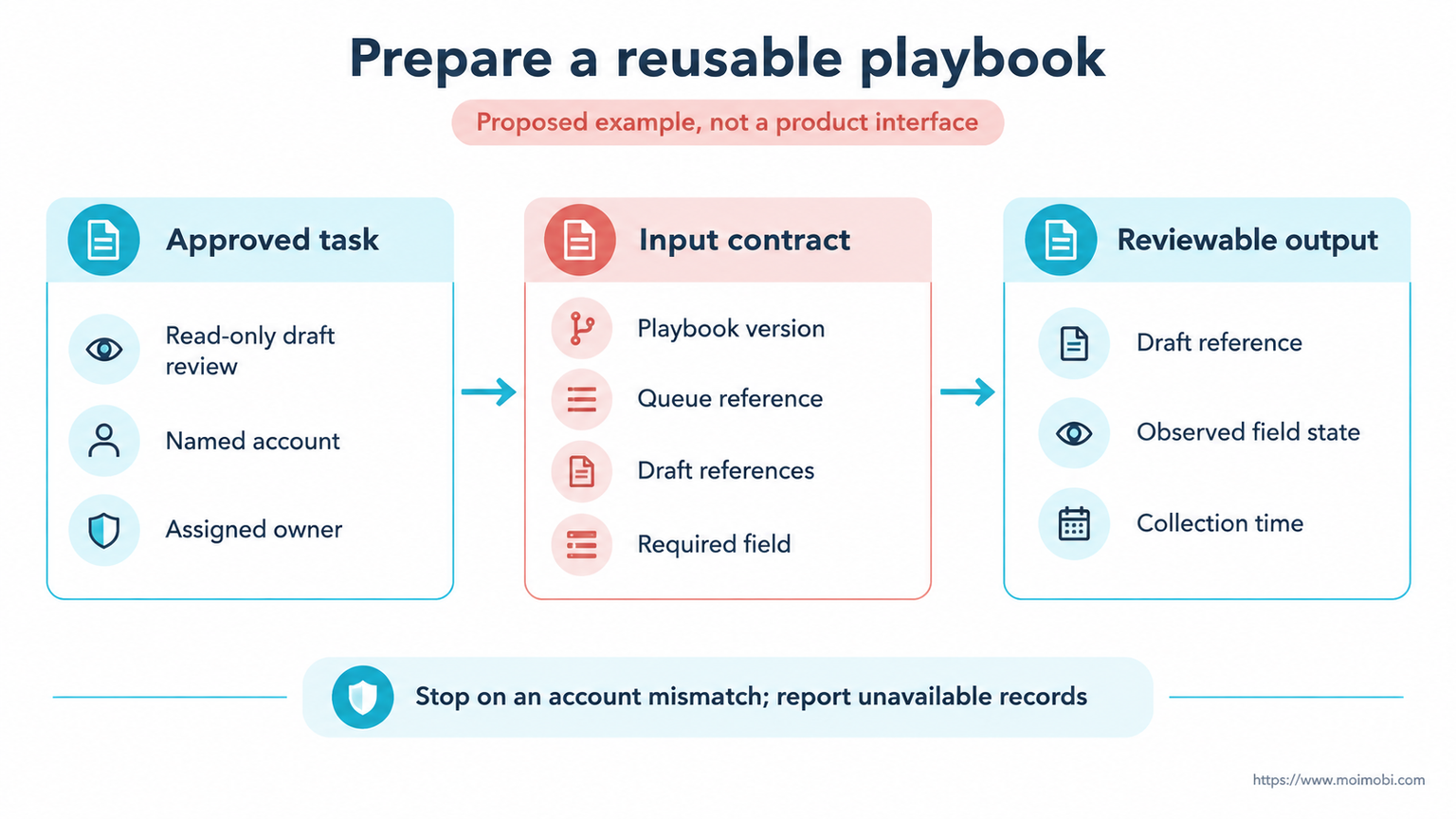
Name one narrow task. "Check assigned drafts for a linked brief" is testable; "manage our social presence" is not. Specify the content queue, approved account reference and fields the operator may read. Use the social content operations context to decide what finding needs a human next.
Prepare a sample input and expected output before automating anything. This is a proposed contract, not a Moimobi API:
playbook_version: 1, the approved procedure.queue_ref: the assigned content queue.draft_refs: the specific records to inspect.required_field: "Brief reference".output: each draft reference, observed field state and collection time.owner: the person who reviews unresolved records.
Keep the account assignment outside free-form reasoning. Review team account lane ownership if several people share the work. The playbook must not select a different account when access fails.
Browser control is only one part of this contract. The W3C WebDriver working draft describes remote browser control, not your task's approval process. Its 2 July 2026 version is a work in progress, not an endorsement of this proposed procedure.
Run the AI browser automation playbook step by step
Do not infer a complete audit from the first visible page of a queue. Define how the assigned records are located and how an unavailable record is reported.
- Confirm the input. Check the account, queue and playbook version against the assignment. A mismatch stops the run before reading records.
- Locate each assigned draft. Match its reference, not only its feed position. Return "Record unavailable" if it cannot be found; don't replace it with a similar draft.
- Read the required field. Distinguish a present brief link from an empty field. In this proposed example, label an unreadable field "Field unavailable" rather than missing. That is a suggested reporting label, not an API response.
- Prepare the finding. Keep the record reference beside the field state. AI may help explain an assigned finding, but must not invent a missing brief.
- Review and close. Compare the output with the assigned list. The reviewer accepts checked rows and assigns unresolved rows to an owner.
The procedure produces a review list, not permission to rewrite captions. A later editing workflow needs its own scope and approval. Treating that next action as implicit would make the playbook broader than its input contract.
Check the result and preserve evidence
Count coverage against the assigned references. If the proposed sample contains 3 drafts, the output needs 3 corresponding rows, including unavailable ones. An empty result is not proof that all drafts passed. Review an output row against its actual source before accepting the run.
Use these illustrative cases to test the contract:
- A visible brief link returns "Brief present" with the draft reference.
- For an inspected empty field, the suggested reporting label is "Brief missing"; don't invent a link.
- A hidden or unreadable field remains unavailable, even when other drafts pass.
- A duplicate draft reference is reported rather than silently counted twice.
Playwright Trace Viewer can inspect recorded actions, snapshots and logs. When that tool is part of your implementation, retain the relevant trace reference for review. A trace can explain what the browser did; it does not automatically prove the review list is complete.
Limit evidence to what the reviewer needs. Do not copy whole inboxes or session data into the playbook archive. Store the approved procedure separately from restricted run artifacts, and define who may read each.
Handle failures and release a changed version
A successful retry does not erase a failed first attempt. Playwright's retry documentation distinguishes tests that pass initially from those that pass after retrying. Apply the reporting lesson to the playbook: record the first failure and its cause, rather than showing only a final green state.
That test behavior is not permission to repeat a public action. This read-only example does not cover publishing or messaging. An uncertain write result needs inspection before repetition, not a copied test-runner retry setting.
When a field label or queue layout changes, freeze the affected procedure. Compare the changed page with its input and result checks. Then create version 2 only after rerunning the relevant sample cases and reviewing the output. Keep version 1 available to explain earlier runs.
Review browser workflow reference material when a changed assumption needs a new implementation. Moimobi's execution-platform direction can frame that discussion, but no production connector or completed workflow acceptance is claimed here.
Frequently asked questions
Is a prompt alone a playbook?
No. The reusable procedure also needs named inputs, expected results, stop rules and a review owner.
Can we start without developers?
Document the task manually first. Evaluate the chosen tool only after you can show an accepted example and a failure case.
What should AI decide?
Limit it to the assigned reading or explanation task. Keep account choice and unapproved edits outside that scope.
Should missing and unavailable be combined?
No. Missing describes an inspected empty field; unavailable means the check could not establish its state.
How often should the playbook change?
Change it when its assumptions change. Record the reason and test the affected cases before releasing another version.
Does this cover mobile Apps?
No. A cloud phone introduces a separate execution environment with different checks. This browser procedure does not validate mobile steps.
What proves completion?
Every assigned record has a checkable result or explicit unresolved state, and the reviewer accepts the resulting list.
Conclusion
A repeatable playbook makes the task's assumptions visible. Begin with a read-only contract, test present, missing and unavailable states, then preserve the version used for each run. Reuse the procedure only while those assumptions hold; update and review it when they change.


