

Use AI agent browser execution to collect a dashboard observation only after checking its account, reporting period and filters. Prepare approved read access, a named metric and the expected view first. The output should bind the visible value to that context, with uncertainty retained when a refresh cannot be confirmed.
This guide addresses a specific reporting error: reading a new period label beside a value still associated with the previous view. It doesn't report a live dashboard run or a verified platform integration. A browser observation is also not an atomic database snapshot.
Key Takeaways
- Capture the filter context with the metric, not afterward.
- Wait for a defined page condition rather than guessing a delay.
- Keep a missing value distinct from zero.
- Reject a row when its reporting context changes during capture.
- State the limits of UI-only evidence.
Prepare AI agent browser execution around a named view
Choose an authorized report and one metric the team can interpret. Name its visible label rather than asking the agent to find a number that looks useful. Define whether the task may change filters; reading a report and changing its saved configuration are different permissions.
Prepare this observation record:
- Account and report reference.
- Reporting period, plus displayed timezone if available.
- Segment, campaign or content filter actually selected.
- Metric label, unit and displayed value.
- Capture time and any visible update-status label.
- Observation status and the person who reviews uncertainty.
Use reporting account ownership to establish who may inspect the view. Keep unrelated accounts and private customer details outside the task. Don't turn access to a dashboard into permission for broad collection.
Mark missing context as unavailable. If the page doesn't expose a timezone or update timestamp, don't supply one from the agent's general knowledge. Preserve the displayed abbreviation instead of silently converting it to an exact value.
Run AI agent browser execution with explicit checkpoints
The task should identify the page condition that permits collection. A visible filter selection alone isn't enough to explain whether the associated metric has refreshed.
Playwright's assertion documentation describes repeatedly checking a defined condition until it holds or times out. That behavior can support a text, value or attribute check. It doesn't establish that a dashboard's data is current or semantically correct.
Apply the proposed sequence to a permitted test view:
- Match the destination. Confirm the account and report against the task. Stop when a similar report or different account appears.
- Establish the view. Read the period and segment. Change them only if that action is authorized, then check the page's applicable readiness condition.
- Capture context and value. Keep the exact metric label, unit, visible value and reporting settings together in the same observation record.
- Recheck the context. Compare the account, period and filters with the values used at capture. Reject the observation if they changed or cannot be read.
- Return a qualified finding. Describe what was observed and which checks remain unresolved. Don't infer a campaign result from a page-loading event.
Keep failed checks visible. An agent should not switch to a nearby metric because the requested field is missing. That would answer a different question while making the report look complete.
Verify coherence without claiming an atomic snapshot
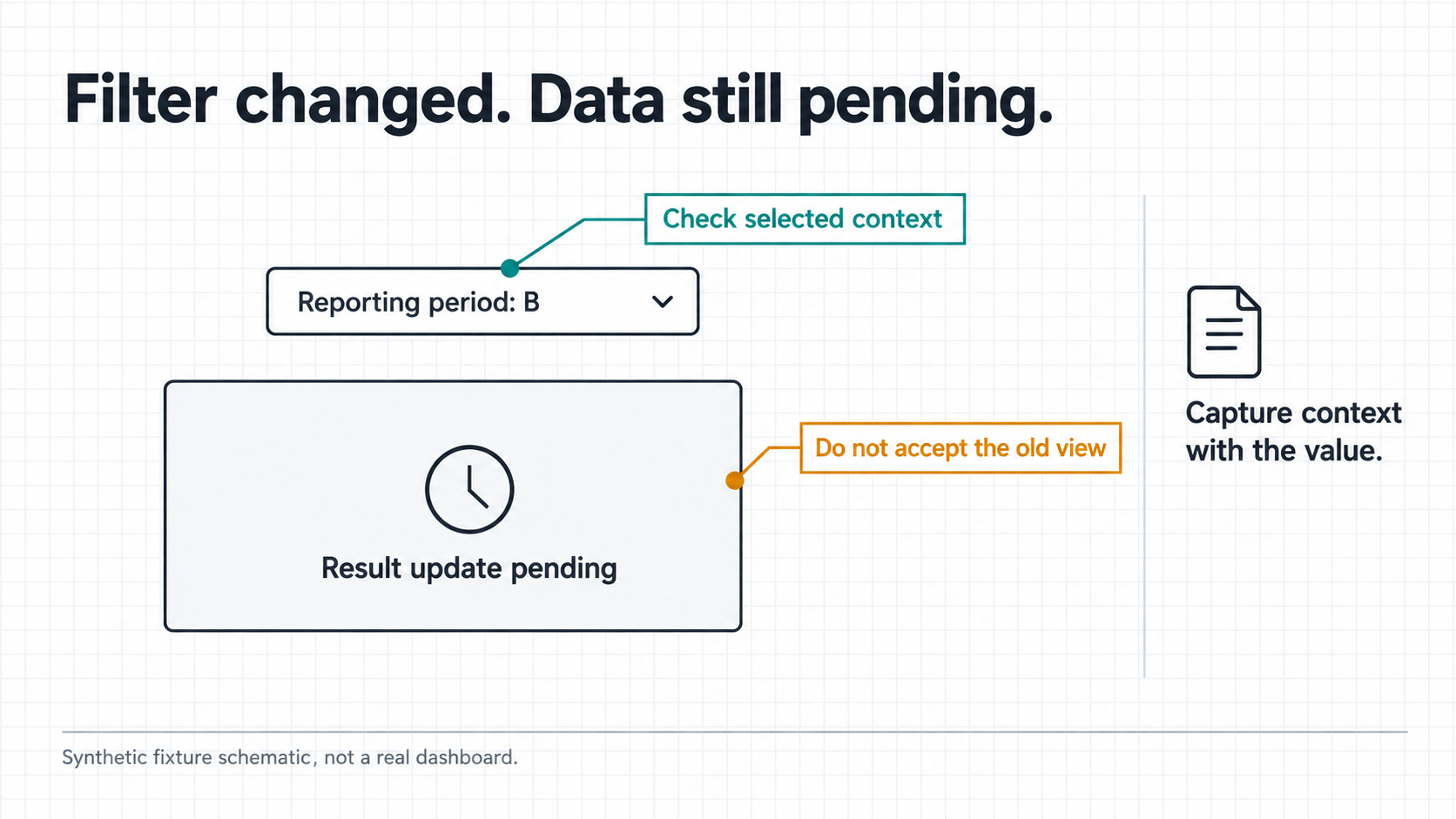
For a proposed test, use an owned fixture with Period A and Period B. Make the label change before the associated value is ready. The expected task behavior is to withhold the row until the chosen condition and context checks are satisfied, or report that the view remains unresolved.
This is a test design, not a measured result. Ask the reviewer to compare the attempted capture with the fixture's known update sequence. Don't grade success from the agent's final explanation alone.
Include these cases in the review:
- Normal view: the intended context and requested field can be read.
- Delayed update: the new filter is visible while its result is still pending.
- Context change: an authorized test change occurs during collection.
- Unavailable field: the metric is missing, without an invented replacement or zero.
Checking context before and after collection can reveal a mismatch. It cannot prove that nothing changed between those checks. If the report requires a single authoritative data batch, use a supported export or API whose documented behavior meets that requirement; don't relabel a UI capture as equivalent.
Use the findings in a social performance review workflow only after someone checks the metric's meaning. A coherent observation can still be the wrong measure for the business question.
Loading signals, failures and reporting limits
The WAI-ARIA1.2 Recommendation defines aria-busy as an accessibility state for content being modified. Authors may use it around updates, and its default is false. It is not a backend data-version marker.
Where a page implements that state correctly, it may be one input to a readiness check. Its absence or a false value doesn't prove the requested data has arrived. Don't invent a universal attribute-based rule for every social dashboard.
On timeout, retain the last observed account, period, filter and loading condition. Report the read as unresolved. Repeating filter changes blindly can make the next observation harder to explain; use the task's bounded retry rule instead.
Don't interpret a missing or failed read as a campaign drop. Separate the observation failure from the business result. A reviewer can then investigate the page or obtain a suitable export without carrying a false metric into the report.
Evaluate the current Moimobi browser task workflow against the actual page and allowed scope. Product documentation or source progress doesn't establish a tested connector, accurate social metrics or current runtime acceptance for every combination.
Frequently asked questions
What should the agent collect with a metric?
Its account, report, period, filters, label, unit and observation time, plus any missing-context note.
Is a selected date filter enough?
No. Check the applicable update condition and the context attached to the result.
Does a successful assertion prove the number is correct?
It proves only the specified condition was met. Metric meaning and source correctness need separate review.
Can a missing value be recorded as zero?
No. Preserve missing evidence as unavailable or unresolved.
Does aria-busy=false mean the dashboard is current?
Not by itself. Its accessibility meaning isn't a data-freshness contract.
When is a browser capture insufficient?
When the task requires an authoritative batch or consistency behavior the page cannot establish.
What should happen after a reporting view changes mid-read?
Reject that observation and review the permitted next attempt. Don't merge the two contexts.
Keep the context attached to the observation
AI agent browser execution can support dashboard review when the task retains what was seen and where it belonged. Check account, period and filters together, preserve failed reads, and state the limits of the evidence. A plausible number without its reporting context is not a finished result.


